Salesforce Conversion Tracking Service

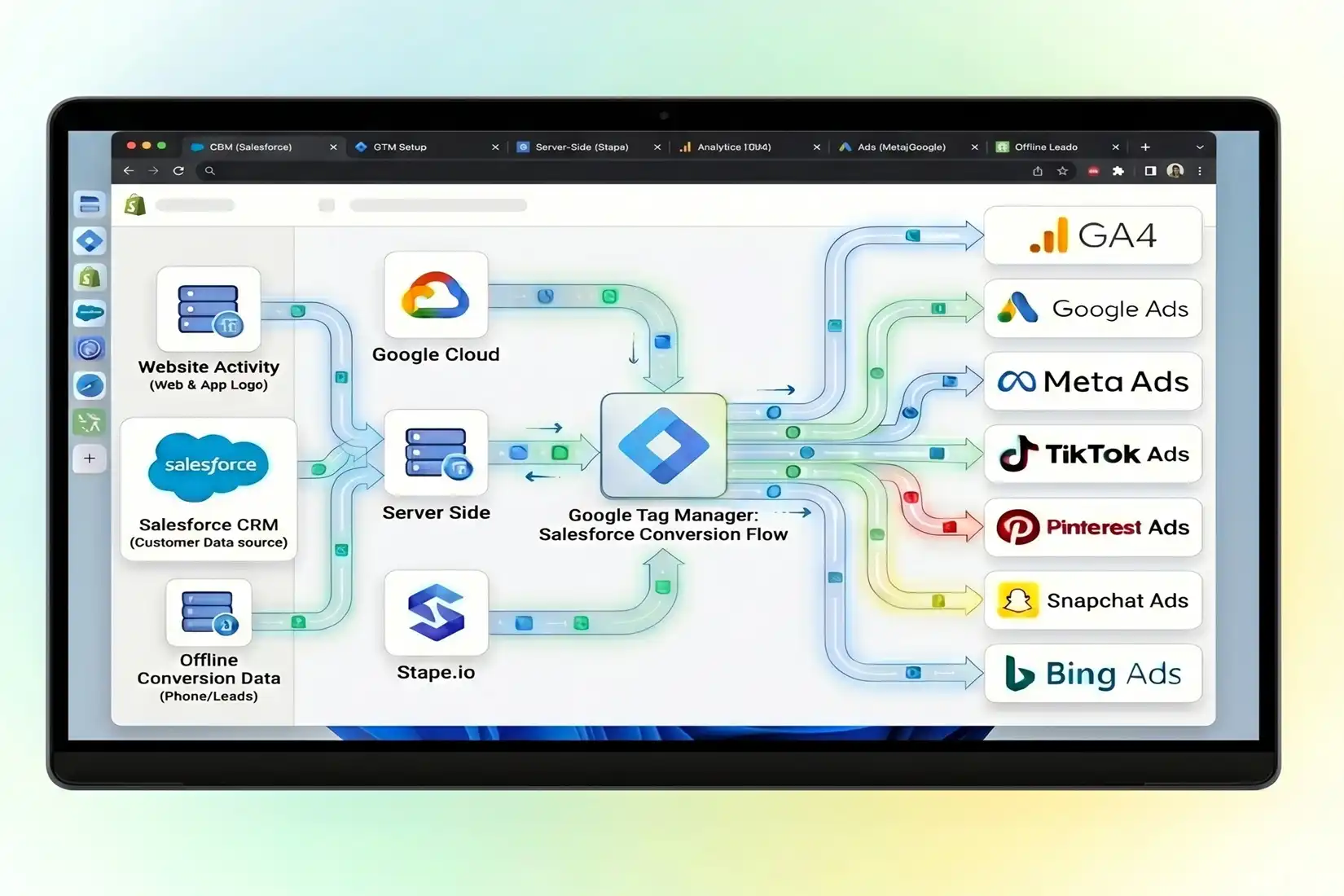
As a  Marketing Attribution Server Side &Conversion Tracking Specialist, I bridge the gap between your Salesforce CRM and ad platforms. I implement precise tracking for qualified leads and closed-won deals to optimize your ROI and scale campaign performance globally.

100 %

Ad revenue

10 %

Lower cost

5:1%

Average ROAS

4.7X%

ROI Growth

SalesForse Conversion Tracking

What Is Salesforce Conversion Tracking

Why Hire a Salesforce Conversion Tracking Specialist?Tracking lead submissions is only the beginning. A specialist ensures your CRM data flows back to Google Ads and Meta, allowing you to optimize for high-value sales rather than just form clicks.

Which Salesforce Forms Can We Track Effectively

I provide comprehensive tracking for various Salesforce entry points. Whether you use native web-to-lead forms or third-party integrations, I ensure every data point is captured for attribution.

Pardot Forms

Sync Pardot form completions with your analytics stack to bridge the gap between marketing automation and final sales revenue attribution for Salesforce Marketing Channal.

Cloud Forms

Implement advanced GTM tracking on Experience Cloud sites to monitor complex user interactions and convert them into actionable conversion data for your ad platforms.

Web-to-Lead Forms

Capture GCLIDs and user data from & UTM Perameter native Salesforce Web-to-Lead forms to attribute every lead back to its original marketing source with 100% accuracy.

Booking Forms

Integrate tools like Calendly or Appointment that sync with Salesforce, using Enhanced Conversions to track appointments as high-value lead actions within Google Ads.

Live Chat & Lead

Capture conversions from Salesforce Chat or Einstein Bots, providing visibility into how your real-time customer service interactions contribute to final sales and showing Real time revenue.

Third-Party Forms

Track conversions Salesforce Integrated Third-Party Formstools like HubSpot or Typeform that feed into Salesforce, ensuring GCLID persistence across the entire lead journey.

Is Salesforce Conversion Tracking Essential for Your Growth

Many B2B businesses struggle because their ad dashboards only show form submissions, not the actual revenue generated in the CRM. Integrating Salesforce with your marketing platforms is vital for true attribution. Without this, your Google Ads or Meta campaigns might be optimizing for “cheap” leads that never convert into sales. By capturing the GCLID (Google Click ID) and passing it into hidden fields, you can link every offline deal back to the specific keyword or ad that triggered it. This ensures your marketing budget is spent on high-intent prospects, reducing wasted spend and significantly improving your overall account health and performance metrics. I help you turn data into a competitive advantage by revealing exactly which campaigns drive profit.

Is Salesforce Conversion Tracking Essential for Your Growth?

Salesforce Conversion Tracking Solutions Platform

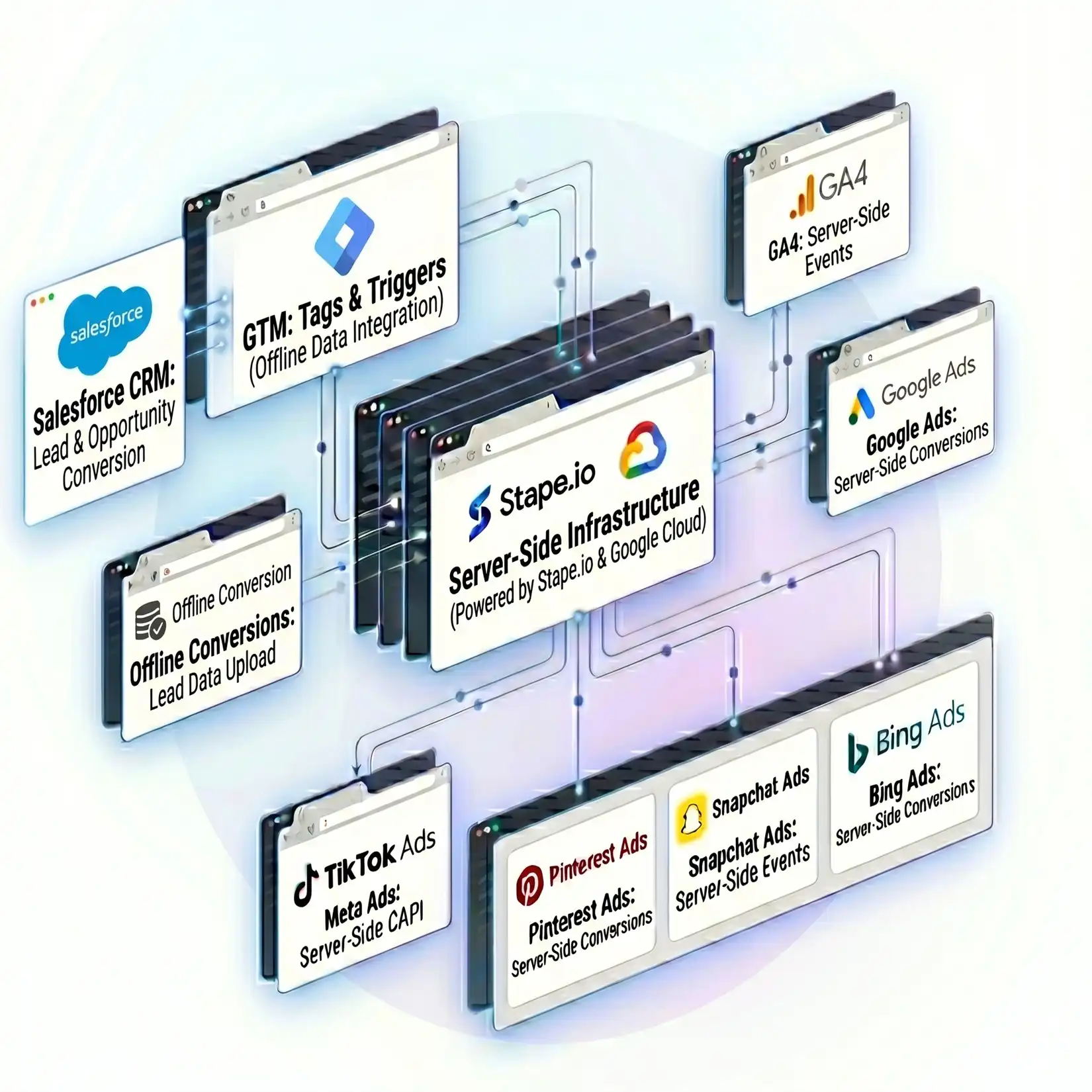
I offer end-to-end technical implementations including server-side GTM and multi-channel API integrations to ensure your data remains privacy-compliant and highly accurate.

Google Analytics 4

Configure sGTM to send Salesforce events to Google Analytics 4, creating a holistic view of the customer journey across all touchpoints.

GAds Conversions

Implement Enhanced Conversions using hashed user data from Salesforce to improve attribution accuracy and recovery of missing conversion signals.

Offline Conversion

Specialist in GCLID-based offline tracking, linking physical sales or signed contracts in Salesforce back to digital ad interactions for true ROI.

CRM Data Import

Set up automated data imports from Salesforce to Google Ads, allowing you to track qualified leads and sales directly in your ad dashboard.

Lead Stage

Expert setup to track every lead submission into Salesforce, ensuring all attribution parameters are preserved for deep-funnel analysis across platforms.

Meta Pixel & CAPI

Link your Salesforce stages to Meta CAPI to send server-side events, improving match quality and ad delivery for Facebook and Instagram campaigns.

What are the Core Benefits of Professional Salesforce Tracking

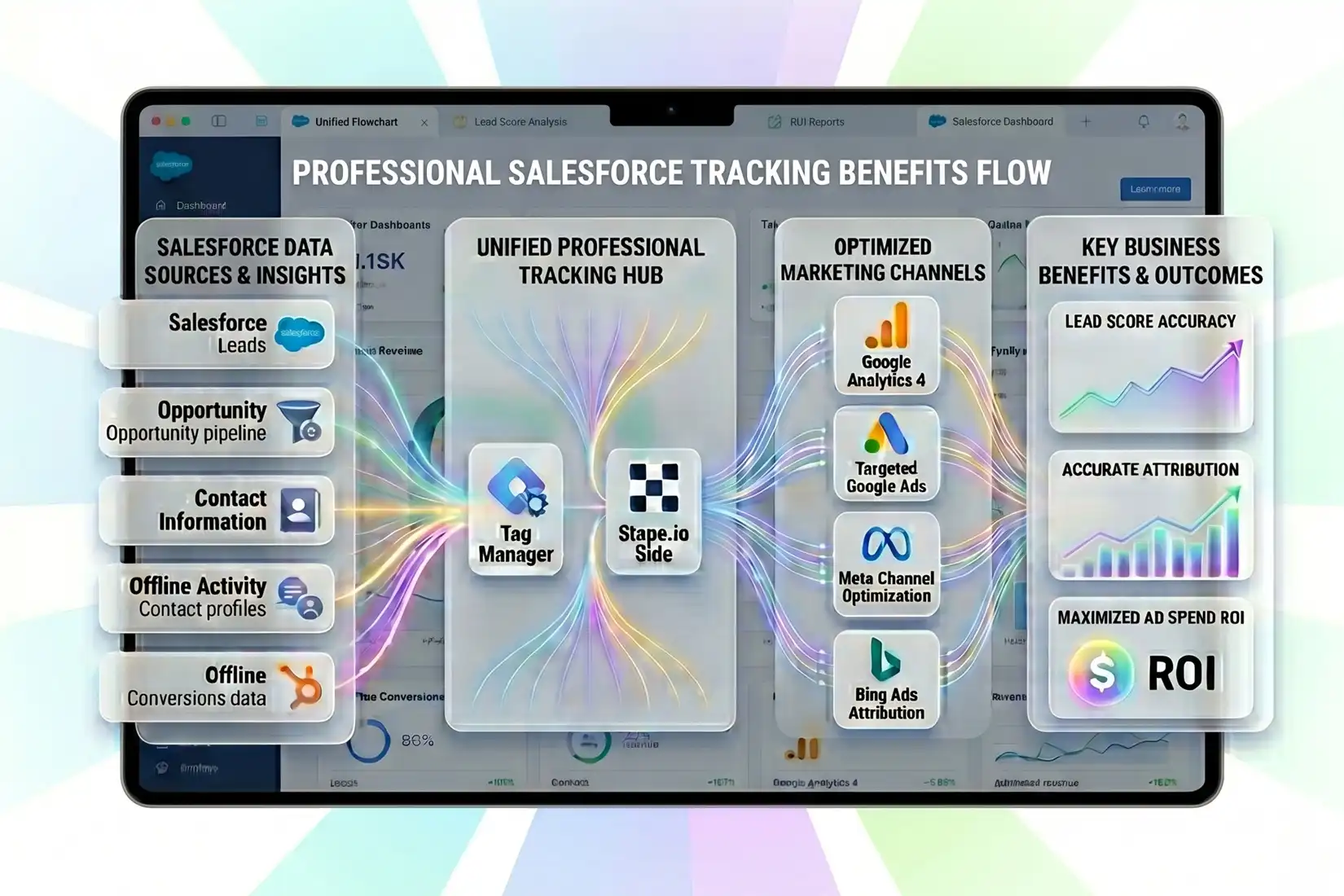
The primary benefit is the ability to use Smart Bidding based on actual profit. Instead of “Maximize Conversions” for leads, you can use “Target ROAS” for actual closed deals. This level of precision helps the algorithm find users similar to your best customers. Additionally, server-side tracking via GTM bypasses ad-blockers and privacy restrictions, ensuring nearly 100% data accuracy. You gain a unified view of the customer journey, from the first ad click to the final contract signature. Implementing multi-channel CAPI for Facebook and TikTok further strengthens your data layer, providing a robust foundation for long-term marketing automation and advanced analytics reporting. This setup protects your measurement from browser restrictions while maximizing lead quality.

Benefits of Salesforce Conversion Tracking Service

AUDIT

Free Offline Salesforce Conversion Tracking Audit

I will review your Salesforce GTM setup and CRM mapping to identify data gaps. This audit ensures your GCLIDs, user data, and conversion stages are correctly configured for maximum ad performance.

FREE audit available
don’t miss out!

Loved by 500+ Businesses worldwid

Claim your audit (it's free)

Client Reviews & Feedback

Clients praise my ability to bridge CRM data with ad platforms. My implementations have helped businesses reduce acquisition costs by optimizing for actual sales rather than surface lead volume.

G ADS
Conversion Tracking
Reporting

Standard tracking only measures form submissions, which doesn’t reflect actual revenue. By tracking offline conversions from Salesforce, you can see which ads lead to “Closed-Won” deals. This allows Google and Meta algorithms to optimize for actual profit rather than just lead volume, significantly improving your Return on Ad Spend (ROAS) and reducing the cost per acquisition for high-quality customers.

The GCLID (Google Click ID) is a unique parameter passed in the URL when a user clicks a Google ad. It is the primary key for attribution. By capturing this ID in a hidden field on your website forms and passing it into Salesforce, you can later send it back to Google Ads to link an offline sale to the specific keyword that drove it.

Yes, Google Tag Manager (GTM) is the most efficient way to capture and pass data. It allows us to deploy “listeners” that detect when a user submits a form and then automatically extract the GCLID or other identifiers to send them to Salesforce. This avoids hard-coding and makes the tracking setup much more scalable and easier to manage across your entire website.

Meta Conversion API (CAPI) sends data from your server (or CRM) directly to Facebook, bypassing browser restrictions like ad-blockers and ITP. When a lead progresses in Salesforce, CAPI sends that event back to Meta. This improves event match quality and ensures your Facebook ads are served to people most likely to become paying customers, not just clickers.

Enhanced Conversions is a feature that uses hashed first-party data, such as email addresses, to improve attribution. When a user converts on your site or in Salesforce, we send the hashed email to Google Ads. This allows Google to match the conversion to a signed-in user even if cookies are missing, significantly increasing the accuracy of your reporting and bidding.

Yes, Pardot (Salesforce Account Engagement) forms can be tracked using GTM custom listeners. We can capture the submission event and the necessary attribution IDs to ensure that Pardot leads are fully integrated into your GA4 and Google Ads reporting. This ensures that your top-of-funnel marketing automation efforts are properly credited for the revenue they generate in the main Salesforce CRM.

Server-side tracking offers superior data privacy and accuracy. By processing data on a server before sending it to vendors, you can clean the data, hide sensitive information, and bypass browser-based tracking preventions. For Salesforce users, this means more reliable attribution of CRM stages back to your advertising platforms, leading to better optimization and more effective marketing spend allocation.

Yes, Zapier or similar automation tools like Make are often used to bridge the gap between Salesforce and ad platforms. When a lead status changes in Salesforce (e.g., to “Qualified”), Zapier can automatically trigger an offline conversion event in Google Ads or Meta. This creates a real-time feedback loop that keeps your advertising algorithms trained on the most current and valuable data.

Absolutely. By using Google Consent Mode V2 and server-side hashing, we ensure that user privacy is respected according to GDPR and other regulations. User data like emails or phone numbers are hashed using the SHA-256 algorithm before being sent to Google or Meta. This allows for accurate tracking without ever exposing raw personally identifiable information (PII) to the advertising platforms.

Offline conversion data is not instantaneous. Once an event is sent from Salesforce to Google Ads, it typically takes 3 to 24 hours to appear in your dashboard. Enhanced Conversion diagnostics may take up to 48-72 hours to fully update status. It is important to verify the setup using GTM Preview Mode and CRM logs first to ensure data is flowing correctly before analyzing the dashboard metrics.

Frequently Asked Questions (FAQ)