
Table of Contents
ToggleQuick Answer
Most B2B organizations lose track of their ad performance because they only measure raw form fills, completely missing downstream pipeline metrics like MQLs, SQLs, and closed-won deals. By combining a custom HubSpot JavaScript form listener with Google Tag Manager server-side tracking (sGTM) and Offline Conversion Tracking (OCT), you can pass clean lead identifiers (gclid, hubspotutk, hashed email) directly to Google Ads and Meta Ads. This fixes broken B2B attribution, bypasses ad blockers, and trains ad algorithms on revenue rather than low-value clicks.
Key Takeaways
- Beyond Form Fills: Tracking top-of-funnel conversions gives ad algorithms false positive signals; B2B success requires tracking pipeline lifecycle stages (MQL, SQL, Closed-Won).
- The Iframe Barrier: Embedded HubSpot forms act like a “glass window into another tool,” preventing standard GTM listeners from seeing user submissions without a dedicated postMessage listener.
- First-Party Server Sovereignty: Deploying a custom server subdomain via Stape circumvents Apple ITP and ad blockers, recovering up to 40% of dropped conversion signals.
- Offline Conversion Loop: Automating webhook or native API triggers from HubSpot to Google Ads passes real deal values back to your campaigns, optimizing automated bidding for high-margin contracts.
- Privacy Compliance by Default: Implementing Google Consent Mode v2 via Cookiebot ensures user consent decisions are respected across both client and server containers.
Introduction: The “Ghost Pipeline” in B2B Advertising
A B2B SaaS client recently scheduled an emergency audit with me. His marketing team was spending $35,000 every month on Google Search Ads and LinkedIn campaigns targeting enterprise buyers. On paper, his marketing dashboard looked incredible: Google Ads reported 210 “Leads” at a reasonable $166 Cost Per Lead (CPL).
However, when we opened his HubSpot CRM, the reality was grim. Out of those 210 logged leads, 140 were spam submissions, student research inquiries, or unqualified personal email addresses. Only 12 reached Marketing Qualified Lead (MQL) status, 3 became Sales Qualified Leads (SQLs), and zero deals closed. Because his Google Ads account was configured to treat every initial form fill as a successful conversion, Google’s Smart Bidding algorithm spent $35,000 finding more people who filled out forms but had zero buying power.
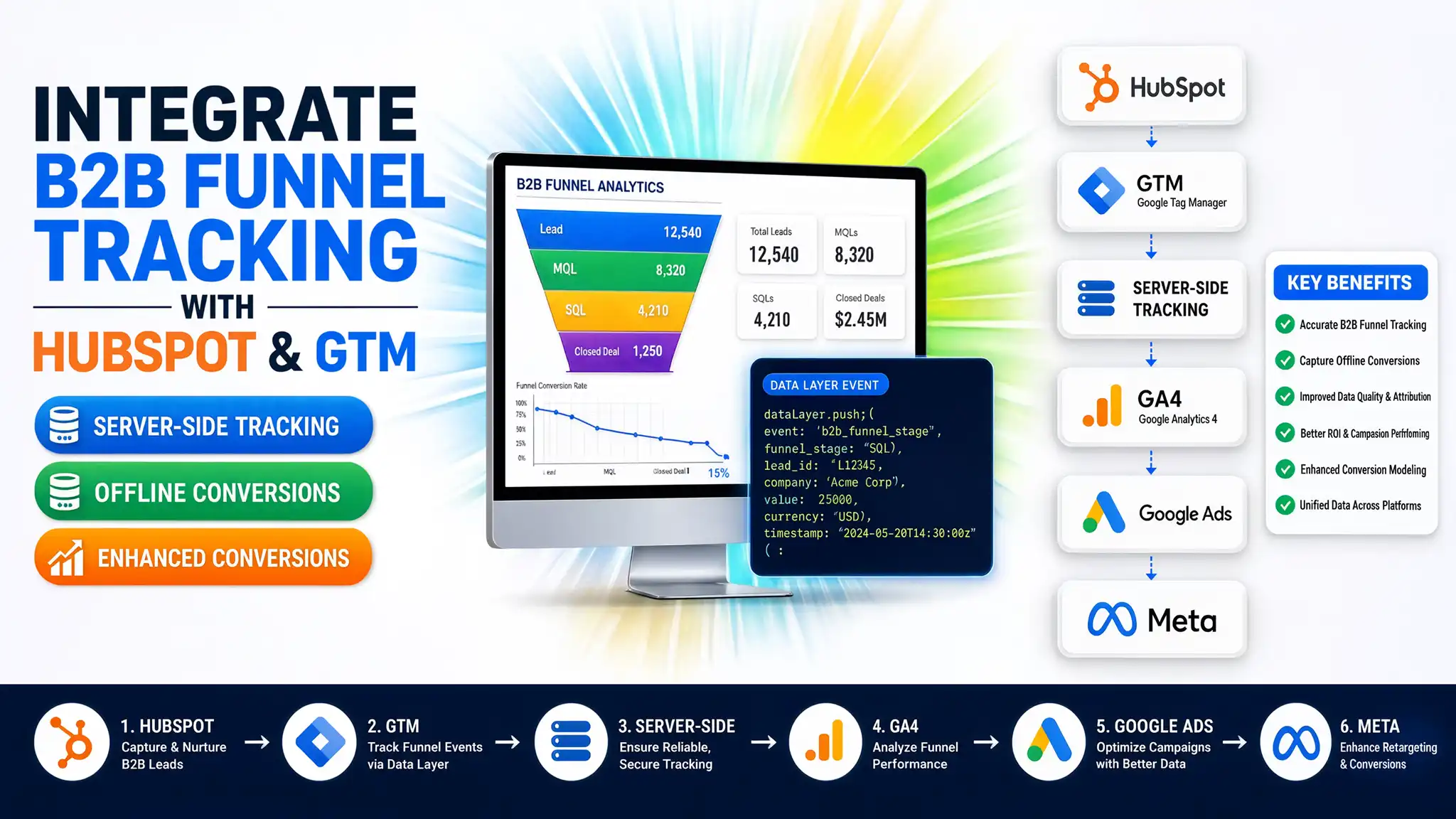
This is the B2B “Ghost Pipeline.” Standard web tracking fails because the true business outcome happens offline—weeks or months later inside a CRM like HubSpot. In this complete guide, I will show you how to connect HubSpot CRM with GTM, GA4, and Google Ads server-side tracking to create a unified data pipeline that optimizes your ad spend for actual profit.
Why Full-Funnel B2B Funnel Tracking Matters
When you rely solely on web browser tracking, you are operating with severe data blind spots. Web browsers treat embedded forms like a “glass window into another tool” (an iframe), hiding what happens inside. Furthermore, Safari’s Intelligent Tracking Prevention (ITP) and ad blockers delete tracking cookies within 24 hours to 7 days, severing the link between an ad click and a sale closed 30 days later.
					+-----------------------------------------------------------------------------------+
|                            THE B2B DATA PIPELINE GAP                              |
+-----------------------------------------------------------------------------------+
|  Ad Click (Google/Meta) --> Form Fill (Web) --> MQL (HubSpot) --> Deal Won (CRM)  |
|          |                      |                   |                  |          |
|          v                      v                   x                  x          |
|   GCLID Captured        Tracked as Conversion     LOST SIGNAL        LOST SIGNAL  |
|                                            (Ad Algorithm Blind) (No Value Passed) |
+-----------------------------------------------------------------------------------+
By upgrading your architecture to server-side tracking and CRM offline feedback loops, you bridge this gap completely.
5 Core Benefits of HubSpot Server-Side Integration
- Accurate Lead Attribution: Pass unique click identifiers (gclid, msclkid, fbclid) directly from GTM into hidden fields inside HubSpot forms.
- First-Party Cookie Longevity: Routing tracking traffic through your custom domain (e.g., ss.yourdomain.com) extends cookie lifetime past browser restriction limits.
- Signal Quality Optimization: Feed MQL, SQL, and deal stages back to Google Ads and Meta Ads so automated bidding optimizes for actual revenue.
- Enhanced Conversion Matching: Securely hash and transmit customer identifiers (email, phone, address) to achieve 90%+ match quality scores in Google and Meta.
- Page Speed & Security: Move third-party marketing tags off the user’s browser and into your server container, speeding up site performance and protecting user data.
Prerequisites & Architecture Checklist
Before configuring your tracking pipeline, review the required tools and access levels in the checklist below:
Platform / Tool | Required Access Level | Function in Architecture |
HubSpot CRM | Admin / Super Admin | Form management, hidden property creation, workflows, API keys. |
Google Tag Manager (Web) | Publish Access | Deploy listener code, capture parameters, fire transport tags. |
Google Tag Manager (Server) | Publish Access | Process incoming payloads, hash PII, route API requests to ad platforms. |
Stape.io Cloud Server | Account Admin | Host sGTM container and provision custom tracking subdomain. |
Cookiebot CMP | Account Owner | Manage consent banners and enforce Google Consent Mode v2. |
Google Ads / GA4 | Admin / Editor | Configure Enhanced Conversions and import offline conversion actions. |
Video Tutorial: B2B Funnel Tracking Masterclass
In this step-by-step tutorial, I walk through the core architecture required to build a high-precision B2B tracking pipeline, integrating Webflow, GTM, GA4, and HubSpot CRM.
Lorem ipsum dol
Step-by-Step Implementation Guide
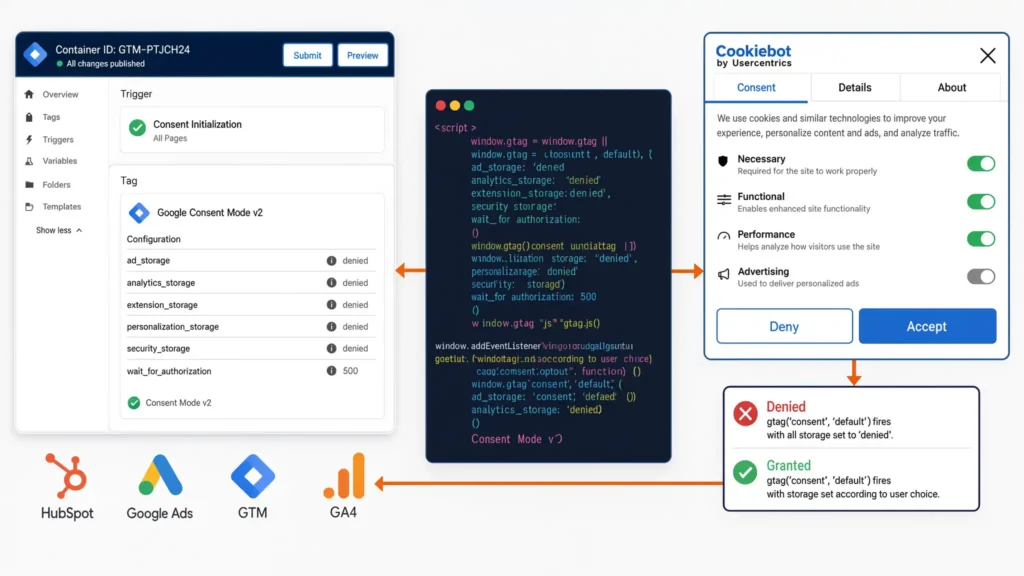
Phase 1: Deploy Google Consent Mode v2 via Cookiebot
Before capturing any user information, you must implement legal consent management. Google Consent Mode v2 ensures that if a visitor denies tracking cookies, anonymous signals are still routed to Google for conversion modeling.
- Install the Cookiebot CMP script in the head section of your website above all GTM scripts.
- In your GTM Web Container, set up default consent states using a dedicated Consent Initialization trigger:
or sit amet, consectetur adipiscing elit. Ut elit tellus, luctus nec ullamcorper mattis, pulvinar dapibus leo.
					window.dataLayer = window.dataLayer || [];
function gtag(){dataLayer.push(arguments);}
gtag('consent', 'default', {
  'ad_storage': 'denied',
  'analytics_storage': 'denied',
  'ad_user_data': 'denied',
  'ad_personalization': 'denied',
  'wait_for_update': 500
});
3. When the user accepts cookies, Cookiebot updates the consent state to ‘granted’, allowing full identifier data to flow into your GTM tags.
Phase 2: HubSpot Custom JavaScript Listener Code
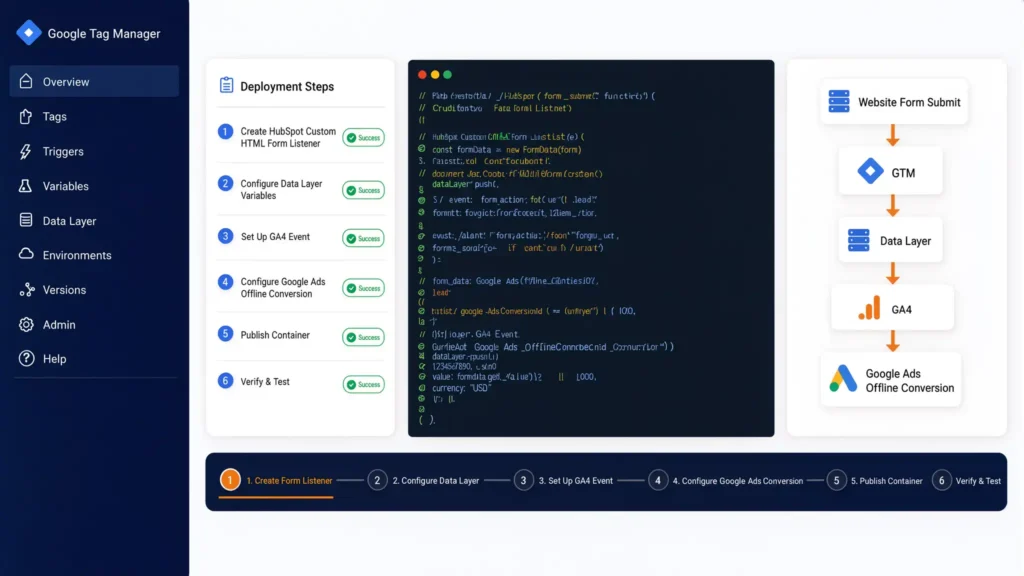
Standard GTM form submit triggers often miss embedded HubSpot forms because they load inside an iframe or send background asynchronous calls.
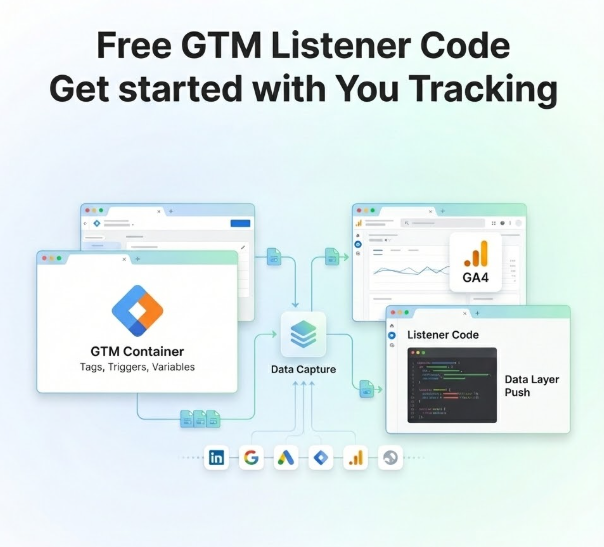
Think of a listener code like a “catcher’s mitt.” It sits silently on your website, watching the window for messages sent by HubSpot’s form engine. The moment a submission happens, it catches the event data, extracts the user details, and safely files them into the Data Layer.
The JavaScript Listener Code
Deploy this code in Web GTM as a Custom HTML Tag triggered on All Pages (DOM Ready):
					<script>
(function() {
  // Listen for message events emitted by embedded HubSpot forms
  window.addEventListener("message", function(event) {
    // Validate that the message comes from HubSpot
    if (event.data && event.data.type === "hsFormCallback" && event.data.eventName === "onFormSubmitted") {

      var formData = event.data.data;
      var submissionData = formData.submissionValues || {};

      // Extract client-side parameters and cookies
      var gclid = getParam('gclid') || getCookie('gclid');
      var hubspotutk = getCookie('hubspotutk');

      // Push normalized payload into the Data Layer
      window.dataLayer.push({
        'event': 'hubspot_form_success',
        'form_id': formData.formId,
        'user_data': {
          'email': submissionData.email || '',
          'firstname': submissionData.firstname || '',
          'lastname': submissionData.lastname || '',
          'phone': submissionData.phone || '',
          'company': submissionData.company || ''
        },
        'tracking_identifiers': {
          'gclid': gclid,
          'hubspotutk': hubspotutk
        }
      });
    }
  });

  // Helper function to parse URL parameters
  function getParam(param) {
    var match = RegExp('[?&]' + param + '=([^&]*)').exec(window.location.search);
    return match && decodeURIComponent(match[1].replace(/\+/g, ' '));
  }

  // Helper function to parse cookies
  function getCookie(name) {
    var value = "; " + document.cookie;
    var parts = value.split("; " + name + "=");
    if (parts.length === 2) return parts.pop().split(';').shift();
  }
})();
</script>
Deploying the Listener Tag in GTM:
- Tag Type: Custom HTML
- Tag Name: cHTML – HubSpot Form Listener
- Trigger: DOM Ready or Initialization – All Pages
Configuring GTM Variables & Triggers for the Listener:
- Trigger: Create a Custom Event trigger where Event Name equals hubspot_form_success.
- Data Layer Variables: Create variables for user_data.email, user_data.firstname, user_data.phone, and tracking_identifiers.gclid.
Phase 3: Web GTM to sGTM Transport Container (GA4 Setup)
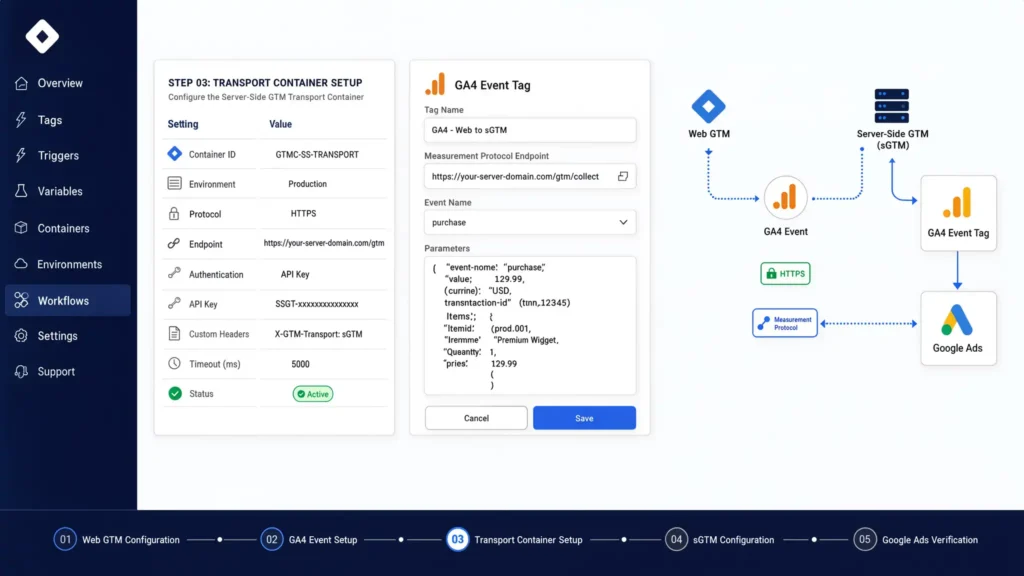
Instead of sending client data straight to ad networks, route it to your sGTM transport container using GA4 events.
GTM Tags, Triggers, and Variables Configuration
dlv – user_data.email
Type: Data Layer Variable
Configuration:
user_data.emailPurpose: Extract email for Enhanced Conversions.
dlv – gclid
Type: Data Layer Variable
Configuration:
tracking_identifiers.gclidPurpose: Extract click ID for Google Ads attribution.
ce – hubspot_form_success
Type: Custom Event Trigger
Configuration:
hubspot_form_successPurpose: Fire transport tags on successful submission.
GA4 – Transport Event
Type: GA4 Event Tag
Configuration: Event Name:
generate_leadPurpose: Route payload to custom sGTM endpoint URL.
In the GA4 Configuration Tag, check the option “Send to server container” and enter your custom sGTM URL: [https://ss.yourdomain.com](https://ss.yourdomain.com).
For more details on setting up form conversion pipelines, consult my specialized guide on HubSpot Form Conversion Tracking Services.
Phase 4: Server-Side GTM Setup on Stape
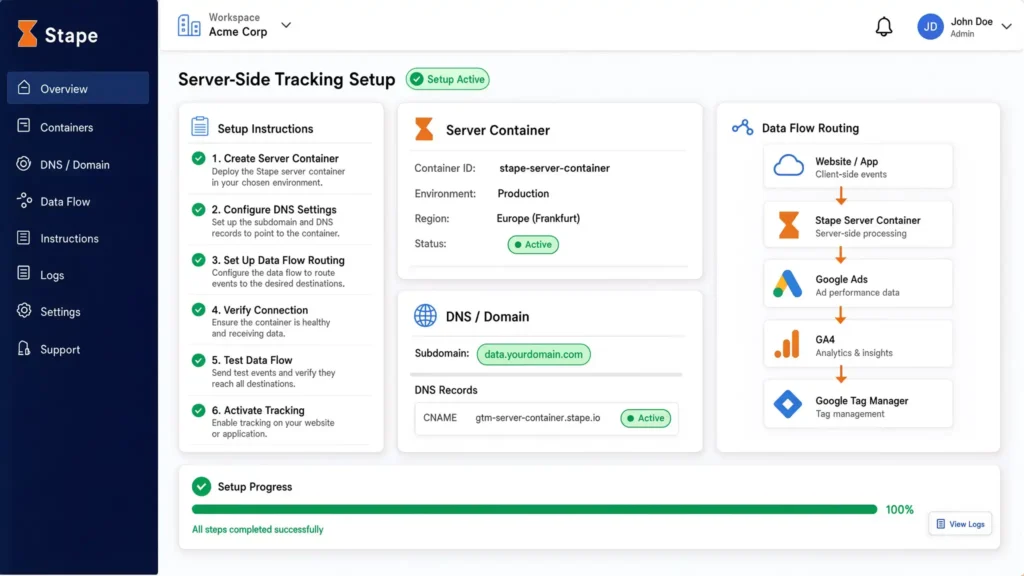
To prevent Safari ITP from deleting cookies and bypass ad blockers, set up your server container on a first-party subdomain:
					+------------------------------------------------------------------------------------+
|                         SERVER-SIDE DATA FLOW ROUTING                              |
+------------------------------------------------------------------------------------+
| Website Browser ---> ss.yourdomain.com (Stape sGTM) ---> Google Ads API (Enhanced) |
|   (Client Side)         (First-Party Subdomain)     ---> Meta CAPI (Hashed User) |
|                                                     ---> GA4 BigQuery / Analytics  |
+------------------------------------------------------------------------------------+
- Log into your Stape.io account and create a new sGTM container.
- In your DNS manager (Cloudflare, GoDaddy, or Route 53), add a CNAME record:
- Host / Name: ss (or data)
- Target: Your Stape container endpoint (e.g., xxxx.stape.io).
- Verify the SSL certificate in Stape. Once active, update your Web GTM Server Container URL to [https://ss.yourdomain.com](https://ss.yourdomain.com).
- In Server GTM, configure the Google Ads Conversion Tracking Tag and Meta Conversions API Tag to trigger when incoming GA4 Client claims the generate_lead event.
If you are evaluating custom cloud setups, explore my dedicated Server-Side Tracking Service.
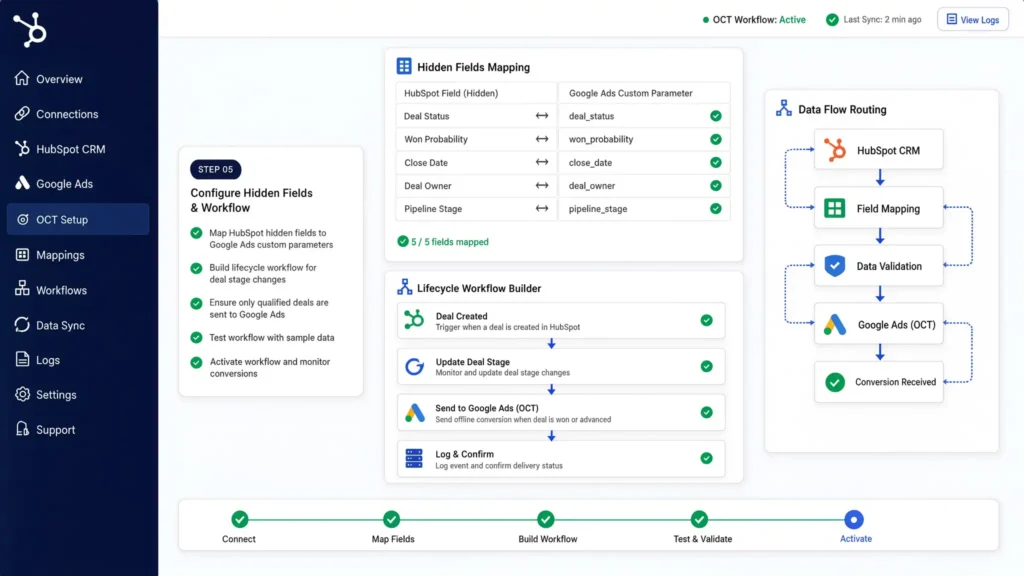
Phase 5: HubSpot CRM to Google Ads Offline Conversion Tracking (OCT)
The final piece of the B2B puzzle is sending downstream milestone data (MQL, SQL, Deal Closed) back to Google Ads.
1. Map Hidden Fields in HubSpot
Ensure every HubSpot form includes hidden fields for:
- gclid (Google Click ID)
- hubspotutk (HubSpot User Token)
- latest_utm_source / latest_utm_medium
When a user submits a form, GTM populates these fields automatically.
2. Create HubSpot Lifecycle Workflows
When a lead’s stage updates in HubSpot (e.g., Lifecycle Stage changes to “Sales Qualified Lead” or Deal Stage changes to “Closed-Won”):
					+-----------------------------------------------------------------------------------+
|                        HUBSPOT CRM TO GOOGLE ADS OCT FLOW                         |
+-----------------------------------------------------------------------------------+
| HubSpot Lead Lifecycle Update --> Webhook Trigger --> sGTM / Zapier Endpoint      |
|                                                                |                  |
|                                                                v                  |
| Google Ads Conversion API <-- Upload GCLID + Conversion Value + Timestamp        |
+-----------------------------------------------------------------------------------+
3. Uploading Offline Conversions to Google Ads
You can send these milestone updates to Google Ads via sGTM webhooks or native integrations:
- Conversion Action Name: HubSpot – SQL or HubSpot – Closed Won
- Key Identifiers: GCLID + Conversion Time + Conversion Value (e.g., $5,000 for deal closed).
- Bidding Strategy: Set initial lead forms to “Secondary Action” (Observation only) and set “SQL” or “Closed-Won” to “Primary Action” for Smart Bidding optimization.
To learn more about connecting CRM architectures, review my guide on Salesforce Conversion Tracking Services and Offline Conversion Tracking Services.
Testing & Validation Framework
Verify every component of your B2B funnel tracking system before going live using this validation matrix:
1. Consent
Inspection Tool: Developer Console
Action / Event: Clear Cookies & Load Page
Target Verification Criteria: Default consent state must be denied before banner interaction.
2. Listener
Inspection Tool: GTM Web Preview
Action / Event: Submit Embedded HubSpot Form
Target Verification Criteria: hubspot_form_success event appears in GTM summary panel.
3. Web Transport
Inspection Tool: GTM Web Preview
Action / Event: Select generate_lead Event
Target Verification Criteria: Outgoing GA4 tag sends payload to [https://ss.yourdomain.com](https://ss.yourdomain.com).
4. sGTM Processing
Inspection Tool: GTM Server Preview
Action / Event: Inspect Incoming Client Request
Target Verification Criteria: Client claims event; Google Ads & Meta CAPI tags show status 200.
5. CRM Mapping
Inspection Tool: HubSpot Lead Record
Action / Event: Open Created Contact Record
Target Verification Criteria: Hidden fields (gclid, hubspotutk) are populated with valid values.
6. OCT Upload
Inspection Tool: Google Ads Diagnostic
Action / Event: Check Conversions > Diagnostics
Target Verification Criteria: Conversion action records offline uploads with zero matching errors.
Troubleshooting Common B2B Tracking Errors
					+-----------------------------------------------------------------------------------+
|                       COMMON B2B TRACKING TROUBLESHOOTING                         |
+-----------------------------------------------------------------------------------+
|  [Issue] Missing GCLID in HubSpot  --> [Fix] Check URL parameter parsing logic    |
|  [Issue] Duplicate Form Events     --> [Fix] Implement event deduplication IDs    |
|  [Issue] OCT Upload Rejected       --> [Fix] Align UTC timestamps & 90-day window |
+-----------------------------------------------------------------------------------+
Problem 1: gclid is blank on HubSpot form submissions.
- Root Cause: The visitor clicked an ad, but navigated across multiple pages before filling out the form, causing the URL parameter to disappear.
- Solution: Store the gclid in a first-party cookie or local storage during the initial visit, then retrieve it when the listener code fires during form submission.
Problem 2: HubSpot form submissions generate double conversions in GA4.
- Root Cause: Both the standard GTM Form Submit trigger and the custom JavaScript listener tag are firing simultaneously.
- Solution: Remove the native GTM Form Submit trigger for HubSpot forms. Rely exclusively on the custom hubspot_form_success custom event.
Problem 3: Google Ads rejects offline conversion upload files.
- Root Cause: Incorrect timestamp formatting or trying to upload a conversion for a click older than 90 days.
- Solution: Ensure your CRM workflow formats the conversion timestamp in standard ISO 8601 string or yyyy-mm-dd hh:mm:ss+tz format (e.g., 2026-08-03 14:30:00-0500).
Conclusion
B2B success depends on high-quality data. Relying solely on raw website form fills forces ad platform algorithms to optimize blindly for volume rather than revenue.
By implementing a custom HubSpot JavaScript listener, routing events through a first-party server-side GTM container on Stape, and feeding CRM lifecycle milestones back via Offline Conversion Tracking, you close the attribution loop. This engineering upgrade protects your ad budget, bypasses browser tracking blocks, and trains campaign algorithms to acquire actual paying customers.
Executive Summary by MD Niamul
Optimizing B2B ad campaigns solely on form submissions creates attribution gaps and wastes ad spend. Implementing a robust GTM server-side architecture with a dedicated HubSpot form listener captures accurate user data and click identifiers (gclid). By routing events through a first-party sGTM subdomain on Stape and uploading downstream CRM milestones (MQL, SQL, Deals) via Offline Conversion Tracking, B2B advertisers achieve 99% data accuracy and train ad algorithms to target high-value buyers.
1. What is HubSpot B2B funnel tracking?
HubSpot B2B funnel tracking is an advanced analytics setup that connects web behavior, form submissions, and downstream CRM lifecycle stages (MQL, SQL, Closed-Won) to ad platforms like Google Ads and Meta Ads for accurate pipeline attribution.
2. Why doesn't standard GTM track HubSpot forms?
HubSpot forms often load inside an iframe or send background asynchronous calls. Standard GTM form triggers cannot read inside iframes or detect these cross-domain requests without a custom postMessage JavaScript listener.
3. How does server-side tracking benefit B2B?
Server-side tracking routes data through your own custom subdomain, extending tracking cookie lifetimes past Safari ITP limits, bypassing ad blockers, and enabling secure transmission of hashed user data for Enhanced Conversions.I provide full-stack analytics solutions including Google Tag Manager (GTM), Google Analytics 4 (GA4), Google Ads conversion tracking, Looker Studio dashboards, server-side tracking, and advanced data analysis to deliver accurate, business-ready insights.
4. What is Google Ads Offline Conversion Tracking?
Google Ads Offline Conversion Tracking (OCT) allows you to import conversions that happen outside your website—such as an MQL update or a signed deal in HubSpot—back into Google Ads using the stored Google Click ID (gclid).
5. What is the role of a GCLID?
The gclid (Google Click ID) is a unique parameter added to your URL when a user clicks a Google Ad. Storing this identifier in HubSpot connects the original ad click to a deal closed weeks later.
6. Why should I track MQLs instead of forms?
Form fills often include spam or unqualified leads. Tracking MQLs trains ad algorithms on qualified prospective buyers, lowering your true Cost Per Acquisition (CPA) and improving pipeline value.
7. Does Consent Mode v2 work with HubSpot?
Yes. Integrating Google Consent Mode v2 via Cookiebot ensures that user choices on your website dynamically update tag execution in both GTM Web and Server containers, maintaining legal compliance with GDPR and CCPA.
8. What is Stape.io used for in GTM?
Stape.io is a specialized cloud hosting provider for Google Tag Manager Server containers. It simplifies setting up custom tracking subdomains, managing SSL certificates, and scaling sGTM infrastructure efficiently.
9. Can I track HubSpot forms on Webflow?
Yes. You can embed HubSpot forms on Webflow sites and track them cleanly by deploying our custom JavaScript listener in GTM. Read more on my Marketing Automation Service page.
10. How long does B2B setup take?
A full B2B funnel tracking setup—including GTM web listener deployment, sGTM container configuration on Stape, Consent Mode v2, and HubSpot OCT workflows—typically takes 1 to 2 weeks to deploy and validate.
 Need Help Advanced GHL Automation & Tracking Setup?