
Quick Answer
Google tag gateway vs server-side tracking comes down to scope. Google tag gateway serves your Google tags (GA4 and Google Ads) from your own domain through a CDN like Cloudflare. It’s free and quick, but it only covers Google and doesn’t let you change the data. Server-side tracking runs a server Google Tag Manager (GTM) container, for example on Stape, on your own subdomain. Your site sends one stream of events to it, and the container forwards them to GA4, Google Ads, the Meta Conversions API, TikTok and more, with first-party cookies and full control over what each platform gets. If you only run Google ads, start with the gateway. If you run Meta or TikTok too, or send CRM sales back, set up server-side tracking.
Key Takeaways
- Browser tracking loses sales: ad blockers, Safari cookie limits and consent choices hide part of your conversions from Google Ads and Meta.
- Google tag gateway is Google-only: it moves Google’s scripts and requests onto your domain, but Meta, TikTok and others stay third-party.
- Server-side GTM is about control: one container on your subdomain feeds every platform, and you decide what data each one receives.
- Event IDs stop double counting: when the pixel and the server both send an event, a shared ID lets the platform keep only one.
- Attribution needs click IDs and CRM data: gclid, fbclid and hashed customer data, plus closed sales from your CRM, are what fix the numbers.
- Consent still applies: moving tags to a server doesn’t replace Consent Mode v2.
Introduction Your Ads Say 20 Sales, Your Store Says 40
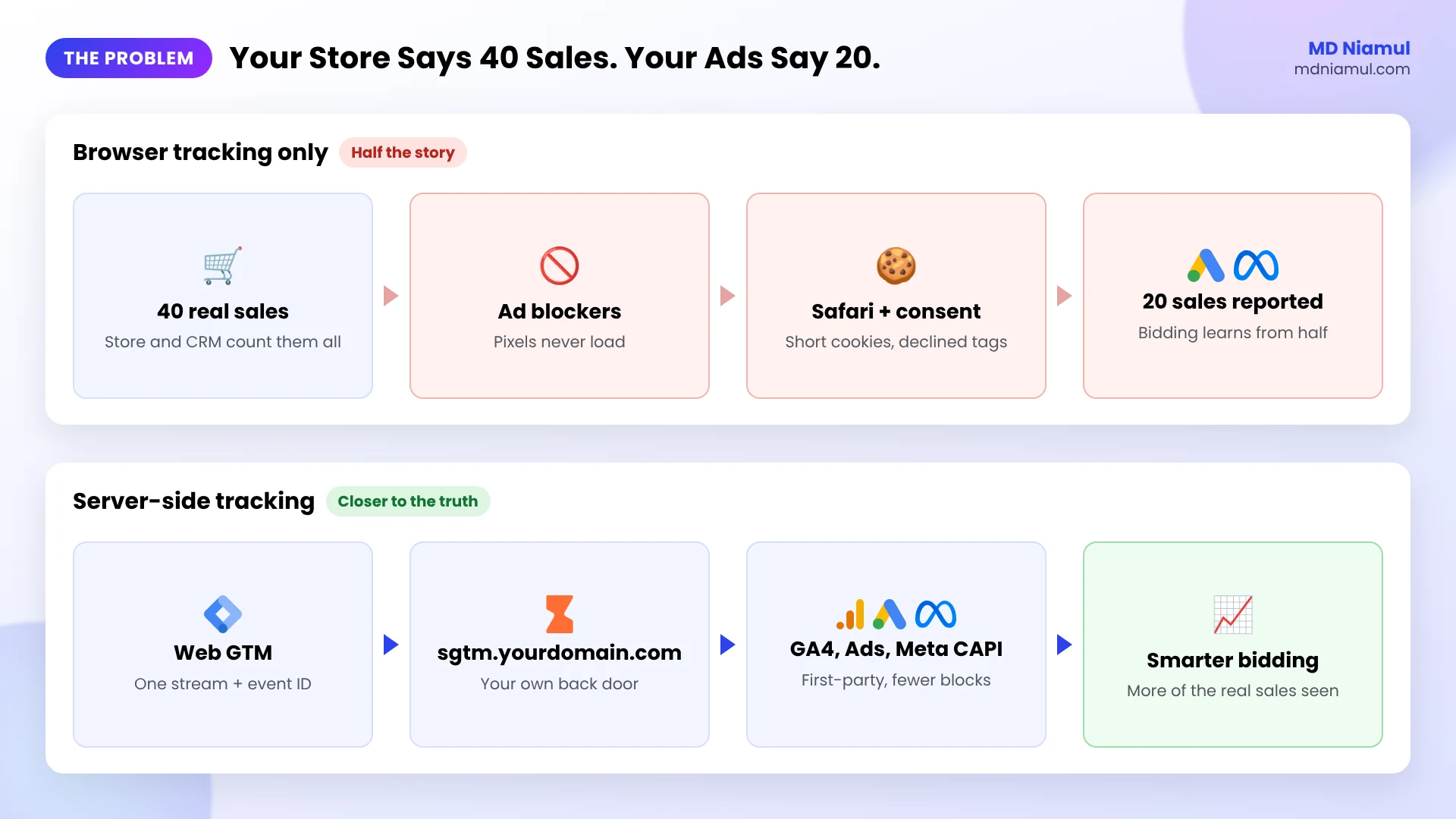
That’s the exact sentence a lot of my clients open with. Shopify or the CRM shows 40 orders. Google Ads and Meta together claim 20. The owner starts wondering which campaigns to cut.
The ads didn’t suddenly stop working. The tracking did. Ad blockers stop pixels from loading. Safari cuts cookie life, so a returning buyer looks like a stranger. Some visitors decline cookies. Each of those removes a sale from what the ad platforms can see, and they keep learning from half the story.
In this guide I explain what server-side tracking is in plain English, how it compares with Google’s newer tag gateway, and how I set it up with GTM, GA4 and Stape to fix marketing attribution.
What Is Server-Side Tracking, in Plain English?
Think of browser tracking as five delivery drivers, one for each ad platform, all trying to leave your shop through the front door. Ad blockers stand at that door and turn some of them away.
Server-side tracking hands one parcel to your own driver, who leaves through your back door, a subdomain like data.yourdomain.com, and delivers a copy to GA4, Google Ads, Meta and the rest. Because it’s your door, cookies are first-party and fewer requests get blocked. And because it’s your driver, you decide what goes in each parcel.
How Does Google Tag Gateway Work?
Google tag gateway for advertisers is Google’s lighter option. Your CDN or load balancer (Cloudflare, Akamai, Fastly or Google Cloud) serves the Google tag from your own domain, and some measurement requests go to Google through that domain too. With Cloudflare it can take only a few clicks, and it’s free apart from any CDN costs.
What it doesn’t do: it only covers Google tags, it doesn’t remove or enrich data, and its cookies are still set by JavaScript, so Safari’s limits still apply. Stape and Google both describe the gateway and server-side GTM as tools you can use together.
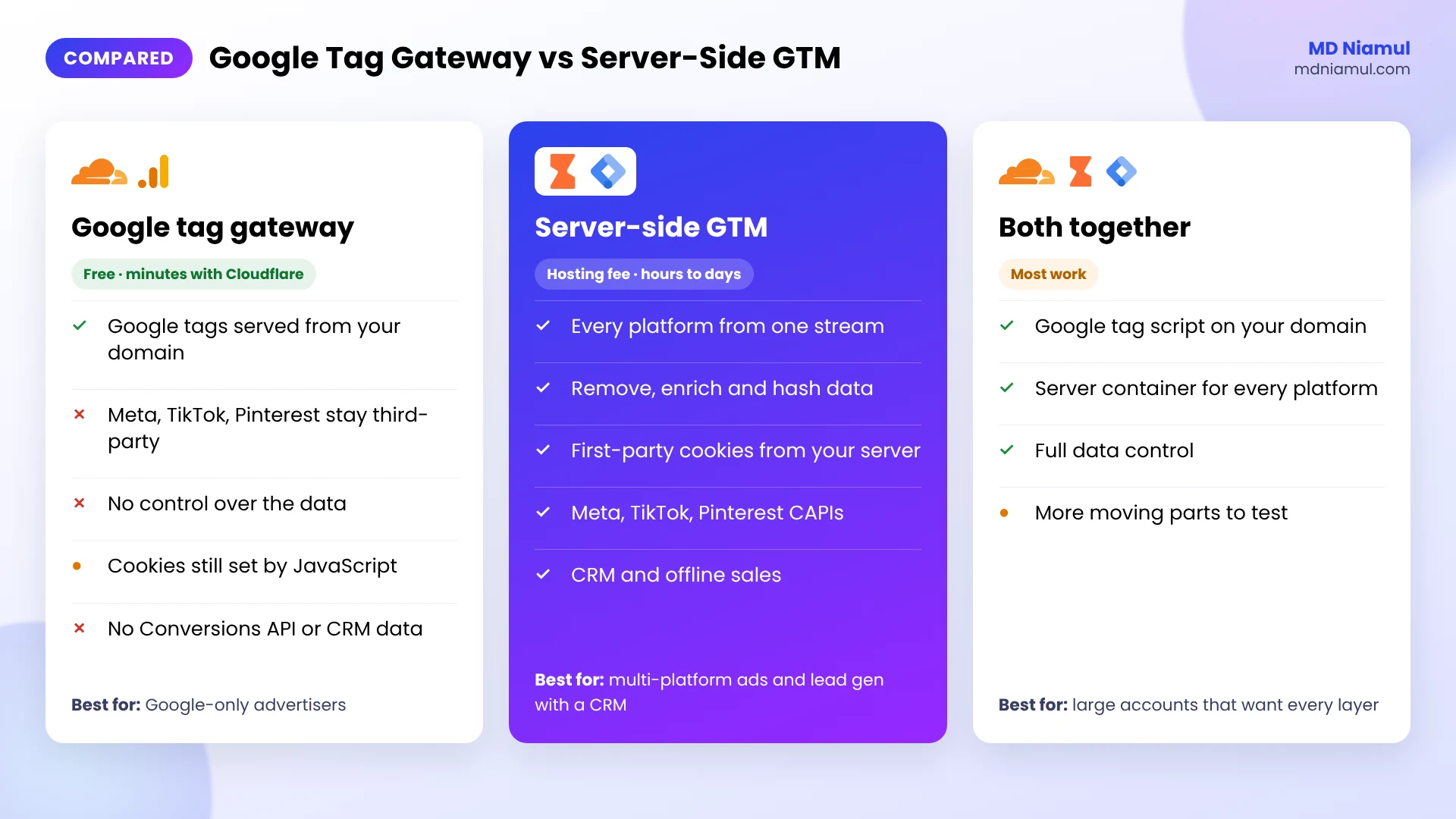
| Google tag gateway | Server-side GTM (Stape) | Both together | |
|---|---|---|---|
| Platforms covered | Google only (GA4, Google Ads) | Google, Meta, TikTok, Pinterest, Snapchat and more | All of them |
| Control over data | None, requests pass through | Full: remove, enrich, hash, route | Full |
| Cookies | Still set by JavaScript | Can be set first-party from your server | First-party |
| Conversions APIs and CRM data | No | Yes | Yes |
| Cost and effort | Free, minutes with Cloudflare | Hosting fee, a few hours to days | Most work |
| Best for | Google-only advertisers | Multi-platform ads, lead gen with a CRM | Large accounts that want every layer |
Prerequisites & Setup Checklist
- Google Tag Manager: a web container on every page, and permission to create a server container.
- GA4 and ad accounts: your GA4 Measurement ID, Google Ads conversion IDs and labels, and a Meta pixel with a Conversions API access token.
- Hosting: a Stape account, or Stape EU if your data should stay in Europe.
- DNS access: so you can add a record for a subdomain like
sgtm.yourdomain.com. - Consent: a cookie banner connected to Google Consent Mode v2 if you have EEA or UK visitors.
Want to see what your site sends right now? Run it through my free server-side tracking checker first.
Video Tutorial Walkthrough
In the video I show why browser tracking breaks, what missed sales cost you, how GTM, GA4 and Stape work together, and how click IDs, the Conversions API, CRM data and Consent Mode fit in. I also compare before and after, including Google tag gateway.
Step-by-Step Implementation Guide
This is the server-side setup I use most for clients. Eight phases, and you test as you go.
Phase 1: Measure What You’re Missing
- Pick the last 30 days and write down real sales or qualified leads from your store or CRM.
- Next to it, write what GA4, Google Ads and Meta report for the same period.
- The gap is your baseline. You’ll compare against it after the setup.
Phase 2: Create the Server Container in GTM
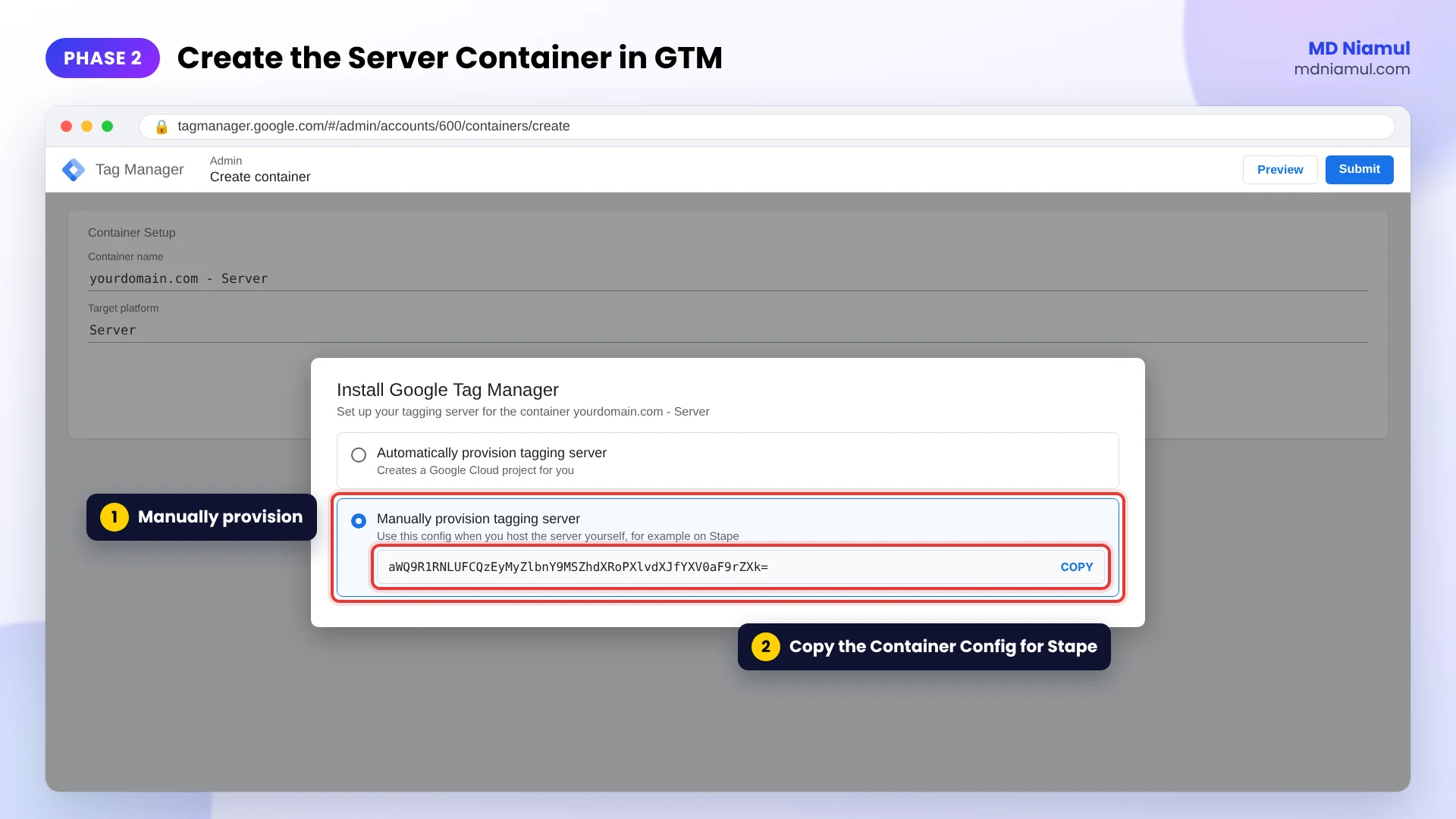
- In Google Tag Manager, go to Admin and create a new container.
- Choose Server as the target platform.
- Pick Manually provision tagging server and copy the Container Config string.
Phase 3: Host the Container on Stape
- In Stape, create a new server GTM container and paste the Container Config.
- Choose the server location closest to your visitors, or an EU location for EU data.
- Wait until the status shows it’s running.
I’m an official Stape partner, and I use it for most clients because the setup is quick and it comes with the extras server tracking needs, like a custom loader and ready-made tags.
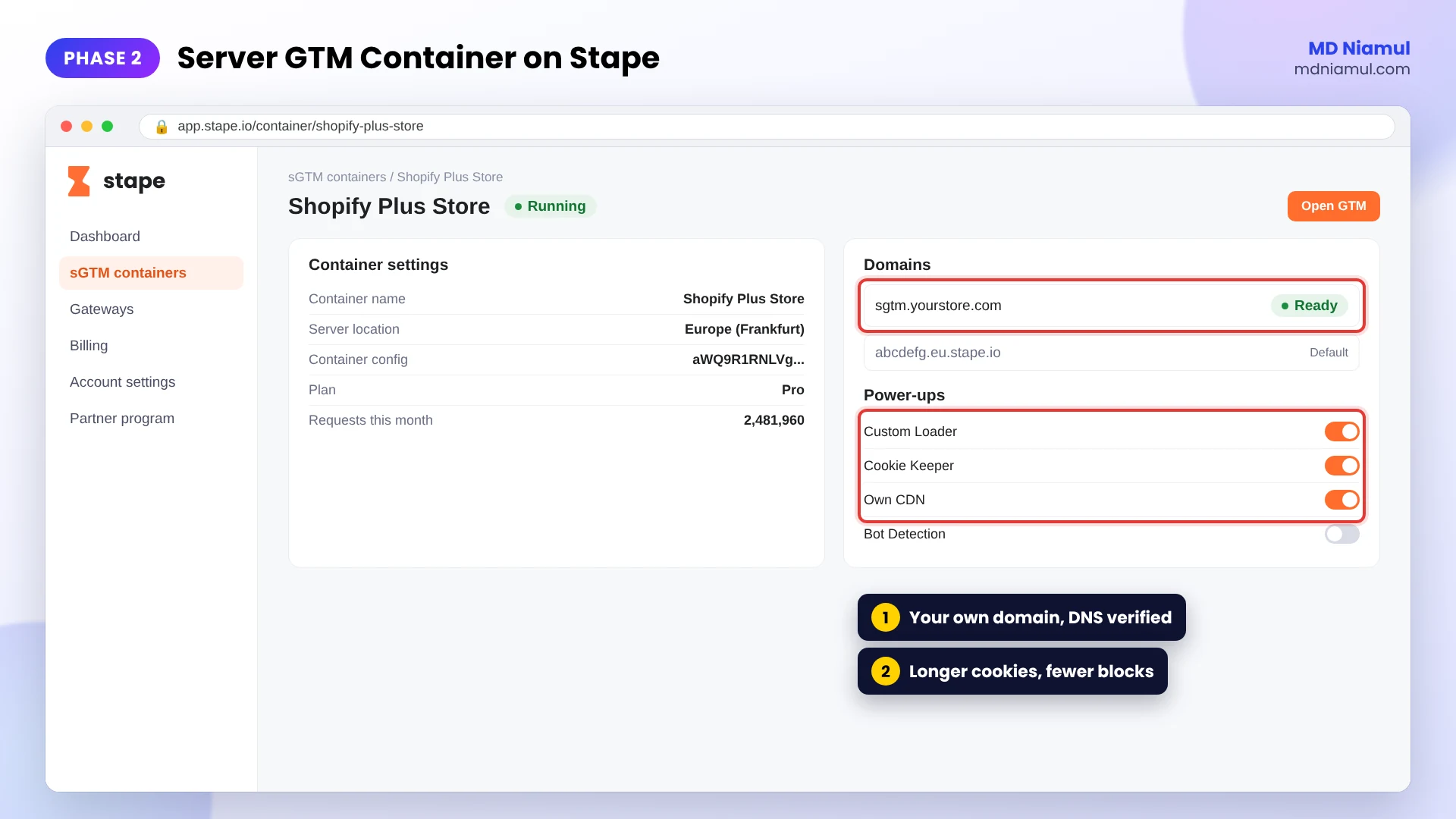
Phase 4: Add Your Own Subdomain
- In Stape, add a custom domain such as
sgtm.yourdomain.com. - Add the DNS record Stape shows you at your domain provider.
- Once it’s verified, use this subdomain everywhere instead of the default Stape URL.
This step matters more than people think. Without your own subdomain, the server is still a third party in the browser’s eyes, and you lose most of the cookie benefit.
Phase 5: Send GA4 Events to Your Server
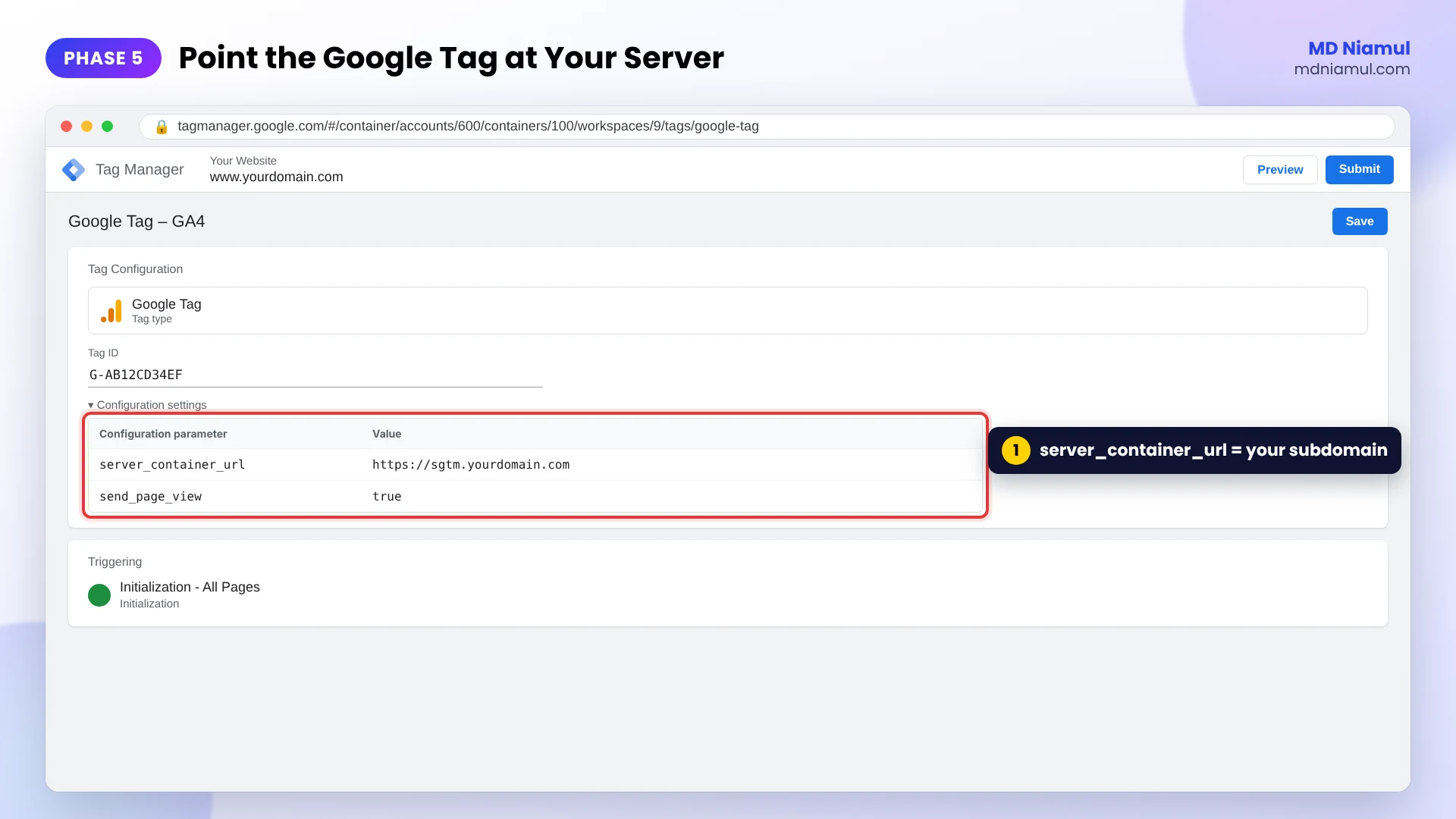
- In your web GTM container, open the Google tag for GA4.
- Add the configuration parameter
server_container_urlwith your subdomain, for examplehttps://sgtm.yourdomain.com. - In the server container, keep the GA4 client and add a GA4 tag that fires on the GA4 client’s events.
- Check in the server container’s Preview that requests arrive and the GA4 tag fires.
Phase 6: Add Google Ads and Meta in the Server Container
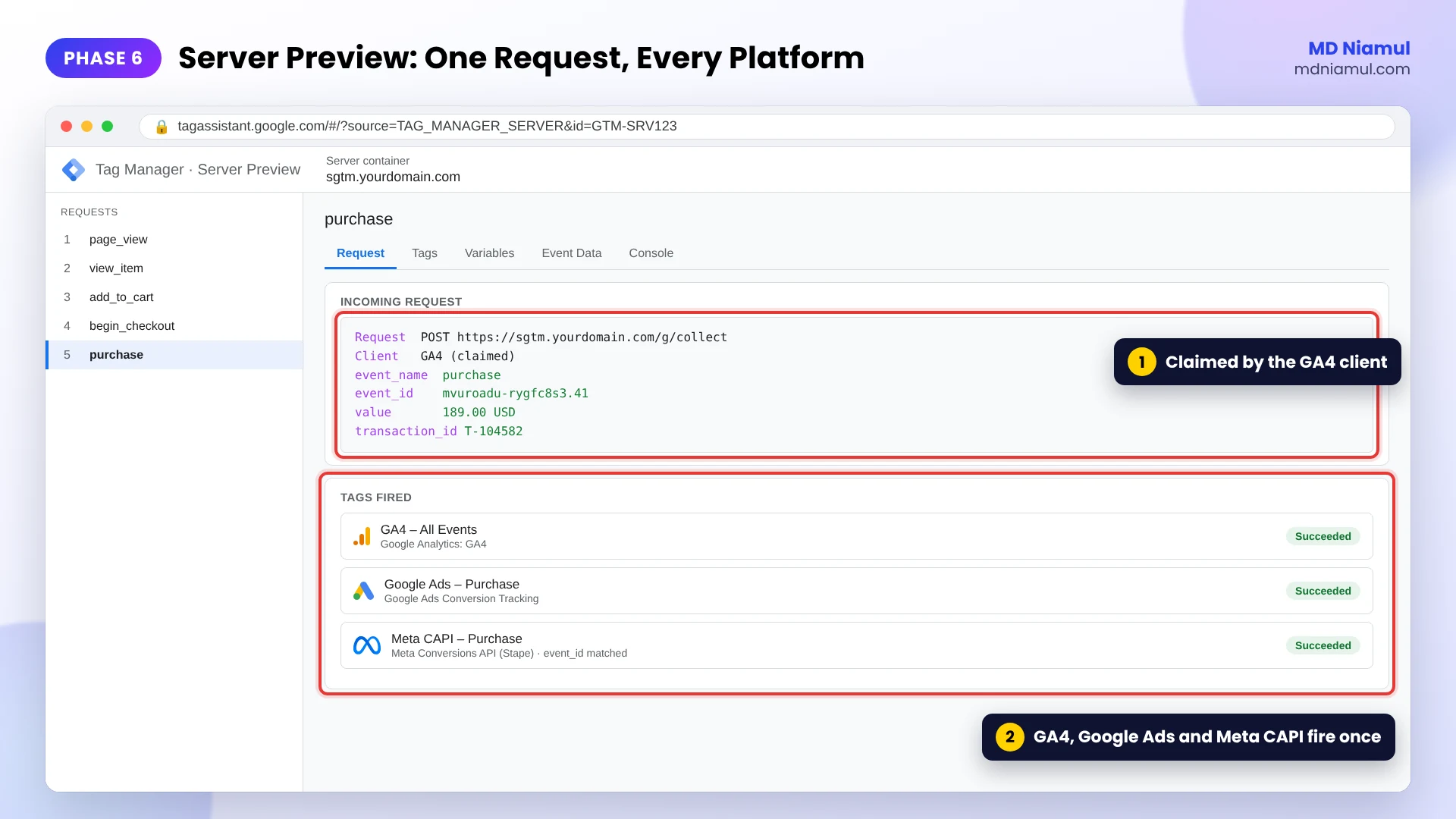
- Add a Conversion Linker and the Google Ads Conversion Tracking tag for your purchase or lead events.
- Add a Meta Conversions API tag (Stape has a template) with your pixel ID and access token.
- Pass hashed email and phone when you have consent, plus the
fbcandfbpvalues, so Meta can match the event to a person. - Send the same event ID from the browser pixel and the server tag. The variable below gives every event on a page a stable ID.
// Shared event ID for pixel + server deduplication, by MD Niamul (mdniamul.com)
// GTM web container: Variables > New > Custom JavaScript. Name it "JS - Event ID".
// First create a Data Layer Variable "DLV - gtm.uniqueEventId" (key: gtm.uniqueEventId).
// Every tag that fires on the same event gets the same ID, so Meta, TikTok and
// Google can drop the duplicate when the browser and the server both send it.
function () {
  var pageId = window.__mdnPageId;
  if (!pageId) {
    pageId = Date.now().toString(36) + '-' + Math.random().toString(36).slice(2, 10);
    window.__mdnPageId = pageId;
  }
  var gtmEventId = {{DLV - gtm.uniqueEventId}};
  return pageId + '.' + gtmEventId;
}
How to use it: add {{JS – Event ID}} as the event ID in your Meta pixel tag, and as an event_id parameter on the GA4 event, so the server-side Meta tag can read the same value. I tested the variable: two tags on the same event get the same ID, the next event gets a new one, and a new page starts a new series.
Phase 7: Decide Whether to Add Google Tag Gateway
- If you run only Google ads and want a quick improvement, Google tag gateway alone is a reasonable start.
- If you already run server-side GTM for Meta and others, the gateway can still serve the Google tag script from your domain. Google lists the gateway together with server-side tagging as a supported setup.
- Test after each change. Check GA4 Realtime and Google Ads diagnostics so nothing is sent twice.
Phase 8: Consent Mode, CRM Sales and Testing
- Connect your banner to Consent Mode v2 so both web and server tags follow each visitor’s choice.
- For lead generation, send qualified leads and closed sales from your CRM back to Google Ads and Meta. I show how in my GoHighLevel offline conversion tracking guide.
- After two to four weeks, compare against your Phase 1 baseline.
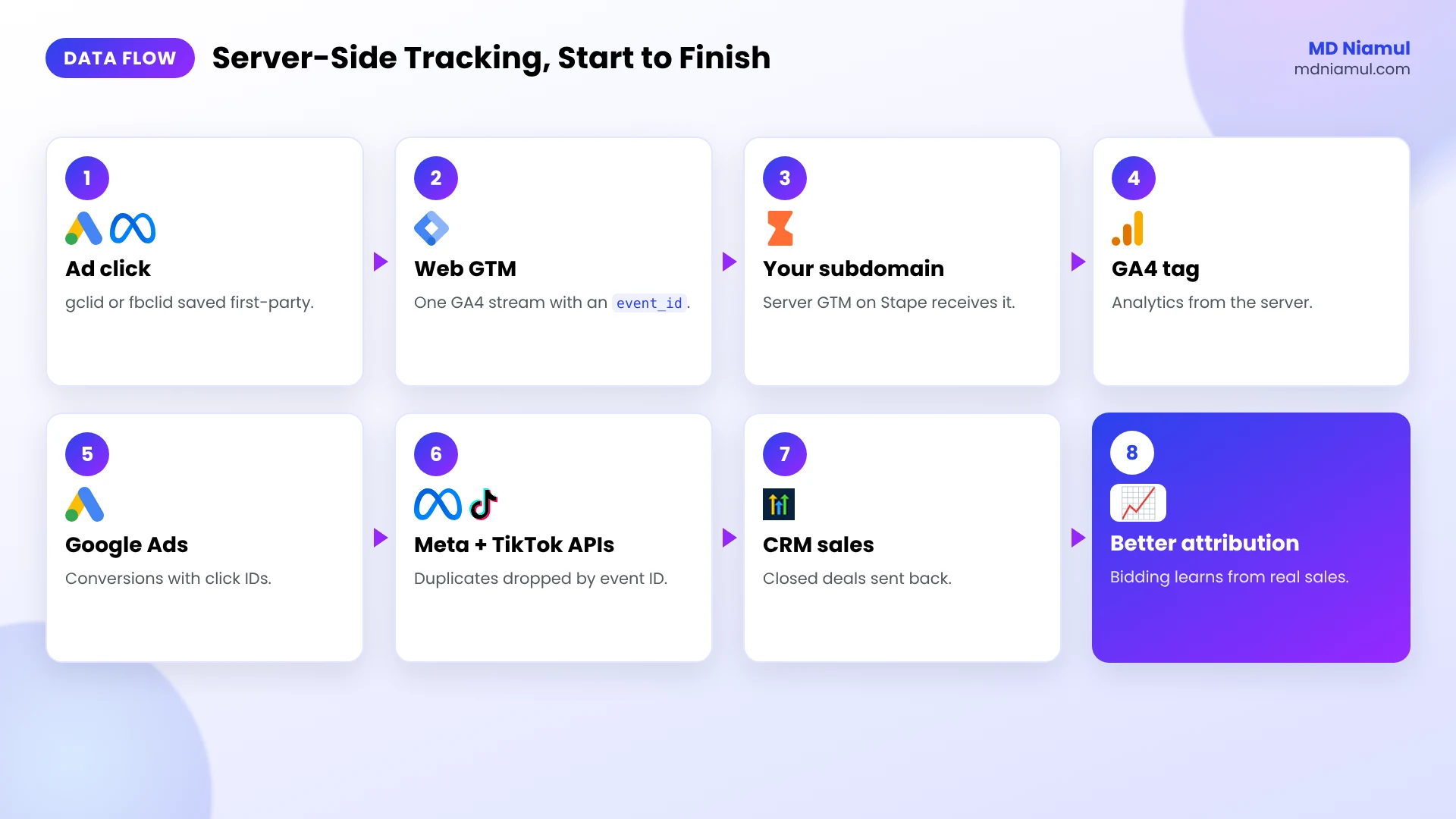
Google Tag Gateway vs Server-Side Tracking: The Data Flow
| # | What happens | Where |
|---|---|---|
| 1 | Visitor clicks an ad, the gclid or fbclid is stored first-party | Your website |
| 2 | Web GTM sends one GA4 stream with an event ID | Web container |
| 3 | The request goes to your subdomain | Server GTM on Stape |
| 4 | Tags forward the event, with consent | GA4, Google Ads, Meta CAPI, TikTok |
| 5 | Platforms drop duplicates using the event ID | Meta, TikTok |
| 6 | CRM sales are sent back as offline conversions | Google Ads, Meta |
Testing & Validation Workflow
- Request test. In the browser’s Network tab, GA4 requests go to your subdomain, not to google-analytics.com.
- Server test. Server Preview shows each request once and each tag firing once.
- Meta test. Events Manager shows browser and server events deduplicated, with good match quality.
- Google Ads test. Conversions appear in diagnostics without errors.
- Consent test. With cookies declined, tags behave the way your Consent Mode setup says.
- Baseline test. After a few weeks, the gap from Phase 1 should be smaller.
Troubleshooting Common Mistakes
Mistake 1: Conversions doubled
The Problem: Meta reports twice as many purchases as your store.
The Cause: the pixel and the server tag send different event IDs, or none.
The Solution: use one shared ID like the variable above in both.
Mistake 2: Still using the default Stape URL
The Problem: no real improvement in Safari after going server-side.
The Cause: the container runs on a stape.io address, so it’s still third-party.
The Solution: set up your own subdomain and update server_container_url.
Mistake 3: GA4 data stops after the switch
The Problem: GA4 Realtime goes quiet.
The Cause: the server container has a GA4 client but no GA4 tag, or the tag’s trigger is wrong.
The Solution: add the GA4 tag in the server container and check it in Preview.
Mistake 4: Expecting the gateway to fix Meta
The Problem: Meta numbers don’t improve after turning on Google tag gateway.
The Cause: the gateway only covers Google tags.
The Solution: use server-side GTM with the Meta Conversions API for Meta.
Mistake 5: Ignoring consent
The Problem: server tags fire for visitors who declined cookies.
The Cause: consent signals aren’t passed to the server container.
The Solution: connect Consent Mode v2 and respect it in the server tags.
What to Set Up Next
- Google Ads: my guide to first-party server-side tracking for Google Ads with GTM and Stape.
- Meta: my guide to the Meta pixel and Conversions API with server-side GTM.
- Attribution basics: read Data Is the Hub for first-touch and last-touch tracking.
- Payloads: check Meta events with the free Meta CAPI payload builder.
Want it set up for your store, funnel or agency clients? See my server-side tracking service.
Conclusion
When the ads and the store disagree, the store is usually right. Server-side tracking gets the ad platforms closer to what the store already knows.
If you only run Google ads, try Google tag gateway this week. If Meta, TikTok or a CRM are in the picture, set up a server container on your own subdomain, share event IDs, and send your real sales back. Then check your baseline again in a month.
Summary by MD Niamul
Google tag gateway vs server-side tracking: Google tag gateway serves Google tags such as GA4 and Google Ads from your own domain through a CDN like Cloudflare, for free, but it covers only Google and doesn’t change the data. Server-side tracking runs a server Google Tag Manager container, which I host on Stape under a subdomain like sgtm.yourdomain.com. It receives one GA4 event stream through server_container_url and forwards events to GA4, Google Ads, the Meta Conversions API and TikTok with first-party cookies. I use a shared event ID so the browser pixel and server event are counted once, add click IDs and hashed customer data for better matching, and send CRM sales back as offline conversions. Consent Mode v2 still has to control every tag.
Frequently Asked Questions (FAQ)
1. What is Google tag gateway?
Google tag gateway for advertisers serves your Google tag from your own domain instead of a Google domain, using a CDN or load balancer like Cloudflare, Akamai, Fastly or Google Cloud. Some measurement requests also go to Google through your domain. It helps Google tags load and send data more reliably, but it only covers Google.
2. Is Google tag gateway the same as server-side tracking?
No. The gateway only changes where Google’s tag and requests are served from. Server-side tracking runs your own server GTM container, which receives events and forwards them to many platforms, including Meta and TikTok. With server-side tracking you can also remove, enrich or hash data before it leaves, which the gateway doesn’t do.
3. Is Google tag gateway worth it?
For a business that only advertises on Google, yes, it’s a cheap and quick improvement, especially with Cloudflare. If you also run Meta, TikTok or Pinterest ads, or want to send CRM sales back, it won’t be enough on its own. Then server-side tracking does far more of the work.
4. What is server-side tracking?
Server-side tracking means your website sends events to a server you control, usually a server GTM container on your own subdomain. That server forwards the events to GA4, Google Ads, the Meta Conversions API and others. Fewer events are lost to ad blockers, cookies are first-party, and you decide what each platform gets.
5. How do I set up server-side tracking with Stape?
Create a server container in Google Tag Manager, copy its Container Config, and create a server GTM container in Stape with it. Add a custom subdomain such as sgtm.yourdomain.com, then set server_container_url in your web Google tag. Finally add GA4, Google Ads and Meta tags in the server container and test in Preview.
6. Why do I need a custom domain for server-side GTM?
The custom subdomain is what makes the server part of your own website in the browser’s eyes. Without it, requests go to a third-party address and cookies are treated as third-party, so Safari and ad blockers treat them the same as before. With it, you get first-party cookies and far fewer blocked requests.
7. How do I stop double counting with Meta pixel and CAPI?
Send the same event ID from the browser pixel and the server Conversions API event. Meta then keeps one and drops the duplicate. The Custom JavaScript variable in this guide gives every event on a page a stable ID that all tags can share, so the browser and server events always match.
8. Does server-side tracking work with Consent Mode v2?
Yes, and it has to. Moving tags to a server doesn’t remove the need for consent. Your banner sets the consent state with Consent Mode v2, the web container passes it on, and server tags should only send data the visitor allowed. This is general information, not legal advice.
9. How much does server-side tracking cost?
You pay for hosting the server container, for example a Stape plan or Google Cloud, plus the setup work. Google tag gateway is free apart from any CDN fees. For most accounts spending real money on Meta and Google, the recovered conversions and better bidding cover the hosting quickly.
10. Can server-side tracking fix marketing attribution on its own?
It fixes a big part of it: fewer lost events, first-party cookies and better matching with click IDs and hashed data. For lead generation you also need the CRM side, sending qualified leads and closed sales back to Google Ads and Meta, so the platforms learn which clicks turned into revenue.
 Need Help Advanced GHL Automation & Tracking Setup?