
About The Client
The client runs an online course business and sells entirely through a sales funnel built inside High-Level CRM. The funnel carries a visitor through several stages — course view, add to cart, lead capture, checkout, payment information and final purchase — with further offer steps placed after the first sale.
Before this project began, the business was already spending on Meta ads and already had a tracking setup in place. Meta/Facebook Pixel was installed. Server-side tracking was installed. Google Analytics 4 was connected. On the surface, everything looked complete.
In reality, almost none of it was reporting correctly — and that is a more expensive problem than having no tracking at all, because nobody goes looking for a problem the dashboard does not admit to.
The Tracking Problems
I began with a full audit of the funnel and the existing tracking architecture, following every funnel step from the browser through to the advertising platform, and recording exactly where the data was being lost. The problems fell into two groups.
Meta / Facebook Tracking Problems
- Very low Event Match Quality. Important events were scoring around 3.1, 4.1 and 4.5 out of 10, so Meta was not receiving enough accurate customer information and browser data was not matching server data.
- Facebook Pixel was not sending data correctly.
- Server-side tracking was installed but never properly implemented.
- Google Tag Manager was not properly connected to the website.
- There was no proper Data Layer on the website.
- First-party data was not being used correctly.
- There was no proper connection to Stape server-side tracking.
- The custom loader was not properly implemented.
- Important data from the individual funnel steps was never being sent to Meta.
- Purchase events were arriving without Transaction ID, price/value or other essential information.
Google Analytics 4 Problems
- Purchase revenue was not being reported.
- There was no way to see which course or product had been purchased.
- Purchase value and revenue data was not coming through.
- Transaction ID was not being captured correctly.
- Ecommerce item data was not being sent properly.
- Ecommerce events across the funnel were not tracking correctly.
In short: Google Analytics was installed, but the client could not see a complete picture of their own sales.
What is Event Match Quality, in plain English? It is Meta’s score, out of 10, for how well it can connect a conversion to a real person. A low score does not mean your ads stopped working — it means Meta is optimising on guesswork. The higher the score, the better Meta can find more buyers like the ones you already have.
Lead Farming Blueprint Company Objectives
Working from the audit, the client and I agreed on five objectives for the project:
- Accurate Conversion Tracking: every meaningful funnel action must be tracked correctly, with no missing steps.
- Improve Meta Event Match Quality: raise match quality on the commercial events so Meta receives complete, usable conversion signals.
- Complete Funnel Visibility: see exactly where a user is in the funnel and which action they have completed.
- Reliable Ecommerce Reporting: make GA4 report purchase revenue, product-level data and transaction data correctly.
- A Durable Tracking Architecture: move to first-party, server-side tracking so conversion data survives browser restrictions and ad blockers.
Project Scope for Lead Farming Blueprint
- Client Overview: an online course business running a complete sales funnel inside High-Level CRM.
- Tracking Audit: full analysis of the sales funnel, Meta tracking and GA4 tracking to identify where data was being lost and which events were missing which parameters.
- Google Tag Manager Implementation: connect GTM to the website correctly and build the trigger and variable structure the funnel actually requires.
- Custom Data Layer Development: build a structured Data Layer for every funnel and ecommerce step.
- Server-Side Tracking: implement server-side tracking and a first-party data architecture using Stape.
- Meta Conversions API: send structured, deduplicated conversion data to Meta from the server.
- GA4 Ecommerce Tracking: rebuild GA4 as a full ecommerce property with item, value and transaction data.
Action Steps
The first step was diagnosis rather than installation. I analysed the complete sales funnel, the Meta tracking setup and the GA4 tracking setup together, and identified exactly where data was disappearing and which event was missing which piece of information. This mattered, because patching individual tags on top of a broken foundation would only have produced a cleaner-looking version of the same bad signal.
Next, I implemented Google Tag Manager properly on the website and built a structured custom Data Layer for every step of the funnel. High-Level CRM funnels do not provide an ecommerce Data Layer of their own, so this had to be written from scratch. Through the Data Layer I captured the information every downstream platform needs instead of leaving the tags to guess it from the page URL: course/product ID, product or course name, product view, view item, add to cart, lead, checkout, payment information, purchase, transaction ID, purchase value, ecommerce item data, user information, funnel step information and the remaining conversion parameters.
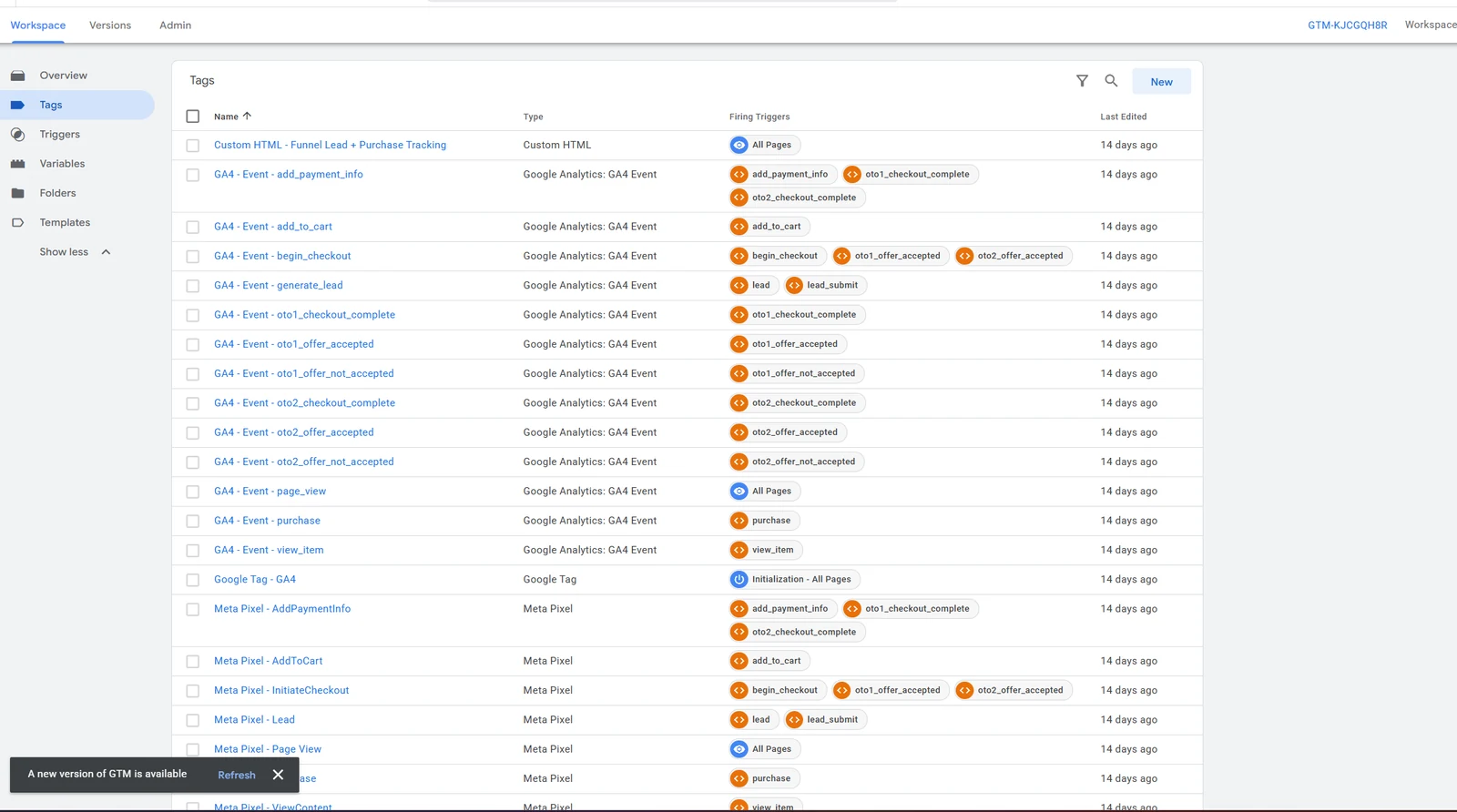
oto1 and oto2 triggers — offer accepted, offer not accepted and checkout complete each fire as their own event instead of being recorded as one generic page view.I then built Data Layer listeners for the different checkout conditions and user journeys inside the funnel, so the system could correctly record which step a user had reached and which action they had actually completed — rather than recording every step as a generic page view.
With the foundation in place, I rebuilt the tracking architecture around first-party and server-side data using Google Tag Manager, the Data Layer, first-party data, server-side tracking and Stape. The flow now runs Website → GTM → Data Layer → Server-Side Tracking → Meta, which sends conversion data to Meta in a far more structured and reliable form. Because the data travels first-party and server-side, conversion signals that the browser would otherwise lose still reach the platform from the server.
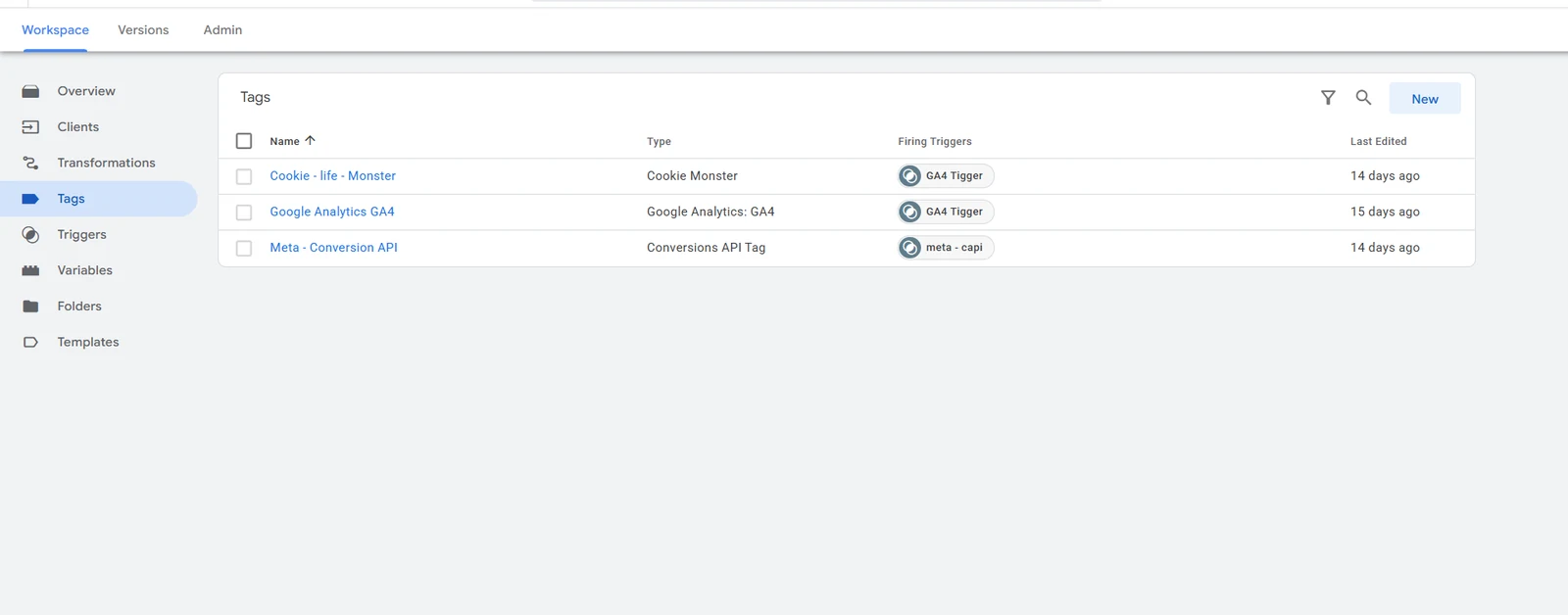
Finally, alongside the Meta work, I fixed and optimised GA4 ecommerce tracking completely. Using the same Data Layer, the correct ecommerce data is now sent to GA4 — view item, add to cart, begin checkout, add payment info, purchase, product/course ID, product/course name, price, quantity, revenue, transaction ID and ecommerce item data. This is what turns GA4 from a traffic counter into an actual revenue report.
Results
Meta Event Match Quality Improved Significantly
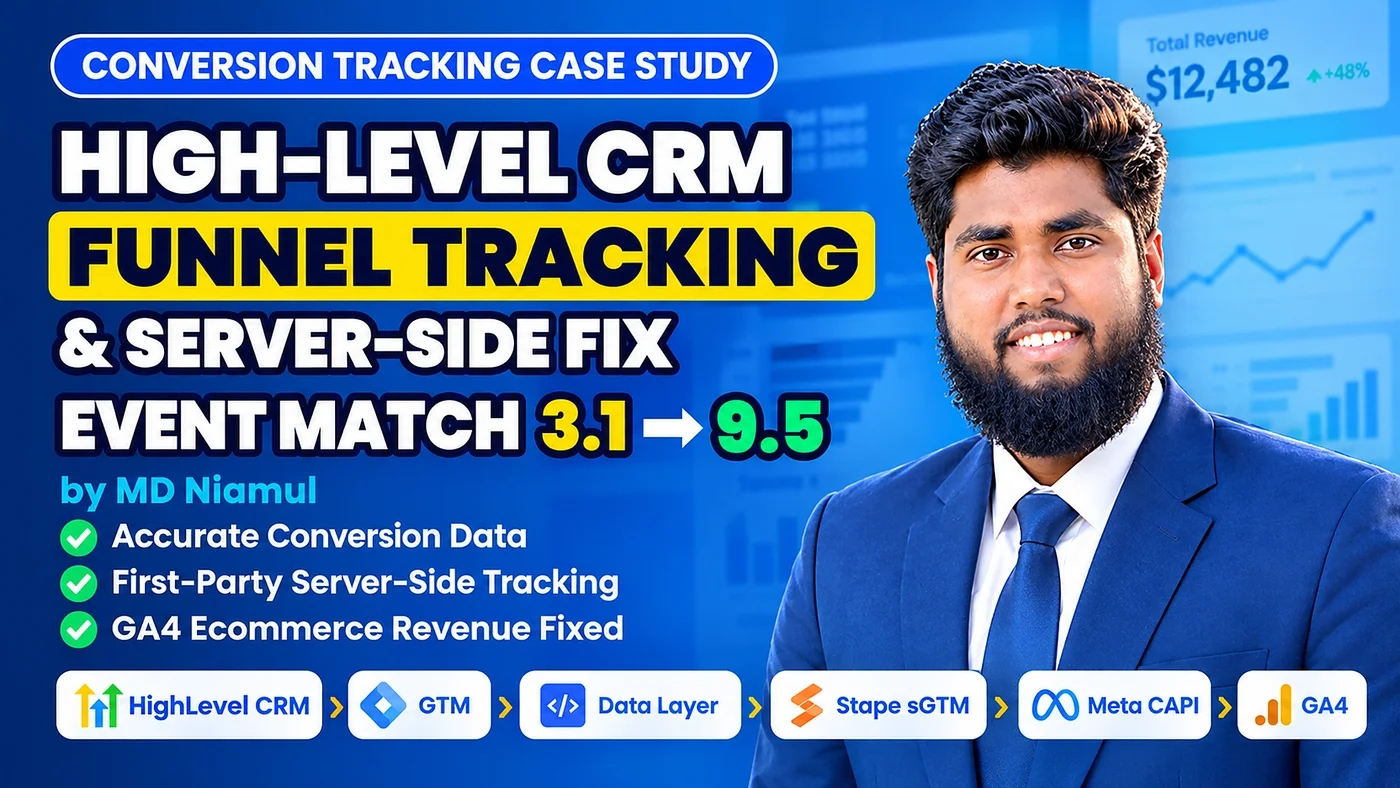
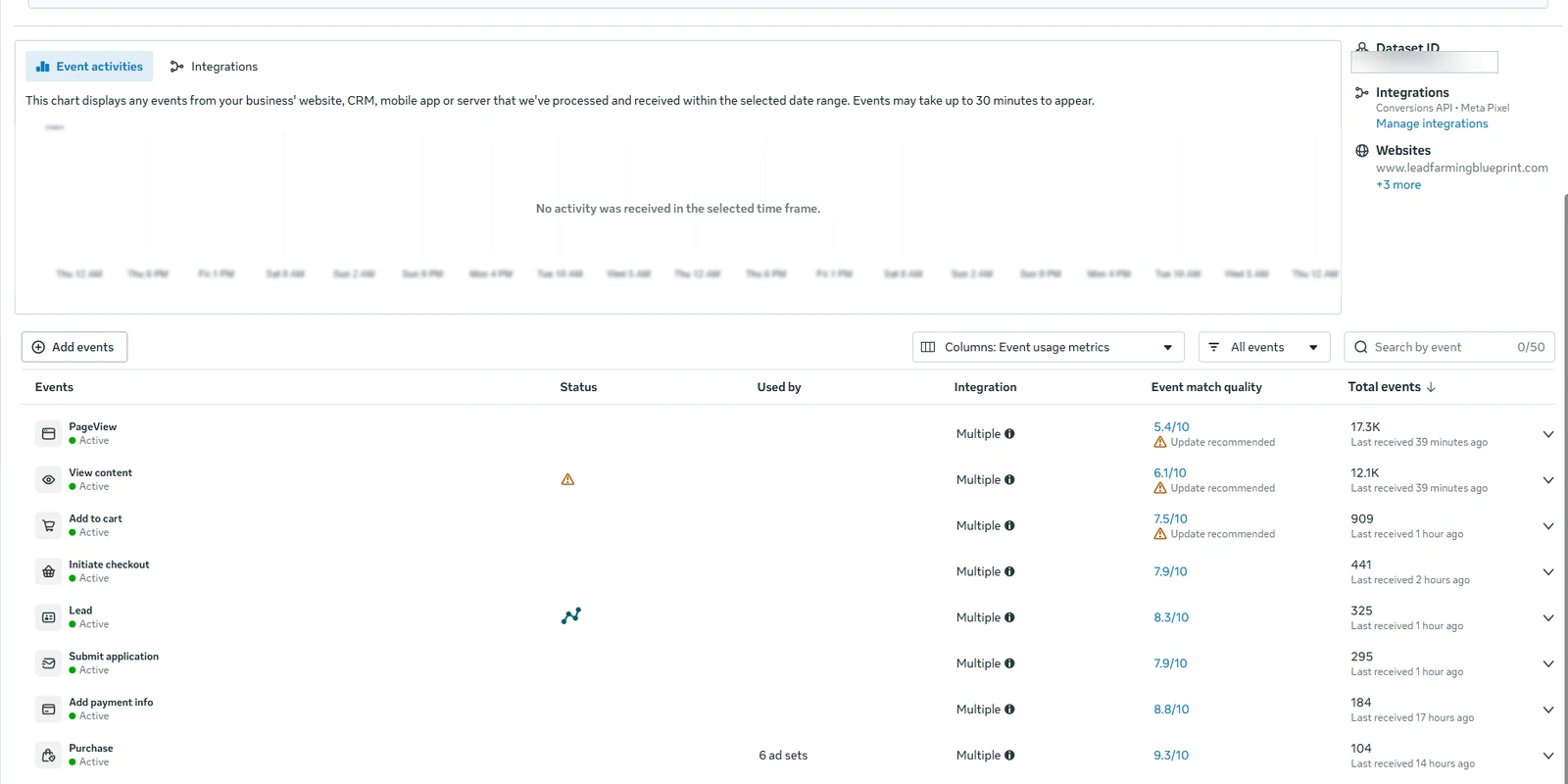
Before the rebuild, Event Match Quality on key events sat at roughly 3.1 to 4.5. After the tracking system was fully optimised, match quality on the important events improved to:
- Purchase — 9.5
- Purchase — 9.3
- Payment Information — 9.3
- Checkout — 9.3
- Add to Cart — 8.3
- Other events — 7.1+ to 9.3+
In practical terms, Meta is now receiving far more complete and better-matched customer data than before.
GA4 Now Reports Real Revenue
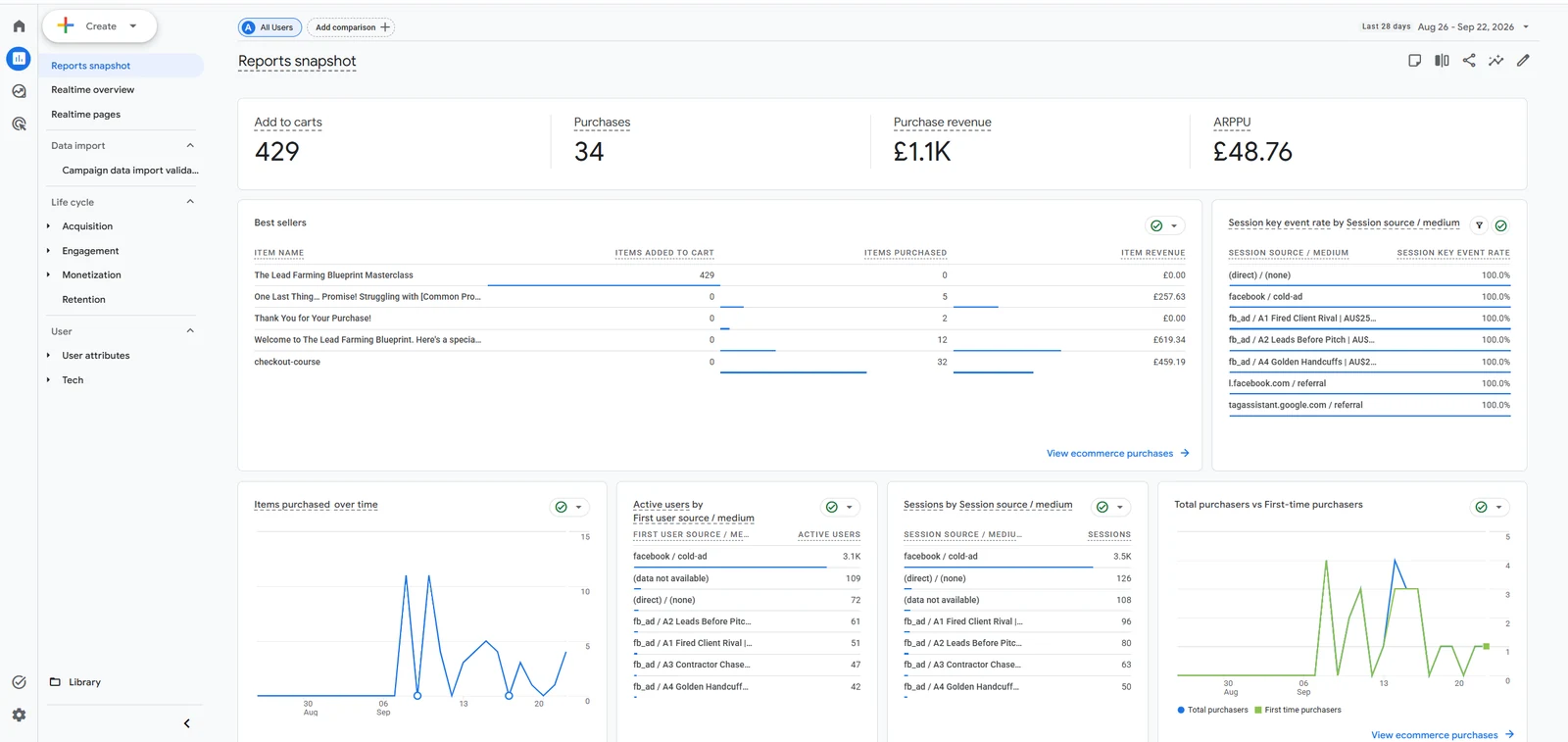
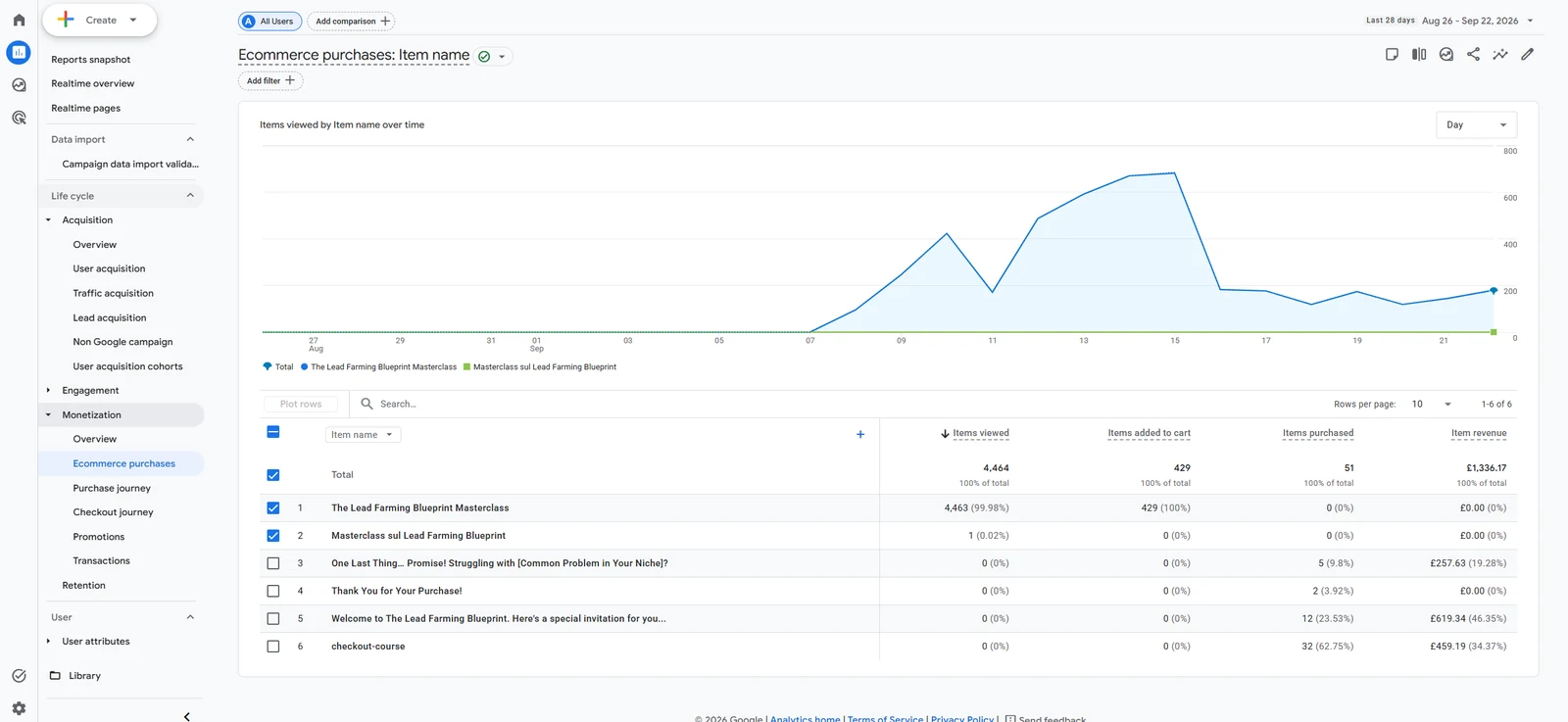
GA4 now correctly receives and reports the purchase and product-level data that was previously missing. The client can finally answer the questions that matter: which course or product was purchased, how much revenue it produced, which transaction that revenue came from, and which ecommerce events the buyer passed through on the way to purchase.
Advertising and Revenue Performance
Fixing the tracking system improved both the quality and the quantity of the conversion data reaching the Meta ads platform:
Better tracking → better conversion signals → better data matching → better optimisation.
After the tracking and conversion data improved, the client saw significant changes in advertising performance and revenue growth, with some campaigns and stages reaching 10X and even 20X revenue increases.
An honest note on these numbers. I do not present this revenue growth as the result of tracking alone. What the tracking optimisation did was give Meta better conversion data and stronger signals, which play an important role in advertising optimisation. Offers, creative and media buying all contribute to revenue. Better data does not create demand — it stops good decisions being made blind.
Final Outcome
This project turned a weak and incomplete tracking setup into a structured, first-party, server-side, ecommerce-ready tracking architecture.
| Area | Before | After |
|---|---|---|
| Google Tag Manager | Not properly connected | Fully implemented and verified |
| Data Layer | None | Custom Data Layer across every funnel step |
| Server-side tracking | Installed but not working | Live server-side architecture on Stape |
| First-party data | Not in use | Implemented |
| Custom loader | Not implemented | Deployed |
| Meta funnel events | Key events untracked | Every important step tracked |
| Purchase data | No transaction ID or value | Transaction ID and purchase value sent correctly |
| Event Match Quality | 3.1 – 4.5 | 7.1 – 9.5 |
| GA4 purchase tracking | Not working | Fixed and optimised |
| GA4 purchase revenue | Not reported | Reported correctly |
| Product-level data | Unavailable | Full ecommerce item data |
| Conversion data for ads | Partial and unreliable | Complete and dependable |
The funnel itself did not change. What changed is that every platform downstream of it now receives complete, accurate conversion data — and the client can finally see which offers are actually producing the revenue.
 Need Help Advanced GHL Automation & Tracking Setup?