
Table of Contents
ToggleQuick Answer:
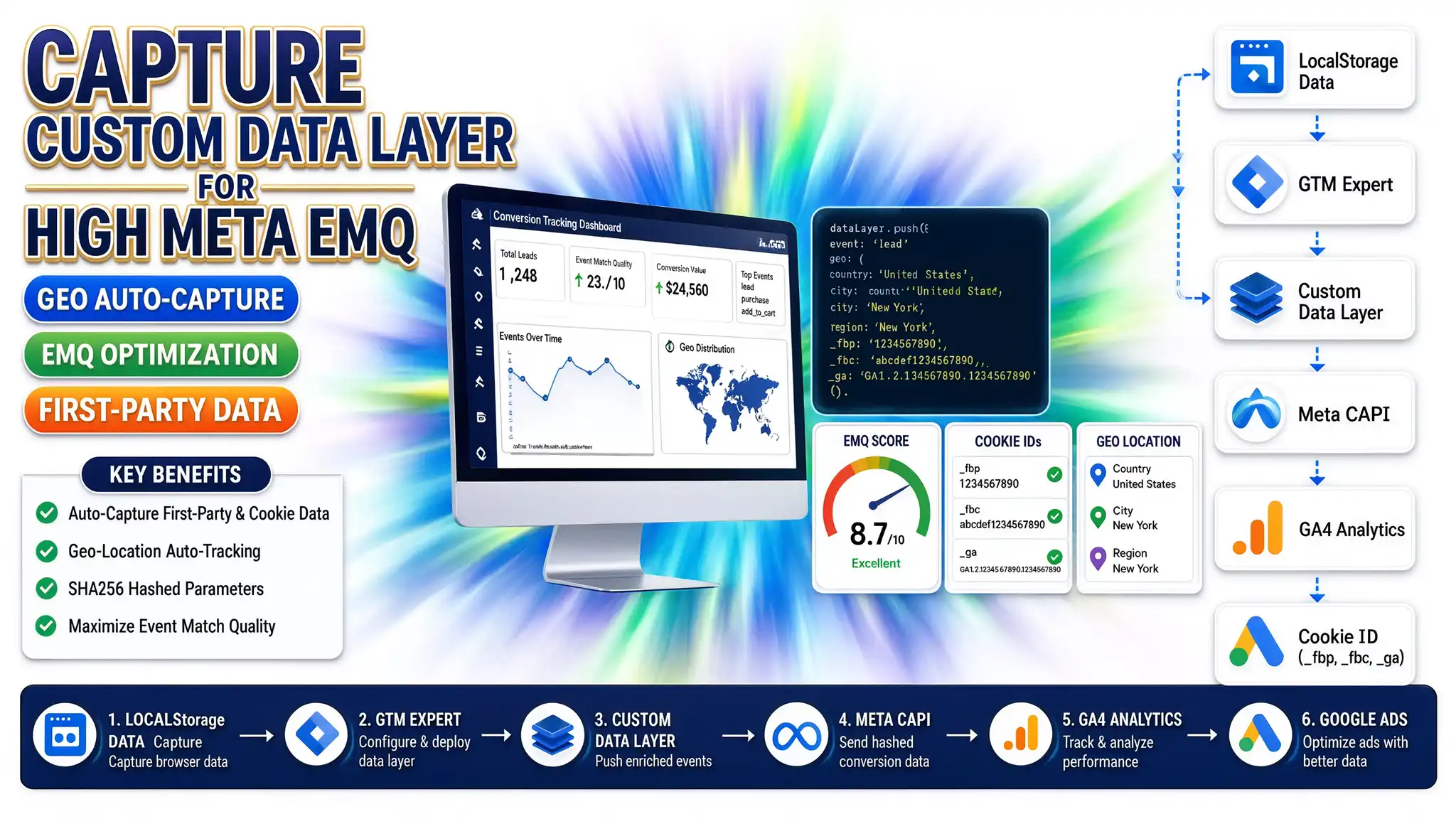
Maximizing Event Match Quality (EMQ) across Meta CAPI, Google Ads, and GA4 requires capturing multi-platform click IDs (`_fbp`, `_fbc`, `gclid`, `fbclid`), browser cookies, and IP-based geo-location details (Country, City, Region) the moment a user lands on your site. Storing these attributes inside browser `localStorage` allows you to enrich standard lead form submissions with comprehensive contextual data, pushing SHA256-hashed parameters into a custom Data Layer for higher conversion attribution and ad bidding accuracy.
Key Takeaways
* Immediate Landing Persistence: Automatically store click IDs and platform cookies in `localStorage` before form interactions occur.
* Geo-Location Enrichment: Fetch IP-based location details (Country, City, Region) and pair them with user lead events.
* High EMQ Score: Maximize Meta Event Match Quality (EMQ) score to 8.0+ by delivering normalized, SHA256-hashed PII parameters.
* Universal Compatibility: Deploy custom JavaScript listeners that work seamlessly across WordPress, Shopify, HubSpot, GoHighLevel, and custom CRM platforms.
* Server-Side Synergy: Stream enriched Data Layer parameters to server-side tracking services and container instances.
The Silent Conversion Loss: Why Native Form Tracking Fails
A client running high-budget ad campaigns across Meta and Google Ads recently came to me with a frustrating problem. Their Facebook Event Match Quality (EMQ) score was sitting at a dismal 3.2 out of 10. They were acquiring dozens of qualified lead form submissions every day, but Meta’s algorithm was failing to match those leads back to actual Facebook user profiles.
The cause was simple: their lead forms only captured standard input fields—name and email. The initial ad click parameters (`fbclid`), Meta browser cookies (`_fbp`, `_fbc`), and geographic location were completely lost as the user navigated through multiple pages before converting.
					+-----------------------------------------------------------------------------------+
|                            USER LANDING & NAVIGATION                              |
| User clicks Ad (URL contains ?fbclid=123...) -> Lands on Site -> Reads 3 Pages    |
+-----------------------------------------------------------------------------------+
                                          |
                                          v
+-----------------------------------------------------------------------------------+
|                                 THE ATTRIBUTION GAP                               |
| Native Form Submit triggers -> URL parameters are lost -> Only Email/Name sent    |
| Meta EMQ Rating: 3.2/10 (Low Match Rate / Poor Conversion Bidding)                |
+-----------------------------------------------------------------------------------+
                                          |
                                          v
+-----------------------------------------------------------------------------------+
|                            ENRICHED TRACKING SOLUTION                             |
| 1. Landing: Save _fbp, _fbc, fbclid, Geo-location to Browser localStorage          |
| 2. Submit: Merge localStorage + Form inputs into Custom Data Layer                |
| Meta EMQ Rating: 8.8/10 (High Match Rate / Optimized Ad Spend)                    |
+-----------------------------------------------------------------------------------+
When you rely solely on basic client-side form submissions, ad platforms operate in the dark. By engineering an automated browser listener that captures click identifiers and geo-location into `localStorage` upon page load, you can enrich every downstream event. When that data is normalized and pushed to the Data Layer (an invisible digital filing cabinet that holds tracking information), your EMQ score jumps significantly—lowering your cost-per-acquisition (CPA) and giving ad algorithms the data they need to find high-converting buyers.
Why Enriched Auto-Capture Matters for Paid Ad Campaigns
Event Match Quality (EMQ) is a rating metric from 1 to 10 used by Meta to evaluate how effectively your conversion event data matches real user accounts on Facebook and Instagram. When your EMQ score is low, ad platforms struggle to attribute conversions accurately. This directly degrades your automated bidding performance in Meta Advantage+ campaigns and Google Ads Smart Bidding.
Standard Tracking vs. Enriched LocalStorage Tracking Architecture
					| Feature | Standard Native Tracking | Enriched LocalStorage & Data Layer |
| --- | --- | --- |
|  Click ID Persistence  | Lost upon page navigation | Preserved across session via `localStorage` |
|  First-Party Cookie Capture  | Limited to standard page view | Extracted (`_fbp`, `_fbc`, `_ga`) & bound to lead |
|  Geo-Location Context  | Missing or limited to server IP | Auto-captured (Country, Region, City) on land |
|  Meta EMQ Score  | Typically 3.0 – 5.0 | Consistently 8.0 – 9.5 |
|  Cross-Domain Tracking  | Prone to parameter loss | Retained in local browser storage |
|  Data Layer Structure  | Generic event triggers | Structured, PII-ready enriched payload |
5 Key Benefits of Advanced Auto-Capture Tracking
- Dramatically Boosts Meta EMQ Ratings: Supplying `_fbp`, `_fbc`, hashed email, phone, city, state, and zip code pushes your match rating above 8.5/10.
- Eliminates Attribute Decay Across Sessions: `localStorage` acts like a digital sticky note attached to the browser, ensuring click parameters like `gclid` and `fbclid` aren’t wiped when users visit multiple pages.
- Powers Google Offline Conversions: Preserves `gclid`, `gbraid`, and `wbraid` identifiers necessary for downstream pipeline updates via offline conversion tracking services.
- Enriches CRM Lead Quality: Passes geo-location parameters (City, Country, Region) directly into lead profiles within HubSpot form tracking setups or GoHighLevel form workflows .
- Platform Agnostic Deployment: Works cleanly across any website, custom CMS, or single-page application (SPA).
Prerequisites & Setup Checklist
Before deploying custom auto-capture scripts and Data Layer handlers, ensure you have the following access levels and tools ready:
					| Requirement | Description | Access Level Needed |
| --- | --- | --- |
|  Google Tag Manager  | Web Container published on your target website | Admin / Edit Access |
|  Meta Events Manager  | Meta Pixel ID and Conversions API Access Token | Admin / Lead Access |
|  Google Analytics 4  | GA4 Measurement ID and Data Streams | Administrator / Editor |
|  GeoIP Lookup API  | Lightweight REST API (e.g., `ipapi.co` or `ip-api.com`) | Free public endpoint or API key |
|  CMS Access  | Ability to inject custom JavaScript into document `<head>` | Workspace Admin |
Video Tutorial Placeholder
Watch the step-by-step walkthrough on how to inspect browser `localStorage`, deploy the auto-capture script in GTM, and verify EMQ scores inside Meta Events Manager.
Step-by-Step Implementation Guide
Follow these five structured phases to set up first-party cookie extraction, geo-location auto-capture, and Data Layer enrichment.
Phase 1: Understanding Target Ad Click & Cookie Parameters
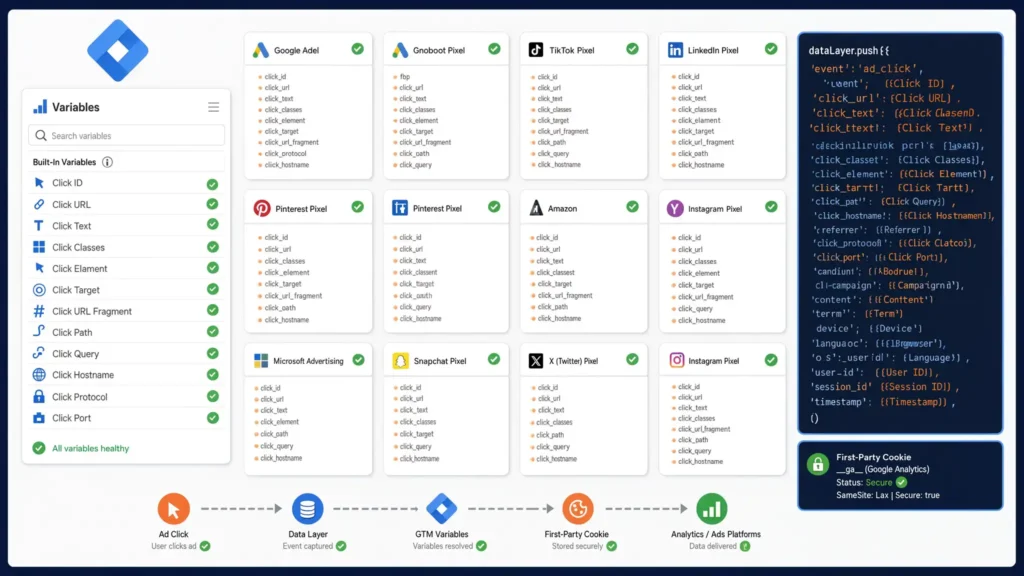
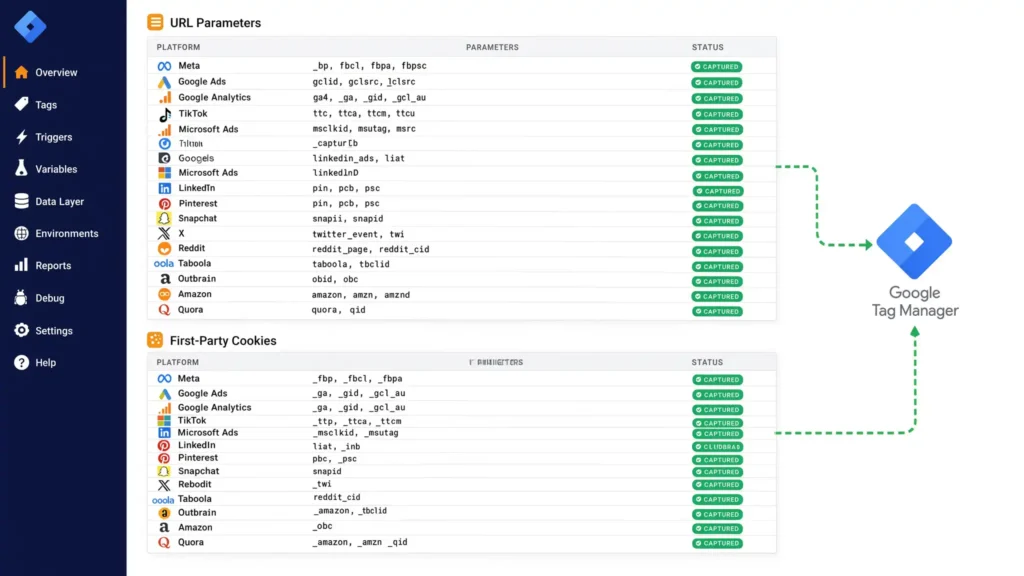
To achieve maximum match fidelity, your tracking script must listen for and store two categories of parameters: URL Parameters (generated when an ad is clicked) and First-Party Cookies (set by platform tags).
Key Click & Identification Parameters to Capture:
* Meta: `fbclid`, `_fbp` (Browser ID), `_fbc` (Click ID Cookie)
* Google Ads: `gclid`, `gbraid`, `wbraid`, `_gcl_au`
* Google Analytics: `_ga`, `client_id`
* TikTok: `ttclid`
* Microsoft Ads (Bing): `msclkid`
* LinkedIn: `li_fat_id`
* Pinterest: `epik`
* Snapchat: `sclid`
* X (Twitter): `twclid`
* Other Platforms: `rdt_cid` (Reddit), `tblci` (Taboola), `dicbo` (Outbrain), `amzn_id` (Amazon), `qclid` (Quora)
Phase 2: Deploying the JavaScript Auto-Capture & Geo Script
Deploy this primary script on every page load using Google Tag Manager (Custom HTML Tag triggered on *Initialization – All Pages*) or directly inside your site’s `<head>` tag.
This script executes three tasks:
- Scans the landing URL for ad click parameters and stores them in `localStorage`.
- Reads essential platform cookies (`_fbp`, `_fbc`, `_ga`) and persists them.
- Asynchronously fetches user geographic location via IP lookup and caches it in `localStorage`.
					<script>
(function() {
  'use strict';

  // 1. Helper function to read URL parameters
  function getUrlParameter(name) {
    name = name.replace(/[\[]/, '\\[').replace(/[\]]/, '\\]');
    var regex = new RegExp('[\\?&]' + name + '=([^&#]*)');
    var results = regex.exec(location.search);
    return results === null ? '' : decodeURIComponent(results[1].replace(/\+/g, ' '));
  }

  // 2. Helper function to read Cookies
  function getCookieValue(name) {
    var value = "; " + document.cookie;
    var parts = value.split("; " + name + "=");
    if (parts.length === 2) return parts.pop().split(";").shift();
    return '';
  }

  // 3. Define Ad Parameters to capture and store
  var clickParams = [
    'gclid', 'gbraid', 'wbraid', 'dclid', 'fbclid',
    'ttclid', 'msclkid', 'li_fat_id', 'epik', 'sclid',
    'twclid', 'rdt_cid', 'tblci', 'dicbo', 'amzn_id', 'qclid'
  ];

  // Capture URL parameters into localStorage
  clickParams.forEach(function(param) {
    var paramVal = getUrlParameter(param);
    if (paramVal) {
      localStorage.setItem('tracking_' + param, paramVal);
    }
  });

  // Capture platform cookies into localStorage
  var fbp = getCookieValue('_fbp');
  var fbc = getCookieValue('_fbc');
  var ga = getCookieValue('_ga');

  if (fbp) localStorage.setItem('tracking_fbp', fbp);
  if (fbc) localStorage.setItem('tracking_fbc', fbc);
  if (ga) localStorage.setItem('tracking_ga', ga);

  // 4. Auto-Capture Geo-Location Data (IP-based)
  var storedGeo = localStorage.getItem('user_geo_country');
  if (!storedGeo) {
    fetch('https://ipapi.co/json/')
      .then(function(response) {
        return response.json();
      })
      .then(function(data) {
        if (data && data.country_code) {
          localStorage.setItem('user_geo_country', data.country_code); // ISO 2-letter
          localStorage.setItem('user_geo_region', data.region);        // State/Region
          localStorage.setItem('user_geo_city', data.city);            // City
          localStorage.setItem('user_geo_postal', data.postal);        // Zip/Postal Code
          localStorage.setItem('user_ip', data.ip);                    // User IP
        }
      })
      .catch(function(err) {
        console.warn('Geo-location auto-capture error:', err);
      });
  }
})();
</script>
How this code works:
* `getUrlParameter()` parses the query string as soon as a buyer lands from an ad click.
* `localStorage.setItem()` stores values like `gclid` or `fbclid` under unique keys.
* `fetch(‘[https://ipapi.co/json/](https://ipapi.co/json/)’)` contacts an external GeoIP service asynchronously without slowing down page load speed.
* Values are stored in lower-case standard formats suitable for ad API hashing requirements
Phase 3: Form Listener & Data Layer Enrichment Script
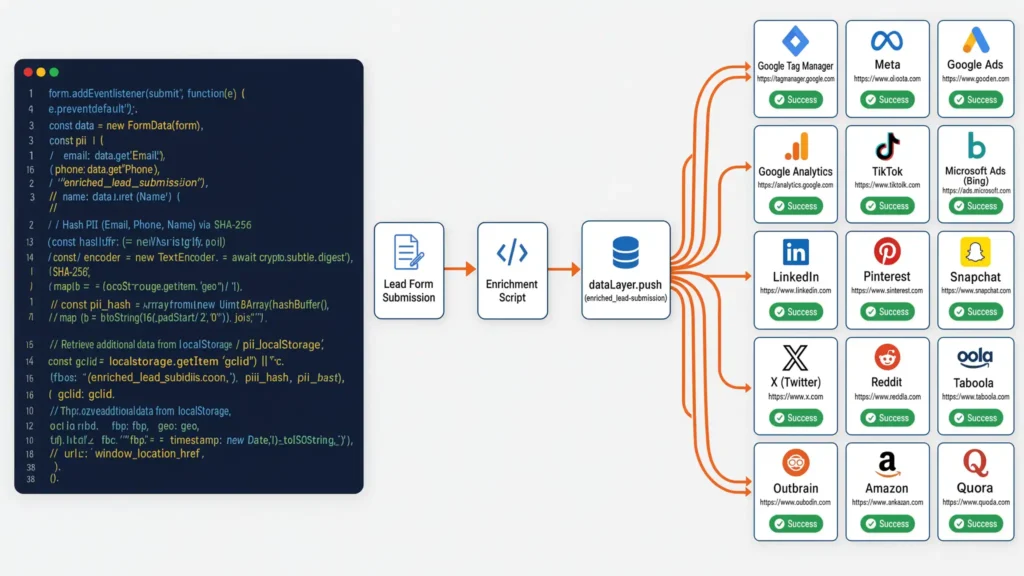
Next, deploy a form listener (a catcher’s mitt that intercepts form submissions). When a user fills out a lead form, this script captures their inputs (Email, Phone, Name), fetches the contextual tracking and geo data from `localStorage`, normalizes the data, computes SHA256 hashes for sensitive PII, and executes an enriched `dataLayer.push()`.
					<script>
(function() {
  'use strict';

  // SHA256 Hashing Utility Function for PII Protection
  async function sha256(message) {
    if (!message) return '';
    var cleanMsg = message.toString().trim().toLowerCase();
    var msgBuffer = new TextEncoder().encode(cleanMsg);
    var hashBuffer = await crypto.subtle.digest('SHA-256', msgBuffer);
    var hashArray = Array.from(new Uint8Array(hashBuffer));
    return hashArray.map(function(b) {
      return b.toString(16).padStart(2, '0');
    }).join('');
  }

  // Generic Form Submission Listener
  document.addEventListener('submit', async function(event) {
    var form = event.target;

    // Extract Form Fields (Adjust querySelectors based on your CRM form markup)
    var emailElem = form.querySelector('input[type="email"], input[name*="email"]');
    var phoneElem = form.querySelector('input[type="tel"], input[name*="phone"]');
    var fnElem = form.querySelector('input[name*="first_name"], input[name*="fname"]');
    var lnElem = form.querySelector('input[name*="last_name"], input[name*="lname"]');

    var rawEmail = emailElem ? emailElem.value : '';
    var rawPhone = phoneElem ? phoneElem.value : '';
    var rawFn = fnElem ? fnElem.value : '';
    var rawLn = lnElem ? lnElem.value : '';

    // Only process if basic contact details exist
    if (rawEmail || rawPhone) {
      // Normalize Phone Number (E.164 standard formatting prep)
      var cleanPhone = rawPhone.replace(/\D/g, '');

      // Generate SHA256 Hashes for Meta CAPI & Google Ads Advanced Matching
      var hashedEmail = rawEmail ? await sha256(rawEmail) : '';
      var hashedPhone = cleanPhone ? await sha256(cleanPhone) : '';
      var hashedFn = rawFn ? await sha256(rawFn) : '';
      var hashedLn = rawLn ? await sha256(rawLn) : '';

      // Persistent First-Party User ID
      var externalId = localStorage.getItem('user_external_id');
      if (!externalId) {
        externalId = 'usr_' + Math.random().toString(36).substring(2, 11) + Date.now();
        localStorage.setItem('user_external_id', externalId);
      }

      // Retrieve Auto-Captured Contextual Data from localStorage
      var geoCountry = localStorage.getItem('user_geo_country') || '';
      var geoRegion = localStorage.getItem('user_geo_region') || '';
      var geoCity = localStorage.getItem('user_geo_city') || '';
      var geoPostal = localStorage.getItem('user_geo_postal') || '';
      var fbp = localStorage.getItem('tracking_fbp') || '';
      var fbc = localStorage.getItem('tracking_fbc') || '';
      var gclid = localStorage.getItem('tracking_gclid') || '';
      var fbclid = localStorage.getItem('tracking_fbclid') || '';

      // Push Universal Enriched Event into Data Layer
      window.dataLayer = window.dataLayer || [];
      window.dataLayer.push({
        'event': 'enriched_lead_submission',
        'user_data': {
          'email_raw': rawEmail,
          'email_hashed': hashedEmail,
          'phone_raw': rawPhone,
          'phone_hashed': hashedPhone,
          'first_name_hashed': hashedFn,
          'last_name_hashed': hashedLn,
          'external_id': externalId,
          'fbp': fbp,
          'fbc': fbc,
          'gclid': gclid,
          'fbclid': fbclid,
          'geo_country': geoCountry,
          'geo_region': geoRegion,
          'geo_city': geoCity,
          'geo_postal': geoPostal
        }
      });
    }
  }, true);
})();
</script>
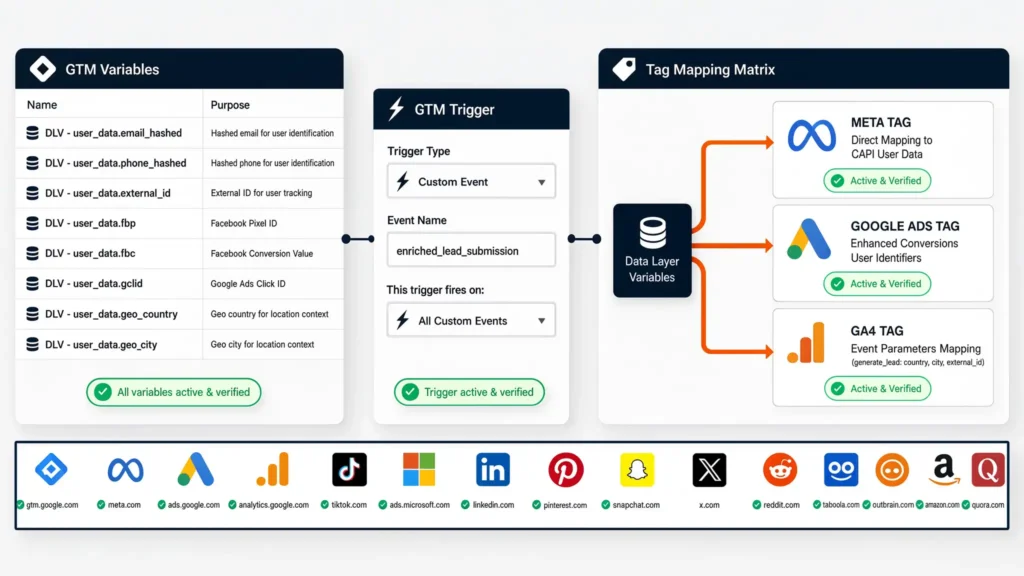
Phase 4: Google Tag Manager (GTM) Container Configuration
Once the JavaScript listener fires and populates the Data Layer, you must configure GTM Variables, Triggers, and Tags to map this enriched payload to your analytics endpoints.
1. Create Data Layer Variables in GTM
Navigate to Variables > New > Data Layer Variable and build the following schema:
					| Variable Name in GTM | Data Layer Variable Name | Purpose |
| --- | --- | --- |
| `DLV - user_data.email_hashed` | `user_data.email_hashed` | Meta CAPI / Google Ads Matching |
| `DLV - user_data.phone_hashed` | `user_data.phone_hashed` | Meta CAPI User Data |
| `DLV - user_data.external_id` | `user_data.external_id` | Unique User Tracking across sessions |
| `DLV - user_data.fbp` | `user_data.fbp` | Meta Browser ID (`_fbp`) |
| `DLV - user_data.fbc` | `user_data.fbc` | Meta Click ID (`_fbc`) |
| `DLV - user_data.gclid` | `user_data.gclid` | Google Ads Tracking Identifier |
| `DLV - user_data.geo_country` | `user_data.geo_country` | User Country Parameter |
| `DLV - user_data.geo_city` | `user_data.geo_city` | User City Parameter |
2. Create the Custom Event Trigger
* Trigger Type: Custom Event
* Event Name: `enriched_lead_submission`
* Trigger Fires On: All Custom Events
					+-----------------------------------------------------------------------------------+
|                            GTM TRIGGER CONFIGURATION                              |
| Trigger Type: Custom Event                                                        |
| Event Name: enriched_lead_submission                                             |
| This trigger fires on: All Custom Events                                          |
+-----------------------------------------------------------------------------------+
3. Tag Mapping Matrix
Map the Data Layer variables directly into your primary advertising tags:
					     +-----------------------------------+
                  |  DLV - user_data.email_hashed     |
                  |  DLV - user_data.phone_hashed     |
                  |  DLV - user_data.fbp / fbc        |
                  |  DLV - user_data.geo_country/city |
                  +-----------------------------------+
                                    |
          +-------------------------+-------------------------+
          |                         |                         |
          v                         v                         v
+-------------------+     +-------------------+     +-------------------+
|     META TAG      |     |  GOOGLE ADS TAG   |     |     GA4 TAG       |
| Direct Mapping to |     | Enhanced Conv.    |     | Event Parameters  |
| CAPI User Data    |     | User Identifiers  |     | Mapping           |
+-------------------+     +-------------------+     +-------------------+
* Meta Pixel & CAPI Tag: Map `user_data.email_hashed`, `user_data.phone_hashed`, `user_data.fbp`, `user_data.fbc`, `user_data.geo_country`, and `user_data.geo_city` under Advanced Matching settings.
* Google Ads Conversion Tag: Enable Enhanced Conversions and select User-Provided Data Variables built from `DLV – user_data.email_raw` and `DLV – user_data.phone_raw`.
* GA4 Event Tag: Fire event `generate_lead` with event parameters: `country`, `city`, and `external_id`. If operating complex CRM automation, review our [marketing automation tracking setups](https://mdniamul.com/marketing-automation-service/).
Phase 5: Normalization Rules for Maximum EMQ Scoring
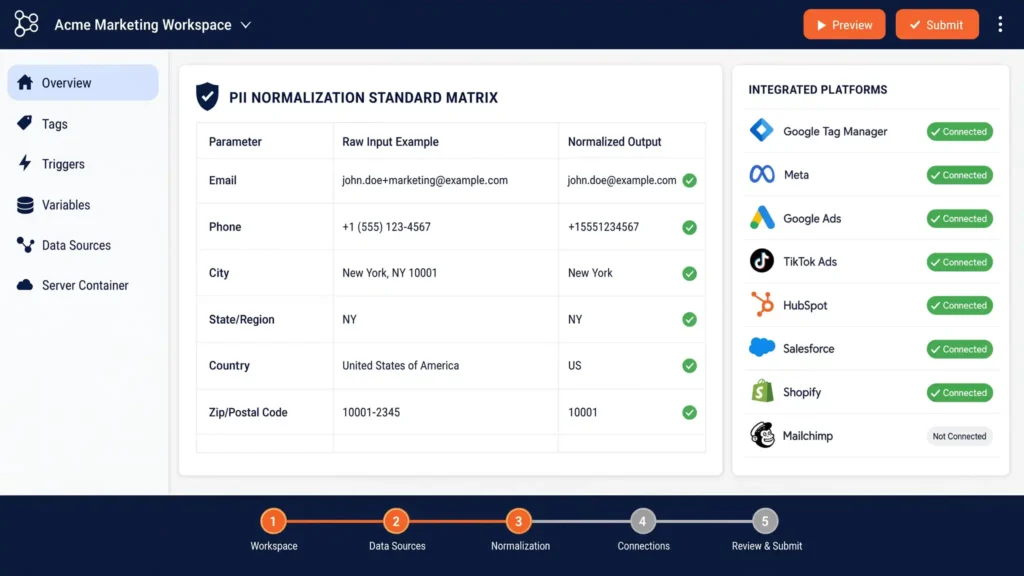
Meta’s deduplication and matching engine relies on strictly formatted parameters. If hashing is executed on incorrectly formatted raw strings, match rates will drop. Follow these normalization standards before hashing PII:
					+-----------------------------------------------------------------------------------+
|                        PII NORMALIZATION STANDARD MATRIX                          |
+-------------------+------------------------------+--------------------------------+
| Parameter         | Raw Input Example            | Normalized Output (Pre-Hash)   |
+-------------------+------------------------------+--------------------------------+
| Email             | John.Doe@Example.COM         | john.doe@example.com           |
| Phone             | +1 (555) 019-2834            | 15550192834                    |
| City              | New York City!               | newyorkcity                    |
| State/Region      | California                   | ca (2-letter ISO code)         |
| Country           | United States                | us (2-letter ISO code)         |
| Zip/Postal Code   | 90210-1234                   | 90210                          |
+-------------------+------------------------------+--------------------------------+
Testing & Validation Procedures
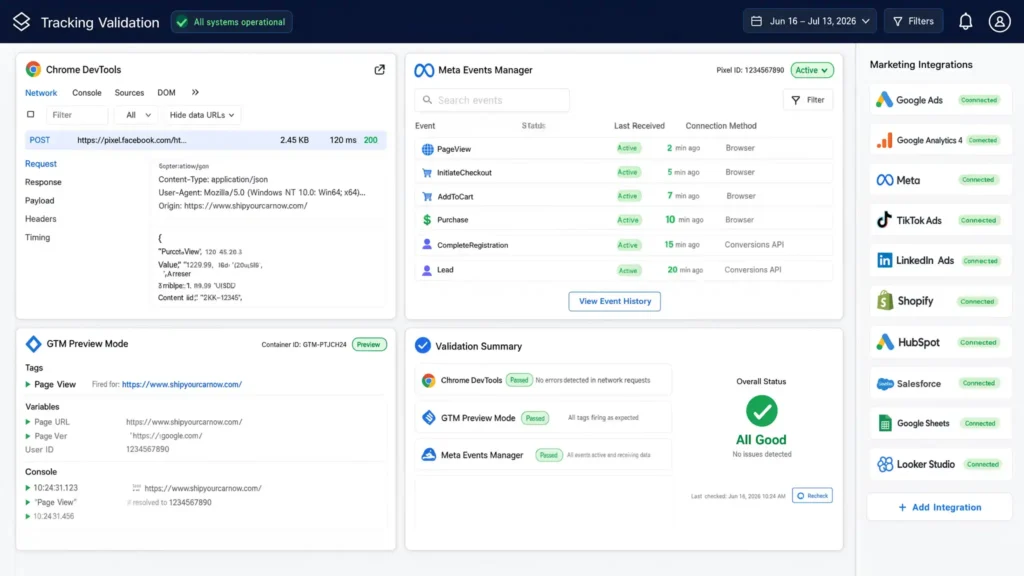
Testing ensures that local storage persistence, Data Layer pushes, and platform match rates function correctly before going live.
Step 1: Inspecting Browser Local Storage
- Open your website in a Chrome Incognito window appended with test ad parameters:
`[https://yourwebsite.com/?fbclid=IwAR2Test123&gclid=CjwKTest456](https://yourwebsite.com/?fbclid=IwAR2Test123&gclid=CjwKTest456)`
- Right-click and choose Inspect > Application > Local Storage > [https://yourwebsite.com ](https://www.google.com/search?q=https://yourwebsite.com).
- Verify that keys `tracking_fbclid`, `tracking_gclid`, `user_geo_country`, and `user_geo_city` are populated.
					+-----------------------------------------------------------------------------------+
| ARCHITECTURE INSPECTOR: Chrome DevTools > Application > Local Storage             |
+------------------------+----------------------------------------------------------+
| Key                    | Value                                                    |
+------------------------+----------------------------------------------------------+
| tracking_fbclid        | IwAR2Test123                                             |
| tracking_gclid         | CjwKTest456                                              |
| user_geo_country       | US                                                       |
| user_geo_city          | Austin                                                   |
| tracking_fbp           | fb.1.1680000000.123456789                                |
+------------------------+----------------------------------------------------------+
Step 2: Validating in GTM Preview Mode
- Connect GTM Preview mode to your site and complete a test form submission.
- In the Debug panel, click on the `enriched_lead_submission` event on the left timeline.
- Open the Data Layer tab and confirm all parameters (`email_hashed`, `fbp`, `geo_country`) match your expected outputs.
Step 3: Meta Events Manager Test Events Tool
- In Meta Events Manager, go to Test Events .
- Trigger a lead submission on your site.
- Check the received server payload. Confirm parameters under Customer Information Parameters show green checkmarks for Email, Phone, Browser IP, User Agent, `fbp`, and `fbc`.
- Monitor your Event Match Quality (EMQ) score over the next 24–48 hours in the Overview tab; target an overall rating of 8.0/10 or higher.
Troubleshooting Common Implementation Issues
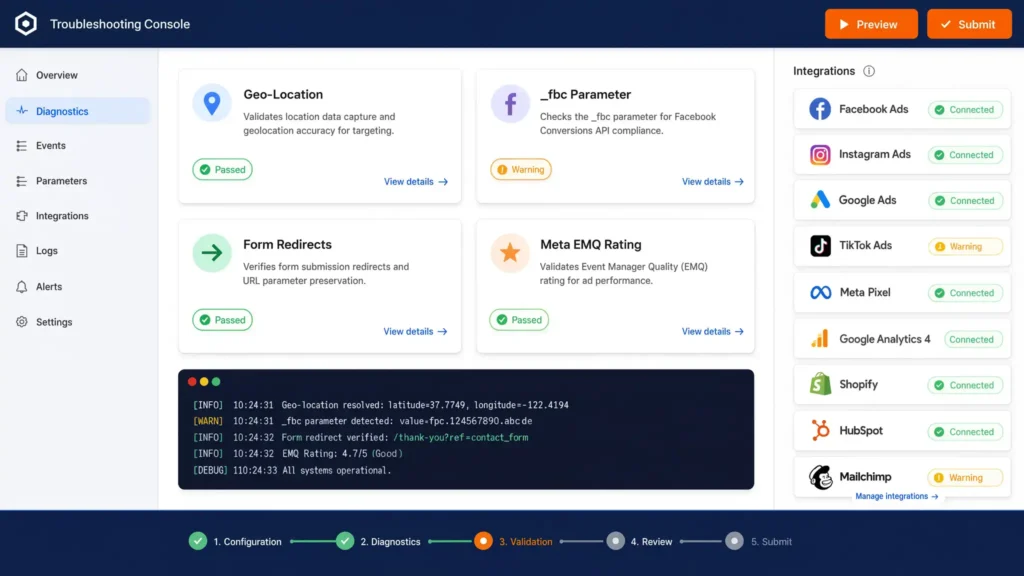
Scenario 1: Geo-Location Data Fails to Load or Returns Empty
* Cause: The public GeoIP API endpoint is blocked by ad-blocking browser extensions or fails due to CORS (Cross-Origin Resource Sharing) policies.
* Solution: Route the geo-location request through a server-side endpoint or deploy Google Tag Manager Server-Side (sGTM) with MaxMind GeoIP integration to append location data on the server level without relying on third-party client API calls.
Scenario 2: `_fbc` Parameter is Missing in Data Layer
* Cause: The `_fbc` cookie is only set by the Meta Pixel when a user arrives directly via a URL containing a `fbclid` parameter.
* Solution: Ensure your auto-capture script constructs a fallback `_fbc` value if `fbclid` exists in `localStorage`. Format: `fb.1.${Date.now()}.${fbclid}`.
Scenario 3: Form Submission Redirects Before Data Layer Push Completes
* Cause: The form uses a hard synchronous redirect that reloads the browser before async SHA256 cryptographic hashing finishes.
* Solution: Use `event.preventDefault()`, await the async SHA256 function execution and `dataLayer.push()`, then trigger `form.submit()` programmatically after a brief delay (150–300ms).
Scenario 4: Meta EMQ Rating Remains Low After Implementation
* Cause: Data parameters are missing standard normalization (e.g., telephone numbers include `+` symbols or spaces, or emails contain leading spaces).
* Solution: Verify that raw input strings are stripped of punctuation and forced to lowercase before passing them into the SHA256 function.
Conclusion
Standard conversion tracking setups are no longer sufficient in an era of strict privacy controls and signal loss. By building an automated web tracking architecture that captures first-party click IDs, cookie parameters, and geo-location into browser `localStorage` on initial landing, you remove attribution gaps. Enriching your lead form submissions with this contextual data pushes Meta Event Match Quality (EMQ) scores to top-tier levels (8.0+), delivering higher conversion attribution accuracy across Meta, Google Ads, and GA4.
If you are setting up conversion tracking across specialized platforms, explore our dedicated guides for Zoho Form conversion tracking, Shopify server-side tracking setups, or third-party checkout tracking solutions.
Summary by MD Niamul
This comprehensive guide outlines how to build an advanced web tracking framework that auto-captures multi-platform cookie IDs (`_fbp`, `_fbc`, `_ga`), click parameters (`gclid`, `fbclid`), and IP-based geo-location data into browser `localStorage`. When a user submits a lead form, a JavaScript listener merges these parameters with normalized, SHA256-hashed user inputs (Email, Phone) into a structured Data Layer event. This setup maximizes Event Match Quality (EMQ) ratings for Meta CAPI and Google Ads, protecting attribution accuracy.
1. What is Meta Event Match Quality?
Event Match Quality (EMQ) is a rating metric (1 to 10) used by Meta to indicate how effectively the customer information sent from your server or pixel matches a real Facebook account profile. Higher scores mean better match accuracy, lower CPA, and better ad delivery optimization.
2. Why store tracking parameters in localStorage?
`localStorage` persists data in the user’s browser across page views and session restarts. Standard URL click parameters disappear when a user navigates to a second page. Storing them in `localStorage` ensures click parameters are never lost before a form submission occurs.
3. How does geo-location capture boost EMQ?
Meta uses geographic identifiers such as City, State/Region, and Postal Code alongside email and phone parameters to match events to user profiles. Providing accurate geo-location data gives Meta extra match signals, directly increasing your overall EMQ score.
4. Should I hash PII client-side or server-side?
Sensitive Personally Identifiable Information (PII) like email addresses and phone numbers should always be normalized and hashed using SHA256 before transmission to external ad platforms. Hashing can occur client-side in custom JavaScript or inside a server-side GTM container.
5. What is the difference between _fbp and _fbc?
The `_fbp` cookie is a browser identifier created by the Meta Pixel to track unique site visitors. The `_fbc` cookie is created only when a user lands on your site via an ad click containing a `fbclid` query parameter.
6. Does capturing geo data slow down my site?
No. The geo-location request uses an asynchronous JavaScript `fetch()` call that runs in the background after the main document load. It does not block page rendering, ensuring zero negative impact on PageSpeed Insights or user experience.
7. Why are my Google Ads parameters missing?
Google click parameters (`gclid`, `gbraid`, `wbraid`) only appear in the URL when a user enters your site from an active Google Ad click. If missing during testing, manually append `?gclid=test_value` to your target URL to verify storage logic.
8. Does this architecture require server-side GTM?
While this architecture enriches client-side Data Layer events, sending these enriched parameters through a server-side Google Tag Manager (sGTM) container yields the best performance. Server containers bypass browser ad blockers and improve data retention.
9. How do I handle users with blocked cookies?
When standard first-party cookies are restricted by strict browser settings, `localStorage` acts as an effective secondary storage layer for click identifiers, ensuring conversion data remains intact throughout the browsing session.
10. Is auto-capturing IP geo-location GDPR compliant?
IP-based geo-location capture should align with local privacy regulations (GDPR/CCPA). Implement cookie consent banners and ensure location data is used solely for analytics and attribution mapping, adhering to end-user consent selections.
 Need Help Advanced GHL Automation & Tracking Setup?