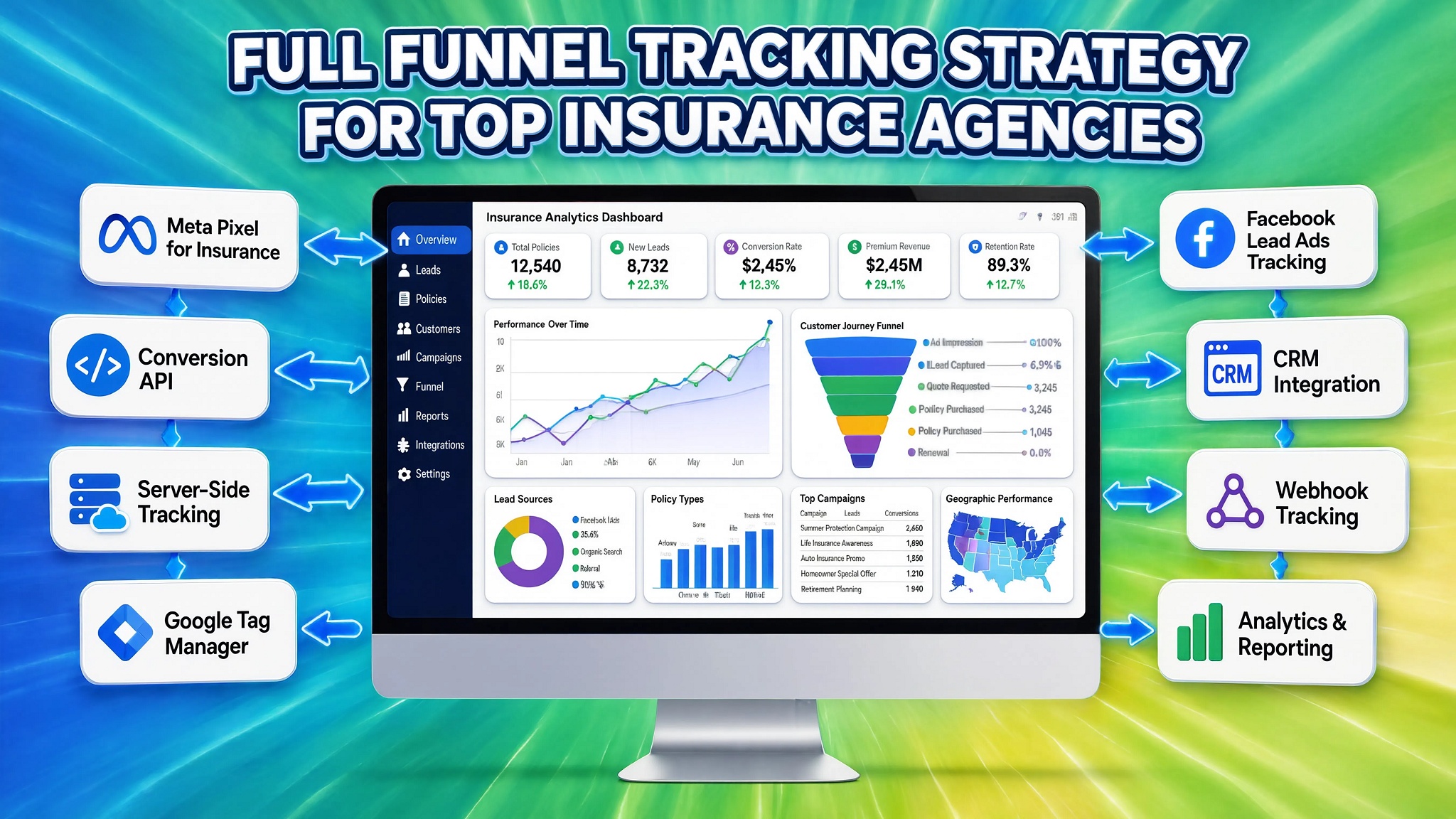

Table of Contents
ToggleQuick Answer
Executing a full funnel tracking strategy for insurance agencies requires bridging the gap between initial online quote form submissions and offline bound policy sales closed in your CRM. By embedding dynamic click ID capture scripts (gclid, fbclid, _fbp), firing Server-Side Google Tag Manager (sGTM) payloads, and uploading offline deal stage conversions from HubSpot or Salesforce back to Google Ads and Meta CAPI, agencies train ad network bidding algorithms to optimize for actual policy revenue rather than unvalidated quote leads.
Key Takeaways
- Bridge the Online-to-Offline Gap: Standard website analytics stop when a lead submits a form. Full-funnel tracking follows the prospect into your CRM until a policy is bound or issued.
- Stop Bidding on Low-Quality Leads: Feeding offline policy stage updates back to Google and Meta Ads redirects smart bidding algorithms away from spam form submissions and toward high-value policyholders.
- Capture Persistent Tracking Identifiers: Saving click IDs (gclid, wbraid, gbraid, fbclid) and browser identifiers (_fbp, _fbc) inside hidden CRM form fields guarantees high-match offline conversion uploads.
- Bypass Ad Blockers via Server-Side GTM: Routing lead data through custom server subdomains (metrics.youragency.com) on Stape.io preserves tracking signals against Safari ITP restrictions and ad blockers.
- Synchronize Privacy Compliance: Implementing Cookiebot Google Consent Mode v2 ensures form lead collection and server-side enrichment comply with GDPR, CCPA, and privacy laws.
Introduction: The $45,000 Insurance Lead Attribution Trap
An independent commercial insurance agency approached me after running into a severe financial hurdle. They were spending $45,000 every month across Google Ads and Meta Ads to drive commercial liability and auto quote requests. Their digital marketing agency reported glowing numbers: over 350 lead form submissions per month at a seemingly healthy $128 Cost Per Lead (CPL).
However, when I sat down with the agency’s principal and examined their CRM pipeline, the real picture emerged. Out of those 350 monthly online leads, their sales producers were closing only 11 bound policies. More than 80% of the incoming leads contained invalid phone numbers, fake email addresses, or uninsurable business profiles.
[ Google / Meta Paid Ads ]
           |
           v
[ Multi-Step Quote Form ] ---> Web Analytics logs "Conversion" ($128 CPL)
           |
           v
[ Insurance CRM (HubSpot/Salesforce) ]
           |
           +---> 80% Fake / Uninsurable Leads (Ad algorithms keep targeting these!)
           +---> 11 Bound Policies Closed (Ad algorithms HAVE NO IDEA these closed!)
The core problem was straightforward: Google Ads and Meta Ads automated smart bidding algorithms were optimizing strictly for “Form Submission Success” page views. Because the ad platforms had zero visibility into which quote requests converted into real bound policy revenue inside the agency’s CRM, the algorithms continued optimizing ad placements to capture the cheapest, lowest-quality leads possible.
In the insurance industry, where customer acquisition costs are high and sales cycles can stretch from weeks to months, relying solely on client-side form submission goals is a recipe for wasted ad spend.
In this comprehensive guide, I will walk you through setting up a complete, end-to-end full funnel tracking strategy designed specifically for insurance agencies. You will learn how to capture hidden click identifiers, deploy custom JavaScript form listeners, configure Server-Side GTM hosted on Stape.io, set up Google Ads Enhanced Conversions and Meta CAPI, and automate offline CRM conversion uploads from platforms like HubSpot, Salesforce, or Zoho.
Why Full-Funnel Tracking Matters for Insurance Agencies
Insurance marketing involves complex multi-step user journeys. Prospects rarely buy a policy on their first site visit; they request quotes, speak with producers over the phone, undergo underwriting, and complete paperwork before a policy is bound.
The Pitfalls of Basic Frontend Lead Tracking
- Algorithm Misalignment: Bidding models (such as Google Target CPA or Meta Maximize Conversions) optimize for quantity rather than quality if they only receive front-end form completion signals.
- Untracked Inbound Phone Calls: Over 40% of insurance quote requests transition to phone calls. If phone calls are not tracked and attributed back to ad campaigns, acquisition metrics remain incomplete.
- Multi-Step Form Drop-offs: Insurance quote calculators often feature 5 to 10 step forms. Standard tracking misses step-by-step funnel drop-offs, making it hard to identify where prospects abandon quote flows.
- Data Loss from Privacy Controls: Browser privacy changes, Apple ITP, and third-party cookie blocking strip user parameters during prolonged quote-to-bind sales cycles.
Strategic Benefits of CRM-Integrated Server-Side Tracking
- Value-Based Bidding Optimization: Feeding actual policy premium values back into ad platforms enables Value-Based Bidding (ROAS optimization), prioritizing high-premium commercial accounts over low-value leads.
- Accurate Cost-Per-Bound-Policy (CPBP): Shifting focus from Cost-Per-Lead (CPL) to true Cost-Per-Bound-Policy gives your leadership team clear visibility into actual acquisition costs.
- Automated Offline Closed-Loop Attribution: Automatically pushing CRM deal stage updates (e.g., “Quote Delivered”, “Underwriting Approved”, “Policy Bound”) back to Google Ads and Meta CAPI closes the attribution loop.
- Improved Ad Network Match Quality: Passing normalized and hashed customer details (email, phone, address) alongside click IDs ensures high match rates across ad platforms.
					+-----------------------------------------------------------------------------------+
|               FRONT-END LEAD TRACKING VS. FULL-FUNNEL CRM TRACKING                |
+--------------------------+-------------------------+------------------------------+
| Evaluation Parameter     | Basic Front-End Setup   | Full-Funnel CRM Strategy     |
+--------------------------+-------------------------+------------------------------+
| Conversion Trigger       | Form Button Click       | Closed/Bound Policy in CRM   |
| Primary Metric           | Cost Per Lead (CPL)     | Cost Per Bound Policy (CPBP) |
| Ad Network Optimization  | Volume of Form Hits     | High-Value Policy Revenue    |
| Phone Call Attribution   | Untracked / Iso lated    | Linked via Dynamic Numbers   |
| Cookie Retention         | Short (1 to 7 Days)     | Extended via sGTM CNAME      |
| Match Quality Score      | Poor (3.0 - 4.5)        | High (8.5 - 9.8)             |
+--------------------------+-------------------------+------------------------------+
Prerequisites & Infrastructure Checklist
Before implementing a full-funnel tracking system across your agency’s marketing stack, review the necessary permissions and software requirements in the table below:
					+-----------------------------------------------------------------------------------+
|                        SYSTEM INFRASTRUCTURE CHECKLIST                            |
+-----------------------+----------------------------------+------------------------+
| Platform / Tool       | Required Access Level            | Core Implementation    |
+-----------------------+----------------------------------+------------------------+
| WordPress / CMS       | Administrator / Developer Access | Embed Form Listeners   |
| Insurance CRM         | Super Admin / API Manager        | Create Custom Fields   |
| Web GTM Container     | Admin Access                     | Deploy Tags & Scripts  |
| Server GTM Container  | Admin Access                     | Data Routing & CAPI    |
| Stape.io Hosting      | Global / EU Account Access       | Cloud Container Host   |
| Google Ads Account    | Admin / API Access               | Enhanced Conversions   |
| Meta Business Suite   | Admin Access                     | CAPI & Event Manager   |
| Cookiebot CMP         | Multi-Domain Admin Access        | Consent Mode v2 Setup  |
+-----------------------+----------------------------------+------------------------+
- CMS / Website Admin Access: Ability to edit form code, inject custom scripts, or modify web page templates.
- Insurance CRM Admin Access: Authority to add custom lead properties (gclid, fbclid, _fbp, submission_id) in platforms such as HubSpot, Salesforce, Zoho, or AgencyBloc.
- Google Tag Manager Workspaces: Administrative access to both Web and Server GTM containers.
- Stape.io Hosting Platform: Account configured on Stape Global Hosting or Stape European Hosting for hosting your server container.
- Ad Platform Access: Admin permissions inside Google Ads (to enable Enhanced Conversions for Leads) and Meta Events Manager (to generate Conversions API tokens).
- Cookiebot CMP Account: Active deployment on Cookiebot with Google Consent Mode v2 support.
Video Walkthrough Tutorial
For a detailed video demonstration on configuring full-funnel tracking, offline conversion uploads, and CRM integrations for insurance marketing campaigns, watch the tutorial below:
Step-by-Step Implementation Guide
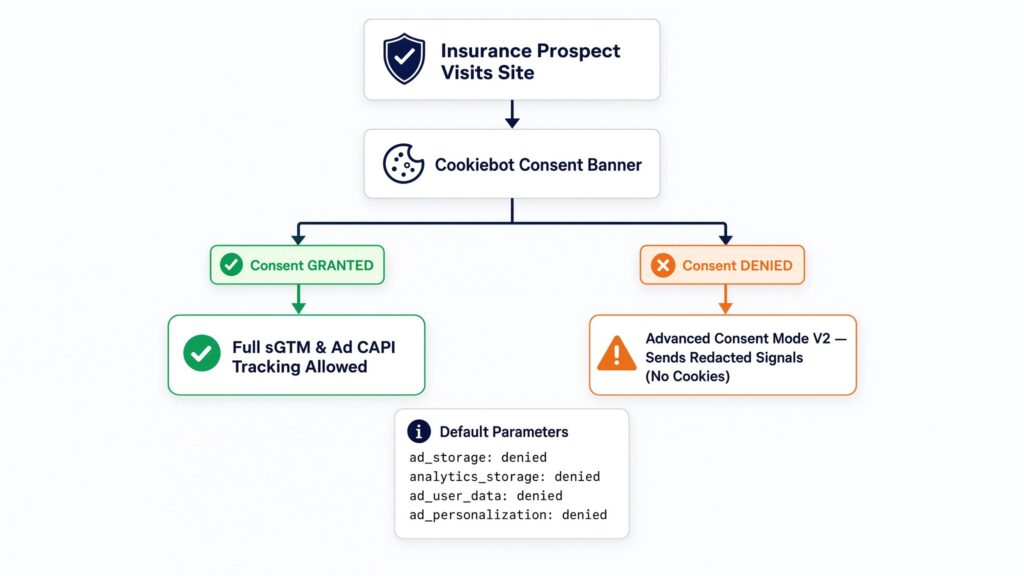
Phase 1: Deploy Google Consent Mode V2 via Cookiebot
Insurance websites handle sensitive user data. Configuring privacy controls using Cookiebot CMP ensures user tracking permissions pass accurately to both web and server containers.
					[ Insurance Prospect Visits Site ]
               |
               v
  [ Cookiebot Consent Banner ]
               |
     +---------+---------+
     |                   |
     v                   v
[ Consent GRANTED ]   [ Consent DENIED ]
     |                   |
     v                   v
Full sGTM & Ad CAPI   Advanced Consent Mode V2
Tracking Allowed      Sends Redacted Signals (No Cookies)
- Create a Cookiebot Account and add your agency’s web domain.
- Open your Web GTM Container, navigate to the Community Template Gallery, and install the Cookiebot CMP template.
- Set default consent parameters to denied for ad_storage, analytics_storage, ad_user_data, and ad_personalization.
- Attach the Cookiebot tag to the Consent Initialization – All Pages trigger.
- In your Google Analytics 4 and ad tags, confirm that Consent Settings align with Google Consent Mode v2 requirements.
Phase 2: Deploy Multi-Step Insurance Quote Form & Call Listener
Insurance quote engines often rely on multi-step forms or hosted checkouts that can obstruct standard tracking tags.
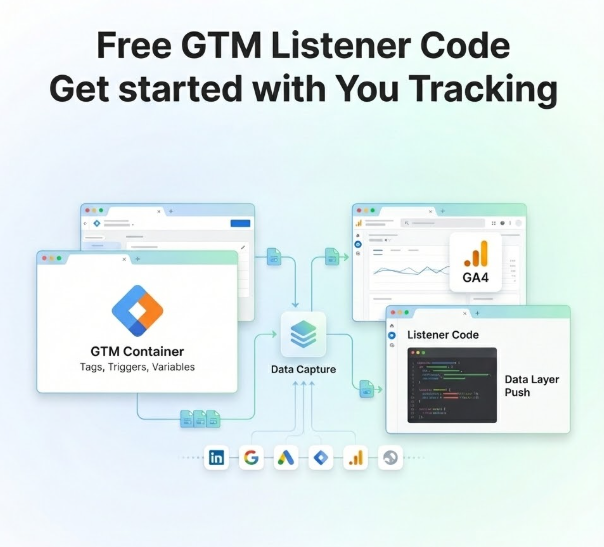
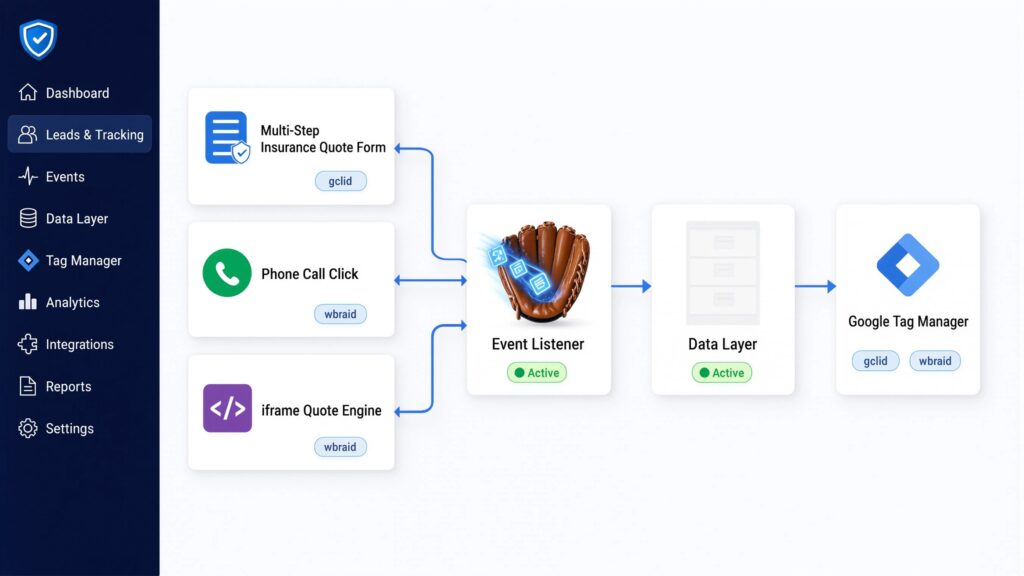
Think of an event listener like a catcher’s mitt—it catches dynamic user actions (like step completions, call clicks, or form submissions) and pushes them into the Data Layer (which acts as an invisible filing cabinet for Tag Manager). If your quote engine runs inside an iframe, remember that an iframe is like a glass window into another tool: you can see through it, but your main page cannot capture interactions inside it without a postMessage listener.
JavaScript Insurance Form & Call Tracking Listener Code
Create a Custom HTML Tag in Web GTM named chtml – Insurance Lead & Call Listener, attached to the Initialization – All Pages trigger:
					<script>
(function() {
  // Utility: Parse URL Parameters
  function getUrlParam(param) {
    var results = new RegExp('[\?&]' + param + '=([^&#]*)').exec(window.location.href);
    return results ? decodeURIComponent(results[1]) : '';
  }

  // Utility: Retrieve Cookie Value
  function getCookie(name) {
    var value = "; " + document.cookie;
    var parts = value.split("; " + name + "=");
    if (parts.length === 2) return parts.pop().split(";").shift();
    return '';
  }

  // Utility: Generate Unique Lead Submission ID
  function generateLeadID() {
    return 'ins_lead_' + Date.now() + '_' + Math.floor(Math.random() * 1000000);
  }

  // Capture ad click identifiers and save to Session Storage
  var gclid = getUrlParam('gclid') || getUrlParam('wbraid') || getUrlParam('gbraid');
  var fbclid = getUrlParam('fbclid');
  if (gclid) sessionStorage.setItem('ins_gclid', gclid);
  if (fbclid) sessionStorage.setItem('ins_fbclid', fbclid);

  var activeGclid = sessionStorage.getItem('ins_gclid') || '';
  var activeFbclid = sessionStorage.getItem('ins_fbclid') || '';
  var fbp = getCookie('_fbp');
  var fbc = getCookie('_fbc');

  // Populate Hidden CRM Form Fields automatically
  function populateHiddenFields() {
    var fieldMap = {
      'gclid_field': activeGclid,
      'fbclid_field': activeFbclid,
      'fbp_field': fbp,
      'fbc_field': fbc
    };

    for (var id in fieldMap) {
      var elem = document.getElementById(id) || document.querySelector('input[name="' + id + '"]');
      if (elem && fieldMap[id]) {
        elem.value = fieldMap[id];
      }
    }
  }

  // Run hidden field population periodically for dynamic forms
  setInterval(populateHiddenFields, 1000);

  // Track Inbound Phone Call Clicks
  document.addEventListener('click', function(e) {
    var phoneAnchor = e.target.closest('a[href^="tel:"]');
    if (phoneAnchor) {
      var phoneNumber = phoneAnchor.href.replace('tel:', '').trim();
      window.dataLayer = window.dataLayer || [];
      window.dataLayer.push({
        'event': 'insurance_phone_call_click',
        'phone_number': phoneNumber,
        'gclid': activeGclid,
        'fbclid': activeFbclid
      });
    }
  });

  // Listen for Insurance Multi-Step Quote Form Submissions
  document.addEventListener('submit', function(e) {
    var form = e.target;
    if (form && (form.classList.contains('insurance-quote-form') || form.id.indexOf('quote') !== -1 || form.querySelector('input[type="email"]'))) {
      var leadId = generateLeadID();
      var emailVal = (form.querySelector('input[type="email"]') || {}).value || '';
      var phoneVal = (form.querySelector('input[type="tel"], input[name*="phone"]') || {}).value || '';
      var zipVal = (form.querySelector('input[name*="zip"]') || {}).value || '';
      var policyType = (form.querySelector('select[name*="policy"], select[name*="type"]') || {}).value || 'General Quote';

      // Inject generated Lead ID into hidden form input if present
      var leadInput = form.querySelector('input[name="submission_id"]');
      if (leadInput) leadInput.value = leadId;

      window.dataLayer = window.dataLayer || [];
      window.dataLayer.push({
        'event': 'insurance_quote_submission',
        'submission_id': leadId,
        'policy_type': policyType,
        'gclid': activeGclid,
        'fbclid': activeFbclid,
        'user_data': {
          'email': emailVal,
          'phone': phoneVal,
          'postal_code': zipVal
        }
      });
    }
  });
})();
</script>
Line-by-Line Technical Breakdown
- sessionStorage.setItem(‘ins_gclid’, …): Captures inbound click identifiers (gclid, wbraid, gbraid, fbclid) from landing page URLs and stores them in session storage to protect against parameter stripping during multi-page quote navigation.
- populateHiddenFields(): Continuously scans multi-step quote forms and populates hidden form fields with tracking IDs before final submission.
- document.addEventListener(‘click’, … tel:): Captures clicks on phone numbers, pushing an event to the Data Layer with attached click IDs for phone call attribution.
- generateLeadID(): Creates a unique transaction key (ins_lead_…) that is stored in your CRM and used to deduplicate online lead events with offline bound policy conversions.
For tailored CRM tracking setups, see our technical guides on HubSpot form tracking, Salesforce conversion tracking, Zoho form tracking, and GoHighLevel form tracking.
Phase 3: Configure Hidden CRM Parameters & Lead Capture Architecture
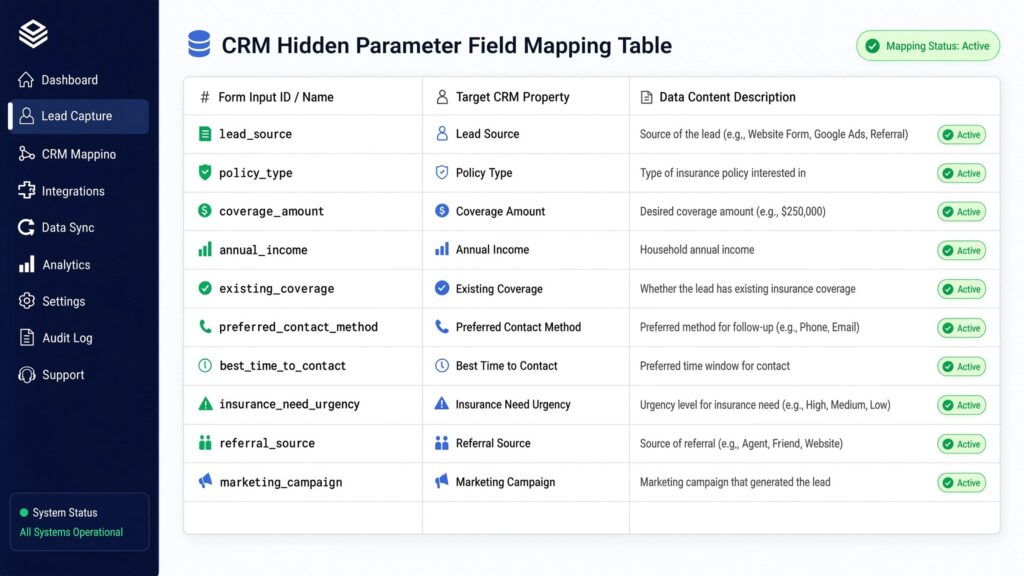
To support offline conversion tracking, set up custom lead properties in your CRM (HubSpot, Salesforce, Zoho, or AgencyBloc) to receive tracking parameters from website forms.
					+-----------------------------------------------------------------------------------+
|                     CRM HIDDEN PARAMETER FIELD MAPPING TABLE                      |
+-----------------------+-------------------------+---------------------------------+
| Form Input ID / Name  | Target CRM Property     | Data Content Description        |
+-----------------------+-------------------------+---------------------------------+
| `submission_id`       | Submission ID (Key)     | Unique identifier (e.g., ins_17)|
| `gclid_field`         | Google Click ID         | Captured `gclid` / `wbraid`     |
| `fbclid_field`        | Meta Click ID           | Captured `fbclid`               |
| `fbp_field`           | Meta Browser ID         | Cookie `_fbp` value             |
| `fbc_field`           | Meta Sub-Cookie ID      | Cookie `_fbc` value             |
| `policy_type`         | Requested Coverage      | Commercial, Auto, Home, Life    |
+-----------------------+-------------------------+---------------------------------+
- Open your CRM settings and create custom text properties for the fields listed in the table above.
- Edit your CMS quote form templates to include hidden <input type=”hidden”> elements matching these field names.
- Verify that test form submissions populate these parameters in new CRM contact records.
Phase 4: Provision sGTM Infrastructure on Stape.io
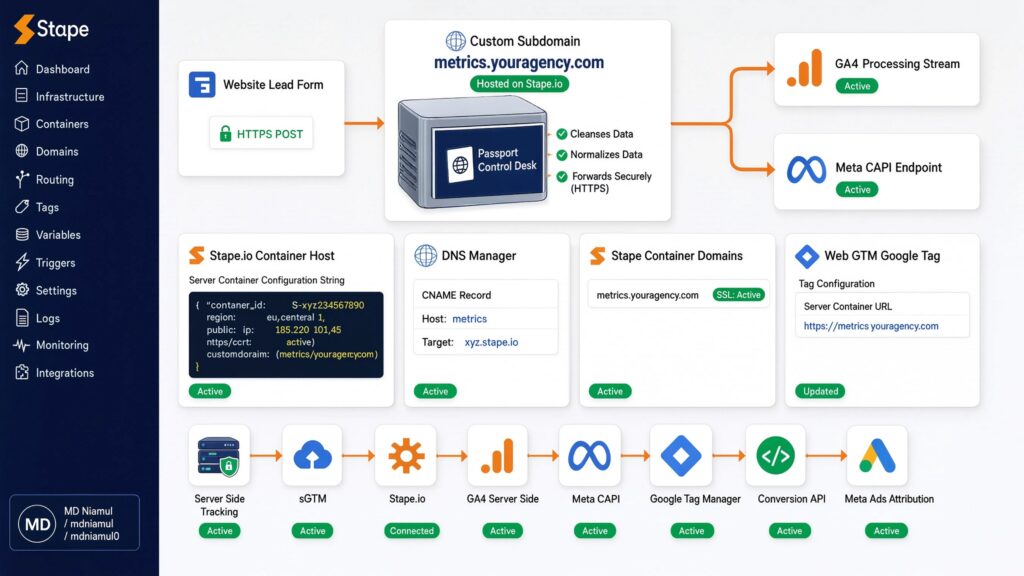
A server container acts like a passport control desk. Instead of sending prospect data straight to third-party ad networks from the browser, your web forms route payloads to your server container first. The server container cleanses, normalizes, and forwards data securely via HTTPS to Google and Meta endpoints.
					[ Website Lead Form ]
          |
          v (HTTPS POST request)
[ Custom Subdomain: metrics.youragency.com ] <--- Hosted on Stape.io
          |
          +-------------------+-------------------+
          |                                       |
          v                                       v
 [ GA4 Processing Stream ]              [ Meta CAPI Endpoint ]
Step 1: Create a Centralized Stape Container Host
- Log into Stape Global Hosting or Stape European Hosting.
- Create a new sGTM container and paste your Server Container Configuration String from Tag Manager.
Step 2: Configure Custom DNS Routing
- Access your DNS manager (Cloudflare, GoDaddy, Namecheap) and create a CNAME record:
- Host: metrics | Target: Your unique Stape URL (xyz.stape.io).
- Inside Stape Container Settings > Domains, add metrics.youragency.com and verify that the SSL certificate displays Active.
- In Web GTM, update your Google Tag (GA4 Configuration) parameter server_container_url to https://metrics.youragency.com.
For additional architecture guidance, review our articles on server-side tracking services and marketing automation services.
Phase 5: Implement Google Enhanced Conversions for Leads & Meta CAPI
To capture initial quote requests accurately before offline policy updates, configure Google Ads Enhanced Conversions for Leads and Meta CAPI inside your sGTM workspace.
					+-----------------------------------------------------------------------------------+
|                 GOOGLE ADS & META CAPI ENHANCED PARAMETER MAP                     |
+----------------------+-------------------------+----------------------------------+
| Parameter Name       | Source Variable         | Processing & Hashing Rule        |
+----------------------+-------------------------+----------------------------------+
| `email` (`em`)       | Form Data Layer Email   | Lowercase, trim spaces, SHA-256  |
| `phone_number` (`ph`)| Form Data Layer Phone   | E.164 digits format, SHA-256     |
| `postal_code` (`zp`) | Form Data Layer Zip     | Trim spaces, SHA-256             |
| `gclid`              | Session Storage GCLID   | Unhashed raw string              |
| `external_id`        | `submission_id`         | Unique tracking key              |
+----------------------+-------------------------+----------------------------------+
- Google Ads Enhanced Conversions for Leads:
- In Google Ads > Goals > Conversions > Settings, enable Enhanced Conversions for Leads. Select Google Tag or Tag Manager as your deployment method.
- In Web GTM, configure your Google Ads User-Provided Data Variable to extract email, phone, and address values from the Data Layer upon quote form submission.
- Meta Conversions API (CAPI) Setup in sGTM:Open your sGTM Workspace and install the Meta Conversions API tag template.
- Enter your Pixel ID and CAPI Access Token.
- Map the event name to Lead for quote submissions, passing submission_id as the external_id to enable event deduplication.

Phase 6: Automated Offline CRM Conversion Uploads (Bound Policies)
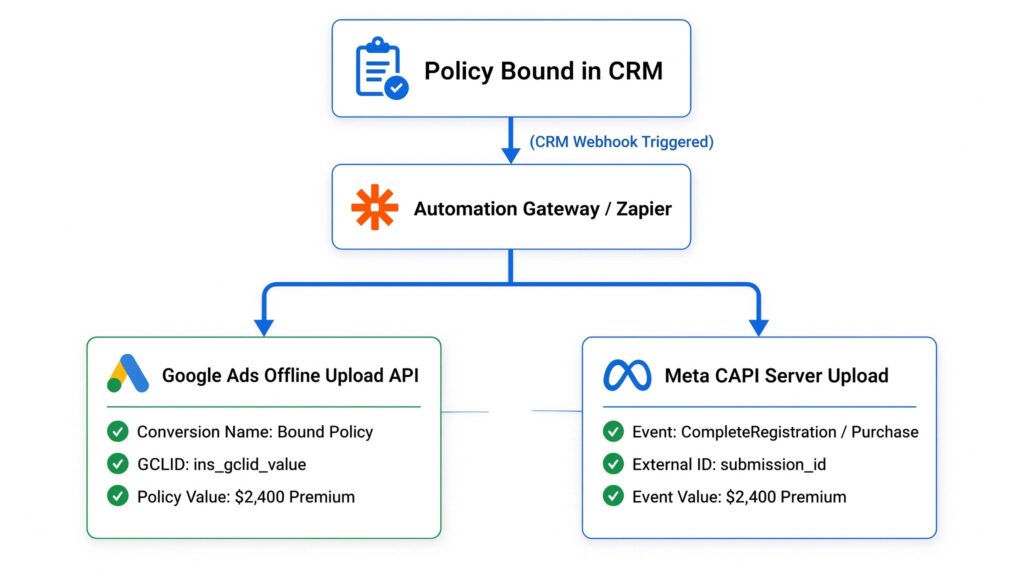
The final step in a full-funnel tracking setup is returning offline sale data to ad platforms when a lead transitions to a bound policy inside your CRM.
					[ Policy Bound in CRM ] ---> (CRM Webhook Triggered)
                                      |
                                      v
                      [ Automation Gateway / Zapier ]
                                      |
       +------------------------------+------------------------------+
       |                                                             |
       v                                                             v
[ Google Ads Offline Upload API ]                             [ Meta CAPI Server Upload ]
- Conversion Name: Bound Policy                               - Event: CompleteRegistration / Purchase
- GCLID: ins_gclid_value                                      - External ID: submission_id
- Policy Value: $2,400 Premium                                - Event Value: $2,400 Premium
Automated CRM Webhook Workflow Setup
- Trigger Condition: Configure a CRM workflow that fires when a deal stage changes to Closed Won or Policy Bound.
- Payload Content: Ensure the webhook payload includes:Lead Identifiers: submission_id, gclid, email, phone
- Policy Details: policy_premium_value (e.g., $2,400), currency (USD)
- Timestamp: Date and time of policy binding
- Data Routing to Google Ads:Configure a destination web app or API integration to send a POST request to the Google Ads API Offline Conversion Service.
- Map gclid to Google Click ID, set conversion action name to Bound Policy, and map policy_premium_value to Conversion Value.
- Data Routing to Meta CAPI:
- Send a server-to-server POST request to [https://graph.facebook.com/v19.0/](https://graph.facebook.com/v19.0/){pixel_id}/events.
- Set event name to Purchase or custom event PolicyBound.
- Pass submission_id as external_id, along with SHA-256 hashed customer identifiers (em, ph) and policy value.
For specialized offline conversion setups, explore our guide on offline conversion tracking services and third-party checkout conversion tracking.
Phase 7: Full-Funnel Analytics & Looker Studio Dashboard Setup
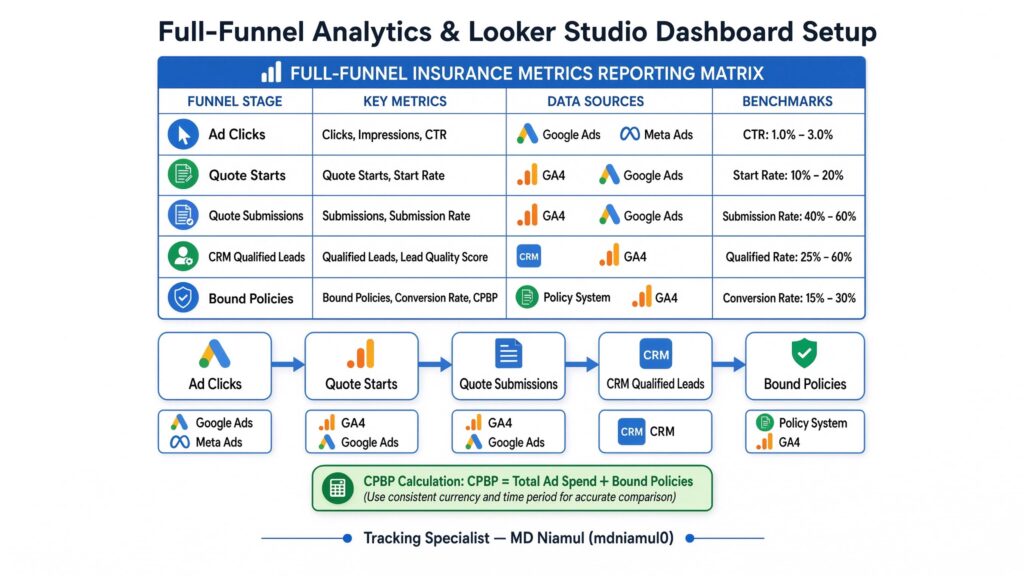
To provide your executive team with clear visibility into marketing performance, combine web behavior, quote submissions, and offline CRM conversions into a unified Looker Studio report.
					+-----------------------------------------------------------------------------------+
|                  FULL-FUNNEL INSURANCE METRICS REPORTING MATRIX                   |
+--------------------+---------------------+--------------------+-------------------+
| Funnel Stage       | Primary Metric      | Data Source        | Target Benchmark  |
+--------------------+---------------------+--------------------+-------------------+
| 1. Top of Funnel   | Ad Impressions/Clicks| Google/Meta Ads   | CTR > 3.5%        |
| 2. Mid Funnel      | Quote Form Starts   | GA4 Custom Events  | Start Rate > 25%  |
| 3. Form Completion | Completed Quotes    | GA4 / sGTM Events  | CPL < $150        |
| 4. CRM Pipeline    | Valid Lead Rate     | CRM Contact Status | > 70% Valid       |
| 5. Bottom Funnel   | Bound Policies      | CRM Sales Data     | Close Rate > 15%  |
| 6. ROI Efficiency  | Cost Per Bound Policy| Ad Spend / Sales   | Target ROAS > 4x  |
+--------------------+---------------------+--------------------+-------------------+
- Connect GA4, Google Ads, Meta Ads, and your CRM database (via BigQuery or direct connectors) to Looker Studio.
- Build a full-funnel funnel chart tracking performance across each stage:
- Ad Clicks → Quote Starts → Quote Submissions → CRM Qualified Leads → Bound Policies.
- Calculate Cost Per Bound Policy (CPBP) by dividing total ad spend by the count of offline bound policies.
Testing & Validation Framework
Validate your full-funnel tracking configuration using this step-by-step testing process:
					+-----------------------------------------------------------------------------------+
|                        SYSTEM TESTING & VALIDATION MATRIX                         |
+-----------------------+-------------------------+---------------------------------+
| Test Stage            | Diagnostic Tool         | Expected Passing Result         |
+-----------------------+-------------------------+---------------------------------+
| 1. Click ID Capture   | Chrome DevTools Console | `gclid` stored in SessionStorage|
| 2. Form Listener Fire | Web GTM Preview Mode    | `insurance_quote_submission` DL |
| 3. Hidden Fields      | DOM Element Inspector   | Hidden fields populate values   |
| 4. sGTM Routing       | Stape sGTM Debug View   | HTTP 200 OK sent to Meta & GA4  |
| 5. CRM Lead Entry     | CRM Contact Record      | Contact record contains GCLID   |
| 6. Offline Upload     | Google Ads Diagnostics  | Offline conversion imported     |
+-----------------------+-------------------------+---------------------------------+
- Verify Click ID Persistence:
- Append test parameters to your landing page URL: ?
- gclid=test_gclid_123& fbclid=test_fbclid_456.
- Complete a multi-step quote form.
- Inspect browser Session Storage to confirm ins_gclid and ins_fbclid are stored.
- Inspect Hidden Form Field Population:Open Chrome DevTools (F12) > Elements tab.
- Locate your hidden form inputs (gclid_field, submission_id). Confirm values are injected prior to form submission.
- Validate sGTM Request Processing:Open sGTM Preview Mode. Submit a test quote.
- Confirm the server container logs an incoming GA4 payload and generates outgoing HTTP 200 POST requests to Google Ads and Meta CAPI endpoints.
- Test Offline CRM Conversion Uploads:Move your test contact record in your CRM to Policy Bound.
- Check your automation webhook logs to confirm a POST payload sent gclid and policy value to Google Ads and Meta CAPI.
- Verify upload status in Google Ads under Goals > Conversions > Diagnostics.
Troubleshooting Common Tracking Errors
Problem 1: Google Ads Offline Conversions Failing to Match
- Cause: The gclid captured during form submission was missing, truncated, or older than the 90-day conversion window.
- Solution: Ensure session storage preserves gclid strings across multi-page quote journeys, and configure form listener scripts to inject click IDs into hidden CRM fields consistently.
Problem 2: High Quote Form Submissions but Zero CRM Leads
- Cause: Form submission triggers in GTM are firing on button clicks without validating whether form fields passed validation rules.
- Solution: Update your GTM form triggers to fire on true gtm.formSubmit events or custom Data Layer events pushed only after successful backend validation.
Problem 3: Low Meta Event Match Quality (EMQ) Score for Insurance Leads
- Cause: The web form or CAPI tag fails to pass customer parameters (email, phone, address, zip code) in an unhashed or improperly formatted state.
- Solution: Ensure email addresses are normalized to lowercase and phone numbers are formatted in E.164 digits before SHA-256 hashing.
Problem 4: Server Container Returning HTTP 400 or 403 Errors
- Cause: An expired Meta CAPI Access Token, misconfigured CNAME DNS settings, or cross-origin CORS policy blocks between your website and custom subdomain.
- Solution: Generate a new permanent CAPI token inside Meta Events Manager and verify that your custom subdomain SSL status displays Active inside Stape settings.
Problem 5: Phone Call Clicks Not Attributed to Paid Ad Campaigns
- Cause: Phone call tracking relies on static HTML links rather than dynamic call tracking script swaps (e.g., CallRail).
- Solution: Deploy dynamic number insertion (DNI) scripts to swap site phone numbers based on traffic source, ensuring inbound calls tie back to original click IDs.
Conclusion
Relying solely on front-end form submission tracking leaves insurance agencies vulnerable to wasted ad spend. When ad networks optimize for unvalidated lead forms, algorithms favor spam quote submissions over high-value policyholders.
Implementing a full-funnel tracking strategy bridges the gap between digital marketing and offline sales. By capturing persistent click IDs, deploying custom form listeners, routing data through Server-Side GTM on Stape.io, and automating offline CRM uploads, you give Google Ads and Meta Ads the data needed to target profitable insurance prospects.
Summary by MD Niamul
This guide details a full-funnel tracking strategy for insurance agencies. By capturing persistent click IDs, deploying custom form and phone listeners, establishing Server-Side GTM on Stape.io, configuring Cookiebot Consent Mode v2, and automating offline CRM uploads to Google Ads and Meta CAPI, agencies eliminate attribution gaps. This setup optimizes ad spending for true policy revenue and lowers overall customer acquisition costs.
1.What is full-funnel tracking for insurance agencies?
Full-funnel tracking connects every stage of the insurance customer journey—from the initial online ad click and multi-step quote request to inbound phone calls and final offline policy binding inside a CRM. It ensures ad network bidding models optimize for actual policy revenue rather than initial quote leads.
2.How do I track offline bound policies in Google Ads?
Offline policy tracking requires capturing Google Click IDs (gclid, wbraid, or gbraid) during quote form submission and saving them in custom CRM fields. When a producer updates a lead status to “Policy Bound”, an automated webhook sends the gclid, conversion action name, and policy value back to Google Ads via the Offline Conversions API.
3.Why should insurance agencies use Server-Side GTM?
Server-Side GTM routes lead tracking through a custom first-party subdomain (metrics.youragency.com). This setup bypasses browser ad blockers, protects against Safari ITP cookie restrictions, reduces page load times, and secures sensitive user data before transmitting it to ad network APIs over HTTPS.
4.What hidden fields are required in insurance quote forms?
Insurance quote forms should include hidden fields for gclid, wbraid, gbraid, fbclid, _fbp, _fbc, and a unique submission_id. These parameters store tracking identifiers that pass directly into your CRM to support offline conversion uploads.
5.How do Enhanced Conversions for Leads work in Google Ads?
Enhanced Conversions for Leads allows agencies to use hashed first-party customer details (like email address or phone number) instead of relying solely on click IDs. When a policy closes offline, Google matches the hashed customer data back to the original Google account that clicked the ad.
6.Can I track phone calls in a full-funnel strategy?
Yes, phone call tracking is a key component of full-funnel setups. By combining dynamic number insertion (DNI) tools with GTM phone click listeners, agencies can attribute inbound calls to specific ad campaigns, landing pages, and click IDs inside their CRM.
7.How does Cookiebot Consent Mode v2 impact lead tracking?
Cookiebot Consent Mode v2 ensures tracking tags respect user privacy choices (granted or denied). When consent is granted, tags collect full tracking data. If consent is denied, Consent Mode sends anonymized signals to ad platforms without writing or reading tracking cookies, helping maintain legal compliance.
8.Which CRM platforms support offline conversion tracking?
Most modern CRMs—including HubSpot, Salesforce, Zoho CRM, AgencyBloc, HighLevel, and ActiveCampaign—support offline conversion tracking. As long as your CRM can store custom lead properties and trigger webhooks or API requests upon deal stage updates, it can integrate into an offline conversion pipeline.
9.How long does it take for offline conversions to update ad algorithms?
After uploading offline conversions via API or webhooks, Google Ads and Meta Ads typically process the events within 3 to 24 hours. Over a 2 to 4-week period, ad algorithms adjust smart bidding strategies based on the newly reported policy values.
10.What is Cost-Per-Bound-Policy (CPBP)?
Cost-Per-Bound-Policy (CPBP) is an executive marketing metric calculated by dividing total ad spend by the number of closed/bound policies over a given period. Unlike Cost-Per-Lead (CPL), CPBP reflects actual customer acquisition costs and campaign profitability.
 Need Help Advanced GHL Automation & Tracking Setup?