
Quick Answer
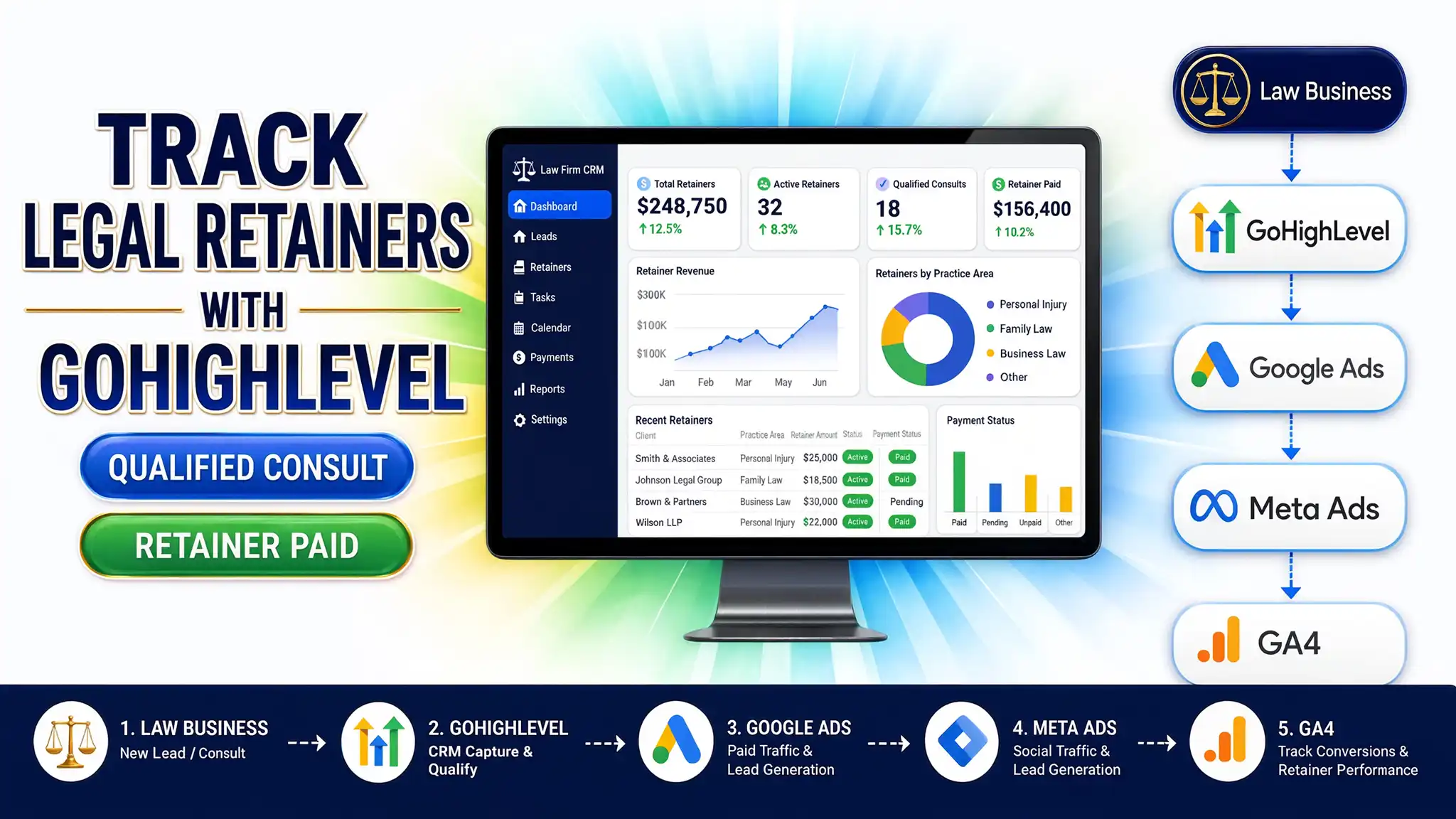
Yes, GoHighLevel (GHL) is an exceptional CRM for law firms, uniting lead capture, automated intake workflows, pipeline management, and call tracking under one umbrella. However, over 80% of legal practices set up their ad tracking incorrectly: they optimize campaigns for top-of-funnel free consultations instead of signed retainers, blow past standard 30-day conversion windows without offline tracking, and violate privacy standards by sending sensitive legal case types directly inside ad event parameters. Correcting these three setup errors transforms underperforming ad spend into predictable case acquisitions.
Key Takeaways
- GHL Unifies Legal Marketing: HighLevel consolidates appointment scheduling, SMS/email follow-ups, forms, call tracking, and pipeline management for law practices.
- Stop Optimizing on Free Consults: Feeding ad platforms top-of-funnel consultation data trains algorithms to target price-shoppers; optimize instead on qualified consultations or signed retainers.
- Offline Conversion Tracking (OCT) Is Mandatory: Legal sales cycles frequently exceed 30 days. Pushing pipeline stage changes (e.g., signed retainer) back to Google Ads and Meta via offline conversion uploads captures long-cycle revenue.
- Protect Sensitive Legal Data: Passing specific case types (e.g., “Personal Injury”, “Criminal Defense”, “Divorce”) in raw pixel parameter streams triggers privacy violations on Google and Meta.
- Implement Consent Mode v2: Implementing Google Consent Mode v2 via Cookiebot ensures compliant data collection across European and global privacy frameworks without dropping critical conversions.
Introduction: The $15,000 Ad Spend Horror Story
A few months ago, a managing partner at a boutique family law practice reached out to me during a crisis. Their agency had recently migrated the firm’s CRM to GoHighLevel. On paper, everything looked glorious: lead forms were buzzing, automated SMS follow-ups fired instantly, and their calendar was completely packed with free initial consultation calls.
Yet, when the accounting department reviewed their monthly P&L statement, they were horrified. The firm had burned over $15,000 on Google Ads and Meta Ads in thirty days, but their actual revenue had dropped by nearly 40%.
When I pulled open their Google Tag Manager account, Google Ads diagnostic panels, and GoHighLevel workflows, the problem became immediately clear. Their ad accounts were heavily optimized for a single conversion goal: Submit Form – Free Consult. Because the ad platform algorithms were instructed to bring in the absolute lowest-cost form fills, they did exactly that. They inundated the calendar with window shoppers, tire kickers, and individuals out of jurisdiction or outside the firm’s fee minimums. Meanwhile, the actual high-value leads—clients who sign $5,000 to $10,000 retainers—took 45 days to convert and were completely invisible to the ad platforms.
This is not an isolated incident. GoHighLevel is an insanely powerful engine for law firms, but when legal practices treat GHL purely as a glorified email sender while relying on default ad pixel setups, they bleed thousands of dollars every month. Let’s dive deep into why GHL works so well for legal marketing, and how to fix the critical conversion tracking mistakes that ruin ROI.
Why GoHighLevel Works for Law Firms (And Where It Breaks)
Law practices operate under different business dynamics than standard e-commerce or local service businesses. Legal services carry higher retainer values, strict regulatory compliance needs, longer consideration windows, and high friction during intake.
					+-----------------------------------------------------------------------------------+
|                           THE MODERN LEGAL INTAKE FUNNEL                          |
+-----------------------------------------------------------------------------------+
| [ Ad Click ] ---> [ GHL Form / Call ] ---> [ Intake Verification ]                |
|                                                     |                             |
|                                                     v                             |
| [ Signed Retainer ] <--- [ Retainer Agreement ] <--- [ Qualified Consultation ]    |
+-----------------------------------------------------------------------------------+
GoHighLevel acts as a central command platform for law firms by offering:
- Unified Multi-Channel Intake: Captures leads via web forms, live chat widgets, inbound call tracking numbers, and direct messages.
- Instant Automated SMS/Email Follow-Up: Reduces speed-to-lead times to under 60 seconds, which is crucial when potential legal clients contact multiple attorneys simultaneously.
- Pipeline Stage Automation: Moves prospects smoothly from “Initial Contact” to “Qualified Consult Scheduled” to “Retainer Sent” and “Signed Client.”
Standard CRM vs. Properly Configured GHL for Legal Practices
Feature / Architecture | Standard Off-the-Shelf CRM Setup | Optimized GoHighLevel + Advanced Tracking Architecture |
Primary Ad Optimization Event | Top-of-Funnel Form Submissions / Free Consults | Qualified Consultations & Signed Retainer Stage Changes |
Conversion Attribution Window | Standard 30-Day Browser Cookie Window | Extended 90+ Day Server-Side / Offline Attribution |
Data Privacy & Parameter Handling | Raw case names passed in pixel parameters (Non-Compliant) | Anonymized case data & scrubbed event properties |
Call Tracking Integration | Separate 3rd-party software detached from ad tools | Integrated GHL Call Tracking tied directly to Google/Meta |
Lead Qualification Workflow | Manual review by staff after calendar booking | Automated pre-qualification logic via form/chat rules |
What Most Law Firms Set Up Wrong in GoHighLevel
If your law firm is running paid search or social ads into GoHighLevel, you are likely suffering from one or more of these three systemic tracking architecture mistakes:
1. Optimizing on Free Consultations Instead of Retainers
When you set up your Google Ads or Meta Ads campaigns to optimize for “Form Submissions” or “Free Consultations,” the algorithm’s machine learning model searches for users most likely to fill out forms. In the legal industry, the people most eager to book free consultations are frequently those looking for free advice with no intention or financial ability to hire an attorney.
					WRONG ARCHITECTURE:
[ Ad Impression ] -> [ Free Consult Form ] -> [ Ad Optimization Signal Sent ]
Result: Algorithm finds more low-intent leads looking for free legal advice.

CORRECT ARCHITECTURE:
[ Ad Impression ] -> [ Consult Form ] -> [ Qualification Filter ] -> [ Retainer Signed ] -> [ Offline Conversion Sent ]
Result: Algorithm learns to find high-paying retainer clients.
By pushing Qualified Consults (jurisdiction confirmed, matter type validated, budget verified) and Signed Retainers back to your ad channels as conversion actions, you train Google Ads Smart Bidding and Meta Advantage+ to target actual high-value clients.
2. Ignoring Long Sales Cycles & 30-Day Attribution Windows
Legal decisions are rarely made on an impulse impulse. From the moment a prospective client clicks an ad for a divorce lawyer, estate planner, or corporate litigation attorney, it may take 35 to 90 days to retain the firm.
Default browser tracking (cookies, client-side Meta Pixels, standard GA4 tags) expires or loses attribution context after 7 to 30 days. When a client signs a retainer on day 42, standard client-side tags fail to attribute that close back to the Google Ads click or Meta campaign that generated the original lead. To your ad manager, the ad campaign looks like a failure, leading them to pause campaigns that were actually generating six-figure revenue.
3. Exposing Sensitive Legal Information in Event Parameters
Passing parameter fields like case_type: “criminal_defense_dui” or matter_type: “personal_injury_medical_malpractice” directly inside client-side event payloads or standard custom parameters violates explicit health, legal, and sensitive data policy guidelines on Meta and Google.
Mapping sensitive inferences directly to user profile records inside ad platform servers creates severe liability. Legal firm conversion tracking must keep specific case details scrubbed from ad platform events while maintaining reliable conversion values and attribution identifiers (GCLID, WBRAID, GBRAID, FBCLID, email hashes, phone hashes).
Prerequisites & Checklist
Before executing this conversion tracking setup, confirm you have the following access rights and accounts ready:
- GoHighLevel Account: Administrator access to your sub-account.
- Google Tag Manager (GTM): Publish access to the Container deployed on your GHL Funnels/Websites.
- Google Ads Account: Admin or Standard access with access to Conversion Action configuration.
- Meta Business Manager: Admin access to the Meta Pixel / Conversions API settings.
- Cookiebot CMP Account: Active account for handling Google Consent Mode v2 setup.
- Server-Side Tracking Platform: A server container endpoint (such as Stape or Google Cloud) if configuring robust offline/server routing. For comprehensive server setups, review my guide on server-side tracking services.
Step-by-Step Implementation Guide
Follow these five core phases to build a resilient, privacy-compliant tracking system for GoHighLevel.
Phase 1: HighLevel Intake Architecture & Custom Field Setup
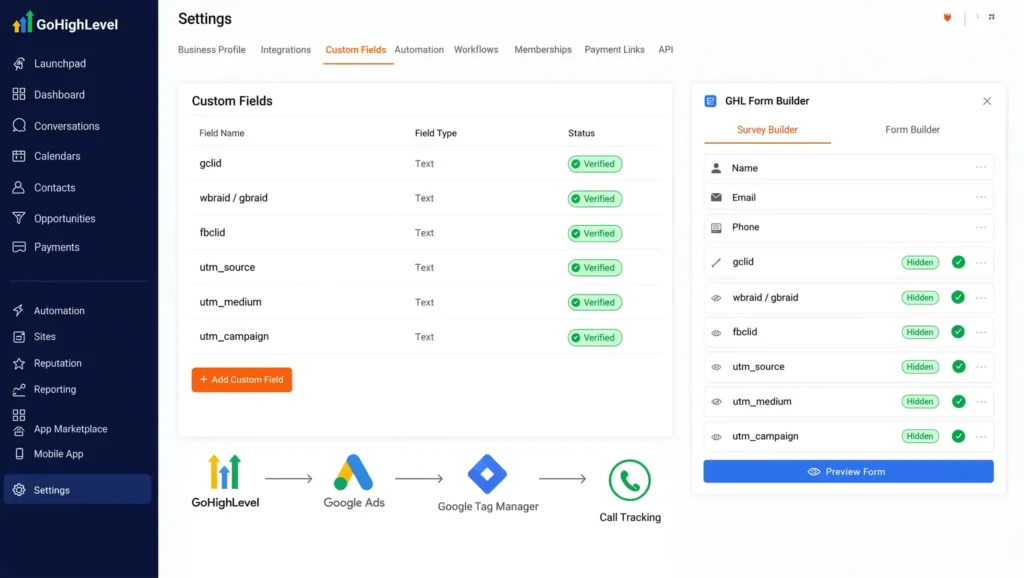
To capture attribution parameters properly, GoHighLevel forms and surveys must store hidden parameter values when a user visits your site from paid ads.
- Navigate to GHL Settings > Custom Fields.
- Create the following standard text custom fields for contacts:
- gclid (Google Click Identifier)
- wbraid / gbraid (Google iOS Privacy Identifiers)
- fbclid (Facebook Click Identifier)
- utm_source
- utm_medium
- utm_campaign
- Open your GHL Form Builder / Survey Builder. Add hidden fields mapped directly to these custom contact fields.
- Set up an automated script or native GHL URL parameter mapping to populate these hidden fields whenever an ad landing page loads.
Lorem ipsum dolor sit amet, consectetur adipiscing elit. Ut elit tellus, luctus nec ullamcorper mattis, pulvinar dapibus leo.
Phase 2: Deploying Google Consent Mode v2 via Cookiebot
Under modern privacy standards, law firms targeting clients across international jurisdictions or US states with modern privacy acts must configure Google Consent Mode v2.
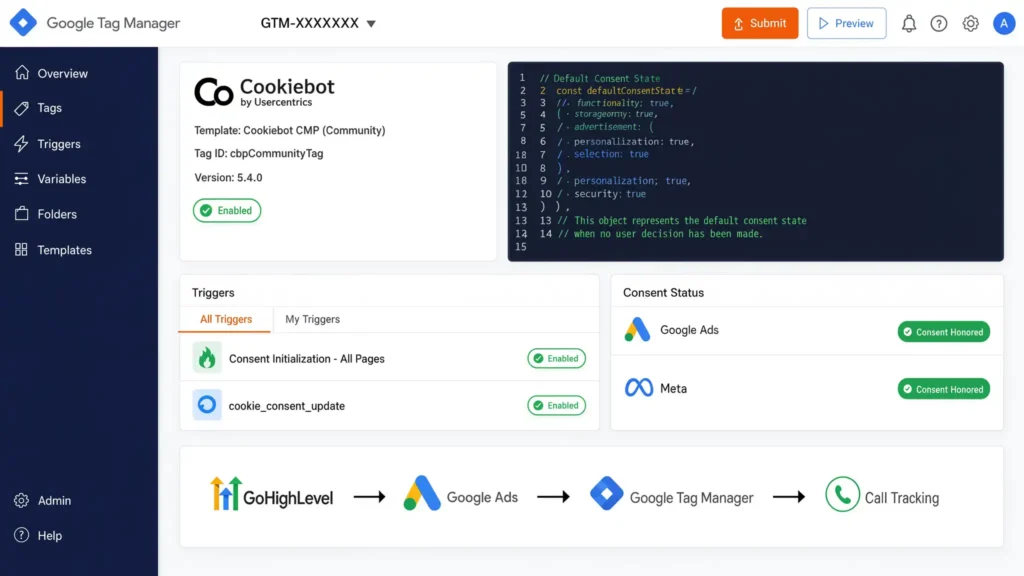
- Create a Cookiebot CMP account and register your landing page domain.
- In Google Tag Manager, install the Cookiebot CMP community template tag.
- Configure the Default Consent State tag prior to any tracking tags executing:
					<script>
  window.dataLayer = window.dataLayer || [];
  function gtag(){dataLayer.push(arguments);}

  // Set default consent states to denied before CMP load
  gtag('consent', 'default', {
    'ad_storage': 'denied',
    'analytics_storage': 'denied',
    'ad_user_data': 'denied',
    'ad_personalization': 'denied',
    'wait_for_update': 500
  });
</script>
- Set the tag trigger to Consent Initialization – All Pages.
- Create an update trigger when Cookiebot receives user consent (cookie_consent_update). Ensure your Google Ads and Meta tags honor these consent flags.
Phase 3: Custom Form Listener Code Implementation
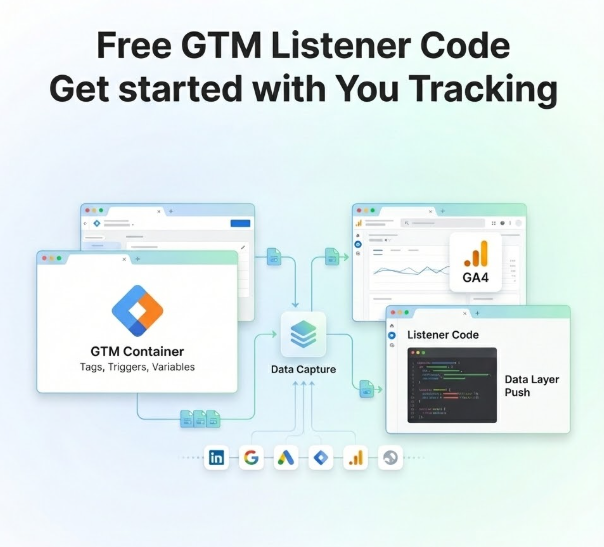
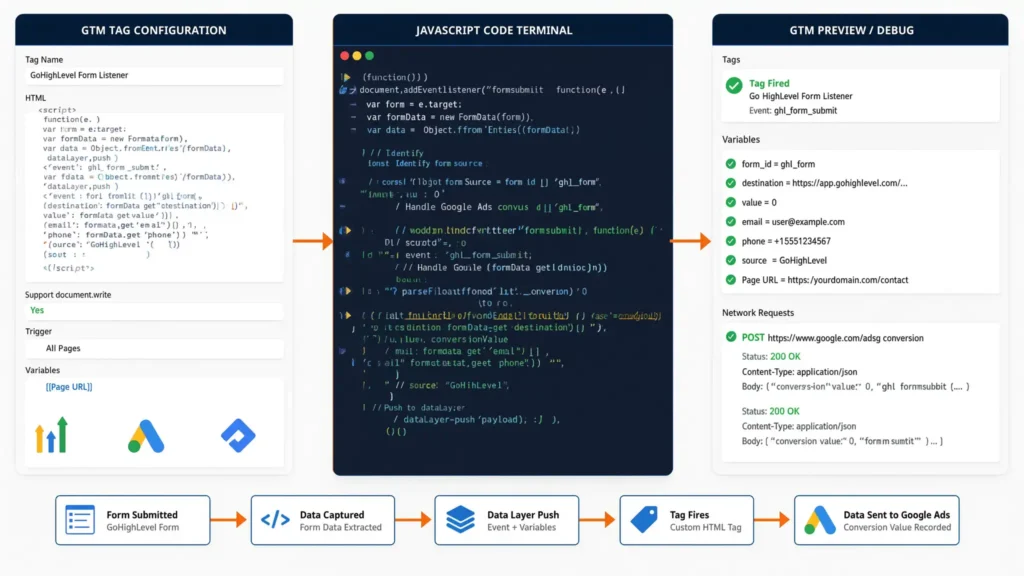
When GoHighLevel forms or calendars are embedded on custom domains or landing pages, standard pageview tags fail to detect when a form submission successfully occurs inside the iframe or AJAX container.
Deploy this custom JavaScript listener tag inside Google Tag Manager triggered on Initialization – All Pages to capture form submissions and push structured events into the dataLayer.
					<script>
(function() {
  // Listen for GoHighLevel postMessage events from embedded forms or calendars
  window.addEventListener('message', function(event) {
    if (!event.data) return;

    // Check for GHL form submission or calendar booking postMessage signals
    var isGHLForm = false;
    var eventType = '';

    try {
      // Handle JSON payload messages
      var data = (typeof event.data === 'string') ? JSON.parse(event.data) : event.data;

      if (data.type === 'ghl_form_submit' || data.event === 'form_submitted') {
        isGHLForm = true;
        eventType = 'ghl_form_submission';
      } else if (data.type === 'ghl_calendar_booking' || data.event === 'appointment_booked') {
        isGHLForm = true;
        eventType = 'ghl_calendar_booking';
      }
    } catch(e) {
      // Handle non-JSON string messages from GHL iframe origins
      if (typeof event.data === 'string' && event.data.indexOf('form-builder:submit') !== -1) {
        isGHLForm = true;
        eventType = 'ghl_form_submission';
      }
    }

    if (isGHLForm) {
      // Push normalized event into Data Layer without sensitive case parameters
      window.dataLayer = window.dataLayer || [];
      window.dataLayer.push({
        'event': eventType,
        'ghl_form_id': data.formId || data.form_id || 'unknown_form',
        'lead_type': 'legal_intake_consultation'
      });
    }
  });
})();
</script>
How This Listener Works:
- window.addEventListener(‘message’): Acts as a “catcher’s mitt,” listening for cross-origin messages emitted by the GoHighLevel iframe window.
- JSON.parse(event.data): Safely unpacks the data message sent from GHL when a user clicks submit.
- window.dataLayer.push({…}): Drops a standardized event into GTM’s data container, allowing custom triggers to fire cleanly without capturing sensitive case fields. For more specialized form tracking implementations, check out my dedicated guide on GoHighLevel form conversion tracking services.
Phase 4: GTM Tags, Triggers, and Variable Setup
With the data layer event firing, configure your GTM container to send clean signals to Google Ads and Meta.
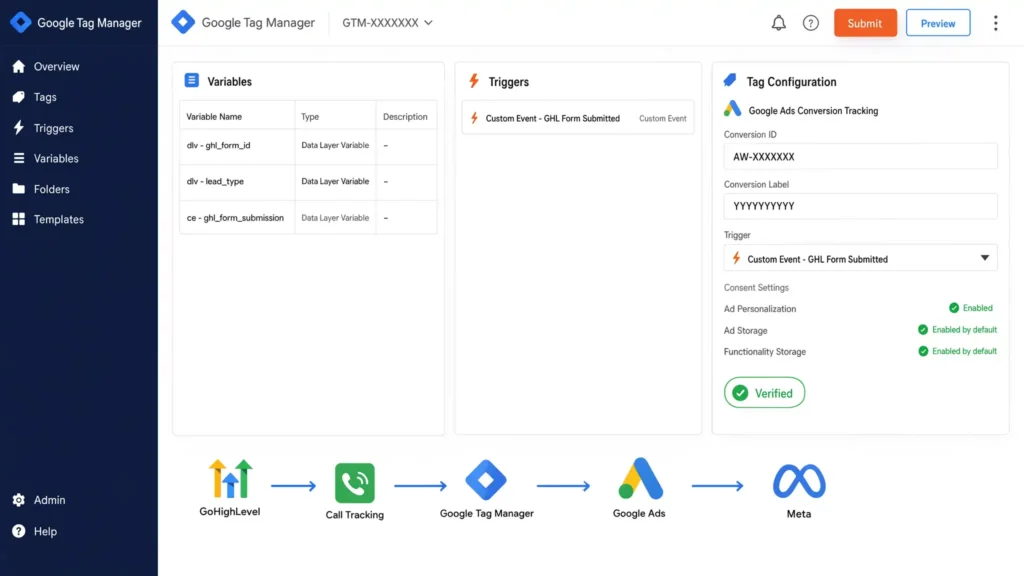
GTM Variables Configuration
Create the following Custom Event and Data Layer Variables:
Variable Name in GTM | Variable Type | Data Layer Variable Name |
dlv – ghl_form_id | Data Layer Variable | ghl_form_id |
dlv – lead_type | Data Layer Variable | lead_type |
ce – ghl_form_submission | Custom Event | ghl_form_submission |
GTM Trigger Setup
- Trigger Name: Custom Event – GHL Form Submitted
- Trigger Type: Custom Event
- Event Name: ghl_form_submission
- Fires On: All Custom Events
GTM Tag Setup (Google Ads Conversion Tag)
- Tag Type: Google Ads Conversion Tracking
- Conversion ID: AW-XXXXXXX
- Conversion Label: YYYYYYYYYY
- Trigger: Custom Event – GHL Form Submitted
- Consent Settings: Require ad_storage = granted.
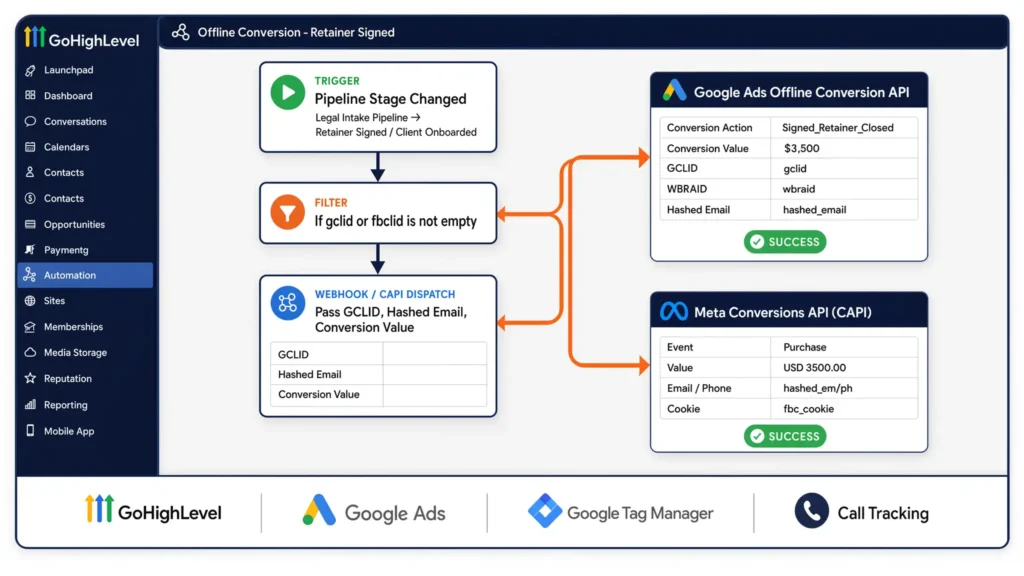
Phase 5: GHL Webhook Workflow for Offline Conversion Tracking (OCT)
To solve the core problem—optimizing for retainers instead of free consults across long sales cycles—you must send pipeline updates from GoHighLevel back to Google Ads and Meta Ads via Webhooks or native integrations.
					+-----------------------------------------------------------------------------------+
|                        GHL OFFLINE CONVERSION WORKFLOW                            |
+-----------------------------------------------------------------------------------+
|  GHL Pipeline Event: "Retainer Signed"                                            |
|       |                                                                           |
|       v                                                                           |
|  GHL Workflow Automation Filter                                                   |
|       |                                                                           |
|       v                                                                           |
|  Webhook / CAPI Dispatch (Includes GCLID, Hash Email, Conversion Value)           |
|       |                                                                           |
|       +----------------------------+----------------------------+                 |
|       |                                                         |                 |
|       v                                                         v                 |
|  Google Ads Offline Conversion API                     Meta Conversions API (CAPI)|
+-----------------------------------------------------------------------------------+
Step-by-Step Workflow Setup inside GoHighLevel:
- Navigate to GHL Automation > Workflows. Create a new workflow named “Offline Conversion – Retainer Signed”.
- Workflow Trigger: Pipeline Stage Changed.
- In Pipeline: Legal Intake Pipeline.
- Pipeline Stage: Retainer Signed / Client Onboarded.
- Action 1: Add Filter — Check if gclid or fbclid is not empty.
- Action 2 (Google Ads): Execute Google Ads Conversion API step OR dispatch Webhook to a custom server script sending data to Google Ads Offline Conversion Upload.
- Pass Conversion Name: Signed_Retainer_Closed
- Pass Conversion Value: e.g., $3,500 (actual retainer fee value)
- Pass Identifiers: gclid, wbraid, hashed email, hashed phone.
- Action 3 (Meta Ads): Execute Meta Conversions API Webhook.
- Pass Event Name: Purchase or Subscribe
- Pass Value & Currency: USD 3500.00
- Pass User Data: Hashed Email (em), Hashed Phone (ph), fbc cookie parameter.
By routing these downstream pipeline triggers, your ad managers can leverage advanced setups like offline conversion tracking services and marketing automation services to auto-optimize bidding strategies toward actual firm revenue.
Testing & Validation
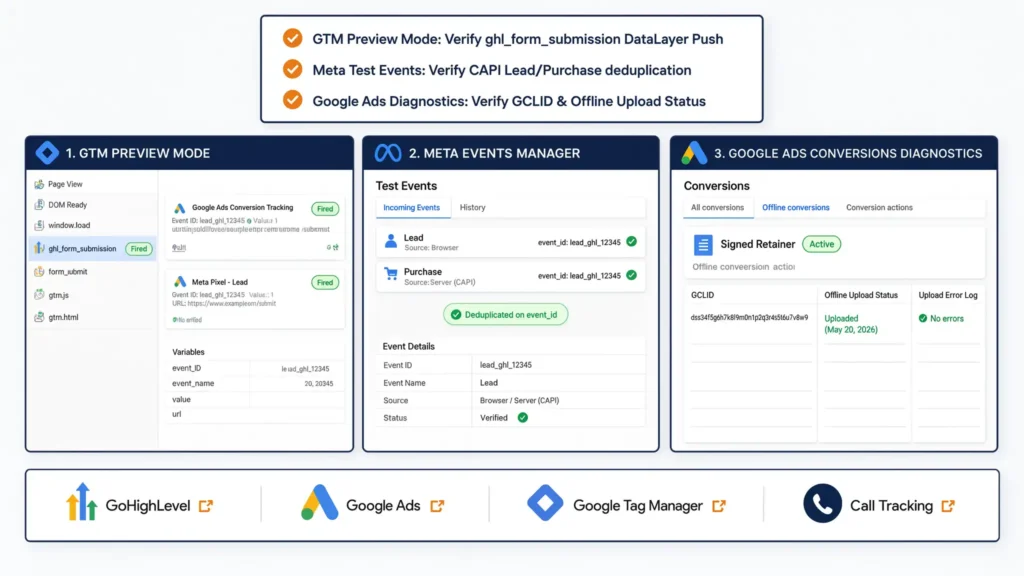
Never push tracking live without verifying data accuracy across debug tools.
- GTM Preview Mode:
- Open GTM Preview Mode, connect your landing page domain, and submit a test GoHighLevel form.
- Check the left-hand event timeline for ghl_form_submission.
- Verify that tags for Google Ads and Meta fire properly on this event.
- Meta Test Events Tool:
- Open Meta Events Manager > Test Events.
- Submit a form or push a pipeline stage in GHL. Verify that both Browser and Server (CAPI) events arrive, deduplicating cleanly on the same event_id.
- Google Ads Conversion Diagnostics:
- Navigate to Google Ads > Goals > Conversions > Summary.
- Inspect your Signed Retainer offline conversion action. Ensure status displays “Active” and check upload error logs for unmapped GCLIDs.
Troubleshooting Common Setup Errors
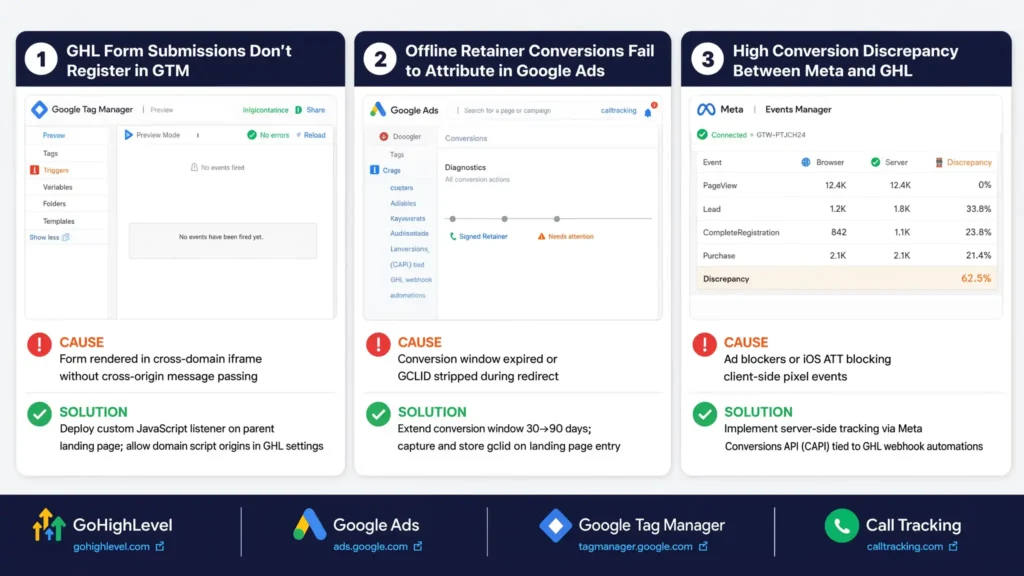
Issue 1: GHL Form Submissions Don’t Register in GTM
- Cause: The form is rendered inside an cross-domain iframe without cross-origin message passing.
- Solution: Confirm the custom JavaScript listener from Phase 3 is deployed directly on the parent website landing page, and ensure domain script origins are allowed in GHL settings.
Issue 2: Offline Retainer Conversions Fail to Attribute in Google Ads
- Cause: The conversion window expired, or GCLID was stripped during redirect.
- Solution: Extend your Google Ads conversion action window from 30 days to 90 days. Ensure your GHL forms correctly capture and store the gclid parameter upon initial landing page entry.
Issue 3: High Conversion Discrepancy Between Meta and GHL
- Cause: Browser ad blockers or iOS Apple App Tracking Transparency (ATT) blocking client-side pixel events.
- Solution: Implement server-side tracking via Meta Conversions API (CAPI) tied directly to GHL webhook automations. Review custom configurations like my third-party conversion tracking setup guide for advanced solutions.
Summary by Niamul
GoHighLevel is a premier CRM platform for modern legal practices, but its true marketing power lies in accurate conversion tracking architecture. By shifting optimization goals from initial free consultations to qualified consults and signed retainers, extending attribution windows to match long legal buying cycles, keeping case details private, and routing offline conversion data using GTM and Webhooks, law firms can unlock consistent profitability from Google and Meta advertising investments.
1.Is GoHighLevel HIPAA and privacy compliant for legal lead intake?
GoHighLevel offers HIPAA-compliant packages with executed Business Associate Agreements (BAAs), making it suitable for practices handling sensitive medical records or personal injury claims. For law practices, maintaining privacy compliance requires sanitizing sensitive case descriptions out of marketing tracking tags before sending custom parameter data to third-party advertising platforms like Meta or Google.
2.Why should law firms optimize for retainers instead of free consults?
Optimizing for free consultations instructs advertising algorithms to search for users who willingly complete forms, regardless of financial capacity or intent to hire an attorney. By optimizing for signed retainers via offline conversion imports, the algorithms train specifically on user profiles that generate real revenue for the law firm.
3.How do I track inbound phone calls generated through GoHighLevel?
GoHighLevel provides native LC Phone / Call Tracking capabilities that dynamically swap phone numbers on your website based on traffic source (DNI – Dynamic Number Insertion). When a user calls a tracking number linked to a Google Ads campaign, GHL registers the call duration and sends the offline conversion call event directly back to Google Ads.
4.What is the maximum attribution window I should set for legal advertising?
Legal clients often consult multiple law firms or delay legal action for weeks after initial search research. You should configure your conversion tracking windows in Google Ads to the maximum allowable duration (typically 90 days) to ensure retainer closes occurring several weeks after the original ad click attribute accurately back to the originating campaign.
5.Can I run Google Consent Mode v2 inside GoHighLevel natively?
While GoHighLevel provides basic cookie banner options, running full Google Consent Mode v2 compliance requires deploying a certified Consent Management Platform (CMP) like Cookiebot or CookieYes via Google Tag Manager. This setup updates consent flags dynamically (ad_storage, ad_user_data) based on direct user interactions.
6.How do I stop ad platforms from receiving sensitive legal case details?
Ensure that JavaScript tags firing on form submissions or webhooks sending server-side events pass generic event labels (such as legal_intake_submit or consultation_requested). Keep granular custom fields like divorce_paternity_matter or felony_defense strictly inside GoHighLevel contact custom fields, fully removed from marketing tags.
7.Does GoHighLevel integrate directly with Meta Conversions API (CAPI)?
Yes, GoHighLevel offers native integrations with Meta Business Manager, but for multi-pipeline legal attribution, building custom workflow automations using webhooks provides higher reliability. Webhooks allow you to explicitly define event timing, deduplication IDs, and hashed customer parameters (em, ph) when contacts transition to paying legal clients.
8.What causes GCLID data to be lost in GoHighLevel forms?
GCLID (Google Click Identifier) parameters are frequently lost when prospects navigate across multiple pages before filling out a form, or when landing pages redirect from HTTP to HTTPS without preserving query parameters. Using persistent cookie scripts or local storage scripts ensures click parameters persist until the intake form is completed.
9.Why are my paid search campaigns showing high leads but low firm revenue?
This issue typically occurs when ad campaigns optimize exclusively for high lead volume rather than qualified case values. Implementing pre-qualification fields within your GHL intake forms (such as geographic residency or case urgency) and passing only qualified consultation events back to Google Ads resolves this misalignment.
10.Can MD Niamul assist our law firm in setting up server-side conversion tracking?
Yes. I specialize in designing and deploying custom analytics frameworks, server-side tracking, Google Consent Mode v2, and offline CRM conversion pipeline setups for law firms and high-ticket service industries. You can book a consultation directly through mdniamul.com or get in touch via WhatsApp.
 Need Help Advanced GHL Automation & Tracking Setup?