
Quick Answer
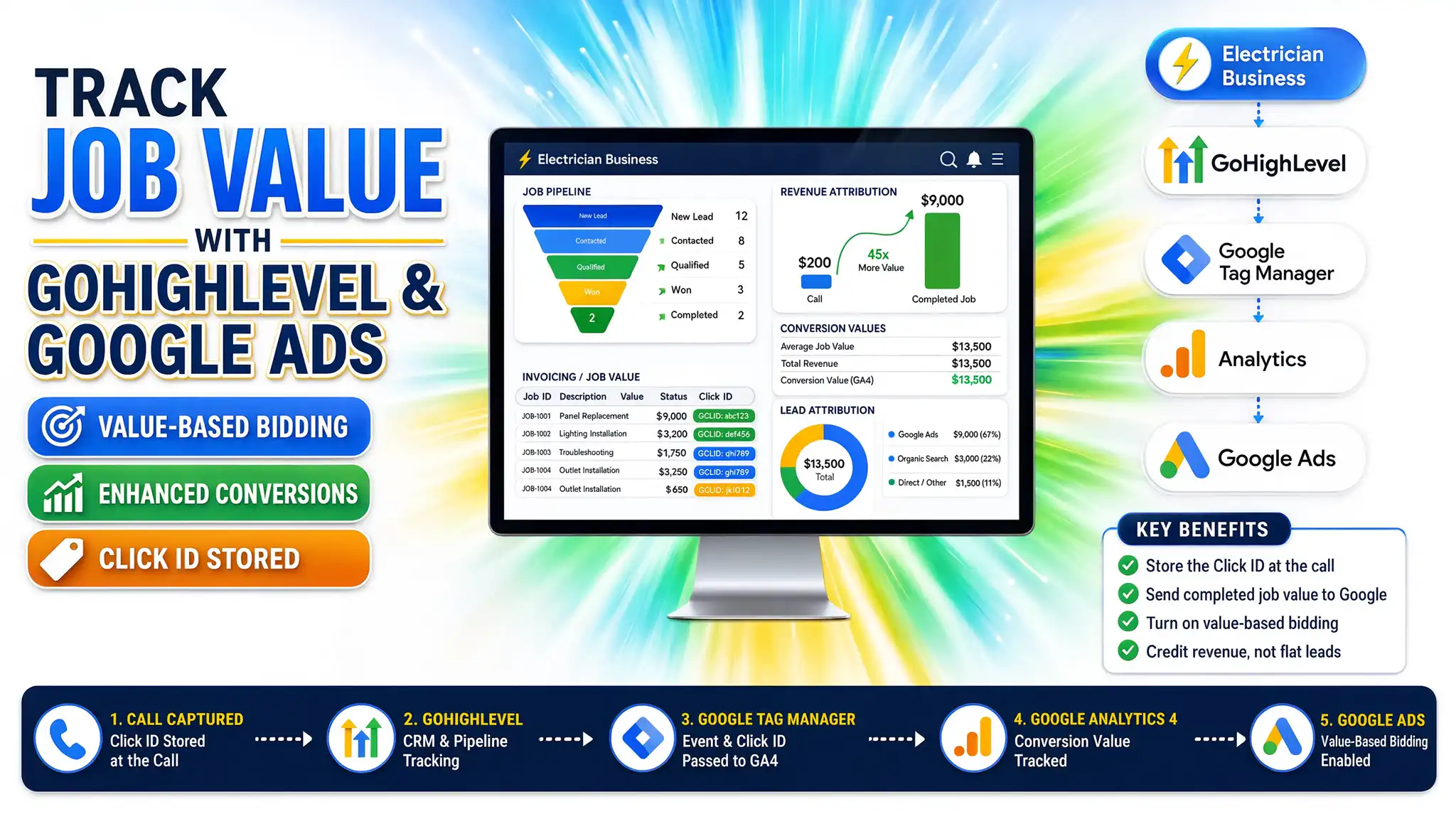
Configuring GoHighLevel google ads Conversion Tracking for electrician business setups requires capturing click identifiers (GCLID) at the exact moment a homeowner fills out an estimate form, storing those values inside your CRM custom fields, and uploading closed-job revenue back to Google Ads. This prevents ad algorithms from treating a massive $9,000 panel upgrade like a routine $200 outlet repair.
Key Takeaways
- The 40x Ticket Trap: Electrical jobs range from minor switch replacements to heavy-duty panel upgrades; flat lead values destroy Google Ads machine learning.
- Click ID Capture: Storing Google (GCLID) and Meta (FBCLID) parameters inside hidden GoHighLevel fields links web traffic to physical field invoices.
- Privacy Compliance: Integrating Google Consent Mode v2 with Cookiebot ensures your tracking adheres to regional laws without losing data attribution.
- JavaScript Listeners: Deploying custom event listeners ensures multi-step booking widgets never drop attribution variables.
- Value-Based Bidding: Feeding real closed-job values back to ad networks trains algorithms to find high-budget property owners instead of low-cost tire-kickers.
Introduction: The $9,000 Blind Spot in Your Electrical Ad Campaigns
Picture sitting across the table from a local electrical contractor who is staring at his monthly ad spend dashboard with absolute frustration. He spent $2,000 on Google Ads, generated 10 leads, and plugged in a flat $150 conversion value for every single submission. His digital marketing agency tells him his cost-per-acquisition is too high, so he is ready to pull the plug on digital advertising entirely.
The tragedy? Lead number 4 started as a simple inquiry about a flickering hallway light. But once his licensed electrician arrived on-site, they uncovered an obsolete 60-amp fuse box that posed a severe fire hazard. That minor $150 service call instantly evolved into an emergency $9,200 panel upgrade.
If your marketing stack only tracks the initial form fill and ignores what happens in the field, your ad platform optimizes for cheap fixes while completely ignoring the high-ticket work that keeps your trucks on the road. Let’s look at how you fix this broken loop using GoHighLevel.
Why GoHighLevel Conversion Tracking Matters for Electrical Contractors
Electrical businesses operate in a unique environment where customer lifetime value and job ticket sizes fluctuate wildly. A ceiling fan installation might net $175, while a whole-home surge protector and heavy-up upgrade can exceed $10,000.
When you feed uniform lead values into Google Ads, algorithms optimize for lead volume rather than actual revenue generation. To fix this, you need a centralized CRM like GoHighLevel working hand-in-hand with professional Marketing Automation Services to track every phase of the customer journey.
The Core Benefits of Proper GHL Tracking
- True ROAS Visibility: Know precisely which keywords and ad campaigns generate major rewiring projects rather than minor service calls.
- Value-Based Bidding: Give Google Ads the real-world revenue data it needs to bid higher for high-intent homeowners.
- Automated Pipeline Syncing: Seamlessly move lead data from initial web forms down to completed invoicing stages.
- Attribution Continuity: Maintain a clear audit trail from the moment a homeowner clicks your ad to the final payment collection.
- Reduced Waste: Stop wasting ad budget on keywords that generate dead-end inquiries.
Prerequisites & Checklist
Before building your tracking and automation infrastructure, ensure you have administrative access to the following assets:
- GoHighLevel Sub-Account: With permissions to edit pipelines and custom fields.
- Google Tag Manager (GTM) Container: Active and installed on your electrician website (WordPress, custom CMS, or Shopify).
- Google Ads Manager Account: Linked with appropriate conversion actions and offline upload permissions.
- Cookiebot CMP Account: Configured for regional privacy consent collection.
Video Tutorial: Implementing GoHighLevel Tracking for Electrical Contractors
Step-by-Step Implementation Guide
Phase 1: Structuring GoHighLevel Pipelines for Electrical Jobs
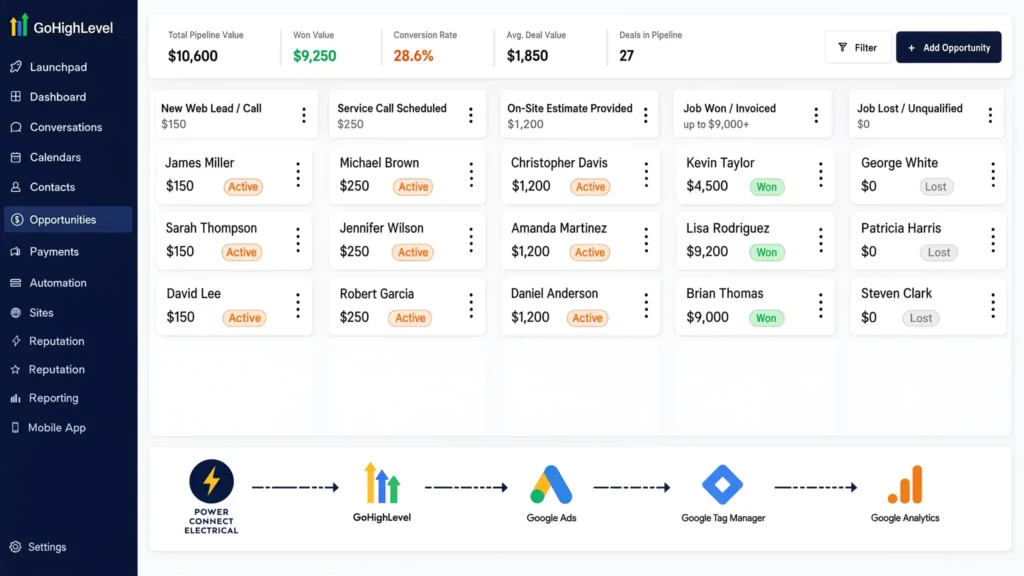
To feed accurate data back to Google Ads, your GoHighLevel CRM pipeline must mirror your real-world sales process. Create a pipeline named “Electrical Contracting Lifecycle” with these stages:
- New Web Lead / Call (Default Value: $150)
- Service Call Scheduled (Default Value: $250)
- On-Site Estimate Provided (Default Value: $1,200)
- Job Won / Invoiced (Dynamic Actual Value up to $9,000+)
- Job Lost / Unqualified (Value: $0)
Phase 2: Capturing Click IDs (GCLID) via GHL Forms
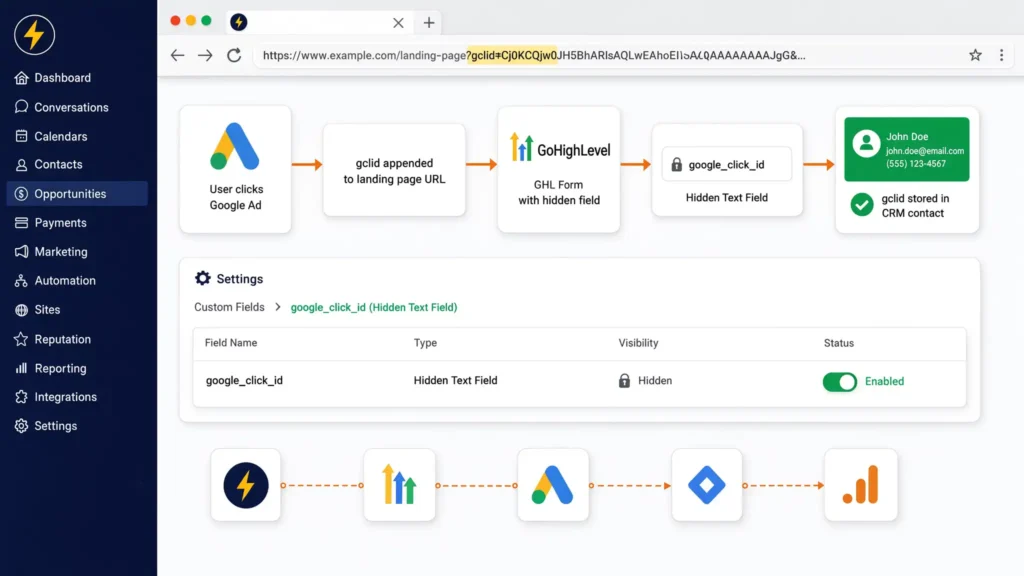
When a user clicks your Google Ad, a unique tracking identifier called a gclid is appended to your landing page URL. You must capture and store this string.
- Navigate to GoHighLevel Settings > Custom Fields and create a new hidden text field named google_click_id.
- Embed your GHL form on your website and add this hidden field to the form layout.
- Ensure your landing pages allow URL parameters to pass cleanly into form inputs so the gclid is safely stored in the CRM contact profile upon submission.
Phase 3: Google Consent Mode v2 Setup with Cookiebot
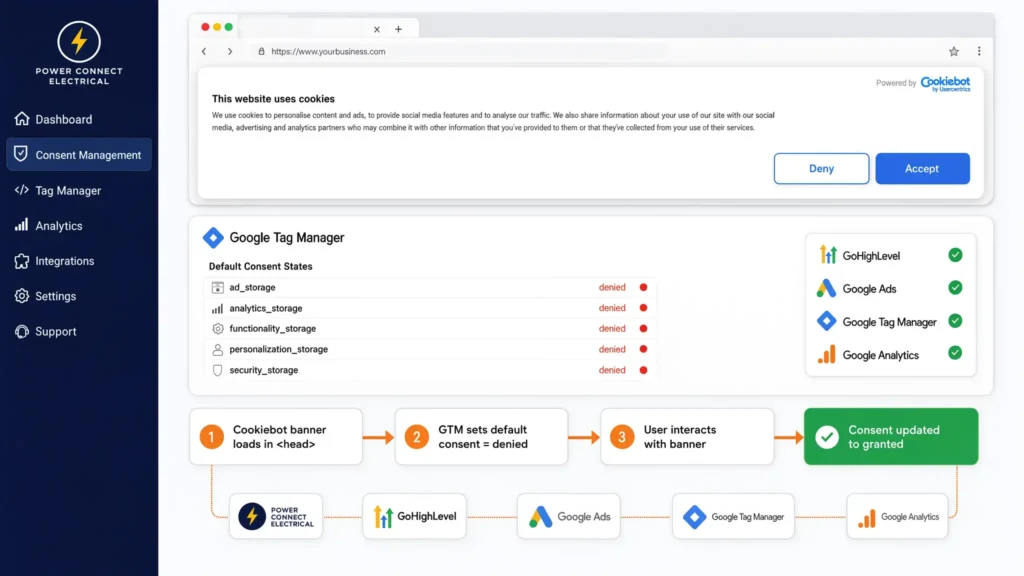
In regions governed by privacy laws like GDPR and CCPA, you must obtain user consent before tracking cookies execute. Cookiebot handles this seamlessly when paired with Google Consent Mode v2.
- Step 1: Install the Cookiebot banner script in the <head> section of your website, ensuring it loads before Google Tag Manager.
- Step 2: Initialize default consent states inside GTM before any tags fire:
					gtag('consent', 'default', {
  'ad_storage': 'denied',
  'analytics_storage': 'denied',
  'ad_user_data': 'denied',
  'ad_personalization': 'denied',
  'wait_for_update': 500
});
- Step 3: Configure Cookiebot event listeners in GTM to update consent parameters to ‘granted’ as soon as the user interacts with the cookie banner. For complex tracking requirements, explore professional Server-Side Tracking Services to ensure zero data loss.
Phase 4: Implementing the Custom JavaScript Listener Code
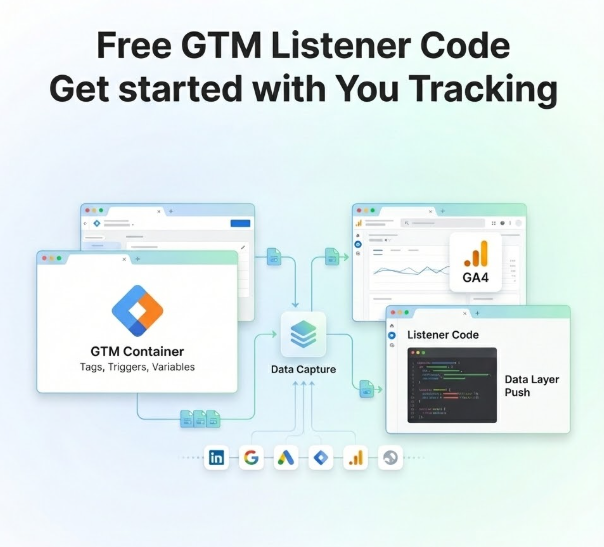
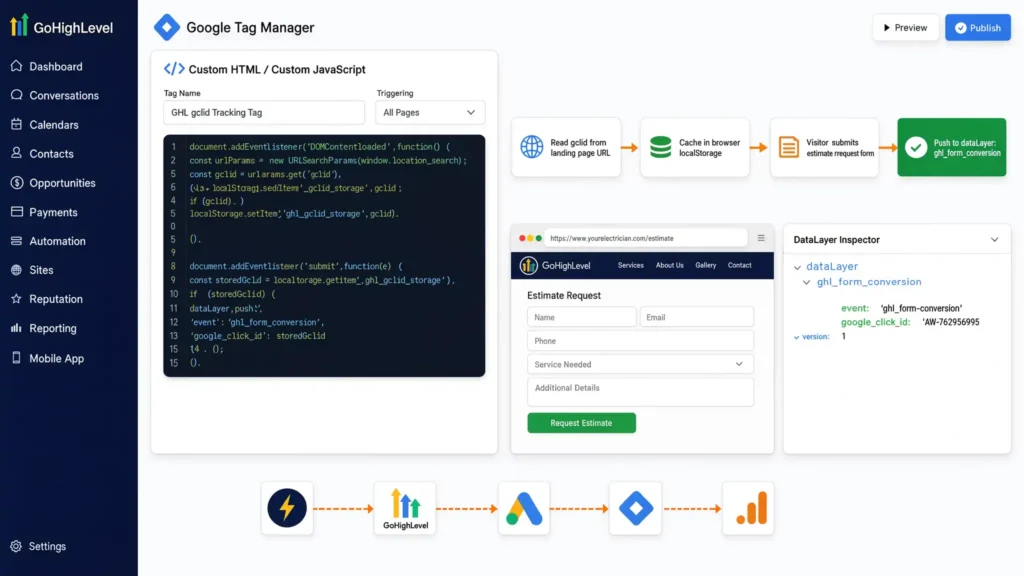
To prevent multi-step booking widgets or embedded GHL forms from dropping the gclid parameter, deploy this robust JavaScript listener via Google Tag Manager.
					document.addEventListener("DOMContentLoaded", function () {
    const urlParams = new URLSearchParams(window.location.search);
    const gclid = urlParams.get('gclid');

    if (gclid) {
        localStorage.setItem('ghl_gclid_storage', gclid);
    }

    // Attach stored GCLID to form submissions
    document.querySelectorAll('form').forEach(form => {
        form.addEventListener('submit', function () {
            const storedGclid = localStorage.getItem('ghl_gclid_storage');

            window.dataLayer = window.dataLayer || [];
            window.dataLayer.push({
                'event': 'ghl_form_conversion',
                'google_click_id': storedGclid
            });
        });
    });
});
- How it works: This script captures the ad click ID from the landing page URL, caches it securely in the browser’s local storage, and injects it into the data layer whenever a visitor submits an estimate request form on your electrical site.
Phase 5: Sending Closed-Job Revenue Back to Google Ads
When an electrician completes a $9,000 panel upgrade and your team marks the deal as “Job Won” in GoHighLevel, an automated webhook or Zapier integration triggers an offline conversion upload.
- Trigger: Pipeline stage transitions to “Job Won”.
- Action: Send an Offline Conversion API payload to Google Ads using the stored google_click_id and the exact invoice value ($9,000).
- Result: Google Ads attributes the high-ticket revenue back to the original keyword, optimizing future ad delivery for similar high-intent homeowners. For specialized setups, look into dedicated Offline Conversion Tracking Services and GoHighLevel Form Conversion Tracking Services.
Testing & Validation
Before relying on your new tracking architecture, run through this validation checklist:
- GTM Preview Mode: Append ?gclid=test_gclid_sample_123 to your website URL, complete a test form submission, and verify that the ghl_form_conversion event fires with the correct click ID in the GTM debug panel.
- GHL Contact Audit: Check your test contact record inside GoHighLevel to confirm that the google_click_id custom field populated successfully.
- Google Ads Diagnostics: Review your Google Ads conversion action status to ensure offline conversion uploads process cleanly without schema errors or expired click timestamps.
Troubleshooting Common Issues
Problem | Root Cause | Solution |
GCLID value is missing in GHL | User navigated across multiple internal pages before filling out the form, clearing URL parameters. | Implement browser local storage caching via our JavaScript listener to persist the gclid throughout the session. |
Consent mode blocking tracking | Cookiebot default state remaining permanently denied without updating. | Verify that Cookiebot is configured correctly in GTM and triggers consent updates instantly upon user opt-in. |
Offline conversions failing upload | Mismatched currency codes or invalid timestamp formats in the API payload. | Ensure your offline conversion payload strictly adheres to Google Ads API requirements, including proper UTC time formatting. |
Duplicate conversions firing | Page reloads triggering form submit listeners multiple times. | Establish strict trigger conditions in GTM and implement event deduplication rules. |
Conclusion
Electrical contractors cannot afford to treat $9,000 panel upgrades like $100 service calls. By deploying GoHighLevel Google Ads conversion tracking, capturing click IDs, enforcing privacy compliance with Cookiebot, and feeding actual closed-invoice values back into ad networks, you transform your marketing from an unpredictable expense into a high-yield growth engine.
Summary by MD Niamul
Mastering GoHighLevel Google Ads conversion tracking transforms how ad platforms view your revenue. By capturing click IDs, integrating Google Consent Mode v2 with Cookiebot, and syncing closed-job invoice values back to Google Ads, you empower ad algorithms to find high-value panel upgrade clients rather than low-cost service calls.
1. Why track panel upgrade values?
Standard lead tracking treats every inquiry as equal, hiding the true profitability of high-ticket services. Feeding actual invoice values back into Google Ads trains the ad algorithms to find homeowners looking for major electrical work rather than cheap service calls, maximizing your return on ad spend.
2. How does GHL capture GCLID?
GoHighLevel captures click IDs by utilizing custom hidden fields embedded in your lead capture forms. A custom JavaScript snippet extracts the gclid parameter directly from the incoming browser URL and stores it safely until the visitor submits their inquiry.
3. What is Google Consent Mode v2?
Google Consent Mode v2 is a regulatory framework protocol that communicates user consent choices regarding cookies to Google tags. It adjusts how tracking tags behave based on whether the user consented to ad storage and analytics storage, ensuring legal compliance with GDPR and CCPA.
4. How does Cookiebot integrate here?
Cookiebot functions as your Consent Management Platform (CMP). It presents a compliant cookie banner to website visitors and communicates their preferences directly to Google Tag Manager, updating Google Consent Mode v2 parameters before tracking scripts execute.
I provide full-stack analytics solutions including Google Tag Manager (GTM), Google Analytics 4 (GA4), Google Ads conversion tracking, Looker Studio dashboards, server-side tracking, and advanced data analysis to deliver accurate, business-ready insights.
5. Can I track phone call conversions?
Yes. GoHighLevel offers robust call tracking features. When a homeowner calls your business from a Google Ad, GHL logs the call duration, caller ID, and source attribution, allowing you to tie phone inquiries directly to pipeline values and offline conversions.
6. What if a lead books offline?
If a customer calls your office directly instead of filling out a web form, your administrative team can manually enter the lead source and associate the profile within GoHighLevel. Once the job is completed and invoiced, the CRM links the final revenue figure back to the customer record.
7. Why use offline conversion tracking?
Offline conversion tracking bridges the gap between digital ad clicks and physical, offline business transactions. It allows you to upload closed-deal revenue data directly back into ad platforms weeks after the initial web form was submitted, giving ad algorithms complete visibility into actual profitability.
8. Is GHL suitable for small electricians?
GoHighLevel is highly scalable and benefits electrical businesses of all sizes. Whether you operate a single truck or manage a large fleet of electricians, GHL centralizes lead management, automated text-back follow-ups, pipeline tracking, and review generation into one unified platform.
9. How do I test my tracking?
You can test your tracking setup by using Google Tag Manager Preview Mode combined with browser developer tools. Append test query parameters to your URL, submit a test lead through your GHL form, and verify that click IDs populate correctly inside your GHL sub-account and analytics debuggers.
10. Where can I get expert help?
Setting up advanced offline conversion tracking and CRM pipelines requires precise technical configuration. If you need professional implementation, you can reach out for specialized Server-Side Tracking Services or connect directly with expert analysts to build a custom data architecture for your business.
 Need Help Advanced GHL Automation & Tracking Setup?