Table of Contents
ToggleQuick Answer
Configuring Meta Conversion API (CAPI) and Multi-Domain Tracking using Server-Side Google Tag Manager (sGTM) hosted on Stape.io combined with GA4 cross-domain auto-linking (_gl) preserves session continuity when users jump between different brand domains. By decorating cross-domain links with tracking IDs (_fbp, _fbc, fbclid) and generating a shared, persistent event_id across browser tags and server requests, Meta deduplicates duplicate payloads seamlessly. This eliminates broken attribution, restores missing checkout conversions across domains, and achieves 99% data accuracy for scaling ad campaigns.
Key Takeaways
- Stop Cross-Domain Data Leakage: Moving visitors between primary marketing domains (brand.com) and secondary checkout domains (checkout-brand.com) breaks client-side browser cookies, resetting attribution to “Direct” or “Referral”.
- Persistent Event ID Deduplication: Generating a single event_id in the browser Data Layer and passing it across domain switches guarantees Meta’s deduplication engine matches browser pixel events with server CAPI requests.
- Unified GA4 & sGTM Architecture: Configuring GA4 cross-domain auto-linking parameters allows sGTM server containers to pass user identifiers seamlessly across multiple domains.
- First-Party Cookie Protection: Deploying custom server subdomains on Stape.io extends cookie lifetimes across all connected domain properties, mitigating Safari ITP restrictions.
- Consent Synchronization: Configuring Cookiebot Consent Mode v2 with cross-domain consent sharing ensures legal compliance without losing user opt-in states between sites.
Introduction: The $54,000 Multi-Domain Attribution Ghost
A high-growth e-commerce client running scaling Meta ad campaigns contacted me after noticing a massive analytics mismatch. His marketing team drove traffic to a content storefront (shopbrand.com), but completed payments occurred on a separate, hosted checkout platform (checkout-brand.com). His backend store reported $160,000 in monthly sales, yet Meta Ads Manager credited only $106,000. Over $54,000 in attributed revenue had completely vanished from his campaign dashboards.
					[Domain A: shopbrand.com] ---> (User Clicks Purchase - Link Unlinked) ---> [Domain B: checkout-brand.com]
          |                                                                           |
   (Has Meta _fbc/_fbp)                                                      (Cookies Lost / Reset)
          |                                                                           |
          v                                                                           v
[Browser Pixel: ViewContent]                                                [Browser Pixel: Purchase]
   Attributed to Meta Ads                                                     Attributed to Direct / Referral
Because the transition between shopbrand.com and checkout-brand.com dropped the initial ad click identifiers (fbclid) and browser cookies (_fbp), Meta treated buyers on Domain B as brand-new visitors. The browser pixel on Domain B logged the conversion as an unattributed or direct sale, robbing Meta’s algorithm of critical purchase signals required to optimize ad targeting.
Deploying standard client-side tracking pixels across multiple domain properties is no longer enough. Network ad blockers, cross-domain cookie restrictions, and Apple’s Intelligent Tracking Prevention (ITP) strip URL parameters during domain redirects.
In this comprehensive guide, I will show you how to build a multi-domain tracking architecture using Meta Conversion API (CAPI), Server-Side GTM, GA4, and Stape.io. You will learn to deploy custom JavaScript link decorators, establish persistent cross-domain event deduplication, enforce Google Consent Mode v2 via Cookiebot across multiple sites, and maximize your Event Match Quality (EMQ) score to scale Meta Ads profitability.
Why Multi-Domain Server-Side Meta CAPI Matters
When your user journey spans two or more distinct web domains, standard browser analytics fail. Understanding where tracking breaks helps highlight why a unified server-side solution is necessary.
The Vulnerabilities of Standard Multi-Site Tracking
- Broken Cookie Identification: Third-party cookie blocking prevents Domain B from reading client-side tracking cookies (_fbp, _fbc, _ga) created on Domain A.
- Attribution Reset: Analytics platforms interpret domain hops as external referrals, overwriting Meta paid ad source attribution with a self-referral from Domain A.
- Duplicate & Orphaned Events: Browser pixels on Domain A register InitiateCheckout, while Domain B registers Purchase under a separate user profile, creating fragmented user journeys inside Meta Events Manager.
- Degraded Event Match Quality (EMQ): When user details (email, phone, browser ID) are stripped during domain handoffs, Meta cannot match conversions back to the ad recipient, driving match scores below 4.0/10.
The Strategic Benefits of sGTM Multi-Domain CAPI
- Unbroken User Journeys: Passing link decoration parameters (_gl, fbclid, _fbp) across domain switches preserves user identity from ad click to checkout completion.
- Deterministic Event Deduplication: Generating a unified event_id prior to domain navigation ensures Meta deduplicates browser and server payloads, preventing double counting.
- Resilient First-Party Cookies: Routing server data through first-party server subdomains via Stape keeps tracking cookies intact across multi-domain ecosystems.
- Improved Optimization Signals: Feeding clean, cross-domain conversion payloads to Meta Graph API enables machine-learning models to optimize bid strategies accurately.
					+-----------------------------------------------------------------------------------+
|               SINGLE-DOMAIN VS. MULTI-DOMAIN CAPI TRACKING COMPARISON             |
+--------------------------+-------------------------+------------------------------+
| Tracking Feature         | Single-Domain Setup     | Multi-Domain sGTM CAPI Setup |
+--------------------------+-------------------------+------------------------------+
| Cross-Site Session Link  | Not Required            | Auto-Linked via _gl & JS     |
| Cookie Persistence       | Standard First-Party    | Decorator-Preserved Cross-Site|
| Deduplication Reliability| High (Single Domain)    | Guaranteed via Cross-ID     |
| Meta Ad Attribution      | Standard                | Complete End-to-End Accuracy |
| Match Quality (EMQ)      | Moderate to High        | Maximized (8.0 - 10.0)       |
| Referral Exclusion Need  | None                    | Essential for Domain B       |
+--------------------------+-------------------------+------------------------------+
Prerequisites & Setup Checklist
Before implementing a multi-domain Meta CAPI server-side pipeline, ensure you have the required access permissions and infrastructure listed below:
					+-----------------------------------------------------------------------------------+
|                           PRE-IMPLEMENTATION CHECKLIST                            |
+-----------------------+----------------------------------+------------------------+
| Asset / System        | Required Access Level            | Purpose                |
+-----------------------+----------------------------------+------------------------+
| Web GTM Containers    | Admin Access (All Domains)       | Deploy Decorators      |
| Server GTM Container  | Admin Access                     | Centralized CAPI Routing|
| Stape.io Hosting      | Global / EU Account Access       | Cloud Container Host   |
| Meta Business Suite   | Admin / Developer Access         | Pixel ID & API Token   |
| GA4 Property          | Editor / Admin Access            | Cross-Domain Linking   |
| DNS Domain Managers   | CNAME Access (All Domains)       | Custom Subdomain Setup |
| Cookiebot CMP         | Multi-Domain Group Access        | Consent Sharing Setup  |
+-----------------------+----------------------------------+------------------------+
- Google Tag Manager Workspaces: Admin access to Web GTM containers installed across Domain A and Domain B.
- Server-Side GTM Container: Admin access to a shared sGTM container used as a proxy for all connected web properties.
- Stape.io Cloud Hosting: Account provisioned on Stape Global Hosting or Stape European Hosting for GDPR compliance.
- Meta Business Manager: Admin access to obtain your Pixel ID and generate a permanent Conversions API Access Token.
- Google Analytics 4 Property: Admin rights to configure cross-domain measurement rules and referral exclusion lists.
- DNS Management Access: Permission to map CNAME records across all domain DNS zone files (metrics.brand.com and metrics.checkout-brand.com).
- Cookiebot CMP Account: Account set up on Cookiebot with cross-domain consent sharing enabled.
Video Walkthrough Tutorial
If you prefer a step-by-step video demonstration of configuring Meta CAPI and Multi-Domain Tracking using sGTM and GA4, watch the video tutorial below:
Step-by-Step Implementation Guide
Phase 1: Deploy Google Consent Mode V2 Across Domains via Cookiebot
When tracking user behavior across multiple domain properties, managing user privacy preferences is critical. Using Cookiebot CMP ensures that consent states (ad_storage, analytics_storage, ad_user_data, ad_personalization) remain synchronized when visitors navigate between your websites.
					[Domain A: shopbrand.com] ---> (User Grants Consent) ---> [Cookiebot Cross-Domain Consent]
                                                                        |
                                                                        v
[Domain B: checkout-brand.com] <--- (Inherits Granted State) <----------+
- Log into your Cookiebot Manager Account and navigate to Domain Groups.
- Add both primary (shopbrand.com) and secondary (checkout-brand.com) domains to the same Domain Group.
- Enable Cross-Domain Consent Sharing within Cookiebot settings. This sets a secure token passing user consent choices across domain switches.
- Open your Web GTM Container (installed on both sites), navigate to the Community Template Gallery, and install the Cookiebot CMP tag template.
- Set default consent states to denied for marketing and analytics categories.
- Attach the Cookiebot tag to the Consent Initialization – All Pages trigger across all container workspaces.

Phase 2: Add Custom Multi-Domain JavaScript Link Decorator & Event Listener
To prevent cross-domain redirects from stripping Meta ad click identifiers (fbclid) and browser tracking cookies (_fbp, _fbc), deploy a custom JavaScript link decorator.
Think of an event listener like a catcher’s mitt—it catches user interactions across your site and pushes them into the Data Layer (which acts as an invisible filing cabinet for Tag Manager). If your checkout operates inside an iframe, remember that an iframe is like a glass window into another tool: you can see through it, but your parent page cannot capture interactions inside it without a custom postMessage listener.
Custom HTML Multi-Domain Link Decorator Tag (Web GTM – Domain A & B)
Create a Custom HTML Tag named chtml – Cross-Domain Meta Decorator & Listener in your Web GTM containers, and trigger it on Initialization – All Pages:
					<script>
(function() {
  // Utility: Retrieve specific cookie value by name
  function getCookie(name) {
    var value = "; " + document.cookie;
    var parts = value.split("; " + name + "=");
    if (parts.length === 2) return parts.pop().split(";").shift();
    return '';
  }

  // Utility: Generate persistent Event ID for deduplication
  function generateEventID() {
    return 'id_md_' + Date.now() + '_' + Math.floor(Math.random() * 1000000);
  }

  // Utility: Extract URL query string parameters
  function getQueryParam(param) {
    var urlParams = new URLSearchParams(window.location.search);
    return urlParams.get(param) || '';
  }

  // Preserve fbclid from URL or Session Storage
  var currentFbclid = getQueryParam('fbclid');
  if (currentFbclid) {
    sessionStorage.setItem('x_fbclid', currentFbclid);
  } else {
    currentFbclid = sessionStorage.getItem('x_fbclid') || '';
  }

  // Retrieve current Meta cookie values
  var fbp = getCookie('_fbp');
  var fbc = getCookie('_fbc');

  // Decorate outbound links targeting Domain B
  document.addEventListener('click', function(e) {
    var anchor = e.target.closest('a');
    if (anchor && anchor.href) {
      var targetUrl = new URL(anchor.href, window.location.href);

      // Specify target cross-domain destinations
      if (targetUrl.hostname.indexOf('checkout-brand.com') !== -1 || targetUrl.hostname.indexOf('shopbrand.com') !== -1) {
        if (currentFbclid) targetUrl.searchParams.set('fbclid', currentFbclid);
        if (fbp) targetUrl.searchParams.set('meta_fbp', fbp);
        if (fbc) targetUrl.searchParams.set('meta_fbc', fbc);
        anchor.href = targetUrl.toString();
      }
    }

    // Capture e-commerce checkout clicks
    if (e.target.closest('.checkout-button, [name="checkout"], .btn-proceed-checkout')) {
      var eventId = generateEventID();
      window.dataLayer = window.dataLayer || [];
      window.dataLayer.push({
        'event': 'custom_initiate_checkout',
        'event_id': eventId,
        'fbp': fbp,
        'fbc': fbc || currentFbclid,
        'cross_domain_source': window.location.hostname
      });
    }
  });

  // Extract inbound decorated URL parameters on Domain B
  var inboundFbp = getQueryParam('meta_fbp');
  var inboundFbc = getQueryParam('meta_fbc');
  if (inboundFbp && !getCookie('_fbp')) {
    document.cookie = "_fbp=" + inboundFbp + "; path=/; domain=." + window.location.hostname + "; max-age=" + (90*24*60*60);
  }
  if (inboundFbc && !getCookie('_fbc')) {
    document.cookie = "_fbc=" + inboundFbc + "; path=/; domain=." + window.location.hostname + "; max-age=" + (90*24*60*60);
  }
})();
</script>
Line-by-Line Technical Breakdown
- getQueryParam(‘fbclid’): Extracts Meta’s click identifier from inbound ad landing URLs.
- sessionStorage.setItem(‘x_fbclid’, …): Saves the fbclid string in browser session storage so it persists even if page navigation removes URL parameters.
- targetUrl.searchParams.set(‘meta_fbp’, fbp): Dynamically decorates outgoing cross-domain links with current _fbp and _fbc cookie values before navigation completes.
- document.cookie = “_fbp=”…: Checks Domain B upon page load for decorated incoming URL parameters and writes them as first-party cookies under Domain B’s hostname.
- generateEventID(): Generates a shared timestamped string (id_md_…) to ensure deduplication across both domains.
For platform-specific implementations, see our technical guides on Shopify server-side tracking, e-commerce server-side tracking, and third-party checkout conversion tracking.

Phase 3: Configure GA4 Cross-Domain Auto-Linking & Referral Exclusions
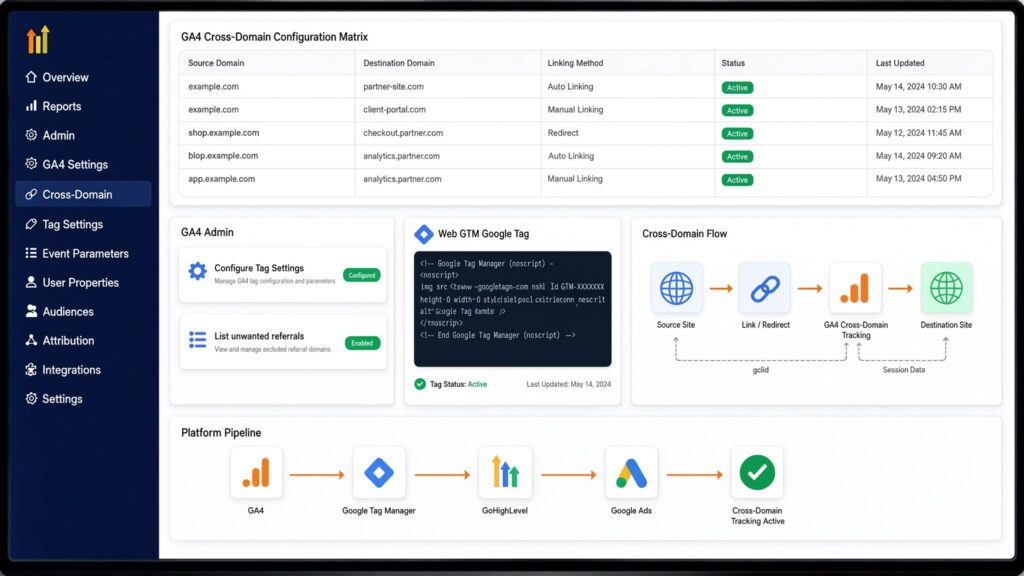
To maintain user session continuity across domains inside GA4 and pass linking identifiers (_gl) to sGTM server containers, configure GA4 cross-domain settings.
					+-----------------------------------------------------------------------------------+
|                      GA4 CROSS-DOMAIN CONFIGURATION MATRIX                        |
+-----------------------+----------------------------------+------------------------+
| Setting Field         | Configuration Parameter          | Target Destination     |
+-----------------------+----------------------------------+------------------------+
| Configure Domains     | shopbrand.com, checkout-brand.com| GA4 Data Stream Admin  |
| Unwanted Referrals    | checkout-brand.com, shopbrand.com| GA4 Data Stream Admin  |
| Web Tag Link Parameter| auto_link: true                  | Web GTM GA4 Tag        |
| Server Container URL  | https://metrics.shopbrand.com    | Web GTM GA4 Tag        |
+-----------------------+----------------------------------+------------------------+
- Configure GA4 Domain Linking:
- Open GA4 Admin > Data Streams > Select Web Stream > Configure Tag Settings.
- Select Configure your domains.
- Add match conditions for all connected domains:
- Condition 1: Contains shopbrand.com
- Condition 2: Contains checkout-brand.com
- List Unwanted Referrals:
- Inside Configure Tag Settings, select List unwanted referrals.
- Add domains shopbrand.com and checkout-brand.com. This prevents cross-domain hops from overwriting original ad campaign acquisition sources with self-referrals.
- Web GTM GA4 Tag Configuration:
- Open your Web GTM Container.
- In your Google Tag (GA4 Configuration Tag), add a configuration parameter:
- Parameter: send_page_view | Value: true
- Parameter: server_container_url | Value: [https://metrics.shopbrand.com](https://metrics.shopbrand.com)
Phase 4: Provision sGTM Multi-Domain Infrastructure on Stape.io
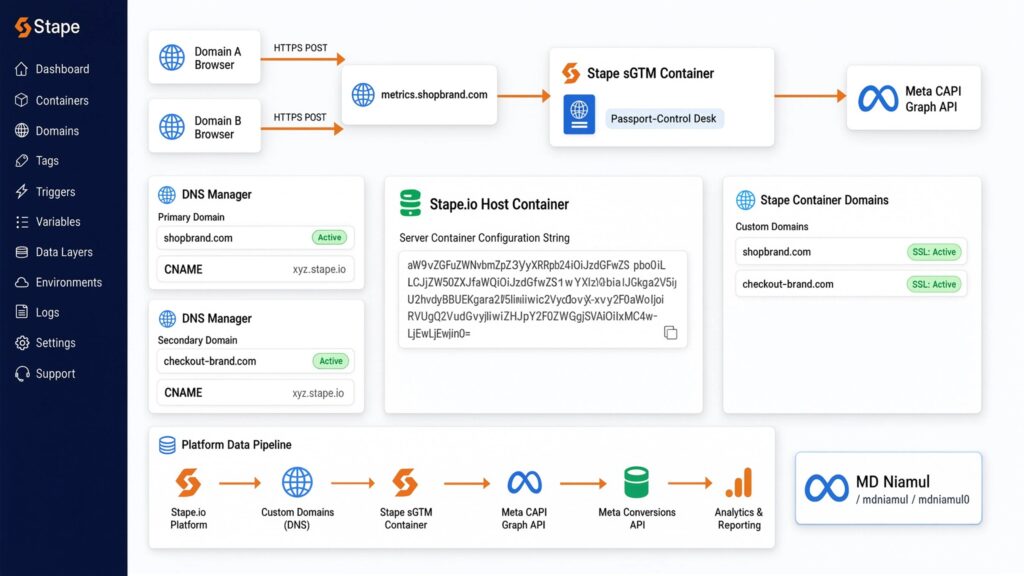
A server container acts like a passport control desk. Instead of letting browser scripts send data directly to third-party ad networks, your web pages send payloads to your central server container first. The server container cleanses, enriches, and forwards the data securely to Meta’s API endpoints over HTTPS.
					[Domain A Browser] ----+
                       |---> (HTTPS POST to metrics.shopbrand.com) ---> [Stape sGTM Container]
                       |                                                         |
[Domain B Browser] ----+                                                         v
                                                                      [Meta CAPI Graph API]
Step 1: Create a Centralized Stape Host Container
- Log into Stape Global Hosting or Stape European Hosting.
- Create a new sGTM container and paste your Server Container Configuration String from Tag Manager.
Step 2: Configure Custom Routing Subdomains
- In your primary domain DNS manager (shopbrand.com), create a CNAME record pointing to Stape:
- Host: metrics | Target: Your unique Stape container URL (e.g., xyz.stape.io).
- In your secondary domain DNS manager (checkout-brand.com), add a matching CNAME record:
- Host: metrics | Target: Same Stape container URL string (xyz.stape.io).
- Inside Stape Container Settings > Domains, add both custom domains (metrics.shopbrand.com and metrics.checkout-brand.com).
- Validate that SSL status reads Active for both mapped domains. Routing server traffic through custom subdomains preserves first-party cookie visibility across your entire web ecosystem.
For additional architectural details, review our guides on server-side tracking services and marketing automation services.
Phase 5: Web Meta Pixel & Persistent Event ID Configuration
To deploy a robust hybrid setup, fire client-side Meta Pixel tags alongside your sGTM server container. Passing identical event_id values guarantees that Meta’s deduplication engine processes events cleanly without double-counting transactions.
					                                 [USER ACTION: PURCHASE ON DOMAIN B]
                                                   |
                     +-----------------------------+-----------------------------+
                     |                                                           |
                     v                                                           v
          [Browser Pixel: Purchase]                                   [Server CAPI: Purchase]
          - Event Name: Purchase                                      - Event Name: Purchase
          - Event ID: id_md_171500_881                                - Event ID: id_md_171500_881
          - Domain: checkout-brand.com                                - Domain: checkout-brand.com
                     |                                                           |
                     +-----------------------------+-----------------------------+
                                                   |
                                                   v
                                       [Meta Events Manager]
                            Matches duplicate Event ID (id_md_171500_881)
                            -> Keeps Server Payload (Enriched User Data)
                            -> Discards Duplicate Browser Event
Web GTM Tag Mapping Table (Domain A & B)
					+-----------------------------------------------------------------------------------+
|                     WEB GTM META PIXEL TAG CONFIGURATION                          |
+-------------------+----------------------+-------------------+--------------------+
| Tag Name          | Tag Type             | Trigger           | Parameters Passed  |
+-------------------+----------------------+-------------------+--------------------+
| Meta - Purchase   | Custom HTML / Pixel  | event = purchase  | Event: Purchase    |
|                   |                      |                   | Event ID: event_id |
| Meta - Checkout   | Custom HTML / Pixel  | custom_initiate_  | Event: Initiate    |
|                   |                      | checkout          | Checkout           |
|                   |                      |                   | Event ID: event_id |
+-------------------+----------------------+-------------------+--------------------+
- GTM Data Layer Variable Creation:
- Name: dlv – event_id | Type: Data Layer Variable | Name in DL: event_id
- Name: dlv – fbp | Type: Data Layer Variable | Name in DL: fbp
- Name: dlv – fbc | Type: Data Layer Variable | Name in DL: fbc
- Meta Browser Pixel Custom HTML Tag Setup:
					<script>
  fbq('track', 'Purchase', {
    value: {{dlv - value}},
    currency: 'USD',
    content_type: 'product',
    contents: {{dlv - contents}}
  }, {
    eventID: '{{dlv - event_id}}'
  });
</script>

Phase 6: Configure sGTM Container for Multi-Domain Meta CAPI Routing
Next, configure your sGTM workspace to process inbound cross-domain payloads sent via GA4 client streams and route them directly to Meta Graph API endpoints.
					+-----------------------------------------------------------------------------------+
|                     sGTM MULTI-DOMAIN CAPI ROUTING TABLE                          |
+----------------------+-------------------------+----------------------------------+
| Server Component     | Configuration Parameter | Operating Function               |
+----------------------+-------------------------+----------------------------------+
| Client Processing    | GA4 Client              | Receives Cross-Domain Streams    |
| Tag Template         | Meta Conversions API    | Formats Payload for Graph API    |
| Authentication       | Permanent CAPI Token    | Authenticates Server Connection  |
| Match Parameter      | {{Event ID}}            | Enforces Event Deduplication     |
| Trigger Rule         | Client Name equals GA4  | Fires on All Inbound Requests    |
+----------------------+-------------------------+----------------------------------+
- Open your sGTM Workspace and navigate to Clients. Confirm the standard GA4 Client is enabled.
- Navigate to Community Template Gallery in sGTM, search for Meta Conversions API, and install the official tag template (by Stape or Facebook).
- Create a new tag named sGTM – Multi Domain Meta CAPI Tag:
- Pixel ID: Enter your Meta Pixel ID (123456789012345).
- API Access Token: Paste the permanent token generated inside Meta Events Manager.
- Action Source: Select website.
- Event Name: Choose Inherit from Client or map explicitly using lookup tables.
- Event ID: Map to {{Event ID}} extracted from the incoming GA4 data stream.
- Set the trigger to fire on all requests where Client Name equals GA4.

Phase 7: Optimize Event Match Quality (EMQ) Across Multi-Domain Journeys
Meta assigns an Event Quality Match Score (ranging from 1.0 to 10.0) based on how effectively user parameters sent via CAPI match real Facebook and Instagram profiles. Optimizing match scores across multi-site setups requires sending formatted, hashed customer identifiers.
					Raw Multi-Site Form Input     Cleaned & Lowercase         SHA-256 Hashed Output
-------------------------     -------------------         ---------------------
" Jane.Smith@Domain.com "  -> "jane.smith@domain.com" -> "e3b0c44298fc1c149afbf4c8996fb924..."
"+1 (555) 019-2831"        -> "15550192831"          -> "f094523d213929009138001928310341..."
Pass the following customer details inside your sGTM Meta CAPI tag configuration. Tag Manager handles normalizing and hashing values using SHA-256 before transmitting them over HTTPS:
					+-----------------------------------------------------------------------------------+
|                     CUSTOMER PARAMETER MATCHING REFERENCE                         |
+----------------------+-------------------------+----------------------------------+
| Parameter Field      | Source Data Location    | Processing & Hashing Rule        |
+----------------------+-------------------------+----------------------------------+
| Email (`em`)         | Data Layer / User Input | Lowercase, trim spaces, SHA-256  |
| Phone (`ph`)         | Data Layer / User Input | Digits only + Country, SHA-256   |
| First Name (`fn`)    | Data Layer / User Input | Lowercase, trim spaces, SHA-256  |
| Last Name (`ln`)     | Data Layer / User Input | Lowercase, trim spaces, SHA-256  |
| Browser ID (`fbp`)   | Cookie `_fbp`           | Pass raw string value            |
| Click ID (`fbc`)     | Cookie `_fbc` / Query   | Pass raw string value            |
| Client IP Address    | HTTP Request Header     | Captured automatically by sGTM   |
| User Agent           | HTTP Request Header     | Captured automatically by sGTM   |
+----------------------+-------------------------+----------------------------------+
For custom platform integrations, check out our implementation guides on Salesforce conversion tracking, HubSpot form tracking, and GoHighLevel conversion tracking.

Testing & Validation Framework
Verify your multi-domain Meta CAPI installation using this structured testing matrix:
					+-----------------------------------------------------------------------------------+
|                        SYSTEM TESTING & VALIDATION MATRIX                         |
+-----------------------+-------------------------+---------------------------------+
| Test Phase            | Diagnostic Tool         | Expected Passing Result         |
+-----------------------+-------------------------+---------------------------------+
| 1. Cross-Domain Links | Web Browser Inspector   | Links contain `_gl` & `meta_fbp`|
| 2. Consent Sharing    | Cookiebot Console       | Consent state inherits state    |
| 3. Listener Execution | Web GTM Preview Mode    | `custom_initiate_checkout` fires|
| 4. Server Processing  | sGTM Preview Console    | Server returns HTTP 200 OK      |
| 5. Meta Deduplication | Meta Test Events Tool   | Events marked "Deduplicated"    |
| 6. Event Match Quality| Meta Events Manager     | EMQ Score reads 8.0 or higher   |
+-----------------------+-------------------------+---------------------------------+
- Step 1: Cross-Domain Link Decoration Verification
- Tool: Google Chrome Developer Tools (Network Tab & Inspector)
- Action: Open shopbrand.com and hover over links pointing to checkout-brand.com.
- Verification: Confirm link URLs dynamically append _gl, fbclid, meta_fbp, and meta_fbc parameters before navigation.
- Step 2: Cross-Domain Cookie Writing Check
- Tool: Chrome DevTools > Application > Cookies
- Action: Click through to checkout-brand.com and inspect active site cookies.
- Verification: Verify that _fbp and _fbc cookies are written correctly under checkout-brand.com.
- Step 3: Web Data Layer Event Generation
- Tool: Web GTM Preview Mode
- Action: Perform a checkout action on Domain B.
- Verification: Confirm that event_id is generated and passed identically to both browser pixel tags and server requests.
- Step 4: sGTM Server Stream Check
- Tool: sGTM Preview Console (Stape)
- Action: Complete a test order while running sGTM Debug view.
- Verification: Confirm that incoming requests to metrics.shopbrand.com or metrics.checkout-brand.com process successfully with an HTTP 200 OK status.
- Step 5: Meta CAPI Deduplication Test
- Tool: Meta Events Manager > Test Events
- Action: Enter your Test Event Code (e.g., TEST88392) into your sGTM CAPI tag settings and complete a purchase.
- Verification: Verify that Events Manager displays paired Browser and Server payloads marked as Deduplicated.
- Step 6: Event Match Quality (EMQ) Review
- Tool: Meta Events Manager Overview
- Action: Review event health stats after 24 hours of live site traffic.
- Verification: Confirm that your overall match score reaches 8.0/10 or higher across all domains.
Troubleshooting Common Tracking Errors
Problem 1: Cross-Domain Hops Overwriting Campaign Attribution
- Cause: Secondary domain (checkout-brand.com) is not listed in GA4 unwanted referral exclusions, or GA4 auto-linking (_gl) is missing from Web GTM tags.
- Solution: Add all connected brand domains to GA4 List unwanted referrals settings. Verify that auto_link: true is enabled across all web containers.
Problem 2: Duplicate Purchase Events in Meta Events Manager
- Cause: The event_id generated on Domain A is lost during domain redirects, causing Domain B to generate a different event_id for CAPI and Pixel tags.
- Solution: Use session storage or URL parameters to pass the initial event_id string across domain switches, ensuring browser and server tags pass identical IDs.
Problem 3: Low Event Match Quality Score on Secondary Domain
- Cause: Checkout forms on Domain B fail to push customer contact fields (email, phone, address) to the Data Layer prior to purchase tag firing.
- Solution: Update your checkout page template to push customer details into the Data Layer during form submission, ensuring CAPI tag variables capture and hash user details cleanly.
Problem 4: Server Container Returning HTTP 400 or 403 Errors
- Cause: Invalid Meta API Access Token or cross-origin CORS policy blocking requests between checkout-brand.com and metrics.shopbrand.com.
- Solution: Add cross-origin resource sharing (CORS) headers inside your Stape container settings, allowing requests from both domain origins.
Problem 5: Missing fbc Cookie Parameters on Mobile Safari
- Cause: Safari ITP strips URL query parameters during cross-domain redirects before client-side scripts execute.
- Solution: Implement server-side parameter processing inside sGTM or use custom JavaScript link decorators that append parameters prior to link navigation.
Conclusion
Relying on standard browser pixels across multi-domain sites creates major tracking gaps. Cross-domain redirects strip cookies, drop ad click identifiers, and distort campaign attribution, preventing Meta’s ad engine from optimizing effectively.
Implementing Meta Conversion API (CAPI) and Multi-Domain Tracking using Server-Side GTM, GA4, and Stape.io resolves these tracking issues. By decorating cross-domain links, establishing first-party server subdomains, synchronizing Cookiebot consent states, and passing shared event_id keys, you build a reliable tracking system. This setup recovers lost conversion data and provides clean attribution signals to help scale your Meta Ads ROAS.
Summary by MD Niamul
This guide provides a comprehensive framework to set up Meta Conversion API (CAPI) and Multi-Domain Tracking using Server-Side GTM, GA4, and Stape.io. By deploying custom JavaScript link decorators, configuring GA4 auto-linking, setting up Cookiebot Consent Mode v2, and executing event_id deduplication, you fix cross-domain data loss. This setup optimizes your Event Match Quality score and equips Meta’s ad engine to deliver improved campaign ROAS.
1.What is multi-domain tracking in Meta CAPI?
Multi-domain tracking in Meta CAPI connects user journeys across separate web domains (such as brand.com and checkout-brand.com). It ensures that ad click identifiers, user cookies, and conversion events pass cleanly between domains without breaking session attribution inside Meta Ads Manager.
2.How does event deduplication work across multiple domains?
Deduplication relies on generating a shared, unique event_id in the browser Data Layer when an action starts. By passing this event_id across domain redirects, both client-side Meta Pixel and server-side CAPI tags transmit identical IDs. Meta matches these duplicate payloads, keeping the higher-quality server data and discarding the duplicate browser payload.
3.Why do cross-domain redirects break Meta Ad attribution?
When a visitor navigates from Domain A to Domain B, browser security rules prevent Domain B from reading third-party cookies set by Domain A. Without cross-domain link decoration or server-side parameter passing, the browser drops the Meta click ID (fbclid), causing Meta to record the conversion as an unmapped or direct sale.
4.How does GA4 auto-linking help sGTM CAPI tracking?
GA4 auto-linking appends a unique parameter (_gl) to outbound links targeting secondary domains. This parameter passes client ID, session ID, and user identifiers across domain hops. sGTM server containers parse these auto-linking parameters to maintain continuous user sessions across all connected domain properties.
5.Do I need separate sGTM containers for each domain?
No, you do not need separate sGTM containers. A single sGTM server container hosted on Stape.io can process incoming requests from multiple web domains. Mapping custom CNAME records (metrics.domainA.com and metrics.domainB.com) to the same Stape container allows a single setup to manage tracking across your entire multi-site ecosystem.
6.How does Cookiebot cross-domain consent sharing work?
Cookiebot cross-domain consent sharing passes a secure consent token when a user clicks between connected domains in the same domain group. When a visitor grants tracking permission on Domain A, Cookiebot automatically applies that granted state on Domain B without prompting the user with another consent banner.
7.What is the difference between _fbp and _fbc cookies?
The _fbp cookie is a persistent browser identifier created by Meta scripts to track unique browsers over time. The _fbc cookie is created only when a user visits your site via a Meta ad click containing an fbclid query parameter. Both cookies are essential for achieving high Event Match Quality scores inside Meta Events Manager.
8.How do I exclude self-referrals in multi-domain setups?
To prevent cross-domain hops from overwriting original ad campaign acquisition sources, add all connected domain hostnames (brand.com, checkout-brand.com) to your GA4 property’s List unwanted referrals settings. This ensures GA4 preserves original session acquisition channels (e.g., facebook / cpc).
9.Will multi-domain sGTM tracking improve my ROAS?
Yes, multi-domain sGTM tracking directly improves Meta Ads ROAS by sending accurate conversion data back to Meta Graph API. When Meta receives complete purchase data connected to original ad clicks, its machine-learning bidding models optimize audience targeting and deliver lower cost-per-acquisition (CPA) performance.
10.Can I implement multi-domain tracking for headless stores?
Yes, multi-domain server-side tracking works seamlessly with headless e-commerce architectures (such as Next.js, Gatsby, or Vue platforms). You can pass customer identifiers and tracking keys via API payloads directly to your sGTM server container endpoint. For headless setups, check out our guide on e-commerce server-side tracking.
 Need Help Advanced GHL Automation & Tracking Setup?