
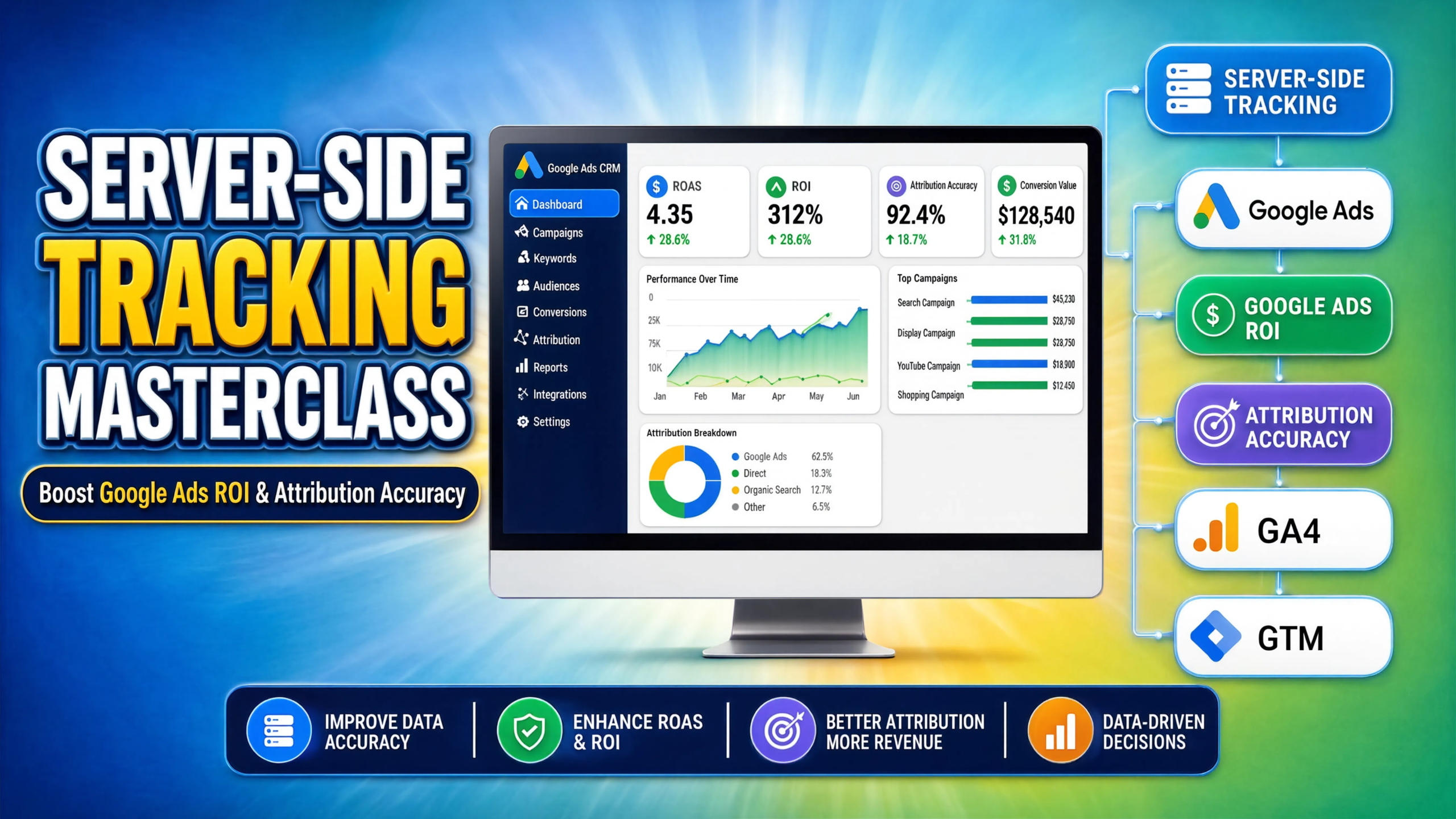

Quick Answer
If your ad platforms only track front-end form submissions, you are feeding them incomplete, low-quality data. By implementing server-side tracking and offline conversion tracking (OCT), you bypass iOS restrictions, capture closed deals from your CRM, and send qualified revenue data back to Google Ads, directly boosting your ROI and attribution accuracy.
Key Takeaways
- The Data Gap is Real: Legacy browser-based tracking loses up to 40% of conversion signals due to Intelligent Tracking Prevention (ITP) and modern ad blockers.
- Server-Side Sovereignty: Moving your tracking to a custom server subdomain (via Stape) reclaims ownership of your first-party data.
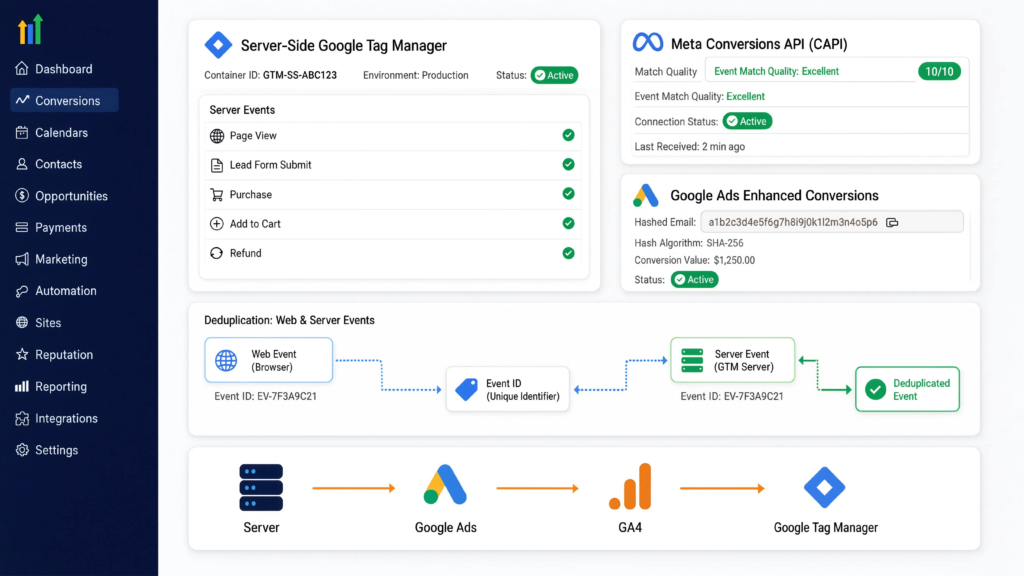
- Enhanced Match Quality: Hashing user data (email/phone) and sending it via the Meta Conversions API pushes your event match quality to a perfect 8 or 10 out of 10.
- Full-Funnel Vision: Tracking form fills isn’t enough; you must feed CRM lifecycle stages (like “Closed Won”) back to ad algorithms to optimize for actual profit.
- Privacy First: Integrating Google Consent Mode v2 via Cookiebot ensures your robust tracking remains fully compliant with global privacy laws.
Introduction: The “Fake Lead” Epidemic
I recently audited a multi-channel ad account for a B2B software company spending $40,000 a month. The marketing director was furious. Google Ads reported 450 leads, but her Salesforce CRM only showed 280. She assumed Google was just generating “fake leads” or clicking its own ads.
The reality? Her data pipeline was bleeding out. Apple’s iOS updates and fierce browser ad blockers were destroying her tracking cookies, dropping up to 50% of her signals. Even worse, the leads she was tracking were just raw form submissions. Her Google Ads account had no idea which of those 280 people actually bought the software, meaning the algorithm was optimizing for cheap clicks instead of paying customers.
Many businesses are stuck in this primitive era of tracking. They assume their data is accurate just because a tag fired. Today, we are going to fix that. Welcome to the masterclass on engineering a modern, full-funnel tracking system that bridges your website, your server, and your CRM to uncover your true Google Ads ROI.
Why Server-Side Tracking Matters for Your ROI
Think of standard client-side tracking like standing on a public sidewalk and shouting customer information across the street to Google. Anyone (like an ad blocker) can easily interrupt you. Server-side tracking is like moving that conversation into your own private office building. You collect the data on your server first, clean it, and securely hand it over to ad platforms.
The 5 Pillars of Tracking Modernization
- Bypassing ITP & Ad Blockers: Because your server runs on a subdomain of your actual website (e.g., ss.yourwebsite.com), browsers treat your tracking cookies as first-party, preventing them from being deleted after 24 hours.
- Unrivaled Attribution Accuracy: By capturing click IDs natively, you maintain a seamless thread from the ad impression to the final CRM invoice.
- Enhanced Match Quality: Platforms like Meta and TikTok thrive on user data. Server-side APIs allow you to securely transmit hashed emails and phone numbers, improving your match scores dramatically.
- Optimizing for Profit: Offline Conversion Tracking (OCT) tells Google when a lead actually buys, training the AI to find high-ticket buyers instead of tire-kickers.
- Lower Cost per Acquisition (CAC): When ad networks receive 99% accurate signals, their machine learning stabilizes, reducing wasted spend and lowering your true CAC.
Video Tutorial: The Server-Side Tracking Masterclass
I break down the complete architecture of this system on my YouTube channel. Watch the masterclass below to see how we engineer this transition.
Prerequisites & Checklist
To build this masterclass setup, you need administrative access to the following:
- Google Tag Manager: Both a Web Container and a Server Container.
- Cloud Hosting: A Stape.io account to host your sGTM container.
- CRM Platform: HubSpot, Salesforce, Pipedrive, or GoHighLevel.
- Consent Management: Cookiebot account configured for your domain.
- Ad Platforms: Google Ads and Meta Ads managers.
Step-by-Step Implementation Guide
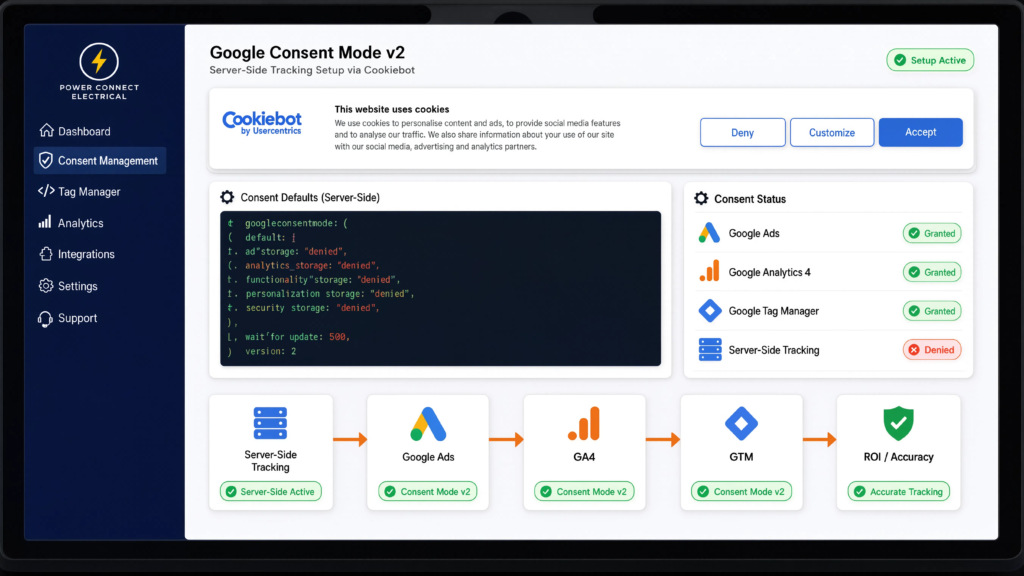
Phase 1: Google Consent Mode v2 via Cookiebot
Before passing data to your server, you must legally acquire it. Google Consent Mode v2 ensures that if a user denies cookies, you can still send anonymous, cookie-less “pings” to your server to retain behavioral modeling.
- Step 1: Add the Cookiebot script to the very top of your website’s <head>.
- Step 2: In your Web GTM, define the default consent state before any tags fire:
					gtag('consent', 'default', {
  'ad_storage': 'denied',
  'analytics_storage': 'denied',
  'ad_user_data': 'denied',
  'ad_personalization': 'denied',
  'wait_for_update': 500
});
- Step 3: Use Cookiebot’s GTM template to update the consent state to ‘granted’ when the user accepts. Your server-side container will automatically inherit these consent parameters.
Phase 2: Deploying the Server-Side Environment (Stape)
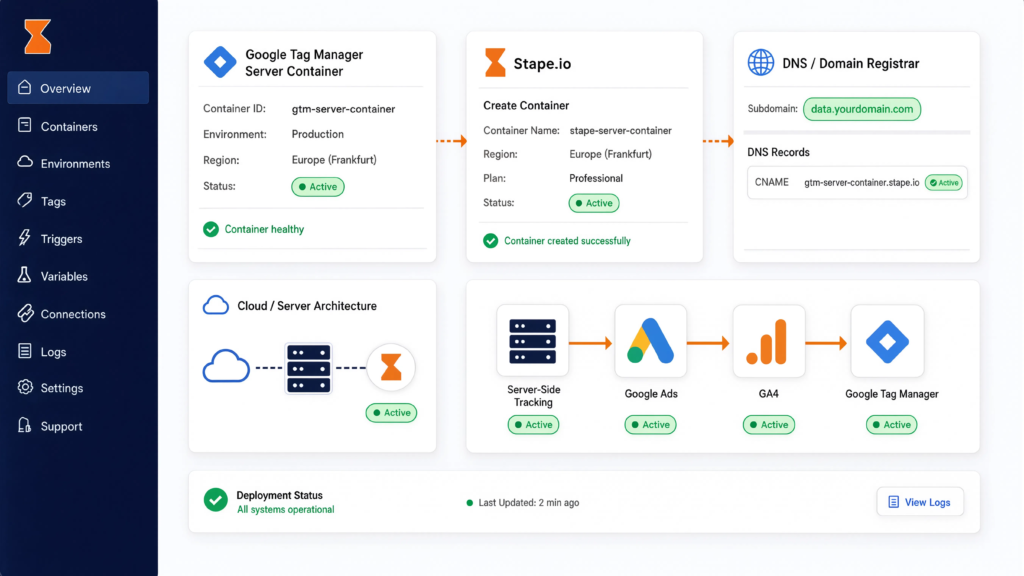
To achieve first-party data status, your server must share a root domain with your website.
- Create a Server Container in Google Tag Manager and copy the Container Configuration code.
- Go to Stape.io, create a new container, and paste the configuration code.
- Crucial Step: Create a custom subdomain (e.g., data.yourdomain.com). Go to your domain registrar (GoDaddy, Cloudflare) and point an A-Record or CNAME to Stape’s IP address.
- Update your Web GTM container’s server URL to match your new custom subdomain.
- Need help setting up the cloud architecture? Check out my Server-Side Tracking Service.
Phase 3: The Direct JavaScript Form Listener
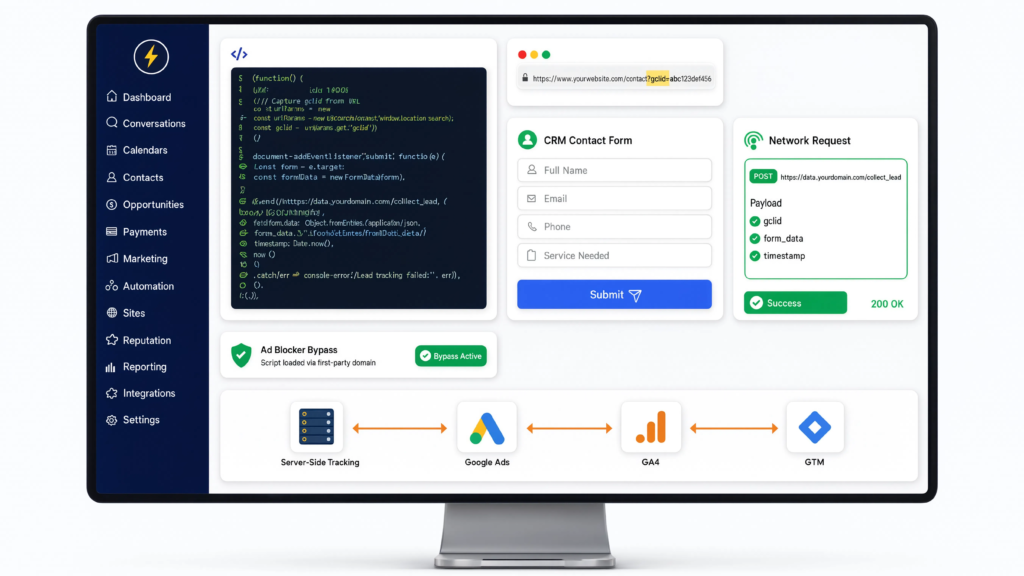
Because we are bypassing standard data layers to prevent third-party script interference, we will use a direct JavaScript listener. This code snags the Google Click ID (GCLID) from the URL, watches for form submissions, and securely transmits the raw data directly to your server endpoint for processing.
					document.addEventListener("DOMContentLoaded", function () {
    // 1. Capture and store the GCLID locally
    const urlParams = new URLSearchParams(window.location.search);
    const gclid = urlParams.get('gclid');
    if (gclid) {
        localStorage.setItem('first_party_gclid', gclid);
    }

    // 2. Listen for CRM form submissions
    document.querySelectorAll('form').forEach(form => {
        form.addEventListener('submit', function (e) {

            // Extract user inputs
            const userEmail = form.querySelector('input[type="email"]')?.value || '';
            const userPhone = form.querySelector('input[type="tel"]')?.value || '';
            const storedGclid = localStorage.getItem('first_party_gclid');

            // 3. Send payload directly to the custom server-side endpoint
            // (Replace with your actual Stape custom subdomain)
            fetch('https://data.yourdomain.com/collect_lead', {
                method: 'POST',
                headers: {
                    'Content-Type': 'application/json'
                },
                body: JSON.stringify({
                    client_id: generateClientId(), // Custom function to generate ID
                    event_name: 'generate_lead',
                    email: userEmail,
                    phone: userPhone,
                    gclid: storedGclid,
                    page_location: window.location.href
                })
            }).catch(err => console.error("Server tracking blocked", err));
        });
    });
});
- How it works: This catcher’s mitt sits on the front end, grabbing user data and firing it straight to data.yourdomain.com. It ignores ad blockers because it looks like a normal website function talking to its own server.
Phase 4: Enhanced Conversions & Meta CAPI
Once the data hits your Server GTM container, you must format it for the ad networks.
- Meta Conversions API (CAPI): Set up a Facebook API tag in sGTM. Map the incoming email and phone variables to the tag. Ensure you generate a unique Event ID in the web container and pass it to the server to deduplicate browser and server events. As mentioned in the, this precise deduplication is how you hit that 10/10 match quality.
- Google Ads Enhanced Conversions: Configure the Google Ads Server Tag to hash the user data (SHA-256) before sending it to Google. This allows Google to match the user who filled out the form to the Google account they were logged into when they clicked your ad, even if cookies were cleared.
Phase 5: Offline Conversion Tracking (OCT) via CRM
Tracking the form fill is only half the battle. To optimize for ROI, you must track the sale.
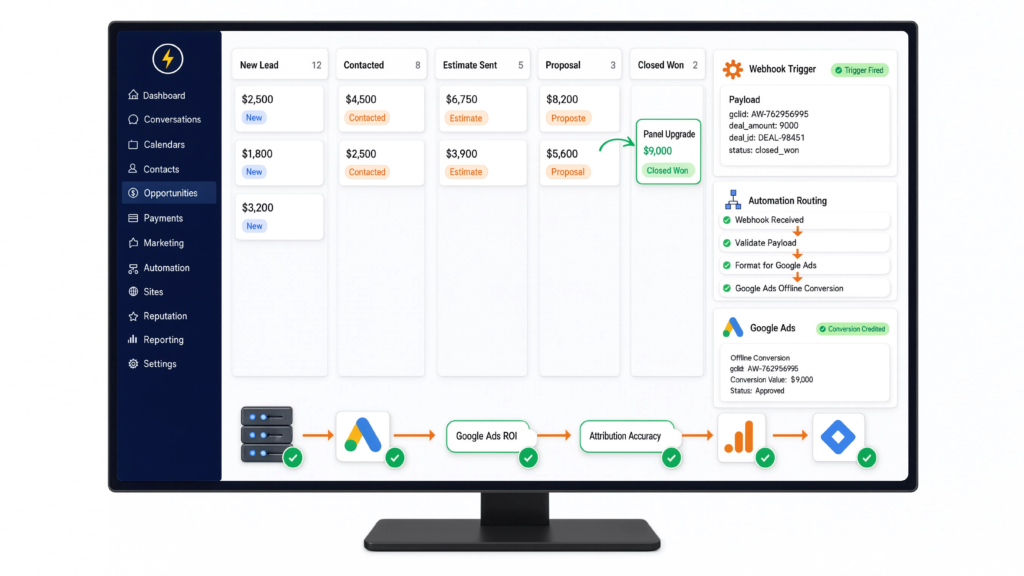
When a lead moves to “Closed Won” in Salesforce or HubSpot:
- Trigger a webhook from the CRM.
- Send the webhook payload (containing the stored GCLID and the actual Deal Amount) to your Server GTM or directly to Google Ads via Zapier/Make.
- Google receives this delayed signal and credits the exact keyword that drove the high-value sale.
- For platform-specific CRM workflows, refer to my guides on HubSpot Form Conversion Tracking Services and Salesforce Conversion Tracking Service.
Testing & Validation Framework
Tool | What to Check | Success Metric |
GTM Web Preview | Submit a form and check the Network tab. | Ensure the fetch request successfully sends a 200 OK status to your data.yourdomain.com endpoint. |
GTM Server Preview | Look at incoming HTTP requests. | The server should receive the payload, hash the email, and fire tags to Google and Meta. |
Meta Events Manager | Check the “Deduplication” tab under Data Sources. | Browser and Server events should both show as “Processed” with the exact same Event ID. |
Google Ads Diagnostics | Check the “Enhanced Conversions” status tab. | Status should say “Recording Enhanced Conversions” with zero mapping errors. |
Troubleshooting Common ErrorsConclusion
Problem | Cause | Solution |
Server requests blocked by browser. | The custom subdomain wasn’t verified, or SSL certificates failed in Stape. | Re-verify your DNS A-records and ensure Stape has generated an active SSL for your tracking domain. |
Meta CAPI showing duplicated events. | The Event ID generated on the web doesn’t match the one received by the server. | Ensure your JavaScript listener passes a single, globally unique ID to both the Meta Pixel and the server payload simultaneously. |
Offline Conversions rejected by Google. | The GCLID is older than 90 days, or the payload timestamp is improperly formatted. | Ensure your CRM automation formats the conversion time in UTC format (e.g., yyyy-mm-dd hh:mm:ss+tz) as required by the Google Ads API. |
Consent mode halting all data. | Cookiebot tags are firing after the custom tracking listener executes. | Adjust GTM tag sequencing to guarantee the default consent state fires before the DOM finishes loading. |
Conclusion
Scaling modern businesses. By shifting your tracking infrastructure to a custom subdomain,
hashing first-party data for Enhanced Conversions, and feeding closed deals back via Offline Conversion Tracking, you stop flying blind. You force the ad algorithms to optimize for actual profit and revenue, leaving competitors who rely on legacy browser tags in the dust.
Summary by MD Niamul
To unlock true attribution accuracy and boost Google Ads ROI, businesses must transition from legacy client-side tags to Server-Side Tracking. By leveraging GTM, Stape cloud hosting, Meta CAPI deduplication, and CRM Offline Conversion Tracking, marketers can bypass iOS restrictions and train ad algorithms on closed revenue instead of arbitrary form submissions.
1. What exactly is server-side tracking?
Instead of a user’s browser sending data directly to Google or Meta, the browser sends data to a cloud server you own. Your server then processes, cleans, and forwards that data to ad platforms, bypassing ad blockers and browser restrictions entirely.
2. Why do ad blockers destroy client-side tracking?
Ad blockers and privacy browsers (like Brave or Safari with ITP) are programmed to identify and block third-party scripts (like the Facebook Pixel or Google Analytics tag) from loading in the user’s browser, instantly killing the data connection.
3. How does Stape improve tracking?
Stape is a cloud hosting infrastructure specifically designed for Google Tag Manager Server containers. It allows you to quickly deploy a custom tracking subdomain, meaning browsers view your tracking requests as secure, first-party data rather than intrusive third-party trackers.
4. What are Enhanced Conversions in Google Ads?
Enhanced Conversions is a feature that captures first-party customer data (like email and phone number), encrypts it using SHA-256 hashing, and securely sends it to Google. Google matches this data against signed-in Google accounts to recover lost attributions.
5. Why is my Meta match quality so low?
Low match quality usually happens because you are only sending IP addresses and browser user-agents. To get an 8/10 or higher, you must use the Conversions API to send hashed personal identifiers (emails, phone numbers, external IDs, and names).
6. What is Offline Conversion Tracking (OCT)?
OCT is the process of tracking actions that happen after a web interaction, usually inside a CRM. Instead of optimizing for a cheap form fill, OCT allows you to send the final, closed revenue value back to Google Ads weeks or months later.
7. Does server-side tracking violate GDPR?
No, server-side tracking actually improves compliance. Because data routes through your own server first, you have total control over what is sent to third parties. You can easily strip out PII or block tags based on user choices collected via Google Consent Mode v2 and Cookiebot.
8. Do I still need Web GTM if I use Server GTM?
Yes. Web GTM is still required to collect the data from the user’s browser (clicks, scrolls, form inputs) and route it to your Server GTM container. They work together as a unified system.
9. Can I track third-party checkouts like Shopify?
Absolutely. Server-side tracking is ideal for cross-domain issues. By passing the client ID and session data securely through the server, platforms like Shopify retain attribution without dropping the user session. Check out my Shopify Server-Side Tracking Service for specifics.
10. How long does a full server-side migration take?
A proper implementation—including Stape configuration, Consent Mode v2, Meta CAPI, Enhanced Conversions, and CRM offline mapping—typically takes a senior tracking engineer 1 to 2 weeks to build, test, and validate fully.
 Need Help Advanced GHL Automation & Tracking Setup?

2 Responses
Ne’er knew this, appreciate it for letting me know.
Glad it was new info for you! What’s something else you’ve come across that surprised you lately?