
Quick Answer
If your Shopify Google Ads campaigns are failing to scale because of massive data loss from ad blockers, privacy updates, and browser restrictions, you need a robust server-side measurement architecture. By implementing Server-Side Google Tag Manager (sGTM) alongside Google Ads Enhanced Conversions and Google Consent Mode V2 via Cookiebot, you ensure 99% conversion data accuracy, allowing Performance Max and shopping campaigns to optimize for real customer value and maximize your return on ad spend (ROAS).
Key Takeaways
- First-Party Data Capture: Secure customer signals directly from your server environment to bypass Safari’s intelligent tracking prevention (ITP) and browser ad blockers.
- Enhanced Conversions Integration: Hash and transmit first-party customer data (email, phone, address) securely to Google Ads, significantly improving attribution matching rates.
- Server-Side Infrastructure: Deploy your tagging infrastructure on reliable cloud hosting providers like Stape Global Stape Referral Link or European Stape Referral Link for secure first-party CNAME mapping.
- Privacy Compliance: Seamlessly integrate Google Consent Mode V2 using Cookiebot Usercentrics Cookiebot Partner Link to respect user consent choices without sacrificing critical data signals.
- Campaign Optimization: Feed pristine conversion data into Google Ads Performance Max and shopping campaigns to lower your cost per acquisition (CPA).
Introduction: The Money-Loss Moment in Google Ads
Last Tuesday, a founder reached out to me in a panic. He was pouring thousands of dollars into a Google Ads Performance Max campaign for his Shopify store. On paper, his Shopify analytics dashboard showed steady daily sales and healthy revenue. Yet, his Google Ads dashboard reported a fraction of those conversions, driving his reported cost per acquisition through the roof and triggering automated alerts from his marketing team that the campaigns were unprofitable.
When we audited his setup, the culprit was crystal clear: browser-side tracking was dropping up to 35% of his purchase events due to aggressive ad blockers, iOS privacy restrictions, and cookie expiration limits. His Google Ads smart bidding algorithm was starving for data, bidding blindly, and wasting budget on low-intent clicks.
This is the exact bottleneck facing e-commerce brands today. When you rely solely on out-of-the-box client-side scripts, you are flying blind. In this comprehensive engineering guide, we will walk through how to build a bulletproof tracking stack for Shopify using Server-Side Google Tag Manager (sGTM), GA4, and Google Ads Enhanced Conversions.
Why Your Shopify Google Ads Tracking Fails (And Why It Matters)
Standard client-side Google Ads tags execute entirely inside the user’s web browser. While easy to install, this approach leaves your conversion data vulnerable to modern privacy constraints.
When you ignore server-side tracking vulnerabilities and fail to implement enhanced conversions, several critical issues cripple your marketing operations:
- Severe Attribution Gaps: Browser restrictions and script blockers delete conversion signals before they reach Google’s servers, underreporting your true ROAS.
- Inefficient Smart Bidding: Google’s automated bidding algorithms rely heavily on complete conversion data. Incomplete signals lead to erratic bidding and higher acquisition costs.
- Signal Degradation: Without hashed first-party customer matching, ad platforms struggle to connect ad clicks to actual completed checkouts.
- Compliance Risks: Operating without modern consent management frameworks exposes your business to regulatory penalties and lost traffic data.
- Stagnant Scaling: You cannot scale ad budgets with confidence when your reporting dashboard does not match your bank account.
Migrating to a robust server-side architecture and implementing enhanced conversions unlocks five core business benefits:
- Bypass Ad Blockers: Server-to-server communication routes conversion payloads through your own custom domain, bypassing client-side blockers instantly.
- Boost Conversion Lift: Enhanced conversions match signed-in Google users who viewed or clicked your ads, recovering unmeasurable cross-device conversions.
- Lower Cost Per Acquisition: Feeding accurate, high-fidelity conversion data to Google Ads enables machine learning models to find high-value buyers efficiently.
- Future-Proof Compliance: Integrating Consent Mode V2 ensures your store respects user privacy laws while retaining modeled conversion insights.
- Unified Data Flow: Centralize your tracking pipeline through Google Tag Manager Server-Side for clean data governance across GA4, Google Ads, and Meta.
Prerequisites & Audit Checklist
Before initiating your server-side tracking setup and enhanced conversions implementation, verify you have secured the following access levels and resources:
- Access Requirements:
- Administrator access to your Shopify Admin and Checkout settings (Shopify Plus or standard checkout extension capabilities).
- Editor or Administrator permissions on Google Tag Manager (Web Container and Server Container).
- Administrator access to your Google Ads account and Google Analytics 4 property.
- Access to your server-side tagging container hosting provider (Stape).
- Access to your Consent Management Platform (Cookiebot dashboard).
- Tools & Extensions:
- Google Tag Assistant Chrome Extension.
- Google Ads Tag Assistant / Conversion Linker debugger.
- Chrome Developer Tools (Network and Console tabs).
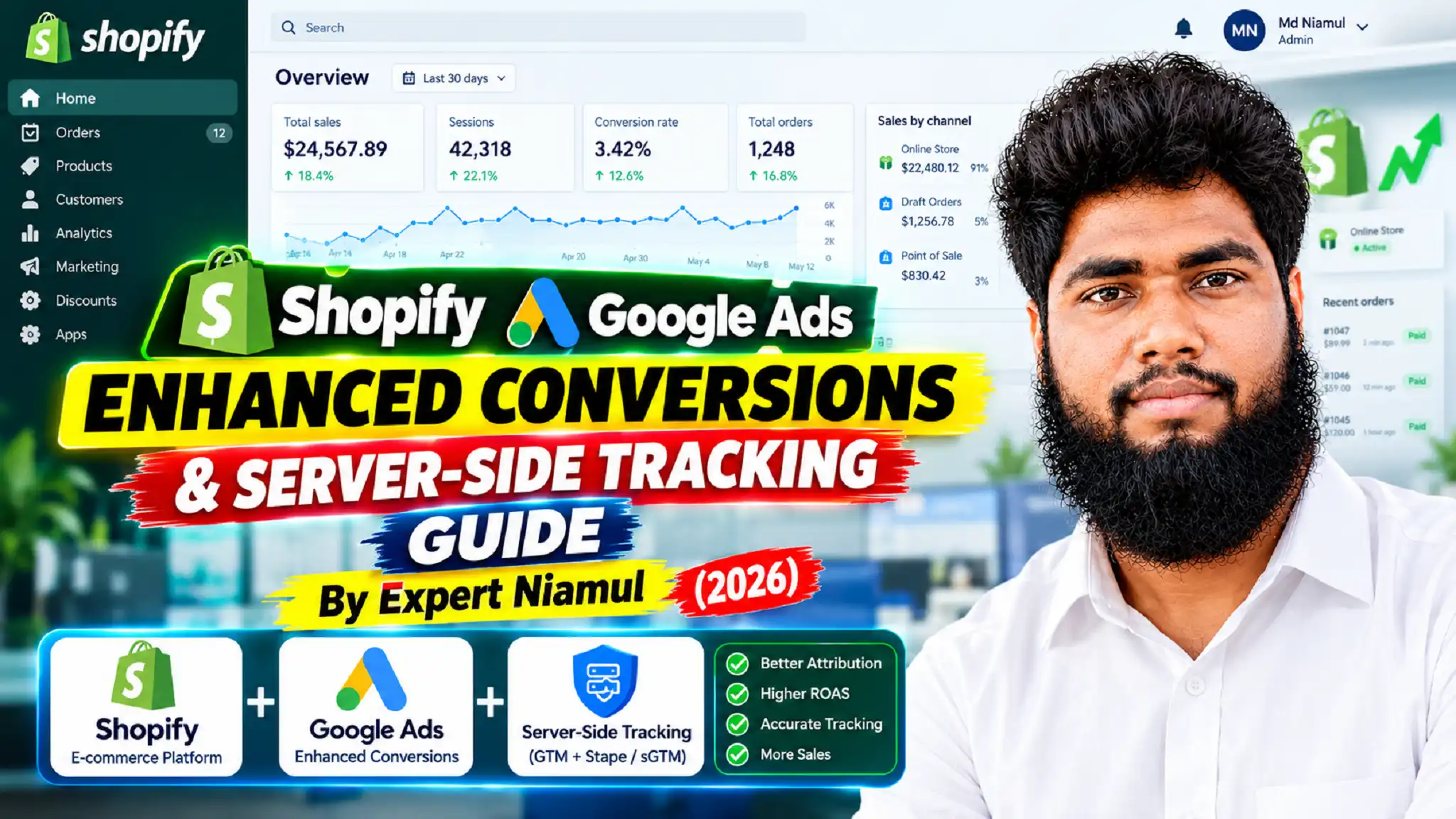
Video Tutorial: Shopify Google Ads Enhanced Conversions & sGTM Walkthrough
Watch the complete technical walkthrough illustrating how we architect server-side tracking and enhanced conversions for Shopify stores:
Summary of Video Insights:
- Diagnostic Breakdown: Explains why standard client-side tags fail in modern web browsers and how data loss distorts ad performance.
- Server-Side Architecture: Demonstrates how to configure a custom tagging domain using Stape for reliable first-party data collection.
- Enhanced Conversions Setup: Details how customer email and phone parameters are securely captured and hashed during checkout.
- Google Ads Optimization: Discusses how clean attribution data empowers Performance Max campaigns to scale profitably.
- Professional Consultation: Invites store owners to reach out via MD Niamul’s Website or book a direct consultation at Calendly or via WhatsApp at +8801776485758.
Step-by-Step Implementation Guide
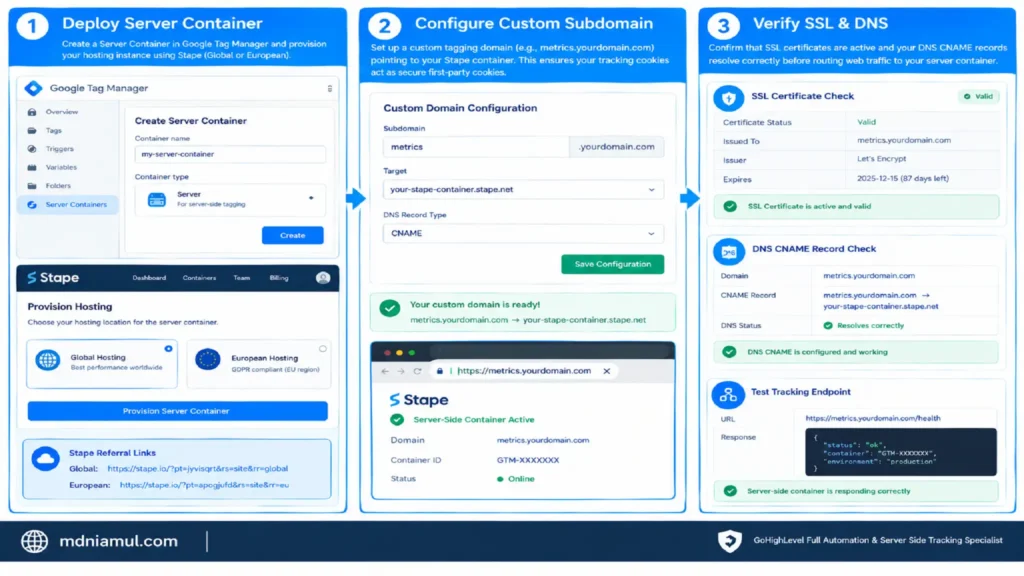
Phase 1: Configuring Server-Side GTM Infrastructure on Stape
Establishing a reliable server-side container is the foundation of modern e-commerce tracking.
- Deploy Server Container: Create a Server Container in Google Tag Manager and provision your hosting instance using Global Stape Referral Link or European Stape Referral Link.
- Configure Custom Subdomain: Set up a custom tagging domain (e.g., metrics.yourdomain.com) pointing to your Stape container. This ensures your tracking cookies act as secure first-party cookies.
- Verify SSL & DNS: Confirm that SSL certificates are active and that your DNS CNAME records resolve correctly before routing web traffic to your server container.
Phase 2: Google Consent Mode V2 & Cookiebot Integration
Privacy compliance must be established at the very beginning of the tracking pipeline to ensure consent states are respected globally.
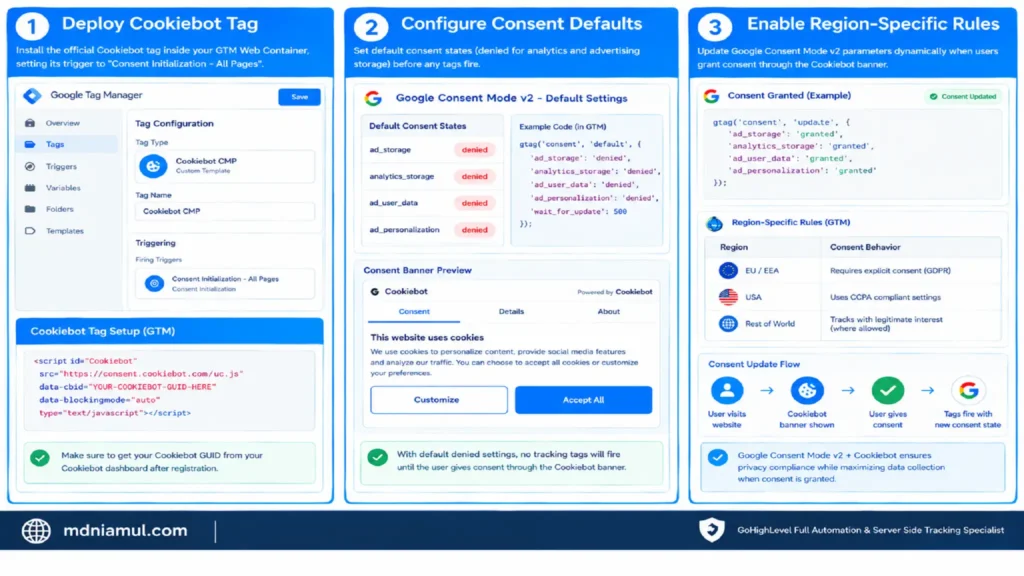
- Deploy Cookiebot Tag: Install the official Cookiebot tag inside your GTM Web Container, setting its trigger to “Consent Initialization – All Pages”.
- Configure Consent Defaults: Establish default consent states (denied for analytics and advertising storage) before tags fire.
- Enable Region-Specific Rules: Ensure Google Consent Mode V2 parameters (ad_storage, ad_user_data, ad_personalization, analytics_storage) dynamically update when users grant consent through the Cookiebot banner.
Phase 3: Implementing Google Ads Enhanced Conversions & GA4
Accurate conversion tracking requires capturing hashed customer details during the checkout process and transmitting them to Google Ads.
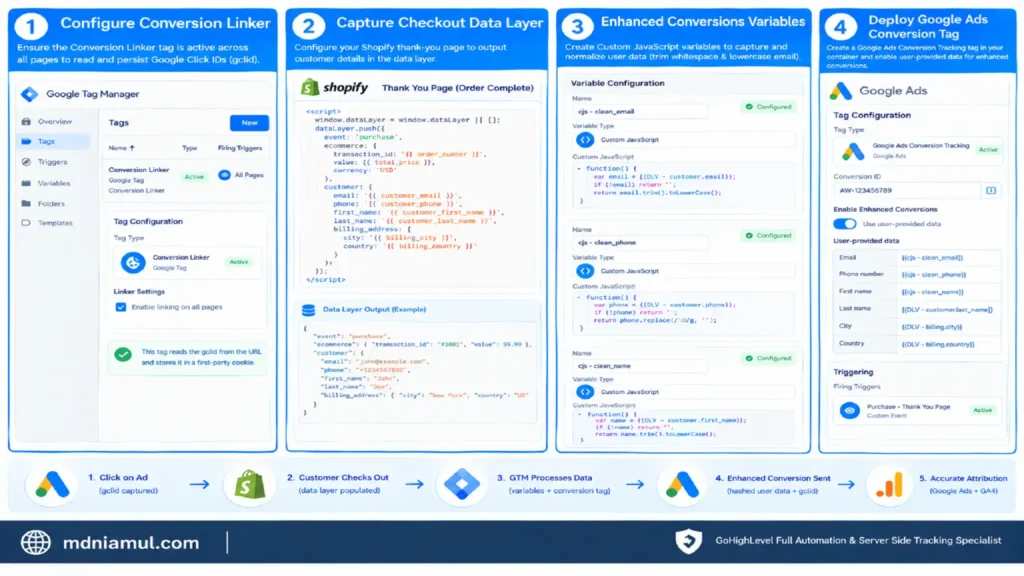
- Configure Conversion Linker: Ensure the Conversion Linker tag is active across all pages in your GTM Web container to read and persist Google Click IDs (gclid).
- Capture Checkout Data Layer: Configure your Shopify thank-you page data layer to output customer details (email, phone number, billing address).
- Set Up Enhanced Conversions Variables: Create Custom JavaScript variables in GTM Web to capture and normalize user data (trimming whitespace and lowercasing email strings).
- Deploy Google Ads Conversion Tag: Create a Google Ads Conversion Tracking tag in your server or web container, enabling user-provided data collection for enhanced conversions and mapping your customer data variables accordingly.
Conditional Code Implementations
Event Listener Code
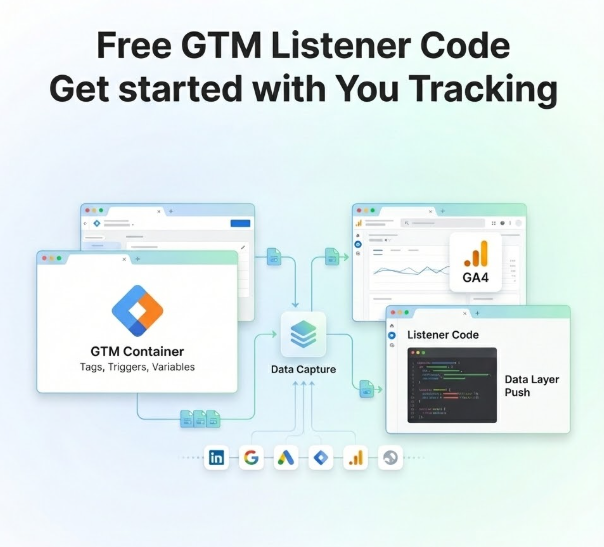
Below is a specialized JavaScript event listener script designed to intercept user interactions, capture form inputs or checkout identifiers, and push clean payloads into the Data Layer for server-side processing.
					/**
 * Advanced E-commerce Interaction & User Data Listener
 * Author: MD Niamul (Conversion Tracking Specialist)
 */
(function() {
    'use strict';

    // Helper function to generate unique event identifiers
    window.generateTrackingId = function() {
        return 'trk_' + Date.now() + '_' + Math.random().toString(36).substring(2, 9);
    };

    // Intercept checkout form submissions or key e-commerce clicks
    document.addEventListener('submit', function(event) {
        var form = event.target;
        if (form && form.classList.contains('shopify-checkout-form')) {
            var trackingId = window.generateTrackingId();
            var emailInput = form.querySelector('input[type="email"]');
            var phoneInput = form.querySelector('input[type="tel"]');

            window.dataLayer = window.dataLayer || [];
            window.dataLayer.push({
                'event': 'secure_checkout_submitted',
                'tracking_id': trackingId,
                'user_email': emailInput ? emailInput.value.trim() : '',
                'user_phone': phoneInput ? phoneInput.value.trim() : ''
            });
        }
    });
})();
How it works: This script acts as an invisible catcher’s mitt, intercepting checkout submissions, generating a unique tracking identifier, and securely staging customer contact inputs in the Data Layer so GTM can hash and relay them to Google Ads without exposing raw data in transit.
Testing & Validation
Thorough testing ensures that your server-side tracking and enhanced conversions are transmitting accurate data before launching live ad traffic.
- GTM Preview Mode: Open GTM Preview for both your Web and Server containers. Perform a test purchase on your Shopify store and verify that tags fire without errors.
- Tag Assistant Debugger: Use Google Tag Assistant to confirm that the Google Ads Conversion Linker and Conversion tags are firing successfully on conversion pages with valid gclid parameters.
- Google Ads Diagnostics: Navigate to your Google Ads Conversion Actions settings and check the Enhanced Conversions status diagnostic report to verify that hashed user data is being received and matched successfully.
- Network Inspection: Use Chrome Developer Tools to inspect outgoing network requests, confirming that payloads are routing through your custom sGTM domain (metrics.yourdomain.com).
Troubleshooting Common Tracking Issues
- Missing GCLID Parameter: Caused by users arriving via non-ad channels or redirection stripping query parameters. Solution: Ensure the Conversion Linker tag is firing on all pages with first-party cookie linking enabled.
- Enhanced Conversions Data Mismatch: Caused by unnormalized email or phone string formatting before hashing. Solution: Use GTM built-in transformations or custom JavaScript to lowercase and trim all customer data fields prior to transmission.
- Ad Blockers Disrupting Tags: Caused by standard client-side script execution. Solution: Migrate tracking calls through your Server-Side GTM container hosted on Global Stape Referral Link to bypass browser-level blocking.
- Consent Mode Blocking Conversions: Caused by improper Cookiebot integration or incorrect consent defaults. Solution: Verify that Google Consent Mode V2 parameters are correctly mapping and updating upon user consent interaction.
Summary by MD Niamul
Implementing Shopify Google Ads Enhanced Conversions and Server-Side Tracking is essential for capturing lost revenue signals, improving attribution accuracy, and scaling your ad campaigns profitably. By eliminating data gaps, boosting match quality scores, and deploying robust sGTM architecture alongside Cookiebot and Google Consent Mode V2, you ensure complete data precision for your e-commerce business.
1. Why are my Shopify Google Ads conversions underreported?
Conversion underreporting happens when standard client-side tracking scripts are blocked by browser ad blockers, Apple’s Intelligent Tracking Prevention (ITP), or strict cookie expiration limits. When users complete a purchase after clicking an ad, if the browser deletes the tracking cookie or blocks the script execution, Google Ads fails to record the conversion. Implementing server-side tracking solves this by routing events securely through your own domain.
2. What are Google Ads Enhanced Conversions?
Google Ads Enhanced Conversions is a feature that improves the accuracy of your conversion measurement by securely sending hashed first-party customer data (such as email addresses, phone numbers, and physical addresses) collected during checkout to Google. When customers complete a conversion while signed into their Google account, Google matches these hashed signals back to the ad interaction, recovering multi-device and cross-browser conversions that standard pixels miss.
3. How does Server-Side GTM bypass ad blockers?
Server-Side Google Tag Manager (sGTM) operates on a custom first-party domain (e.g., metrics.yourdomain.com) hosted via dedicated infrastructure like Stape Global Stape Referral Link. Because requests are sent from your website directly to your own server container—and subsequently forwarded server-to-server to Google’s API endpoints—client-side ad blockers and browser privacy restrictions cannot intercept or delete the tracking payload.
4. Do I need Cookiebot for Shopify Google Ads tracking?
If your e-commerce store operates in or sells to customers located within the European Union (EU) or regions governed by privacy laws such as GDPR and CCPA, utilizing a Consent Management Platform like Cookiebot is legally mandatory. Integrating Cookiebot with Google Consent Mode V2 ensures your tracking tags dynamically respect user consent choices while preserving aggregated measurement modeling.
5. How do I verify if Enhanced Conversions are working?
You can verify your Enhanced Conversions setup by navigating to your Google Ads account, selecting Tools > Conversions, and clicking on your primary purchase conversion action. Review the Diagnostics tab, where Google Ads provides real-time status reports on your enhanced conversion health, match rates, and signal quality once sufficient transaction volume passes through your store.
6. What is the role of the GCLID in Google Ads tracking?
The GCLID (Google Click Identifier) is a unique tracking parameter appended to your ad URLs when a user clicks your Google Ad. It passes information from the ad click to your landing page so that when a conversion occurs, the ad platform knows exactly which campaign, ad group, and keyword generated the sale. Preserving and passing the GCLID through your server-side container is vital for accurate attribution.
7. Can I use multiple Google Ads accounts on Shopify?
Yes, you can track conversions for multiple Google Ads accounts, but doing so requires careful configuration inside Google Tag Manager to prevent duplicate triggers or conflicting data streams. Each Google Ads account conversion tag must receive its own unique conversion ID and label while sharing the same unified customer data layer and enhanced conversion variables.
8. What are the best hosting providers for sGTM?
For reliable, high-performance Server-Side GTM container hosting, specialized infrastructure providers like Stape are the industry standard. You can deploy your server container easily using their global network via the Global Stape Referral Link or their dedicated European infrastructure via the European Stape Referral Link, ensuring optimal uptime and fast response times.
9. How does server-side tracking improve Performance Max ROAS?
Performance Max campaigns rely entirely on machine learning algorithms to optimize bidding and audience targeting. By implementing server-side tracking and enhanced conversions, you feed your campaigns 15% to 30% more accurate conversion data that would otherwise be lost to ad blockers. This complete data picture enables the bidding algorithm to target high-intent buyers more effectively, lowering your CPA and boosting your overall ROAS.
10. How often should I audit my Google Ads tracking setup?
You should conduct a thorough audit of your Google Ads tracking and analytics setup at least once every quarter, or immediately before scaling ad budgets or launching major promotional events like Black Friday and Cyber Monday. Regular audits ensure your custom domains remain healthy, consent configurations comply with privacy updates, and your conversion data pipeline operates at peak precision.
 Need Help Advanced GHL Automation & Tracking Setup?