
Quick Answer
To track GoHighLevel (GHL) lead forms accurately in Google Analytics 4 (GA4) using Google Tag Manager (GTM), you must bypass cross-origin iframe security restrictions. Deploy a Custom HTML postMessage JavaScript listener script on your parent website via GTM to capture form submission signals sent by the embedded GoHighLevel iframe. Once the listener pushes a ghl_form_submit event to the Data Layer, create a custom event trigger in Web GTM to fire a client-side GA4 generate_lead event, and mirror it through a Server-Side GTM container on Stape for 99% conversion data accuracy.
Key Takeaways
- Break Through Iframe Isolation: GoHighLevel forms load inside cross-origin iframe containers; native GTM form triggers cannot detect them without a custom postMessage event listener.
- Streamline Lead Data Layers: A custom JavaScript listener extracts lead IDs, emails, and phone numbers from the iframe message payload and pushes a structured ghl_form_submit event into your Data Layer.
- Achieve 99% Server-Side Accuracy: Forwarding GA4 events through a Server-Side GTM (sGTM) container hosted on Stape bypasses ad blockers, browser privacy limits (Safari ITP), and network drop-outs.
- Maintain 2026 Compliance: Integrating Cookiebot with Google Consent Mode V2 ensures GA4 tags only execute when visitors explicitly grant analytics consent.
- Eliminate Duplicate Lead Reporting: Attaching submission IDs or form parameters prevents double-counting leads when users reload confirmation screens or interact with multi-step funnels.
Introduction: The $24,000 GoHighLevel Lead Attribution Disaster
A digital marketing agency scaling Google Ads for high-ticket service clients reached out to me after spending over $24,000 on ad spend across three months. Their Google Ads dashboard reported 140 lead conversions, while their GoHighLevel (GHL) CRM showed over 380 actual form submissions. More than 60% of their conversion data had vanished into thin air. Because Google Ads was optimizing on incomplete conversion signals, the Smart Bidding algorithm kept pushing budget toward underperforming audiences.
The culprit? The agency relied on basic page-view triggers on thank-you URLs or standard GTM form submission triggers. Because modern GoHighLevel forms, calendars, and surveys
run inside cross-origin iframe embeds, standard tracking tags remain completely blind to completed submissions.
If you cannot track lead form submissions with pinpoint accuracy, your marketing automation, funnel optimization, and ad bidding strategies will fall apart. In this comprehensive guide, I will show you how to set up rock-solid, server-side GoHighLevel lead form tracking in GA4 using GTM in 2026.
Why Standard Tracking Fails on GoHighLevel Forms (And How to Fix It)
Understanding why GoHighLevel tracking breaks requires looking under the hood of web security architecture.
The Iframe Security Wall
Think of an iframe as a glass window cut into a brick wall. Your parent landing page is the wall, while the GoHighLevel form inside the iframe is a completely different building seen through the glass window. You can visually see the form through the window, but Google Tag Manager (which lives on the wall) cannot reach through the glass to inspect field inputs, button clicks, or native HTML submit events inside the other building.
Because of the browser’s Same-Origin Policy, standard GTM Form Submission triggers and Element Visibility triggers are blocked from inspecting what happens inside the GoHighLevel domain (msgsndr.com or leadconnectorhq.com).
					[ Visitor's Browser / Parent Website ]
       │
       ├──► Web GTM Container Running on Parent Domain
       │
       └──► [ GoHighLevel Iframe Embed (msgsndr.com) ]
                  │
                  ▼ (User Completes Form)
           [ postMessage Signal Broadcast ]
                  │
                  ▼
       [ Custom Listener Script in GTM ] ──► (Catches Broadcast)
                  │
                  ▼
       [ Parent Page Data Layer Push ] ──► [ GA4 & sGTM Tag Fired ]
The Solution: A postMessage Listener
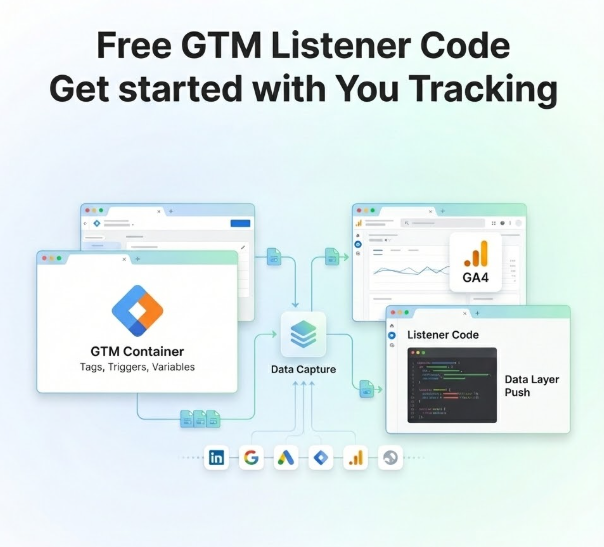
The standard, secure way cross-origin iframes communicate with parent pages is through the browser’s native window.postMessage() API. Think of a postMessage listener as a catcher’s mitt. When a user submits a form inside a GoHighLevel iframe, GoHighLevel automatically broadcasts an invisible message out to the parent window.
By placing a custom JavaScript listener script on your host website via GTM, your main page “catches” this broadcast message, parses the payload (extracting details like form ID or contact details), and pushes a clean ghl_form_submit event into your Data Layer—which acts as an invisible filing cabinet.
5 Key Benefits of Advanced GoHighLevel Tracking
- 100% Signal Capture: Captures inline form fills, pop-ups, multi-step surveys, and calendar bookings seamlessly without dropping missing events.
- First-Party Data Enrichment: Extracts hashed customer data such as email addresses and phone numbers to enable Google Ads Enhanced Conversions.
- Bypass Privacy Shield Limits: Server-side routing on Stape circumvents Safari Intelligent Tracking Prevention (ITP) and ad-blocker restrictions.
- Optimized Bidding Algorithms: Trains Google Ads and Meta CAPI models on real, verified conversions to drastically lower acquisition costs.
- Full Funnel Visibility: Connects lead capture directly with specialized CRM conversion tracking services for end-to-end attribution.
Prerequisites & Tracking Architecture Checklist
Before diving into tag creation, make sure you have proper access levels across all platforms involved in this setup:
- GoHighLevel CRM (Admin / Editor Access): Required for embedding forms, accessing funnels, and inspecting iframe container settings.
- Google Tag Manager (Publish Access): Required for deploying listener scripts, creating custom variables, and publishing tags.
- Google Analytics 4 (Editor / Admin Access): Required for configuring custom event definitions, custom dimensions, and testing in DebugView.
- Stape.io (Account Owner Access): Required for hosting the Server-Side GTM container and configuring first-party custom domain mapping.
- Cookiebot CMP (Account Admin Access): Required for implementing Google Consent Mode V2 enforcement and consent banner policies.
Video Tutorial: Complete Setup Walkthrough
Watch my step-by-step video tutorial to follow along visually as we build this setup from start to finish:
Step-by-Step Implementation Framework
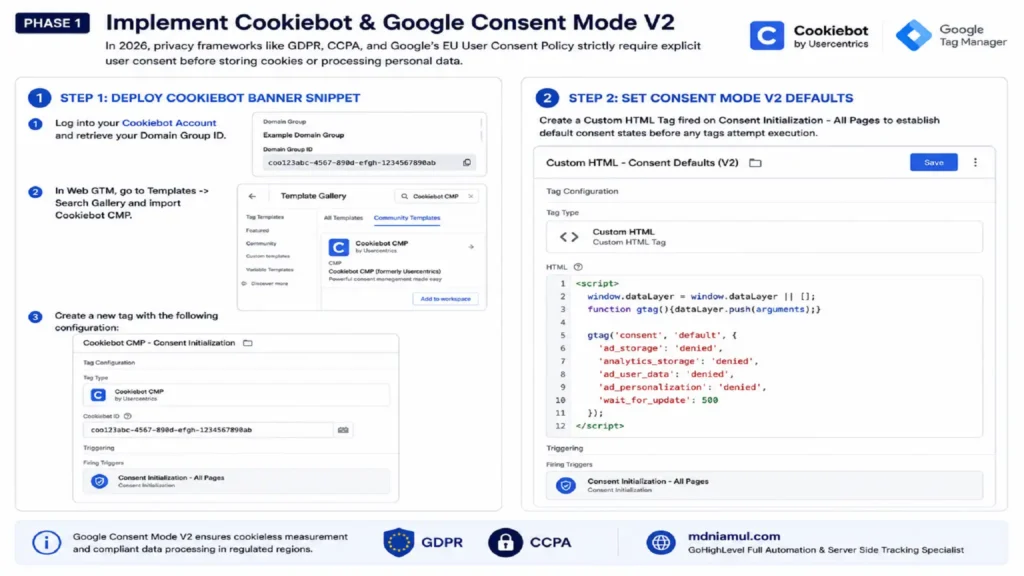
Phase 1: Implement Cookiebot & Google Consent Mode V2
In 2026, privacy frameworks like GDPR, CCPA, and Google’s EU User Consent Policy strictly require explicit user consent before storing cookies or processing personal data.
Step 1: Deploy Cookiebot Banner Snippet
- Log into your Cookiebot Account and retrieve your Domain Group ID.
- In Web GTM, go to Templates -> Search Gallery and import Cookiebot CMP.
- Create a new tag:
- Tag Type: Cookiebot CMP
- Cookiebot ID: Enter your Domain Group ID
- Trigger: Consent Initialization – All Pages
Step 2: Set Consent Mode V2 Defaults
Create a Custom HTML Tag fired on Consent Initialization – All Pages to establish default consent states before any tags attempt execution:
					<script>
  window.dataLayer = window.dataLayer || [];
  function gtag(){dataLayer.push(arguments);}

  gtag('consent', 'default', {
    'ad_storage': 'denied',
    'analytics_storage': 'denied',
    'ad_user_data': 'denied',
    'ad_personalization': 'denied',
    'wait_for_update': 500
  });
</script>
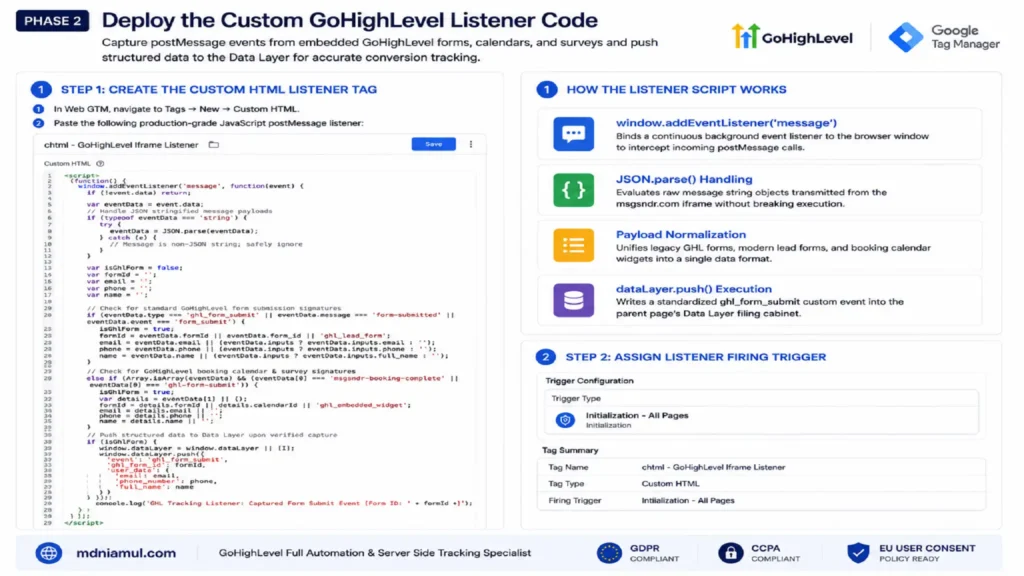
Phase 2: Deploy the Custom GoHighLevel Listener Code
Step 1: Create the Custom HTML Listener Tag
- In Web GTM, navigate to Tags -> New -> Custom HTML.
- Paste the following production-grade JavaScript postMessage listener:
					<script>
(function() {
  window.addEventListener('message', function(event) {
    if (!event.data) return;

    var eventData = event.data;

    // Handle JSON stringified message payloads
    if (typeof eventData === 'string') {
      try {
        eventData = JSON.parse(eventData);
      } catch (e) {
        // Message is non-JSON string; safely ignore
      }
    }

    var isGhlForm = false;
    var formId = '';
    var email = '';
    var phone = '';
    var name = '';

    // Check for standard GoHighLevel form submission signatures
    if (eventData.type === 'ghl_form_submit' || eventData.message === 'form-submitted' || eventData.event === 'form_submit') {
      isGhlForm = true;
      formId = eventData.formId || eventData.form_id || 'ghl_lead_form';
      email = eventData.email || (eventData.inputs ? eventData.inputs.email : '');
      phone = eventData.phone || (eventData.inputs ? eventData.inputs.phone : '');
      name = eventData.name || (eventData.inputs ? eventData.inputs.full_name : '');
    }
    // Check for GoHighLevel booking calendar & survey signatures
    else if (Array.isArray(eventData) && (eventData[0] === 'msgsndr-booking-complete' || eventData[0] === 'ghl-form-submit')) {
      isGhlForm = true;
      var details = eventData[1] || {};
      formId = details.formId || details.calendarId || 'ghl_embedded_widget';
      email = details.email || '';
      phone = details.phone || '';
      name = details.name || '';
    }

    // Push structured data to Data Layer upon verified capture
    if (isGhlForm) {
      window.dataLayer = window.dataLayer || [];
      window.dataLayer.push({
        'event': 'ghl_form_submit',
        'ghl_form_id': formId,
        'user_data': {
          'email': email,
          'phone_number': phone,
          'full_name': name
        }
      });
      console.log('GHL Tracking Listener: Captured Form Submit Event [Form ID: ' + formId + ']');
    }
  });
})();
</script>
How the Listener Script Works
- window.addEventListener(‘message’): Binds a continuous background event listener to the browser window to intercept incoming postMessage calls.
- JSON.parse() Handling: Evaluates raw message string objects transmitted from the msgsndr.com iframe without breaking execution.
- Payload Normalization: Unifies legacy GHL forms, modern lead forms, and booking calendar widgets into a single data format.
- dataLayer.push() Execution: Writes a standardized ghl_form_submit custom event into the parent page’s Data Layer filing cabinet.
Step 2: Assign Listener Firing Trigger
- Trigger Type: Initialization – All Pages
- Tag Name: chtml – GoHighLevel Iframe Listener
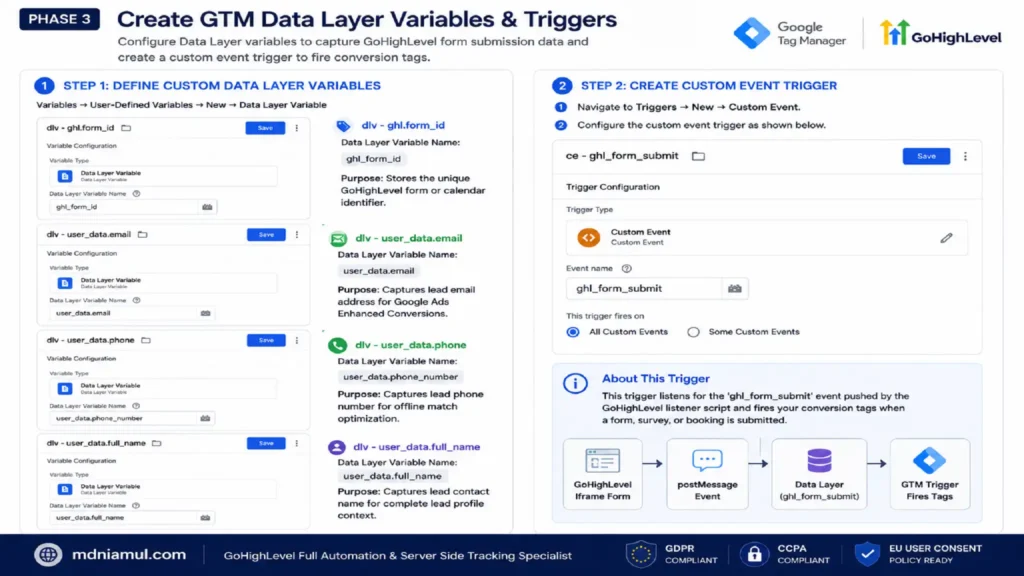
Phase 3: Create GTM Data Layer Variables & Triggers
Step 1: Define Custom Data Layer Variables
Navigate to Variables -> User-Defined Variables -> New -> Data Layer Variable:
- dlv – ghl.form_id
- Data Layer Variable Name: ghl_form_id
- Purpose: Stores the unique GoHighLevel form or calendar identifier.
- dlv – user_data.email
- Data Layer Variable Name: user_data.email
- Purpose: Captures lead email address for Google Ads Enhanced Conversions.
- dlv – user_data.phone
- Data Layer Variable Name: user_data.phone_number
- Purpose: Captures lead phone number for offline match optimization.
- dlv – user_data.full_name
- Data Layer Variable Name: user_data.full_name
- Purpose: Captures lead contact name for complete lead profile context.
Step 2: Create Custom Event Trigger
- Navigate to Triggers -> New -> Custom Event.
- Event Name: ghl_form_submit
- Trigger Name: ce – ghl_form_submit
Phase 4: Configure Client-Side GA4 Lead Event Tracking
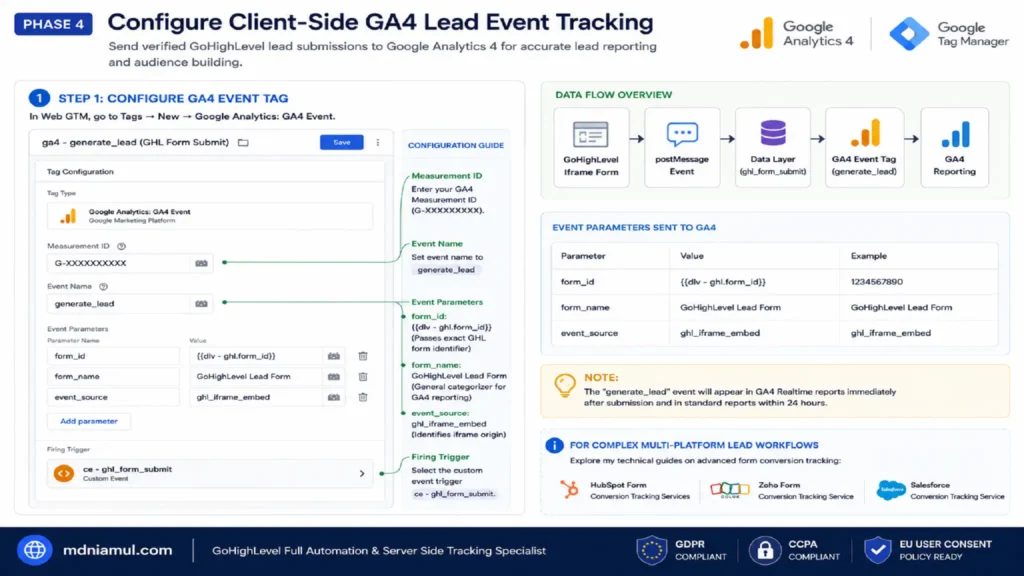
Step 1: Configure GA4 Event Tag
- In Web GTM, go to Tags -> New -> Google Analytics: GA4 Event.
- Measurement ID: Enter your GA4 Measurement ID (G-XXXXXXXXXX).
- Event Name: generate_lead
- Event Parameters:
- form_id: {{dlv – ghl.form_id}} (Passes exact GHL form identifier)
- form_name: GoHighLevel Lead Form (General categorizer for GA4 reporting)
- event_source: ghl_iframe_embed (Identifies iframe origin)
- Firing Trigger: Select ce – ghl_form_submit.
Note: For complex multi-platform lead workflows, explore my technical guides on HubSpot Form Conversion Tracking Services, Zoho Form Conversion Tracking Service, and Salesforce Conversion Tracking Service.
Phase 5: Implement Server-Side Tracking (sGTM) on Stape
Server-side tracking routes conversion signals through your own custom first-party subdomain, bypassing browser cookie limitations and ad-blocker interception.
					[ Visitor Browser ]
        │
        ▼ (Client HTTP Request)
[ Custom First-Party Subdomain: sgtm.yourdomain.com ]
        │
        ▼
[ Server-Side GTM Container Hosted on Stape ]
        │
        ├──► [ Google Analytics 4 Servers ]
        └──► [ Google Ads / Meta Conversion API ]
Step 1: Set Up Server Container on Stape
- Register a server hosting account via Stape Global Hosting or Stape European Hosting.
- Create a new Server GTM Container in Stape and input your Container Configuration Code from Google Tag Manager.
Step 2: Setup First-Party Subdomain
- In Stape, assign a custom domain such as sgtm.yourdomain.com.
- Add a CNAME record in your DNS provider (Cloudflare, Namecheap, GoDaddy) pointing sgtm to your designated Stape server target URL.
- In Web GTM, open your Google Tag (GA4 Configuration), click Configuration Settings, and add parameter server_container_url set to https://sgtm.yourdomain.com.
Step 3: Create Server-Side GA4 Tag
- Switch to your Server GTM Container.
- Go to Tags -> New -> Google Analytics: GA4.
- Action: Default – Event Data.
- Trigger: Client Name equals GA4.
For complete server-side implementations across e-commerce and lead funnels, review my Server-Side Tracking Service, Ecommerce Server-Side Tracking Service, and Shopify Server-Side Tracking Service.
Testing & Validation Framework
To ensure your conversion data flows without error, execute this 4-step verification sequence:
- GTM Web Preview Mode: Open GTM Tag Assistant, navigate to your landing page, and fill out the embedded GoHighLevel lead form. Verify that the ghl_form_submit event appears in the left panel and that your GA4 – generate_lead tag fires successfully.
- Browser Developer Tools Inspection: Press F12 -> open the Console tab -> verify the output message: GHL Tracking Listener: Captured Form Submit Event.
- GA4 DebugView Live Verification: Log into GA4 -> navigate to Admin -> DebugView. Submit a test entry and ensure the generate_lead event registers within 10 seconds along with all attached parameters (form_id, event_source).
- Stape Server-Side Debugger Check: Open Server GTM Preview mode while submitting the form. Inspect the incoming HTTP POST request to ensure the server receives client signals with status code 200 Success.
Troubleshooting Common GoHighLevel Tracking Errors
- Problem: Listener doesn’t fire ghl_form_submit
- Root Cause: Domain mismatch or iframe sandbox blocking postMessage communications.
- Exact Solution: Remove restrictive sandbox attributes from the iframe embed code inside GoHighLevel to allow window message broadcasting.
- Problem: Duplicate generate_lead events in GA4
- Root Cause: Form fires both an iframe submission listener event and a thank-you URL page view trigger.
- Exact Solution: Delete thank-you page view conversion triggers; rely purely on the custom Data Layer event for single-source execution.
- Problem: form_id parameter shows as undefined in GA4
- Root Cause: GoHighLevel payload structure omitted an explicit ID parameter in modern update frames.
- Exact Solution: Ensure listener script includes fallback logic: formId = eventData.formId || ‘ghl_lead_form’.
- Problem: Server Container returns 404 or 502 status codes
- Root Cause: DNS CNAME record not fully propagated or incorrect server URL syntax in GTM.
- Exact Solution: Re-check DNS CNAME status in Cloudflare and verify server_container_url formatting in your Web GTM GA4 configuration settings.
Comparative Overview: Form Tracking Methodologies
- Thank-You Page Tracking:
- Data Accuracy: 60% – 70%
- Iframe Support: No (Fails on embedded forms)
- Ad-Blocker Bypass: No
- Lead Parameter Capture: Limited (Page context only)
- Privacy Compliance: Manual configuration required
- Native GTM Form Trigger:
- Data Accuracy: 0% (Completely fails on iframe embeds)
- Iframe Support: No
- Ad-Blocker Bypass: No
- Lead Parameter Capture: No
- Privacy Compliance: Manual configuration required
- Custom Listener + Server-Side GTM (Recommended):
- Data Accuracy: 99% Accurate
- Iframe Support: Yes (Full Cross-Origin Support)
- Ad-Blocker Bypass: Yes (First-Party Domain Routing)
- Lead Parameter Capture: Yes (Full Email & Phone Hashing Support)
- Privacy Compliance: Automated via Cookiebot & Consent Mode V2
Conclusion
Scale Your GoHighLevel Campaigns with Unshakeable Data
Tracking embedded GoHighLevel lead forms doesn’t have to be a guessing game. By implementing a custom postMessage JavaScript listener script in Google Tag Manager, you break through cross-origin iframe security barriers and capture every single lead submission in real-time. Paired with Google Consent Mode V2 via Cookiebot and Server-Side GTM hosted on Stape, this strategy provides reliable, privacy-compliant conversion tracking that empowers Google Analytics 4 and Google Ads Smart Bidding algorithms to optimize effectively.
Executive Summary by MD Niamul
Tracking GoHighLevel lead forms in GA4 requires bypassing cross-origin iframe barriers using a custom postMessage JavaScript listener script deployed via Google Tag Manager. The script catches hidden iframe submission signals and pushes a clean ghl_form_submit event into the Data Layer. Combined with Cookiebot for Consent Mode V2 compliance and Server-Side GTM hosted on Stape, this setup ensures 99% conversion accuracy, eliminates duplicate leads, and feeds clean attribution data to GA4 and ad networks.
1.How does standard GTM form tracking handle GoHighLevel forms?
Standard Google Tag Manager form triggers rely on inspecting the Document Object Model (DOM) of the host web page to catch HTML <form> submit events. Because GoHighLevel forms load inside cross-origin iframe elements hosted on external servers (such as msgsndr.com), browser Same-Origin Policy security rules block GTM from viewing or listening to actions inside the frame. A custom postMessage listener is required to bridge the communication gap between the iframe and the parent page.
2.Can I track GoHighLevel calendar bookings using this listener code?
Yes, absolute clarity is achieved for GoHighLevel calendar widgets as well. When a user books a meeting through an embedded GHL calendar, GoHighLevel broadcasts a msgsndr-booking-complete postMessage event payload. The custom listener provided in this tutorial captures both standard form submit messages and calendar booking completion payloads, pushing a unified ghl_form_submit event into your parent page’s Data Layer for tracking in GA4.
3.How do I avoid double-counting leads when users refresh thank-you pages?
Double-counting occurs when agencies track page views on thank-you URLs. If a user reloads or reopens a thank-you page URL, a second conversion fires. By relying on custom Data Layer event listeners (ghl_form_submit) rather than page location URLs, conversion tags fire strictly when the postMessage submission script executes. Additionally, attaching unique submission IDs ensures deduplication across server-side pipelines.
4.Is Server-Side Tracking required for GoHighLevel form tracking?
While client-side postMessage tracking captures iframe signals, Server-Side GTM (sGTM) hosted on Stape is strongly recommended in 2026. Browser privacy features like Apple’s Safari ITP limit client cookie retention to 7 days, and ad blockers regularly intercept analytics HTTP requests. Server-side tracking routes data through your custom first-party subdomain, ensuring 99% conversion capture accuracy and extended data longevity.
5.How does Google Consent Mode V2 affect GoHighLevel tracking?
Google Consent Mode V2 ensures your website respects user privacy preferences under laws like GDPR. By integrating Cookiebot with GTM, analytics tags dynamically adjust their behavior based on visitor choices. When consent is granted, full conversion and user parameters are passed to GA4. If denied, tags send cookieless pings, preserving user privacy while maintaining basic attribution modeling capabilities in GA4.
6.Can I send GoHighLevel lead data to Google Ads Enhanced Conversions?
Yes! The custom postMessage listener script extracts user inputs—such as email address, phone number, and full name—from the iframe submission payload. By passing these data layer variables into your Google Ads Conversion Tag or Server-Side Tag as User-Provided Data, SHA-256 hashed customer identifiers are sent directly to Google, significantly improving campaign match rates and bidding performance.
7.What is the difference between Cookiebot and CookieYes for setup?
Both Cookiebot (Cookiebot Signup) and CookieYes (CookieYes Signup) are fully certified Consent Management Platforms (CMP) that natively support Google Consent Mode V2. Cookiebot offers seamless automatic script blocking and GTM tag template integration, whereas CookieYes provides a simple, UI-driven rule builder. Either CMP can be deployed following the same GTM consent architecture outlined in Phase 1.
8.Does this tracking listener slow down my landing page speed?
No, the custom JavaScript listener script is extremely lightweight (under 2KB) and executes asynchronously in the background. It adds zero render-blocking overhead to your host website. Furthermore, routing analytics calls through a Server-Side GTM container reduces total client-side JavaScript execution, actually improving mobile page performance metrics and Core Web Vitals score.
9.Can I track embedded GoHighLevel surveys with this exact setup?
Yes, GoHighLevel multi-step surveys broadcast postMessage completion events identical to standard lead forms. When a visitor reaches the final step and submits the survey, the iframe emits a submission signal. Our postMessage listener catches this signal, extracts the survey ID, and fires your GA4 generate_lead event seamlessly without requiring separate tracking tags for every survey.
10.What should I do if my GoHighLevel form redirects instantly?
If your GoHighLevel form is configured to immediately redirect to an external URL, the parent page may reload before the postMessage listener completes tag execution. To resolve this, either configure the GHL form to display an inline success message instead of a redirect, or utilize sGTM transport beacon calls that execute instantly before the page unload sequence completes.
 Need Help Advanced GHL Automation & Tracking Setup?