
Quick Answer
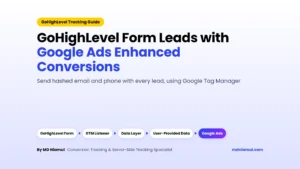
GoHighLevel iframe form tracking works by listening to the messages the GoHighLevel (GHL) embed sends to your page, because Google Tag Manager (GTM) can’t see inside the iframe. After a successful form or survey submit, GoHighLevel’s own code posts a set-sticky-contacts message to the parent page. That message carries the contact details as JSON. Calendar widgets are reported to post msgsndr-booking-complete after a booking. A GTM Custom HTML listener catches those messages, pushes ghl_form_submit, ghl_survey_submit or ghl_booking_complete to the data layer, and your GA4, Google Ads and Meta tags fire from there.
Key Takeaways
- Embedded GHL widgets are iframes: GTM’s form trigger can’t see a submit that happens inside them.
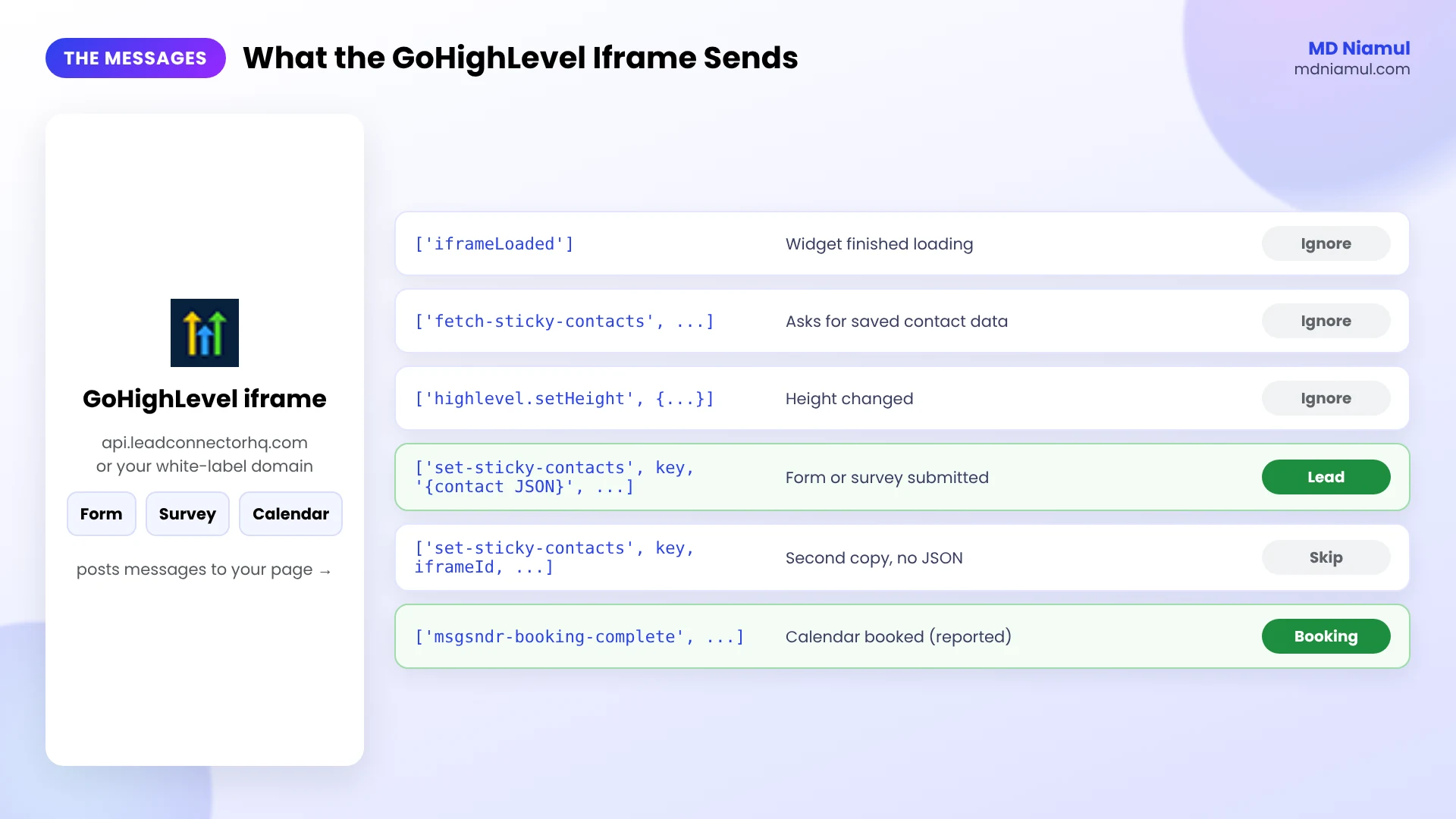
- Use the real message: I read GoHighLevel’s current form code. After a submit it sends
["set-sticky-contacts", key, "{contact JSON}", locationId, fingerprint]to your page. - Load messages aren’t leads: the iframe also sends
iframeLoaded,fetch-sticky-contactsandhighlevel.setHeight, so the listener has to ignore them. - One listener, three widgets: forms, surveys and calendars can all go through the same GTM tag.
- Email and phone come with the submit: useful for Google Ads enhanced conversions and Meta matching, with consent.
- Browser tracking is step one: server-side tracking, Conversions APIs and offline conversions from the GHL pipeline finish the job.
Introduction: Leads in GoHighLevel, Nothing in Google Ads
This is one of the most common messages I get from agencies: “GoHighLevel shows 60 new contacts this month, Google Ads shows 9 conversions.” The forms work. The tracking doesn’t.
Most of the time the GHL form, survey or calendar is embedded on a WordPress, Webflow or Shopify site. It loads in an iframe from a GoHighLevel domain, so GTM on your site has no idea a lead just came in.
A lot of listener code you’ll find online looks for messages like form-submitted or ghl_form_submit. I went through GoHighLevel’s current form code and didn’t find those names being sent to the parent page. So in this guide I’ll show you the messages GoHighLevel actually sends, a listener built on them, and how to connect it to GA4, Google Ads and Meta.
What Does the GoHighLevel Iframe Send to Your Page?
| Message (first item of the array) | When it’s sent | Use it for tracking? |
|---|---|---|
iframeLoaded |
The widget finished loading | No |
fetch-sticky-contacts, fetch-query-params |
The widget asks your page for saved contact data and URL parameters | No |
highlevel.setHeight |
The widget changed height | No |
set-sticky-contacts with contact JSON |
After a successful form or survey submit | Yes, the submit signal |
msgsndr-booking-complete |
After a calendar booking (as reported by other tracking guides; see below) | Yes, the booking signal |
One detail matters here. GoHighLevel sends set-sticky-contacts twice after a submit: once with the contact JSON, and once with only the iframe ID. The listener below only counts the one with JSON, and only once per widget.
Prerequisites & Setup Checklist
- GoHighLevel: the form, survey or calendar embedded on your website with the GHL embed code.
- Google Tag Manager: a container on every page with an embed, and publish rights.
- GA4 and ad accounts: your GA4 Measurement ID, Google Ads conversion ID and label, and Meta pixel if you run Meta ads.
- White-label domain (if you have one): the custom domain your GHL widgets load from.
- Consent: a cookie banner connected to Google Consent Mode v2 for EEA and UK visitors.
Not sure your container is set up cleanly? Check it with my free GTM container analyzer.
Video Tutorial Walkthrough
In the video I cover why embedded GHL forms, surveys and calendars break tracking, how custom GTM listeners capture them, and how server-side tracking, Conversions APIs, offline conversions, automation, dashboards and Consent Mode fit around it.
Step-by-Step Implementation Guide
Eight phases. Do them in order and test each one in GTM Preview before moving on.
Phase 1: Check How the Widget Is Embedded
- Open the page with your GHL form, survey or calendar and right-click the widget, then choose Inspect.
- If you see an
<iframe>with asrconleadconnectorhq.com,msgsndr.comor your white-label domain, this guide is for you. - Note the widget ID at the end of the URL, for example
/widget/form/AbC123. You’ll see it again in the data layer.
If the form sits on a GoHighLevel funnel page itself (not embedded), you can also track it with the funnel’s thank-you page or GHL’s own tracking settings. The listener is for embeds on your own site.
Phase 2: Add the GoHighLevel Listener in GTM
- In GTM, go to Tags → New → Custom HTML and paste the code below.
- If your widgets load from a white-label domain, add it to
WHITE_LABEL_HOSTS. - Set the trigger to All Pages, or a Page View trigger for pages with GHL embeds.
- Name it cHTML – GoHighLevel Listener and save.
<script>
// GoHighLevel iframe listener for forms, surveys and calendars by MD Niamul (mdniamul.com)
// Built on the messages GoHighLevel's own form code sends to the parent page.
// GTM: Custom HTML tag, trigger All Pages (or the pages with GHL embeds).
(function () {
  window.dataLayer = window.dataLayer || [];
  var GHL_HOSTS = /(^|\.)(leadconnectorhq\.com|msgsndr\.com|gohighlevel\.com)$/;
  var WHITE_LABEL_HOSTS = [];   // add your white-label domain, e.g. 'link.youragency.com'
  var sent = {};

  function allowed(origin) {
    var host = '';
    try { host = new URL(origin).hostname; } catch (e) { return false; }
    return GHL_HOSTS.test(host) || WHITE_LABEL_HOSTS.indexOf(host) > -1;
  }
  function frameOf(source) {
    var frames = document.getElementsByTagName('iframe');
    for (var i = 0; i < frames.length; i++) {
      if (frames[i].contentWindow === source) return frames[i];
    }
    return null;
  }

  window.addEventListener('message', function (event) {
    if (!allowed(event.origin) || !Array.isArray(event.data)) return;
    var data = event.data;
    var frame = frameOf(event.source);
    var src = frame ? frame.src : '';
    var widgetId = (src.match(/\/(?:form|survey|booking)\/([A-Za-z0-9_-]+)/) || [])[1] || (frame && frame.id) || 'ghl';

    // Form or survey submitted:
    // ["set-sticky-contacts", key, "{contact JSON}", locationId, fingerprint]
    if (data[0] === 'set-sticky-contacts' && typeof data[2] === 'string' && data[2].charAt(0) === '{') {
      if (sent[widgetId]) return;
      sent[widgetId] = true;
      var contact = {};
      try { contact = JSON.parse(data[2]); } catch (e) {}
      var type = /\/survey\//.test(src) ? 'survey' : 'form';
      window.dataLayer.push({
        event: 'ghl_' + type + '_submit',
        form_platform: 'gohighlevel',
        form_type: type,
        form_id: widgetId,
        user_data: { email: contact.email || '', phone_number: contact.phone || '' }
      });
      return;
    }

    // Calendar booking completed: ["msgsndr-booking-complete", ...]
    if (data[0] === 'msgsndr-booking-complete') {
      if (sent['booking_' + widgetId]) return;
      sent['booking_' + widgetId] = true;
      window.dataLayer.push({
        event: 'ghl_booking_complete',
        form_platform: 'gohighlevel',
        form_type: 'calendar',
        form_id: widgetId
      });
    }
  });
})();
</script>
I tested it in a browser with simulated GHL iframes that sent the same messages GoHighLevel sends. Load and height messages were ignored, a submit gave exactly one ghl_form_submit even though set-sticky-contacts arrived three times, the survey and calendar each gave their own event, and an iframe from an unknown domain was ignored.

Phase 3: Test the Events in GTM Preview
- Click Preview, open the page and submit a real test lead.
- In Tag Assistant, look for
ghl_form_submit(orghl_survey_submit,ghl_booking_complete). - Open the Data Layer tab and check
form_id,form_typeanduser_data.
About calendars: I verified the form and survey message in GoHighLevel’s code. For calendars I couldn’t load a live booking widget to read its code, so the msgsndr-booking-complete check is based on what other tracking guides report. Book one test appointment and confirm the event appears before you rely on it.

Phase 4: Create Triggers and Variables
- Create a Custom Event trigger with event name
ghl_form_submit|ghl_survey_submitand Use regex matching on. Name it CE – GHL Lead. - Create a second Custom Event trigger for
ghl_booking_complete, named CE – GHL Booking. - Create Data Layer Variables for
form_id,form_type,user_data.emailanduser_data.phone_number.
Want to test your regex first? Use my free GTM regex tester.
Phase 5: Send Leads and Bookings to GA4
- Add a Google Analytics: GA4 Event tag with event name
generate_leadon CE – GHL Lead, with parametersform_idandform_type. - Add a second GA4 Event tag, for example
book_appointment, on CE – GHL Booking. - Don’t send email or phone as GA4 parameters. Google doesn’t allow personal data in GA4.
- Mark
generate_leadas a key event in GA4 once it shows up.
Phase 6: Send Conversions to Google Ads and Meta
- Add a Google Ads Conversion Tracking tag on CE – GHL Lead, and turn on enhanced conversions with the email and phone variables.
- Add a separate Google Ads conversion for bookings if a booked call matters more than a form fill.
- Fire a Meta Pixel Lead event (and Schedule for bookings), with an event ID so the Conversions API can be deduplicated later.
- Make sure a Conversion Linker tag fires on all pages.

Phase 7: Add Server-Side Tracking and Conversions APIs
- Route GA4 through a server-side GTM container on your own subdomain, hosted on Stape (or Stape EU).
- Send the same lead to the Meta Conversions API and TikTok Events API from the server, with the same event ID.
- Pass hashed email and phone only with consent.
I explain the choice between Google tag gateway and full server-side GTM in my guide on Google tag gateway vs server-side tracking.
Phase 8: Close the Loop with GHL Deals, Dashboards and Consent
- Send qualified leads and won deals from the GHL pipeline back to Google Ads and Meta. My GoHighLevel offline conversion tracking guide has tested n8n code for this.
- Use n8n, Make or Zapier for the automations you can’t do inside GHL workflows.
- Build one Data Studio report (the tool Google called Looker Studio until April 2026) with spend, leads, bookings and revenue.
- Connect Consent Mode v2 so every tag follows the visitor’s choice. Test it with the free Consent Mode checker.
GoHighLevel Iframe Form Tracking: The Full Data Flow
| # | What happens | Where |
|---|---|---|
| 1 | The visitor submits a form or survey, or books a call | GHL iframe |
| 2 | GHL posts set-sticky-contacts or msgsndr-booking-complete |
GHL → your page |
| 3 | The listener pushes ghl_form_submit, ghl_survey_submit or ghl_booking_complete |
GTM Custom HTML |
| 4 | Custom Event triggers fire the tags | GTM |
| 5 | GA4, Google Ads (with enhanced conversions) and Meta record the conversion | Browser and server |
| 6 | Won deals go back to the ads as offline conversions | GHL pipeline → Google Ads, Meta |

Testing & Validation Workflow
- Load test. Open the page without submitting. No
ghl_events. - Error test. Submit with a required field empty. No event.
- Form test. A real submit gives one
ghl_form_submitwith the rightform_id. - Booking test. A test booking gives one
ghl_booking_complete. - Tag test. GA4, Google Ads and Meta tags each fire once per event.
- Platform test. The lead shows in GA4 DebugView, Google Ads diagnostics and Meta Test Events.
- Weekly check. Compare new GHL contacts from the website with conversions in the ads.
Troubleshooting Common Mistakes
Mistake 1: The listener never fires
The Problem: leads arrive in GHL, but Preview shows nothing.
The Cause: the widget loads from a white-label domain the listener doesn’t trust, or the listener looks for message names GHL doesn’t send.
The Solution: add your domain to WHITE_LABEL_HOSTS and use the set-sticky-contacts check above.
Mistake 2: Leads counted two or three times
The Problem: one submit shows as several conversions.
The Cause: GHL sends set-sticky-contacts more than once, and the listener counts every copy.
The Solution: only count the message with contact JSON, once per widget, as the code does.
Mistake 3: Conversions fire on page load
The Problem: conversions appear when nobody submitted.
The Cause: the listener reacts to any GHL message, including iframeLoaded and height updates.
The Solution: react only to the submit and booking messages.
Mistake 4: Email shows up in GA4 reports
The Problem: personal data appears in GA4.
The Cause: user_data was mapped to GA4 event parameters.
The Solution: use email and phone only for Google Ads enhanced conversions and Meta, never as GA4 parameters.
Mistake 5: Bookings never tracked
The Problem: forms work, the calendar doesn’t.
The Cause: the calendar opens as a pop-up or link instead of an embed, or the booking message is different in your account.
The Solution: embed the calendar, test a booking in Preview, and if nothing arrives, track the confirmation redirect page instead.
What to Set Up Next
- The full GHL picture: my GoHighLevel conversion tracking guide for GA4 and Google Ads.
- Other iframe forms: the same idea for Pipedrive and Zoho forms.
- Listener for another tool: try the free form tracking listener generator.
Want it done and documented for your account or your agency clients? See my GoHighLevel form conversion tracking services.
Conclusion
GoHighLevel embeds aren’t hard to track once you listen for the right message. The trouble is that a lot of code online listens for messages GHL never sends.
Start with the listener and one real test lead. When ghl_form_submit shows up in Preview, wire it to GA4, Google Ads and Meta. Then add server-side tracking and send won deals back from the pipeline, so your ads learn from real clients.
Summary by MD Niamul
GoHighLevel iframe form tracking needs a listener because GoHighLevel (GHL) forms, surveys and calendars embedded on your site load in an iframe that Google Tag Manager can’t see into. I checked GoHighLevel’s current form code. After a successful submit, the iframe posts [“set-sticky-contacts”, key, contact JSON, locationId, fingerprint] to the parent page. Calendar bookings are reported to post msgsndr-booking-complete. My GTM Custom HTML listener trusts only GHL and white-label domains, ignores load and height messages, and counts each submit once. It pushes ghl_form_submit, ghl_survey_submit or ghl_booking_complete with the form ID and contact details. Custom Event triggers then fire GA4 generate_lead, Google Ads with enhanced conversions and Meta Lead or Schedule. Test the calendar event in Preview first, and keep email out of GA4.
Frequently Asked Questions (FAQ)
1. Why doesn’t Google Tag Manager track my GoHighLevel form?
When a GoHighLevel form, survey or calendar is embedded on your website, it loads in an iframe from a GoHighLevel domain. Google Tag Manager runs on your page and can’t see inside that iframe, so the Form Submission and click triggers never fire. You need a listener that catches the messages the iframe sends to your page.
2. What message does a GoHighLevel form send after a submit?
In GoHighLevel’s current form code, a successful form or survey submit posts an array to the parent page: set-sticky-contacts, a key, the contact details as JSON, the location ID and a fingerprint. It’s sent more than once, and one copy has only the iframe ID, so a good listener counts only the copy with JSON, once.
3. Why does my GoHighLevel listener code not work?
Many listeners shared online check for messages like form-submitted or ghl_form_submit. I didn’t find those being sent to the parent page in GoHighLevel’s current form code. If your listener waits for them, it never fires. Switch to the set-sticky-contacts check, and add your white-label domain if your widgets use one.
4. How do I track GoHighLevel calendar bookings?
Embed the calendar, then listen for the msgsndr-booking-complete message, which other tracking guides report the calendar sends after a booking. I couldn’t load a live booking widget to verify it in the code, so book one test appointment in GTM Preview. If no event appears, track the booking confirmation redirect page instead.
5. Does the listener work with white-label GoHighLevel domains?
Yes, but you have to tell it about your domain. The listener trusts leadconnectorhq.com, msgsndr.com and gohighlevel.com by default. If your agency loads widgets from something like link.youragency.com, add that hostname to the WHITE_LABEL_HOSTS list in the code, or the messages will be ignored.
6. Can I get the lead’s email for enhanced conversions?
Yes. The set-sticky-contacts message includes the contact details, so the listener pushes email and phone in user_data. Use them only for Google Ads enhanced conversions and Meta matching, with consent. Don’t send them to GA4 as event parameters, because Google doesn’t allow personal data in GA4.
7. Which GA4 event should I use for GoHighLevel leads?
Use generate_lead for form and survey submissions. It’s a GA4 recommended event and imports cleanly into Google Ads. For calendar bookings, a separate event such as book_appointment lets you report and bid on booked calls on their own. Add form_id and form_type as parameters so you can compare widgets.
8. Should I track the thank-you page instead?
You can, if your form redirects to a thank-you page on your own site. The downside is that reloads and bookmarks count again. The listener only fires on a real submit, and it works when the form shows an inline thank-you message. Pick one method, not both, or leads get counted twice.
9. Do I still need server-side tracking for GoHighLevel?
The listener fixes the iframe problem, but browser tags still lose data to ad blockers and Safari. Sending the same leads through server-side GTM, the Meta Conversions API and TikTok Events API recovers more of them. Then send qualified leads and won deals from the GHL pipeline back to Google Ads and Meta.
10. Does this work for forms on GoHighLevel funnel pages?
The listener is meant for GHL widgets embedded on your own website, such as WordPress, Webflow or Shopify. On a GoHighLevel funnel page, the form isn’t inside an iframe on your site, so you’d track it with the funnel’s thank-you step, GHL’s tracking settings, or GTM installed on the funnel itself.
 Need Help Advanced GHL Automation & Tracking Setup?