
Quick Answer
GoHighLevel offline conversion tracking means sending your closed-won sales from the GoHighLevel (GHL) pipeline back to Google Ads and Meta, with the deal value. Save the visitor’s click IDs (GCLID, GBRAID, WBRAID and FBCLID) in contact custom fields when the lead comes in. Then build a workflow on Opportunity Status Changed to Won that fires a Custom Webhook into n8n, Make or Zapier, or into a server-side GTM container. From there, upload the sale to a Google Ads offline conversion action and send a Purchase event to the Meta Conversions API.
Key Takeaways
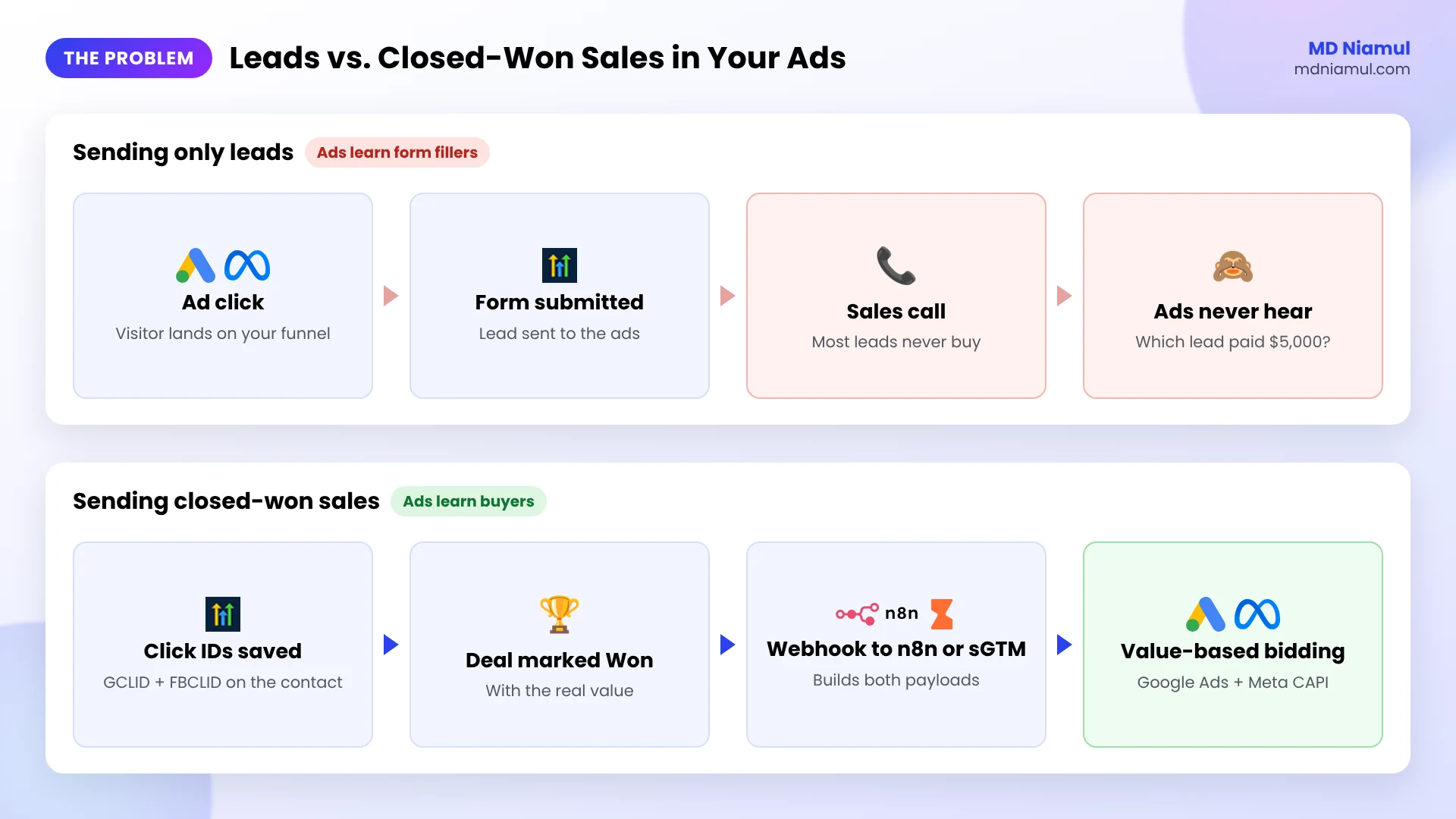
- Leads are not sales: if Google Ads and Meta only see form fills, they keep finding people who fill forms, not people who pay.
- The click ID is everything: without a GCLID on the contact, Google Ads can’t match a sale to an ad click. Meta matches better with FBCLID plus hashed email and phone.
- GHL’s built-in Google Ads action has a gap: per HighLevel’s own help article, “Add to Google Ads” works with triggers like Form Submission and Order Purchase, not with a pipeline deal being marked Won.
- One webhook can feed both platforms: a single Won workflow can send the sale to Google Ads and Meta at the same time.
- Timing matters: Google Ads accepts clicks up to 90 days old for most import sources, and Meta wants most events within 7 days of the sale.
- Revenue opens up better bidding: real deal values let you move to value-based bidding in Google Ads and Meta.
Introduction Why Your Ads Keep Finding the Wrong Leads
Here’s a pattern I see in a lot of GoHighLevel accounts. The agency is proud of its cost per lead. The sales team is quietly frustrated, because half those leads never pick up the phone.
Nobody is lying. Google Ads and Meta are doing exactly what they were told to do: get more form submissions. They have no idea which of those people later paid $5,000 and which ones ghosted the sales rep.
The fix is to send the sale back. When a deal moves to Won in your GHL pipeline, the ad platforms should hear about it, with the value. After a few weeks of that, they start looking for buyers instead of form fillers.
In this guide I’ll show you the setup I use for GoHighLevel clients: how to capture the click IDs, how to trigger on closed-won deals, and how to send them to Google Ads and Meta through n8n, Make, Zapier or server-side tracking.
If you only need Google Ads lead conversions from GHL forms, start with my earlier guide on Google Ads offline conversion tracking with GoHighLevel CRM. This post is about closed-won revenue, for both Google Ads and Meta.
Why Track Closed-Won Sales Instead of Leads?
| Tracking only leads | Tracking closed-won sales | |
|---|---|---|
| What the ad platform learns | Who fills in forms | Who actually buys |
| Value per conversion | Same for every lead, or none | The real deal value from the opportunity |
| Bidding you can use | Maximize conversions, target CPA | Maximize conversion value, target ROAS |
| Typical result | Cheap leads, low close rate | Fewer junk leads, more revenue per dollar |
Prerequisites & Setup Checklist
- GoHighLevel: admin access to the sub-account, a pipeline with a clear Won status, and opportunity values filled in.
- Google Ads: auto-tagging switched on, and permission to create conversion actions.
- Meta: a pixel (dataset) in Events Manager and a Conversions API access token.
- Automation tool: n8n, Make or Zapier, or a server-side GTM container on Stape.
- Consent: if you have leads from the EEA or UK, make sure your forms and privacy policy cover sending conversion data to ad platforms.
Video Tutorial Walkthrough
In the video I explain the lead vs. closed-won problem, show where the click IDs go in GoHighLevel, set up the pipeline trigger, and talk through the Zapier, Make and n8n options.
Step-by-Step Implementation Guide
I split the setup into eight phases. The first three are inside GoHighLevel and Google Ads. Then we move the data.
Phase 1: Create the Offline Conversion Action in Google Ads
- In Google Ads, click + and choose Conversion action.
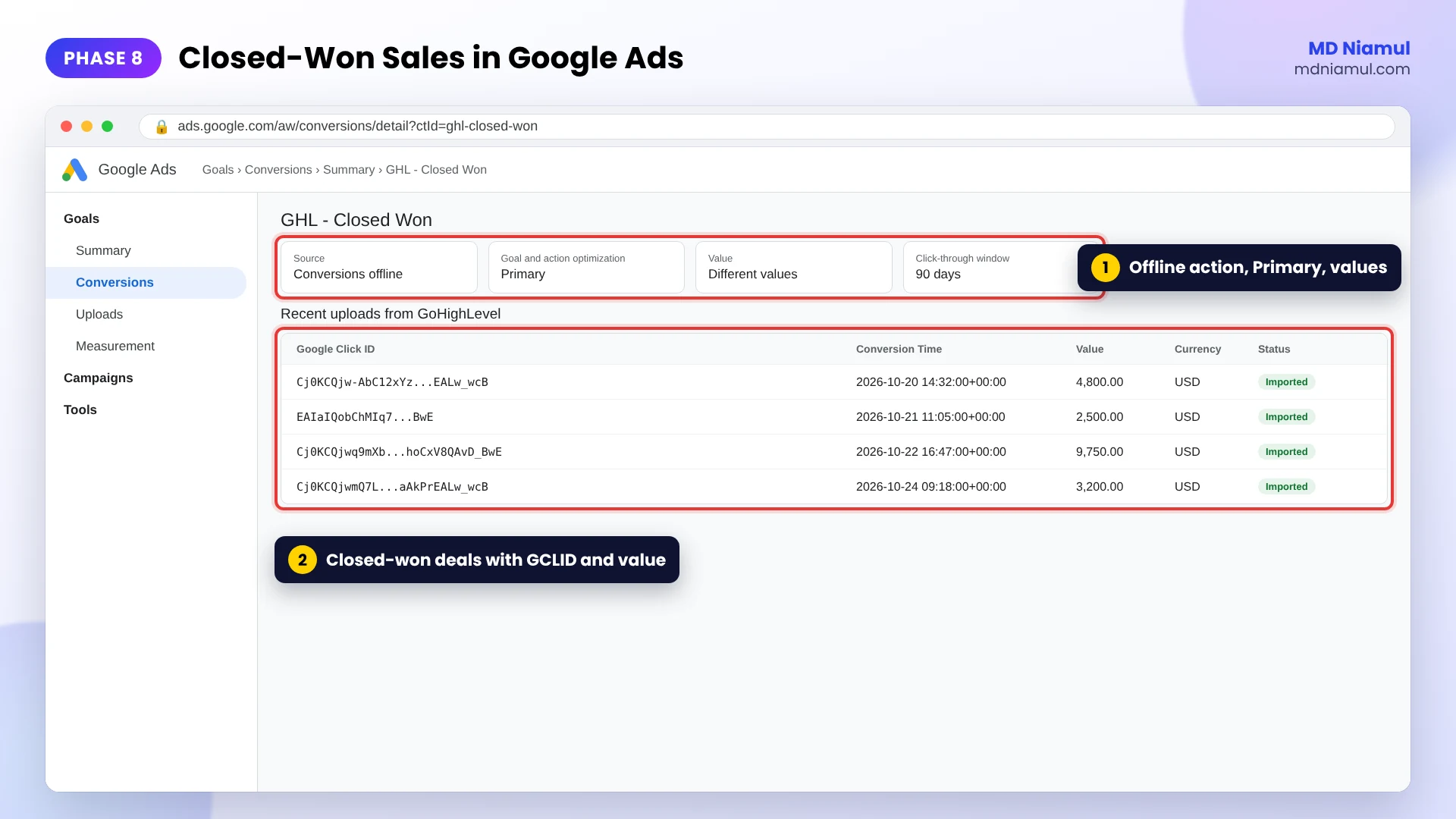
- Pick Conversions offline as the source. You can skip the data source for now.
- Choose the Purchase category and name it something you will copy exactly later, such as
GHL - Closed Won. - Choose Use different values for each conversion, so every deal sends its own value.
- Set the click-through window to 90 days. For a one-off service sale, set Count to One.
Keep the name in a note. If the name you send later is off by one space or capital letter, Google Ads rejects the row.
Phase 2: Save Click IDs on the GoHighLevel Contact
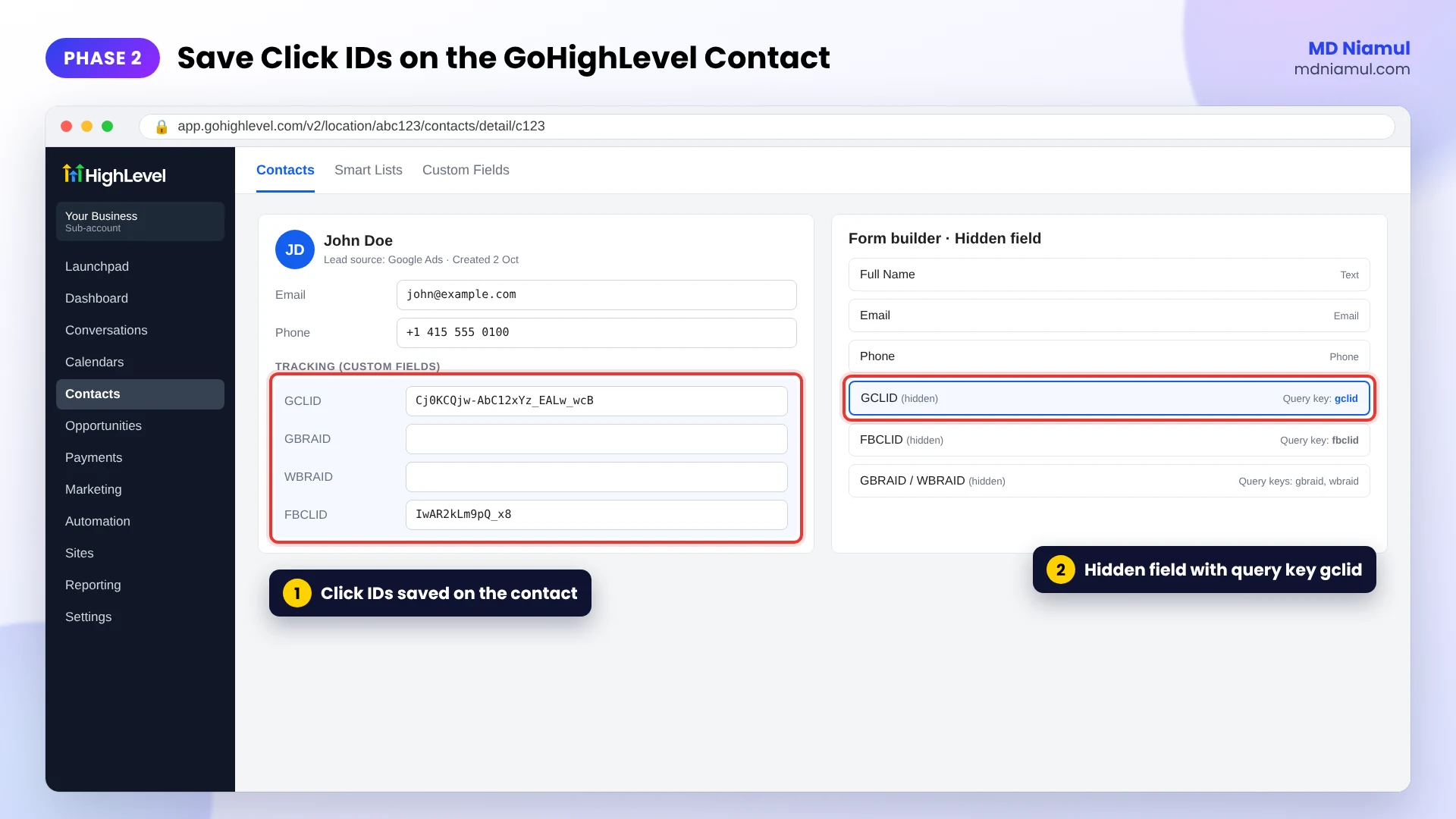
- In GHL, go to Settings → Custom Fields and create text fields for GCLID, GBRAID, WBRAID and FBCLID.
- Add them to your forms as hidden fields, and set each field’s query key to the URL parameter (
gclid,gbraid,wbraid,fbclid). - Submit a test lead from a URL like
?gclid=TEST123&fbclid=TEST456and check the contact record.
Here’s the catch I run into most: hidden fields only read the URL of the page the form is on. In a multi-step funnel, or when the visitor browses before converting, the click ID is gone by the time they submit. In those cases I store the IDs in a first-party cookie on the landing page and pass them into the form. That’s the same idea I use for Pipedrive click ID capture.
Phase 3: Make Sure the Opportunity Has a Real Value
- Open your pipeline and confirm the opportunity value is filled in when a deal closes.
- Agree with sales on one rule: a deal is only marked Won when the client has paid or signed.
- If you sell in several currencies, keep the currency on the contact or opportunity as a custom field.
Garbage in, garbage out. If reps mark deals Won early, you will teach Google Ads and Meta the wrong thing.
Phase 4: Build the Closed-Won Workflow in GoHighLevel
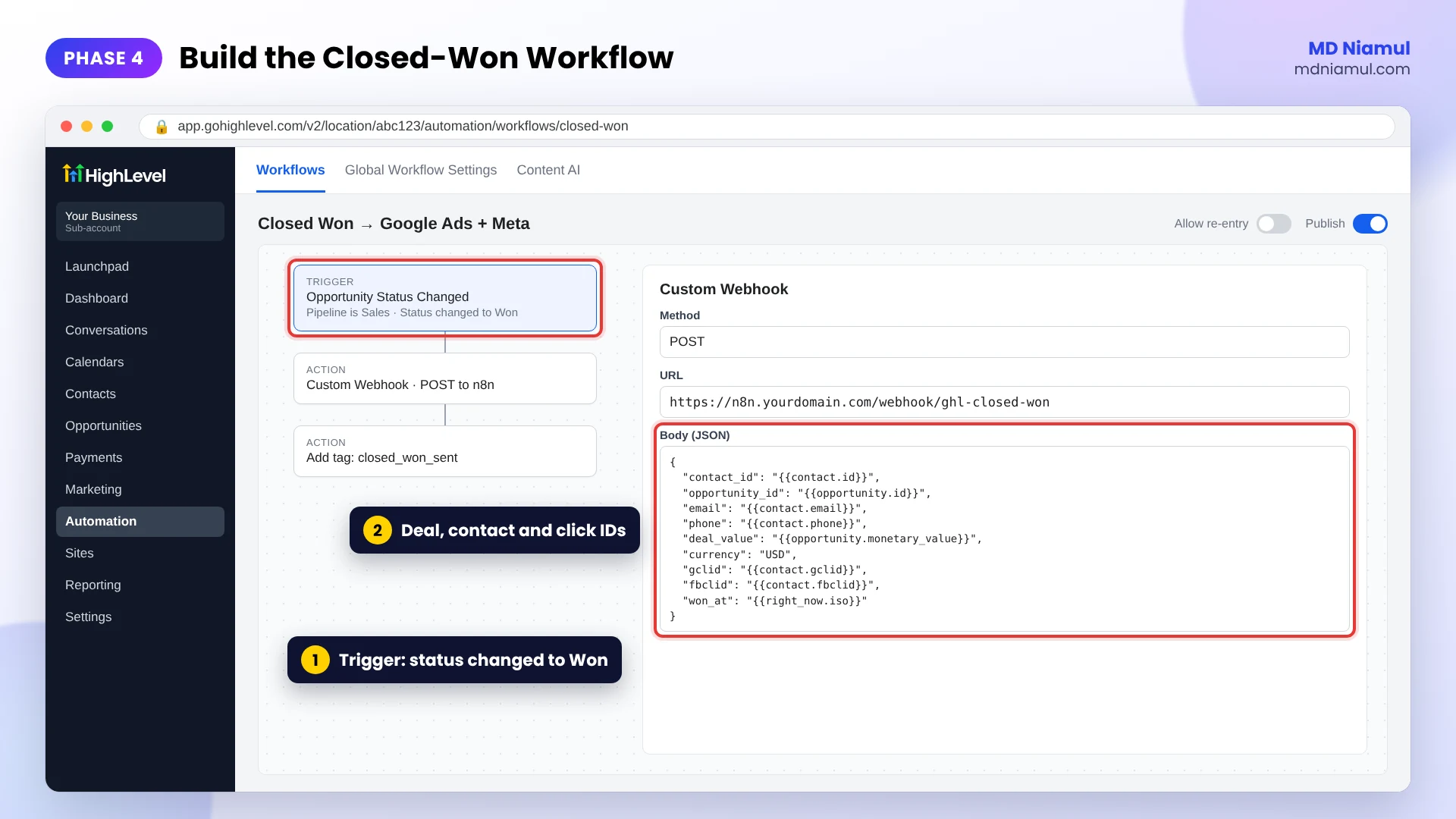
- Go to Automation → Workflows and create a new workflow.
- Add the trigger Opportunity Status Changed, filtered to your pipeline, with the status changed to Won.
- Add the action Custom Webhook, method POST, and paste the webhook URL from n8n, Make or Zapier.
- Send the fields below as JSON. Pick each value from the merge field menu, so the keys stay the same every time.
| Key in the webhook | Value from GoHighLevel |
|---|---|
contact_id, opportunity_id |
Contact ID and opportunity ID |
email, phone, first_name, last_name |
Contact fields |
deal_value, currency |
Opportunity value and your currency field |
gclid, gbraid, wbraid, fbclid |
The custom fields from Phase 2 |
won_at, lead_created_at |
The date the deal was won and the date the contact was created |
Why not GHL’s built-in “Add to Google Ads” action? HighLevel’s help article lists the triggers it supports, and pipeline status changes aren’t among them. A Custom Webhook works on any trigger, and the same request can feed Meta too.
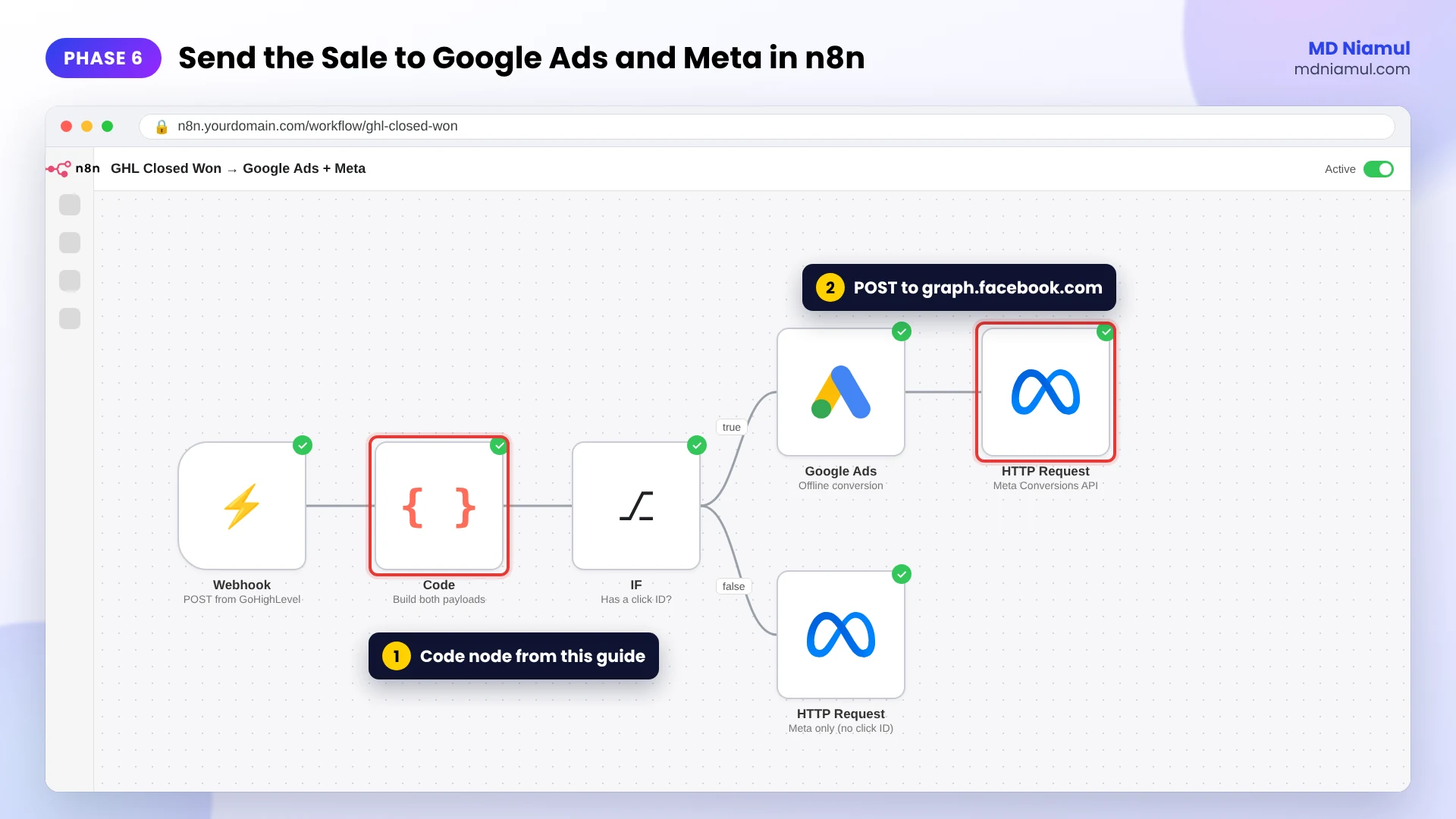
Phase 5: Turn the Webhook into Google Ads and Meta Payloads
In n8n, add a Webhook node to receive the GHL request, then a Code node with the script below. It hashes the customer data for Meta, builds the fbc value from the stored FBCLID, formats the time the way Google Ads wants it, and skips Google when there’s no click ID.
// GoHighLevel closed-won payload builder by MD Niamul (mdniamul.com)
// n8n Code node, mode "Run Once for Each Item", placed after the Webhook node
// that receives GoHighLevel's Custom Webhook when an opportunity is Won.
// Self-hosted n8n: allow crypto with NODE_FUNCTION_ALLOW_BUILTIN=crypto
const crypto = require('crypto');
const b = $json.body || $json;
const CONVERSION_NAME = 'GHL - Closed Won';   // must match Google Ads exactly
const ACTION_SOURCE = 'system_generated';     // use 'phone_call' if reps close by phone

const clean = v => (v === undefined || v === null) ? '' : String(v).trim();
const sha = v => clean(v) ? crypto.createHash('sha256').update(clean(v).toLowerCase()).digest('hex') : undefined;
const digits = clean(b.phone).replace(/[^0-9]/g, '');
const value = Number(String(b.deal_value || '0').replace(/[^0-9.]/g, '')) || 0;
const currency = (clean(b.currency) || 'USD').toUpperCase();
const wonAt = b.won_at ? new Date(b.won_at) : new Date();

// Google Ads offline conversion (needs one click ID)
const hasClickId = clean(b.gclid) || clean(b.gbraid) || clean(b.wbraid);
const googleAds = hasClickId ? {
  gclid: clean(b.gclid), gbraid: clean(b.gbraid), wbraid: clean(b.wbraid),
  conversion_name: CONVERSION_NAME,
  conversion_time: wonAt.toISOString().slice(0, 19).replace('T', ' ') + '+00:00',
  conversion_value: value,
  currency: currency
} : null;

// Meta Conversions API event (hashed customer data, fbc from the stored fbclid)
const leadTime = b.lead_created_at ? new Date(b.lead_created_at).getTime() : wonAt.getTime();
const fbc = clean(b.fbc) || (clean(b.fbclid) ? 'fb.1.' + leadTime + '.' + clean(b.fbclid) : undefined);
const userData = {
  em: sha(b.email) ? [sha(b.email)] : undefined,
  ph: digits ? [sha(digits)] : undefined,
  fn: sha(b.first_name) ? [sha(b.first_name)] : undefined,
  ln: sha(b.last_name) ? [sha(b.last_name)] : undefined,
  external_id: sha(b.contact_id) ? [sha(b.contact_id)] : undefined,
  fbc: fbc
};
Object.keys(userData).forEach(k => userData[k] === undefined && delete userData[k]);

const meta = {
  data: [{
    event_name: 'Purchase',
    event_time: Math.floor(wonAt.getTime() / 1000),
    event_id: 'ghl_won_' + clean(b.opportunity_id),
    action_source: ACTION_SOURCE,
    user_data: userData,
    custom_data: { value: value, currency: currency, lead_event_source: 'GoHighLevel' }
  }]
};

return { json: { google_ads: googleAds, meta: meta, skipped_google: !hasClickId } };
I tested it with sample GHL data. A messy value like $4,800.00 comes out as 4800. The email and phone hashes match SHA-256 of the normalized values, and a contact with no click ID returns google_ads: null instead of a broken row. Set CONVERSION_NAME to the exact name from Phase 1.
Using Make or Zapier instead? Same idea: map the webhook fields, hash email and phone for Meta, and use the built-in Google Ads offline conversion module.
Phase 6: Send the Sale to Google Ads and Meta
- Google Ads: send the
google_adsobject to your Google Ads offline conversion step (the Google Ads app in Zapier or Make, the Google Ads API, or a Google Sheet that Google Ads imports on a schedule). - Meta: add an HTTP Request node that POSTs the
metaobject tohttps://graph.facebook.com/<version>/<PIXEL_ID>/eventswith your access token. - While testing, add your
test_event_codefrom Events Manager so the event shows in the Test events tab.
Want to check the Meta payload by hand first? Paste it into my free Meta CAPI payload builder. For the Google side, the free offline conversion builder checks the columns.
Phase 7: Optional Server-Side Route with Stape
If you already run server-side GTM, you can point the GHL webhook at your server container instead of n8n. A Data Client receives the request, and tags in the container send the Meta Conversions API event and the Google Ads offline conversion. I like this when a client already has their whole tracking in one sGTM container, because everything stays in one place.
I host these containers on Stape, or Stape EU for EU data. More on that in my server-side tracking service.
Phase 8: Switch to Value-Based Bidding
- Let closed-won conversions build up for a few weeks and check that values look right.
- In Google Ads, set the closed-won action as Primary and consider moving the lead action to Secondary.
- Move campaigns to Maximize conversion value, and later to a target ROAS once you have steady volume.
- In Meta, use the Purchase event with value for optimization and reporting.
Don’t flip everything on day one. With only a handful of sales a month, keep optimizing on leads and let the revenue data guide budget decisions first.
GoHighLevel Offline Conversion Tracking: The Full Data Flow
| # | What happens | Where |
|---|---|---|
| 1 | Visitor clicks an ad and lands with gclid or fbclid |
Your funnel |
| 2 | The form saves the click IDs on the contact | GoHighLevel |
| 3 | Sales works the opportunity and marks it Won with a value | GHL pipeline |
| 4 | The workflow sends a Custom Webhook | GHL workflow |
| 5 | The Code node builds both payloads | n8n, Make, Zapier or sGTM |
| 6 | Google Ads imports the sale; Meta receives a Purchase | Google Ads, Meta Events Manager |
Testing & Validation Workflow
- Contact test. A test lead from a tagged URL has GCLID and FBCLID in its custom fields.
- Workflow test. Move a test opportunity to Won and check the workflow’s execution log.
- Webhook test. n8n receives the request with every key filled.
- Meta test. The Purchase event appears in Test events with value and good match quality.
- Google Ads test. The upload shows in the conversion action’s diagnostics without errors. Fake test GCLIDs will fail, which is expected; use a real click for the final check.
- Monthly check. Compare Won deals in GHL with imported conversions in Google Ads and Meta.
Troubleshooting Common Mistakes
Mistake 1: The GCLID field is empty
The Problem: deals reach Won, but Google Ads gets nothing.
The Cause: the form wasn’t on the landing page, a redirect stripped the URL, or the form is an iframe embed on another site.
The Solution: store the click IDs in a first-party cookie on landing and pass them into the hidden fields.
Mistake 2: Google Ads rejects the conversion name
The Problem: uploads fail with an unknown conversion action.
The Cause: the name in the payload doesn’t match Google Ads character for character.
The Solution: copy the name straight from Google Ads into CONVERSION_NAME.
Mistake 3: Meta shows the event but low match quality
The Problem: Purchases arrive in Events Manager, but attribution is weak.
The Cause: only email is sent, or phone numbers include spaces and symbols before hashing.
The Solution: send email, phone (digits only, with country code), names, external ID and fbc, all normalized before hashing, as the script does.
Mistake 4: Old deals are ignored
The Problem: deals that took months to close never show up.
The Cause: the click is older than Google’s import window, or the Meta event time is more than 7 days in the past.
The Solution: send the sale as soon as it’s won, and for long sales cycles also send an earlier stage, like a qualified lead.
Mistake 5: Sales are counted twice
The Problem: Meta reports more purchases than you closed.
The Cause: GHL’s own Facebook Conversions API action and your webhook both send Purchase for the same deal.
The Solution: pick one sender, and always send a stable event_id like ghl_won_<opportunity id>.
What to Set Up Next
- The browser side: my GoHighLevel conversion tracking guide for GA4 and Google Ads covers GTM, key events and enhanced conversions.
- Hashing: check your normalization with the free hashing code generator.
- Automation: see my marketing automation service for n8n, Make and Zapier builds.
Want this built and documented for your account? Take a look at my GoHighLevel conversion tracking specialist page and my offline conversion tracking services.
Conclusion
The form fill is where your ads stop seeing the customer. Everything that happens after that, the calls, the follow-ups, the signed deal, lives in GoHighLevel.
So start small. Get the click IDs onto every new contact this week. Then build the Won workflow and send one test deal through to Google Ads and Meta. Once real sales are flowing back, you can decide when to let the ad platforms bid on revenue.
Summary by MD Niamul
GoHighLevel offline conversion tracking sends closed-won sales from the GoHighLevel (GHL) pipeline back to Google Ads and the Meta Conversions API, so both platforms optimize for revenue instead of raw leads. Here’s how I set it up. I save GCLID, GBRAID, WBRAID and FBCLID in contact custom fields through hidden form fields. Then I create a Google Ads offline conversion action with different values per conversion. A GHL workflow triggered by Opportunity Status Changed to Won sends a Custom Webhook to n8n, Make, Zapier or a server-side GTM container on Stape. That step uploads the sale to Google Ads and posts a hashed Purchase event to Meta. The catch: GHL’s built-in Add to Google Ads action doesn’t run on pipeline status changes, and old clicks or late events get rejected, so send each sale as soon as it’s won.
Frequently Asked Questions (FAQ)
1. What is GoHighLevel offline conversion tracking?
It’s the process of sending events that happen after the form fill, like a closed-won deal in your GoHighLevel pipeline, back to your ad platforms. Google Ads gets the sale with the GCLID and value. Meta gets a Purchase event through the Conversions API. That way the ad platforms learn which clicks turned into paying clients.
2. How do I connect Google Ads to GoHighLevel?
In GoHighLevel, connect your Google account under Settings, Integrations, Google, and pick the right Google Ads account. In Google Ads, create a conversion action with Conversions offline as the source. GHL’s Add to Google Ads workflow action can then send conversions for supported triggers like form submissions, provided the contact has a GCLID, GBRAID or WBRAID.
3. Why can’t I use Add to Google Ads for closed-won deals?
HighLevel’s help article lists the triggers the Add to Google Ads action supports, such as Form Submission and Order Purchase. A pipeline deal moving to Won isn’t one of them. So for closed-won revenue I use the Opportunity Status Changed trigger with a Custom Webhook and send the sale to Google Ads through n8n, Make, Zapier or server-side GTM.
4. What is the Meta Conversions API?
The Meta Conversions API is a server-to-server way to send events to Meta instead of relying only on the browser pixel. For GoHighLevel sales, it lets you send a Purchase event with the deal value, hashed email and phone, and the click ID, even though the sale happened in your CRM and not on your website.
5. Does GoHighLevel have a built-in Meta Conversions API action?
Yes, GoHighLevel has a Facebook Conversions API workflow action that sends events like Lead and Purchase from a connected pixel. You can use it, but don’t also send the same Purchase from a webhook, or Meta will count the sale twice. I prefer one webhook that feeds both Google Ads and Meta, so the data stays in one place.
6. Which click IDs should I store in GoHighLevel?
Store GCLID, GBRAID and WBRAID for Google Ads, and FBCLID for Meta, each in its own contact custom field. GBRAID and WBRAID show up on some iOS and app traffic instead of GCLID. Also make sure email and phone are captured, because Meta uses them, hashed, to match the sale to a person.
7. How fast do I need to send a closed sale?
As soon as it’s won. Google Ads imports clicks up to 90 days old for most file-based sources, and Meta expects most Conversions API events within 7 days of when they happened. If your sales cycle is longer than about three months, also send an earlier stage, like a qualified lead, so the platforms still learn.
8. Should I use n8n, Make or Zapier?
All three work. Zapier is the quickest to set up and has a ready Google Ads offline conversion step. Make gives more control at a lower price. n8n is my pick for clients who want to self-host and keep full control, and the Code node in this guide is written for it. Server-side GTM on Stape is another good route.
9. When should I switch to value-based bidding?
Once closed-won conversions with values are flowing in steadily, usually after a few weeks. In Google Ads, make the closed-won action Primary, then try Maximize conversion value before setting a target ROAS. With only a few sales a month, keep bidding on leads for now and use the revenue data for budget decisions.
10. Is it legal to send customer data to Google Ads and Meta?
It depends on where your leads are and what they agreed to. Email and phone must be hashed before sending, and leads in the EEA or UK need a clear consent basis and a privacy policy that covers ad platforms. I set up the technical side correctly, but check the legal side with your own adviser. This isn’t legal advice.
 Need Help Advanced GHL Automation & Tracking Setup?