
Quick Answer
Server-side tracking sends your website events through a server you control, usually a server-side Google Tag Manager (GTM) container on your own subdomain, instead of only through browser pixels that ad blockers and Safari limit. Marketing attribution is how you decide which ad, channel or touchpoint gets credit for a lead or sale. Put together with a CRM like GoHighLevel, they make your data the hub. Every click, lead and closed deal is captured once, stored with its source, and sent back to GA4, Google Ads and Meta, so reports and bidding run on the same, accurate numbers.
Key Takeaways
- Pixels alone miss conversions: ad blockers, cookie limits and consent rules stop a share of browser events from ever reaching the ad platforms.
- Server-side tracking runs on your domain: events go through a container you own, set first-party cookies and are harder to block.
- Attribution answers “what worked?”: it decides which source gets credit, and first-touch and last-touch often tell different stories.
- The CRM closes the loop: GoHighLevel knows which leads became customers. Sending that back to Google Ads and Meta is what makes bidding smarter.
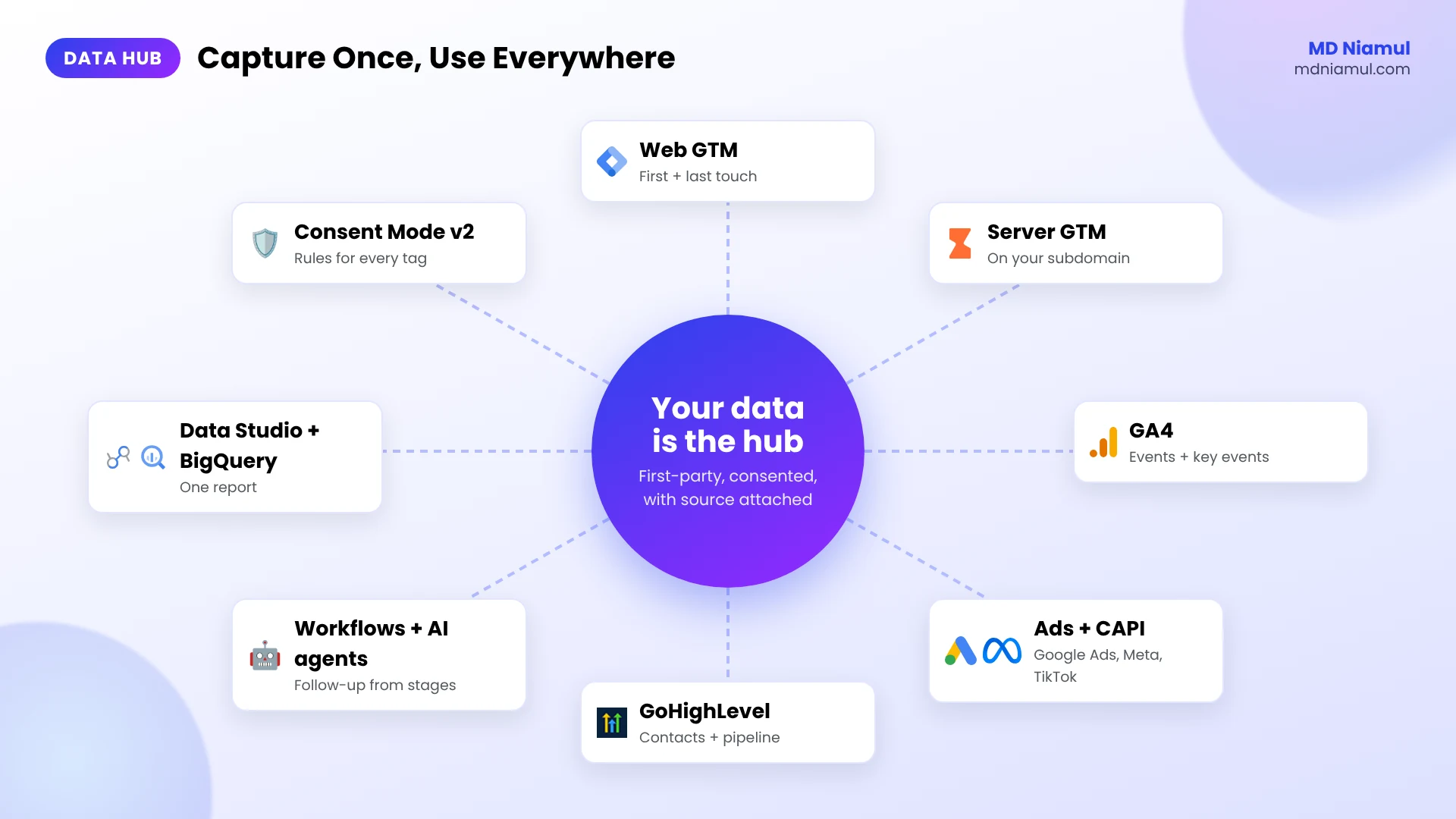
- One hub, many outputs: capture the data once, then feed GA4, ad platforms, the CRM and your dashboards from the same source.
Introduction Data Is the Hub
When a business owner first gets on a call with me, the problem usually sounds like one of these. “Google Ads says 40 leads, GoHighLevel says 25, and my sales team says 12 were real.” Or: “We switched off a campaign and leads went up. What?”
The ads aren’t always the problem. The data is. Each tool sees a different slice. The pixel misses people with ad blockers, GA4 loses the source when the visitor comes back from another device, and the CRM never tells the ad platforms who actually paid.
I build tracking with one idea in mind: your data is the hub. Everything goes in once, cleanly, with its source attached. Everything else, your reports, your ad bidding, your follow-up workflows and AI agents in GoHighLevel, reads from that hub.
In this post I’ll explain the two pieces people ask me about most, server-side tracking and marketing attribution, in plain words. Then I’ll walk you through how I connect them with GoHighLevel.
What Is Server-Side Tracking?
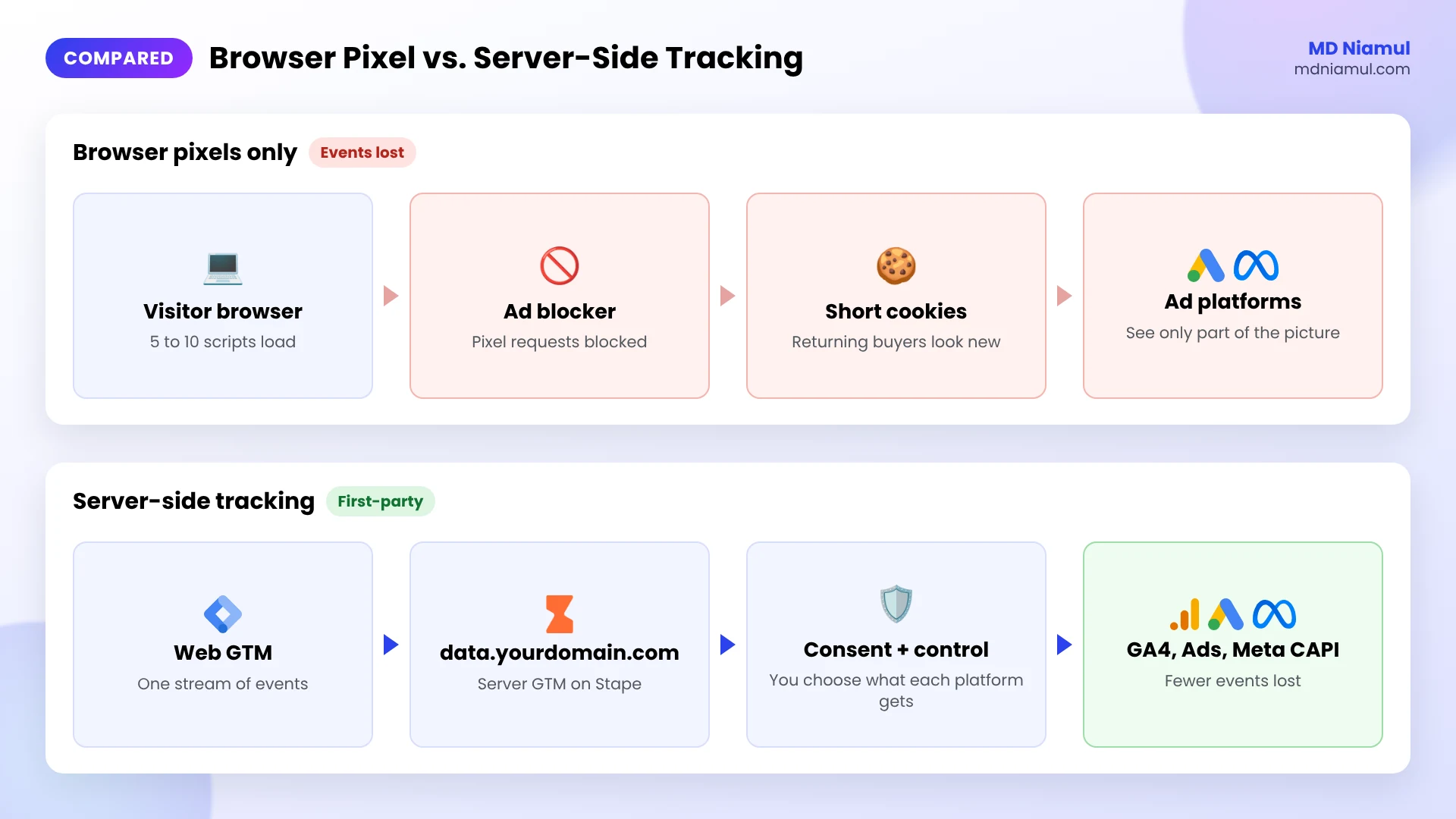
Server-side tracking means your website sends events to a server first, and that server forwards them to GA4, Google Ads, Meta, TikTok and others. With normal client-side tracking, each pixel loads in the visitor’s browser and sends its own data, which is exactly what ad blockers and browser privacy features target.
| Browser pixel (client-side) | Server-side tracking | |
|---|---|---|
| Where tags run | In the visitor’s browser | In a server container on your subdomain |
| Ad blockers | Often blocked | Much harder to block |
| Cookies | Often third-party or short-lived in Safari | First-party, set from your own domain |
| Data control | Each pixel collects what it wants | You decide what each platform receives |
| Page speed | Many scripts on the page | Fewer scripts in the browser |
It doesn’t replace consent. Server-side tags should still follow the visitor’s cookie choice, and that’s why I connect every setup to Google Consent Mode.
What Is Marketing Attribution and How Does It Work?
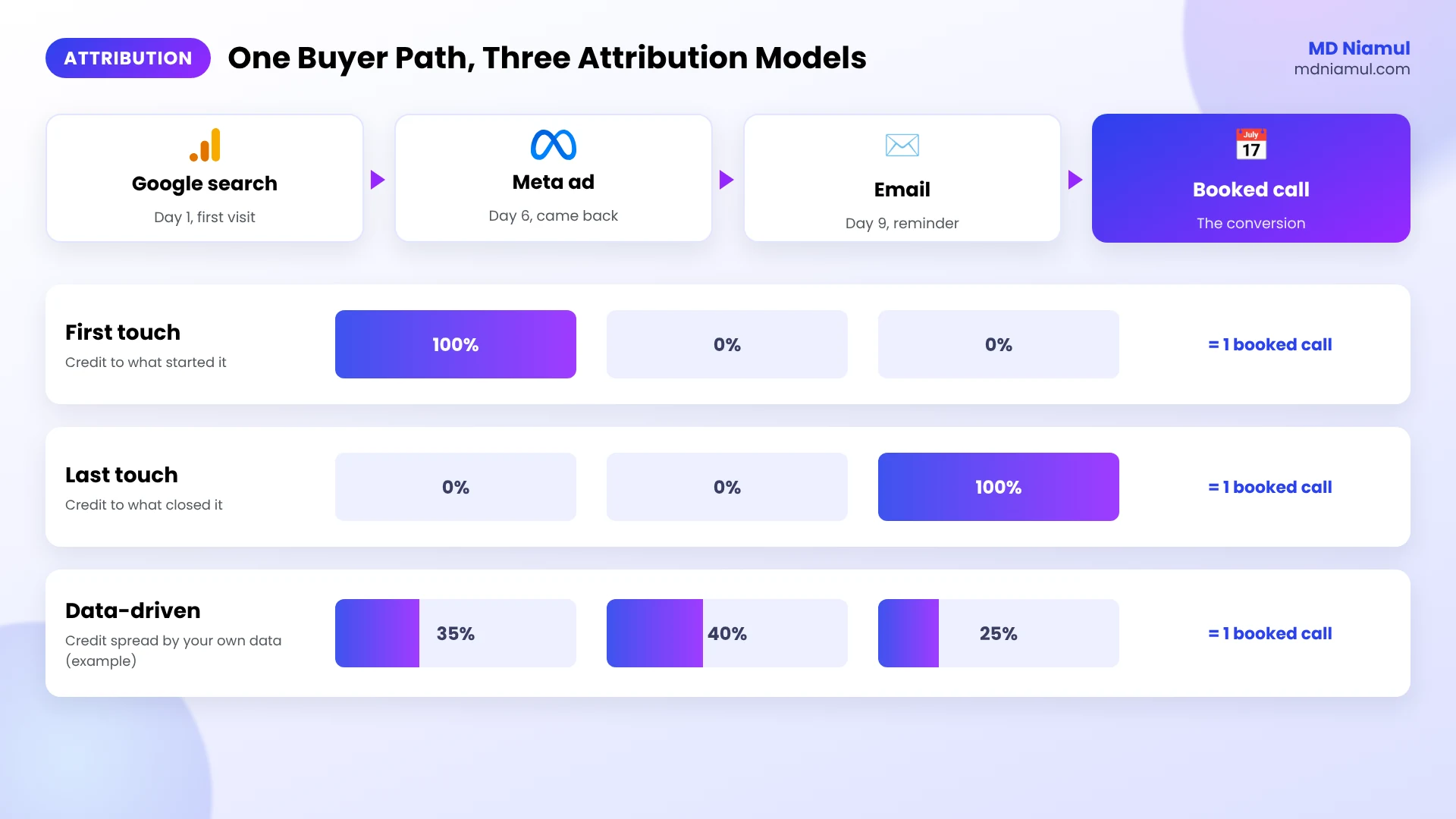
Marketing attribution is the set of rules that decides which touchpoint gets credit for a conversion. A buyer might find you through a Google search, come back from a Meta ad a week later, and finally book after an email. Who gets the credit?
- First touch gives all the credit to the first channel. Good for seeing what starts conversations.
- Last touch gives it to the last channel before the lead. Good for seeing what closes.
- Data-driven, the default in GA4 and Google Ads, spreads credit based on patterns in your own data.
No model is “true”. The useful part is comparing them. When first touch says Meta and last touch says Google brand search, both channels are doing a job, and cutting either one usually hurts.
Prerequisites & Setup Checklist
- Google Tag Manager: a web container on every page, with publish rights.
- GA4 and ad accounts: admin or editor access to GA4, Google Ads, Meta and any other platform you run.
- GoHighLevel: access to custom fields, pipelines and workflows in the sub-account.
- A subdomain for tracking: for example
data.yourdomain.com, for the server container. - Consent: a cookie banner connected to Google Consent Mode v2 if you have visitors from the EEA or UK.
Not sure what your site sends today? Start with my free tracking audit tool or the free server-side tracking checker.
Video Tutorial Walkthrough
In this short video I introduce myself and the work I do: GoHighLevel and AI agent automation, marketing attribution and server-side tracking, and why I treat data as the hub of every marketing setup.
Step-by-Step Implementation Guide
This is the order I build a data hub in for clients. You can stop after any phase and still be better off than before.
Phase 1: Audit What You Track Today
- List every conversion that matters: form leads, calls, bookings, purchases, closed deals.
- For each one, write down where it’s counted today: GA4, Google Ads, Meta, GoHighLevel.
- Compare one month of numbers side by side. Big gaps tell you where to start.
I usually find the same three issues: duplicate conversions, a conversion counted on a page view instead of a real submit, and no CRM data going back to the ads.
Phase 2: Capture First-Touch and Last-Touch Source
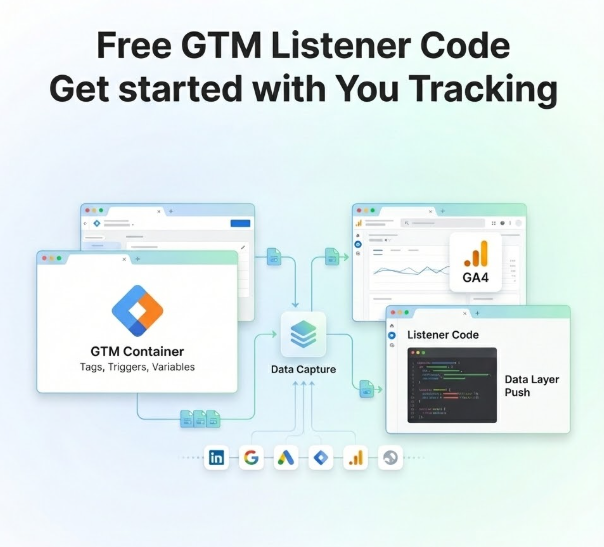
- In GTM, create a Custom HTML tag with the code below.
- Fire it on Initialization – All Pages, after consent if you use a banner.
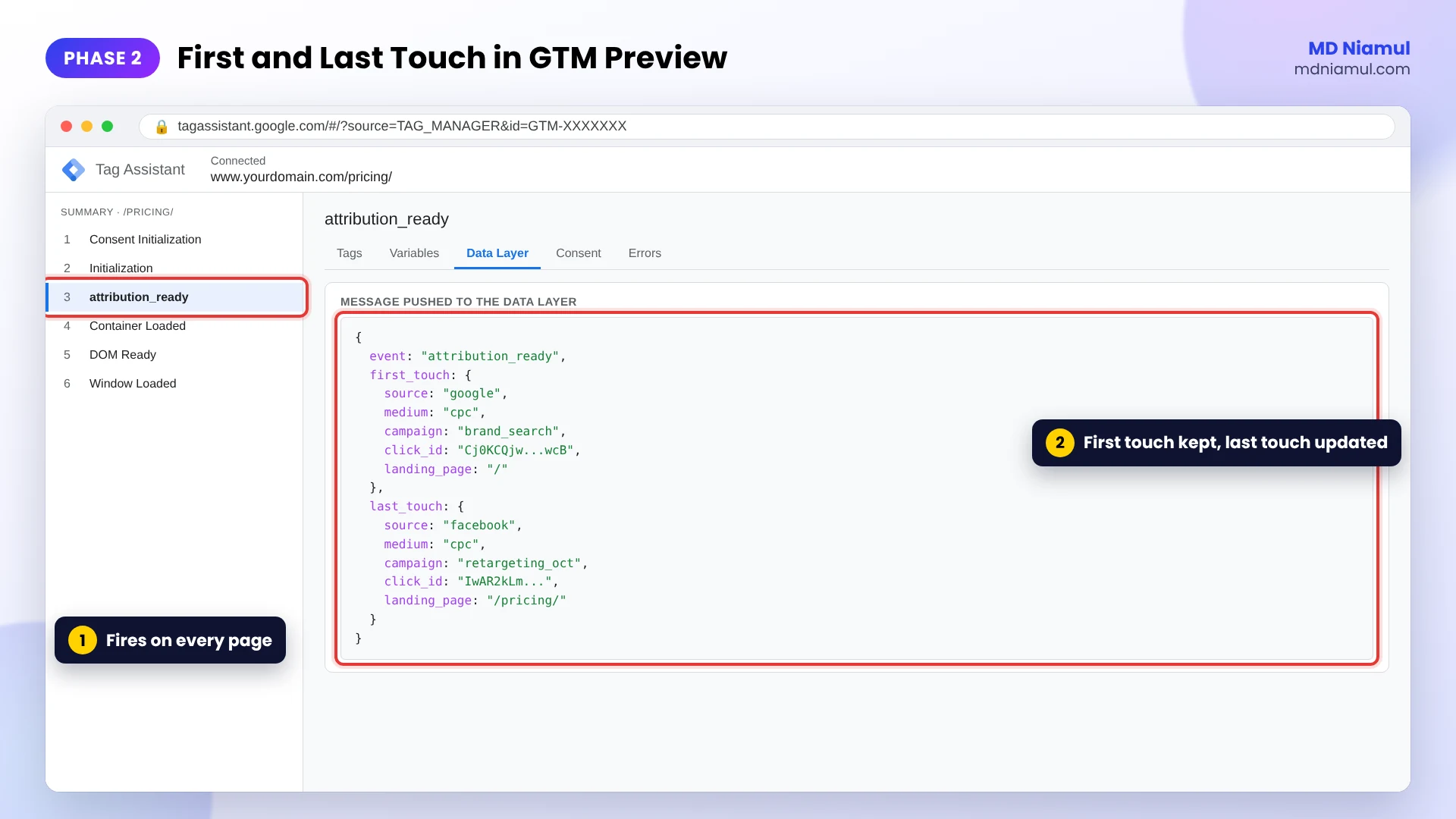
- Check in GTM Preview that an
attribution_readyevent appears withfirst_touchandlast_touch.
<script>
// First-touch and last-touch attribution capture by MD Niamul (mdniamul.com)
// Add as a GTM Custom HTML tag on Initialization - All Pages (after consent).
// Saves where each visitor first came from and where they came from last,
// then pushes both to the data layer so forms, CRM fields and tags can use them.
(function () {
  window.dataLayer = window.dataLayer || [];
  var DAYS = 180;
  var p = new URLSearchParams(window.location.search);
  var ref = document.referrer ? new URL(document.referrer).hostname : '';
  var external = ref && ref.replace(/^www\./, '') !== window.location.hostname.replace(/^www\./, '');

  function read(name) {
    var m = document.cookie.match('(?:^|; )' + name + '=([^;]*)');
    try { return m ? JSON.parse(decodeURIComponent(m[1])) : null; } catch (e) { return null; }
  }
  function write(name, obj) {
    document.cookie = name + '=' + encodeURIComponent(JSON.stringify(obj)) +
      '; max-age=' + DAYS * 86400 + '; path=/; SameSite=Lax' +
      (window.location.protocol === 'https:' ? '; Secure' : '');
  }

  var clickId = p.get('gclid') || p.get('gbraid') || p.get('wbraid') || p.get('fbclid') || p.get('ttclid') || '';
  var tagged = p.get('utm_source') || clickId;
  var searchEngine = /(^|\.)(google|bing|yahoo|duckduckgo|baidu|yandex)\./.test(ref);
  var touch = {
    source: p.get('utm_source') || (p.get('gclid') || p.get('gbraid') || p.get('wbraid') ? 'google' :
            p.get('fbclid') ? 'facebook' : p.get('ttclid') ? 'tiktok' : (ref || 'direct')),
    medium: p.get('utm_medium') || (clickId ? 'cpc' : (external ? (searchEngine ? 'organic' : 'referral') : '(none)')),
    campaign: p.get('utm_campaign') || '',
    click_id: clickId,
    landing_page: window.location.pathname,
    time: new Date().toISOString()
  };

  var first = read('mdn_first_touch');
  if (!first) { first = touch; write('mdn_first_touch', first); }
  var last = read('mdn_last_touch');
  if (!last || tagged || external) { last = touch; write('mdn_last_touch', last); }

  window.dataLayer.push({ event: 'attribution_ready', first_touch: first, last_touch: last });
})();
</script>
What it does: the first time someone visits, it saves their source, medium, campaign, click ID and landing page in a first-party cookie, and keeps it for 180 days. Every new ad click, tagged link or outside referral updates a second “last touch” cookie. Clicks between your own pages don’t overwrite anything.
I tested it in a browser across four visits: a Google Ads click, a page view on the same site, a visit from Google search and a Meta ad click. First touch stayed on the Google Ads click every time. Last touch moved to organic search and then to Facebook paid, as it should.
Phase 3: Make GoHighLevel the CRM Hub
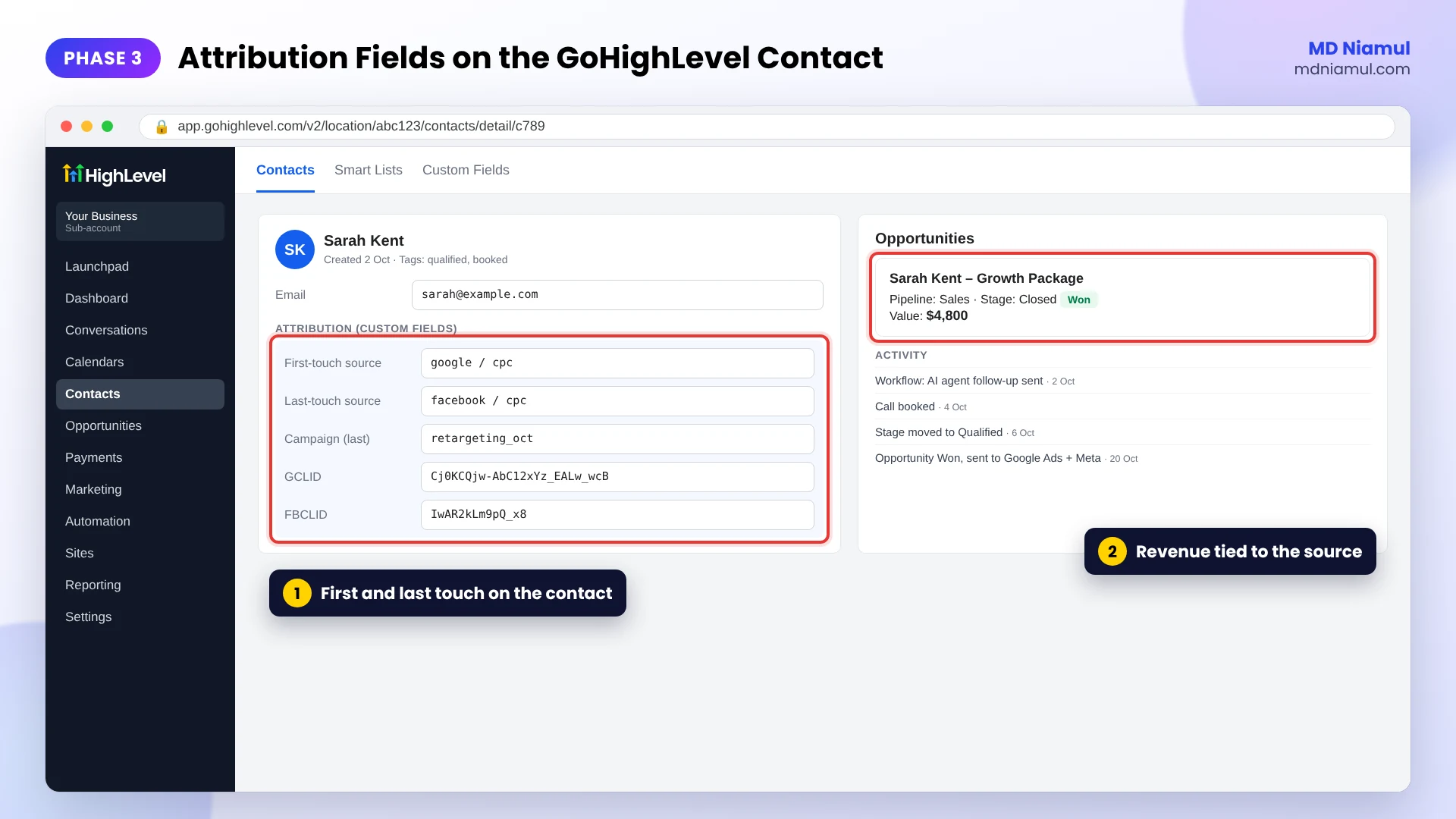
- In GoHighLevel, create contact custom fields for first-touch source, last-touch source, campaign, GCLID and FBCLID.
- Fill them from your forms with hidden fields, or pass them in from the data layer values above.
- Build your pipeline so every stage means something: new lead, qualified, booked, won.
- Use workflows and AI agents for follow-up, but trigger them from the same stages, so tracking and automation tell the same story.
This is the part most setups skip. When the source sits on the contact, you can see in GoHighLevel which channel brought your best clients, not just your most leads.
Phase 4: Add Server-Side Tracking
- Create a server container in GTM and host it, for example on Stape (or Stape EU for EU data).
- Point a subdomain such as
data.yourdomain.comto it, so cookies are first-party. - Send GA4 events to the server container, then add tags for GA4, Google Ads, Meta Conversions API, TikTok Events API and any other platform you use.
- Use the same event ID in the browser pixel and the server event, so platforms can remove duplicates.
I’m an official Stape partner, and this is the setup I use most. More detail is on my server-side tracking service page.
Phase 5: Send CRM Results Back to the Ads
- In Google Ads, create an offline conversion action for qualified leads or closed deals.
- In GoHighLevel, trigger a workflow when an opportunity is won and send the deal with its value and click ID.
- Send the same sale to the Meta Conversions API as a Purchase, with hashed email and phone.
I wrote the full walkthrough, with tested n8n code, in my guide on GoHighLevel offline conversion tracking for Google Ads and Meta.
Phase 6: Report Attribution in One Dashboard
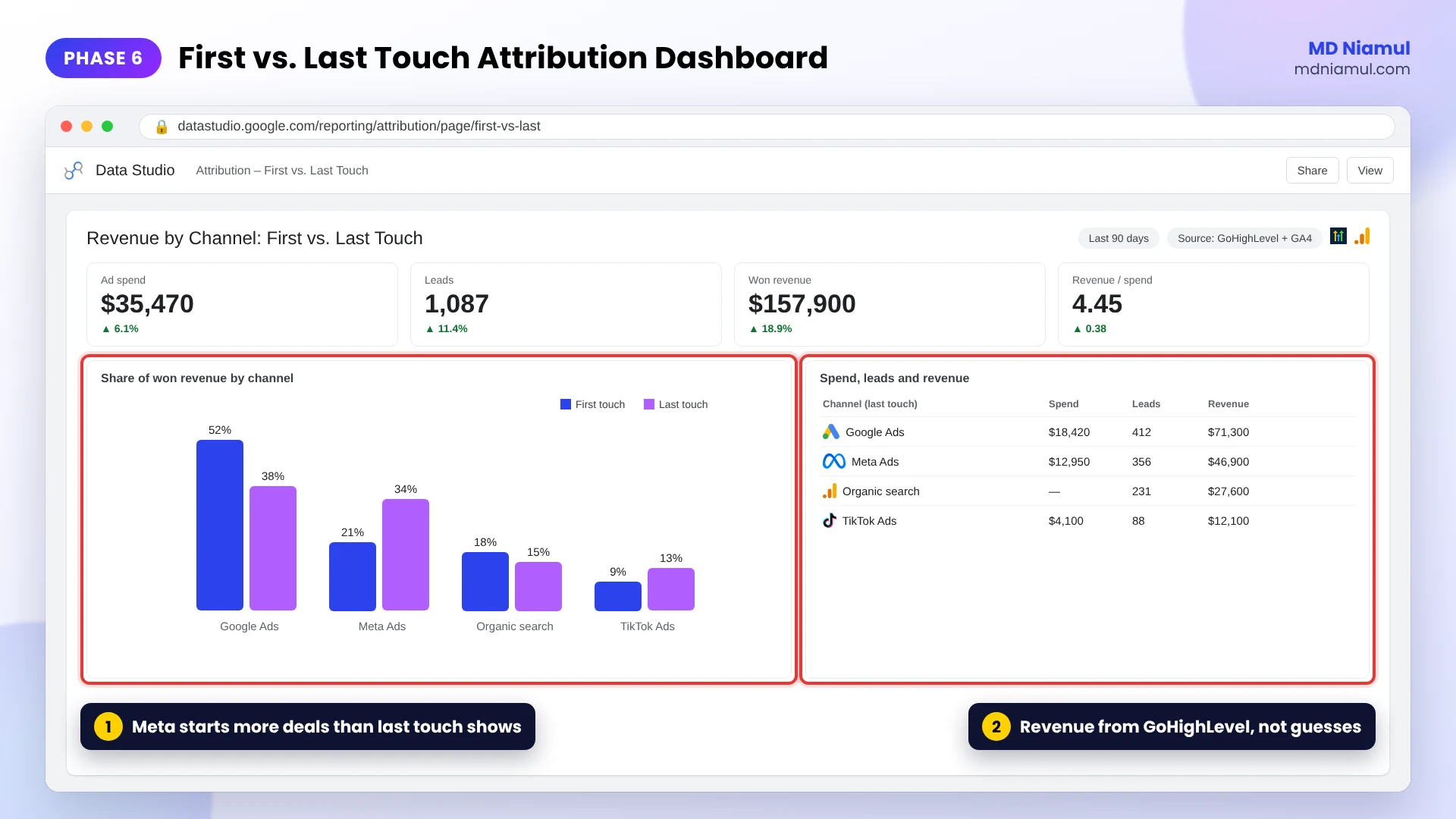
- Bring GA4, ad spend and GoHighLevel deals into Data Studio (the tool Google called Looker Studio until April 2026).
- Show first-touch and last-touch side by side by channel, next to spend and revenue.
- For bigger accounts, use the GA4 BigQuery export and SQL for path and cohort questions.
My free GA4 BigQuery SQL generator helps with the queries.
Phase 7: Connect Google Consent Mode v2
- Connect your cookie banner to Consent Mode, with default states set before any tag fires.
- Make sure the attribution tag and server tags respect the visitor’s choice.
- Test it with my free Consent Mode checker.
How Server-Side Tracking, Attribution and GoHighLevel Fit Together
| # | What happens | Where |
|---|---|---|
| 1 | Visitor arrives and first/last touch are saved | GTM web container |
| 2 | Events go to your own subdomain | Server-side GTM on Stape |
| 3 | GA4 and ad platforms get the events, with consent | GA4, Google Ads, Meta, TikTok |
| 4 | The lead lands with its source and click IDs | GoHighLevel contact |
| 5 | Workflows and AI agents follow up; the deal is won | GoHighLevel pipeline |
| 6 | Closed revenue goes back to the ads | Google Ads, Meta CAPI |
| 7 | Spend, leads and revenue sit in one report | Data Studio, BigQuery |
Testing & Validation Workflow
- Attribution test. Visit with a tagged URL, then without one. First touch stays, last touch only changes on a new tagged or outside visit.
- Server test. In the server container’s Preview, each event arrives once and each tag fires once.
- Duplicate test. Meta Events Manager shows browser and server events deduplicated.
- CRM test. A test lead in GoHighLevel has its source and click IDs filled.
- Revenue test. A test deal marked Won reaches Google Ads and Meta.
- Monthly check. Compare leads and revenue across GA4, the ads and GoHighLevel.
Troubleshooting Common Mistakes
Mistake 1: Every lead shows as Direct
The Problem: GoHighLevel or GA4 shows most leads as Direct or (none).
The Cause: the source is only read from the URL on the form page, so it’s gone after the visitor browses.
The Solution: save first and last touch in cookies on arrival, as in Phase 2.
Mistake 2: Conversions doubled after going server-side
The Problem: Meta or Google Ads reports twice as many conversions.
The Cause: the browser and server events don’t share an event ID, or an old tag still fires.
The Solution: send one event ID to both, and remove old duplicate tags.
Mistake 3: Server-side setup but cookies still short
The Problem: returning visitors still look new in Safari.
The Cause: the server container runs on a third-party domain instead of your own subdomain.
The Solution: map a subdomain like data.yourdomain.com to the container.
Mistake 4: Different numbers in every tool
The Problem: GA4, Google Ads and GoHighLevel never agree.
The Cause: different attribution models and conversion windows, plus duplicates.
The Solution: fix duplicates first, then compare like with like, and pick one source of truth for revenue: the CRM.
Mistake 5: Ads optimize for junk leads
The Problem: cost per lead looks great, sales are poor.
The Cause: the ad platforms only see form fills.
The Solution: send qualified leads and closed deals back from GoHighLevel, as in Phase 5.
Who I Help
I work with agencies, lead generation businesses and D2C brands, mostly in the US, Canada, the UK and Australia, through Upwork, Fiverr and direct projects. If you’re looking for a GoHighLevel expert who also handles marketing attribution and server-side tracking, see my GoHighLevel specialist and attribution and server-side tracking specialist pages, or my marketing attribution tracking service.
Conclusion
Most tracking problems aren’t really about one broken tag. They come from tools that each keep their own version of the truth.
Start with the audit, so you know where the gaps are. Then capture the source on every visit, give GoHighLevel the full picture, and send real results back to the ads. Once your data is the hub, the reports start agreeing with your bank account.
If you want help with any of it, get in touch here.
Summary by MD Niamul
Server-side tracking sends website events through a server-side Google Tag Manager container on your own subdomain, so fewer conversions are lost to ad blockers and browser cookie limits. Marketing attribution decides which channel gets credit for a lead or sale, and comparing first-touch with last-touch shows which channels start and which close the deal. I connect both with GoHighLevel so data becomes the hub. I save first-touch and last-touch source in first-party cookies, store them and click IDs on the GoHighLevel contact, and run GA4, Google Ads and Meta Conversions API through server-side GTM on Stape. Closed deals go back to the ads, and everything lands in one Data Studio report. Consent Mode v2 has to sit on top of all of it.
Frequently Asked Questions (FAQ)
1. What is server-side tracking?
Server-side tracking means your website sends events to a server you control, usually a server-side Google Tag Manager container on your own subdomain, and that server forwards them to GA4, Google Ads, Meta and other platforms. Because the tags don’t all run in the visitor’s browser, fewer events are lost to ad blockers and short browser cookies.
2. Is server-side tracking better than a pixel?
It’s not either-or. I usually run both: the browser pixel plus a server event with the same event ID, so platforms can remove duplicates. The server side recovers events the pixel misses and gives you control over what data each platform receives. The pixel still helps with some on-page signals.
3. Is server-side tracking GDPR compliant?
It can be, but moving tags to a server doesn’t remove the need for consent. Server-side tags should still follow the visitor’s cookie choice through Google Consent Mode and your banner. The upside is control: you can strip or limit data before it reaches each platform. This is general information, not legal advice.
4. What is attribution in marketing?
Marketing attribution is how you decide which channel or touchpoint gets credit for a lead or sale. Someone might find you on Google, return from a Meta ad and book after an email. Attribution models like first touch, last touch and data-driven split the credit differently, and comparing them shows what each channel actually does.
5. How does marketing attribution work in GA4?
GA4 uses data-driven attribution by default for key events. It looks at the paths that led to conversions in your own data and spreads credit across the touchpoints that seem to matter. You can compare it with last click in the Advertising section. It only sees what GA4 tracks, so CRM sales need to be sent in separately.
6. What’s the difference between first-touch and last-touch attribution?
First touch gives all the credit to the channel that brought the visitor the first time. Last touch gives it to the channel just before the conversion. First touch shows what starts conversations, last touch shows what closes them. I save both on every lead so you can see them side by side.
7. Why use GoHighLevel as the data hub?
GoHighLevel holds the part ad platforms never see: which leads were qualified, which booked and which paid. When the lead’s source and click IDs are stored on the contact, you can report on real revenue by channel, run workflows and AI agents from the same stages, and send closed deals back to Google Ads and Meta.
8. Do I need Stape for server-side tracking?
No, you can host a server-side GTM container on Google Cloud or another provider. I use Stape for most clients because setup is quicker, it supports custom domains and EU hosting, and it has ready templates for Meta, TikTok and other APIs. I’m an official Stape partner, so I can manage it end to end.
9. How long does a full tracking setup take?
It depends on how many platforms, forms and CRMs are involved. A clean GTM, GA4 and Google Ads setup is often a few days. Adding server-side tracking, several Conversions APIs, GoHighLevel offline conversions and a dashboard takes longer. I always start with an audit and give a clear plan before any work begins.
10. How do I hire MD Niamul as a GoHighLevel expert?
You can message me on Upwork or Fiverr, or use the contact page on mdniamul.com. Tell me your website, ad platforms, CRM and what’s not adding up. We’ll meet online, I’ll ask about your business and funnel, and you’ll get a tailored plan before setup. Every project ends with documentation and a walkthrough.
 Need Help Advanced GHL Automation & Tracking Setup?