
Quick Answer
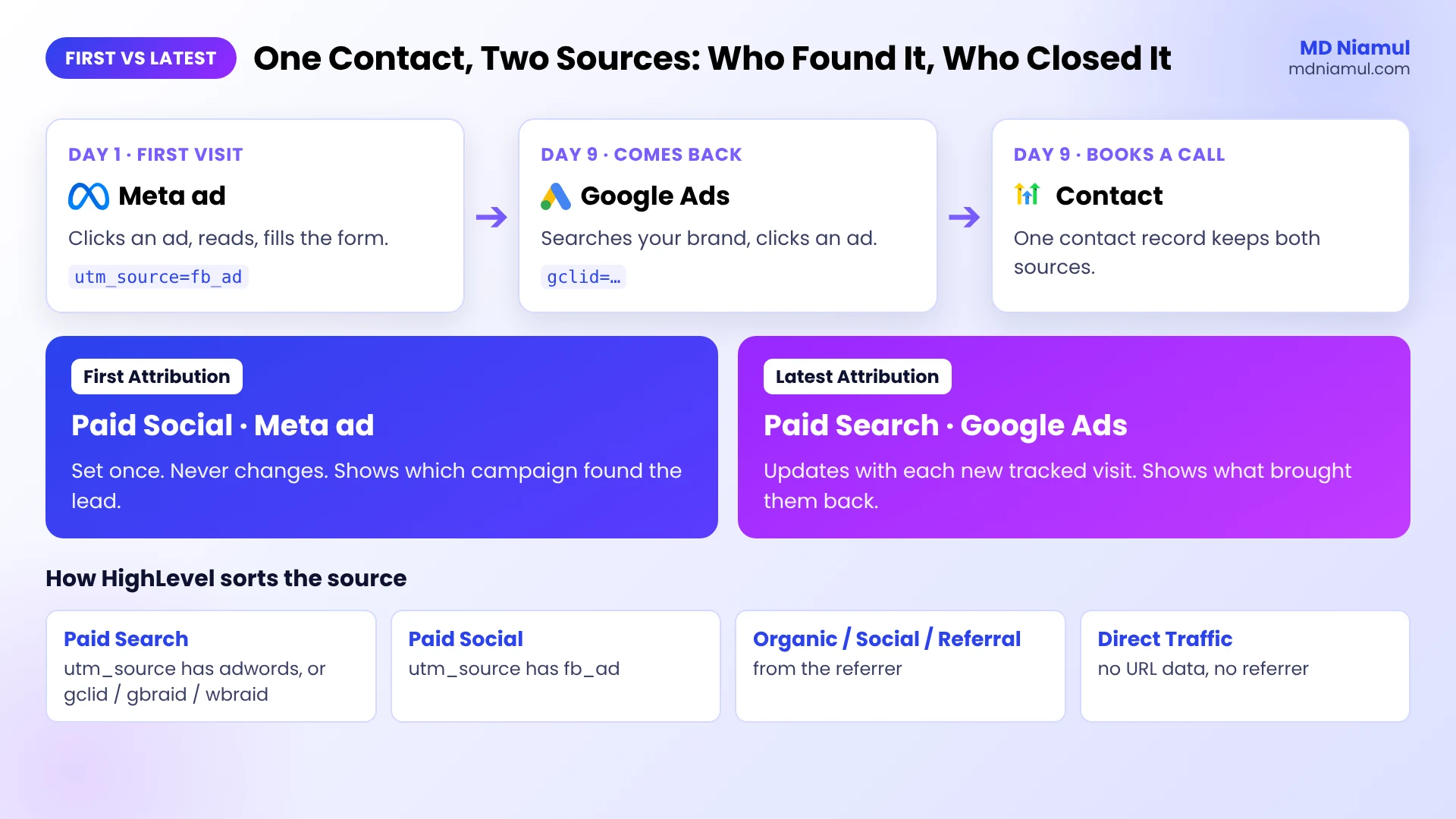
GoHighLevel attribution saves two sources on every contact: First Attribution, the first time the contact reached you, and Latest Attribution, which changes with each new tracked interaction. First tells you which ad found the lead. Latest tells you what brought them back before they converted. Both depend on the page URL and referrer, so use consistent UTMs, keep Google Ads auto-tagging on, and make sure embedded forms still see the UTMs when visitors land on one page and fill the form on another.
Key Takeaways
- Two sources per contact: HighLevel’s help docs say First and Latest Attribution are stored on every contact. First never changes, Latest changes with the last recorded interaction.
- The URL decides the channel: HighLevel checks the page URL and referring domain.
utm_sourcecontaining “adwords” or agclid,gbraidorwbraidmeans Paid Search, and “fb_ad” means Paid Social. - Reports can use either one: dashboard widgets have an Attribution filter where you pick First or Latest Attribution before the UTM fields.
- Embedded forms only see what’s in the URL: GoHighLevel’s embed script sends the parent page URL and referrer to the form, and keeps UTMs only in session storage, only after it has loaded on a page that had them.
- Click IDs aren’t kept by the embed: in the current embed code, only
utm_parameters are saved for later pages. Agclidon the landing page is gone by the contact page. - A small GTM script closes the gap: the tested script below keeps UTMs and click IDs for 30 minutes across pages and tabs, and hands them to the GHL embed.
Introduction Which Ad Brought This Lead?
When I open a GoHighLevel account for a new client, the attribution columns are usually half empty. Some contacts say Direct Traffic even though they came from Google Ads. Others show a Facebook campaign as the source of a lead that actually came back through a Google search. Then the agency stops trusting the numbers and goes back to asking the sales team.
GoHighLevel already tracks more than most people use. Every contact gets a first and a latest source, and the reports can show either one. The problem is the input: messy UTMs, forms on a different page than the ad’s landing page, and third-party forms GHL can’t see.
This guide follows the three fixes from the video: understand first vs latest, feed GoHighLevel clean UTMs, and check that embedded forms actually receive them. I read GoHighLevel’s own embed script to see what it does with UTMs, and tested a fix against it.
First Attribution vs Latest Attribution
| First Attribution | Latest Attribution | |
|---|---|---|
| What it is | The first time the contact interacted with your HighLevel account | The most recent recorded interaction |
| Does it change? | No | Yes, with every new tracked interaction |
| Question it answers | Which campaign found this lead? | What brought them back before they converted or booked? |
| Use it for | Lead generation spend, top-of-funnel campaigns | Retargeting, email and closing touches |
| Default in some contact widgets | Selectable | Built in for Contacts by Source, by Medium and Top Sources |
Prerequisites & Setup Checklist
- Admin access to the GoHighLevel sub-account.
- Access to your ad accounts’ tracking templates or final URL suffixes.
- Google Ads auto-tagging turned on.
- Google Tag Manager (GTM) on your website, if your GHL forms are embedded there.
- A list of every place leads come in: native GHL forms, surveys and calendars, embedded widgets, and third-party forms.
Need help building consistent links? Use the free UTM builder, and check each ad’s landing page with the free UTM redirect checker.
Video Tutorial Walkthrough
In the video I show the difference between first and latest attribution on a real contact, how to feed GoHighLevel clean UTMs, and how to check embedded forms, with a before and after.
Step-by-Step Implementation Guide
Eight phases. Phases 1 and 2 show what GoHighLevel already gives you. Phases 3 to 6 fix the input. Phases 7 and 8 test and use it.
Phase 1: Read First and Latest Attribution on a Contact
- Open a recent contact that came from an ad and expand its attribution details.
- Compare the two sets: source, medium, campaign, content, referring URL and landing page for First and for Latest.
- Pick five contacts you know came from paid ads. If they show Direct Traffic, the UTMs or click IDs didn’t reach GoHighLevel. That’s what the rest of this guide fixes.
Phase 2: Report on First or Latest
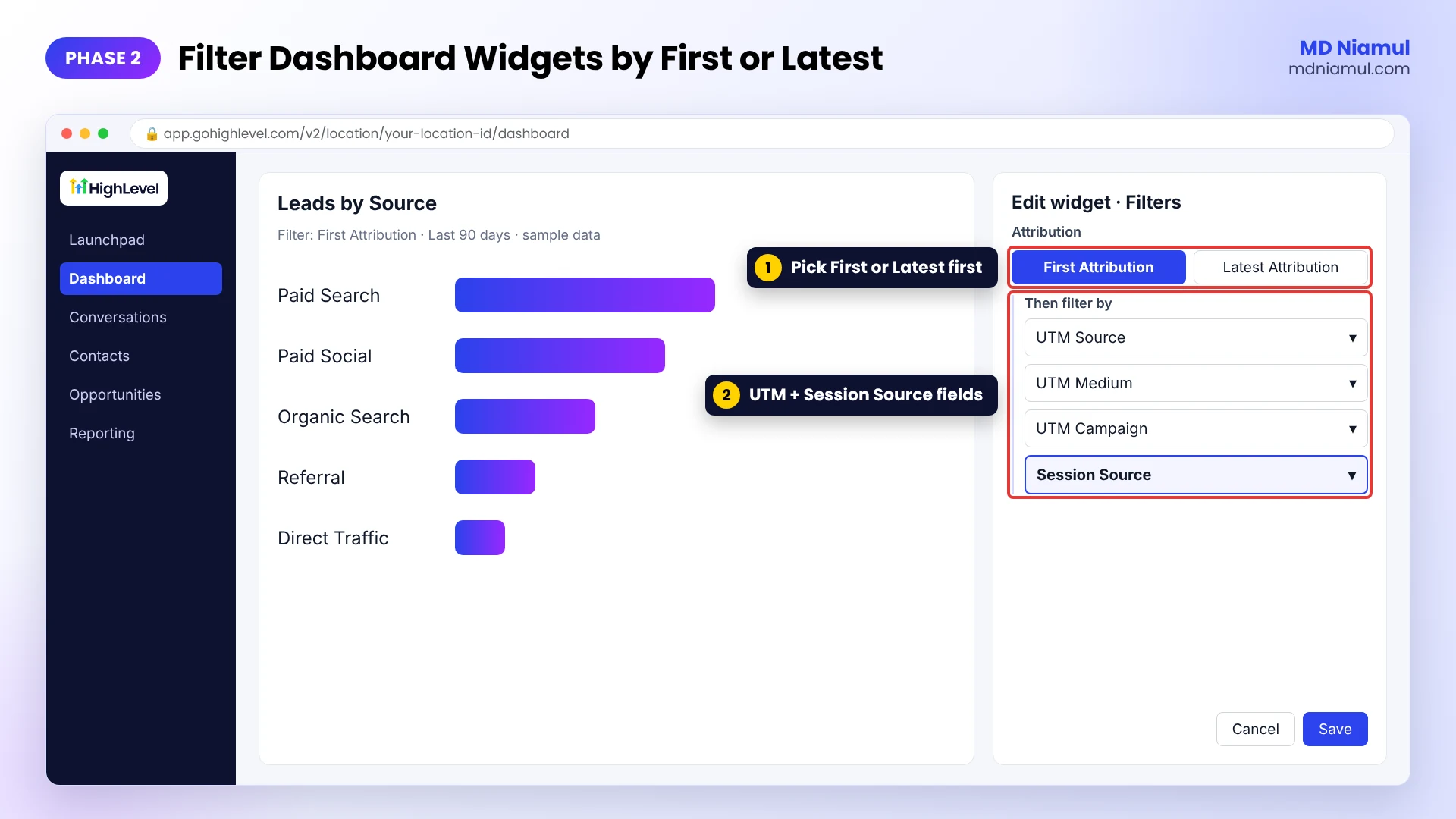
- In Dashboards, add or edit a contacts or opportunities widget and add the Attribution filter.
- Choose First Attribution or Latest Attribution first. HighLevel’s docs say the UTM and Session Source fields only become available after that choice.
- Build two views side by side: leads by first source and leads by latest source. Campaigns that show up strongly in “first” are finding new people. Campaigns strong in “latest” are closing them.
- Remember that some built-in widgets (Contacts by Source, by Medium, Top Sources) already use Latest Attribution.
Phase 3: Feed GoHighLevel Clean UTMs
- Keep auto-tagging on in Google Ads. HighLevel counts a
gclid,gbraidorwbraidin the URL as Paid Search, even with no UTMs. - For Meta ads, HighLevel’s rule looks for “fb_ad” in
utm_sourceto call it Paid Social. If GoHighLevel is your main report, use a source likefb_adin your URL parameters. - Check how that affects GA4 before you change it. GA4’s default channel groups expect sources like “facebook”, so you may need a custom channel group there.
- Write UTMs in lowercase and keep the same spelling everywhere.
Facebook,facebookandfbbecome three different sources. - Always fill
utm_campaign, so you can tell campaigns apart, not just channels.
Phase 4: Check How Your Embedded Forms Get UTMs
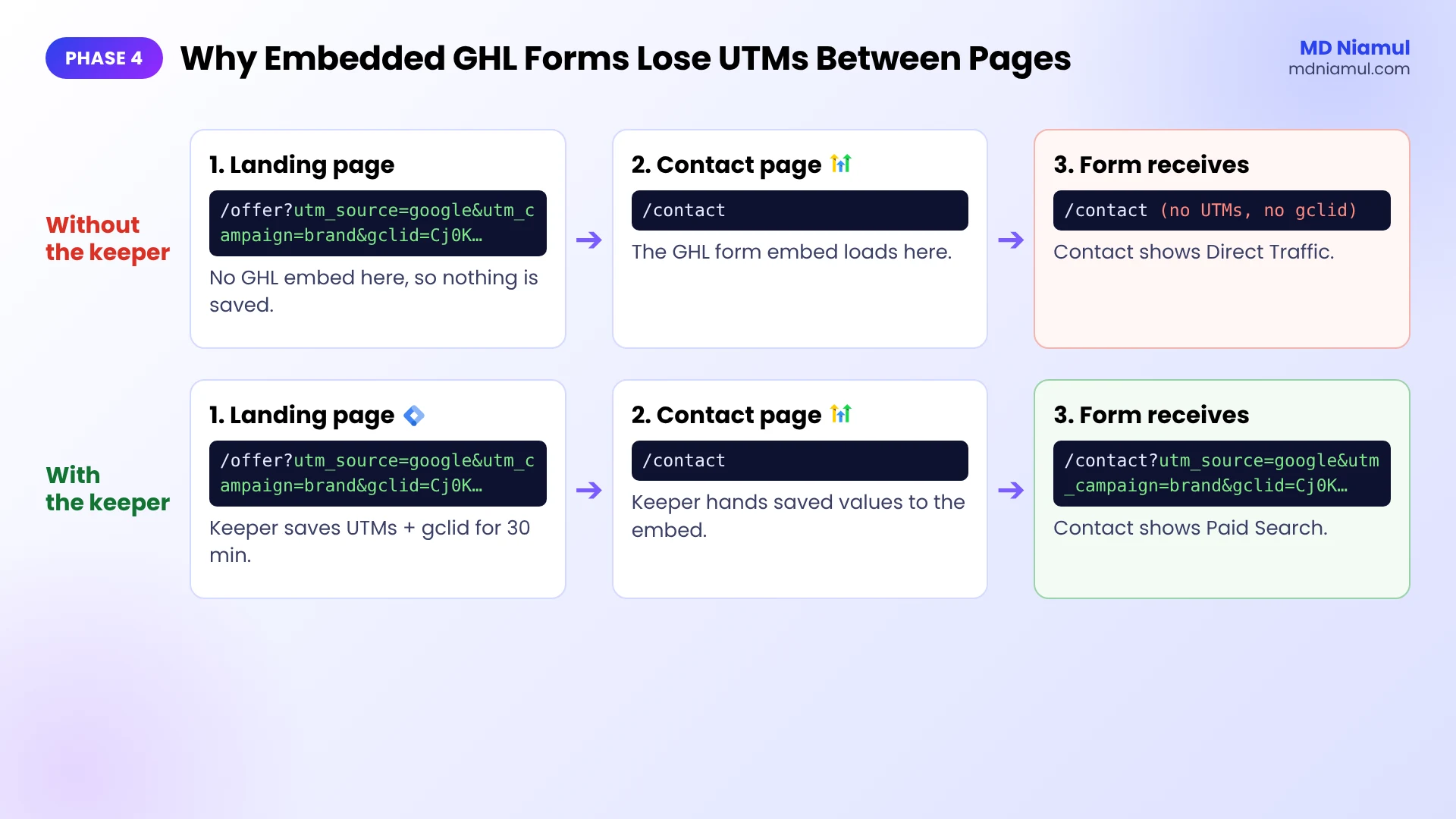
- GoHighLevel forms, surveys and calendars embedded on your site run in an iframe. I read GoHighLevel’s embed script (
form_embed.js): when the form loads, the script sends it the parent page’s URL anddocument.referrer. - If the current page has no UTMs, the script adds the UTMs it saved earlier in the same browser tab, from session storage. It only saves
utm_parameters, and only on pages where the embed script itself loaded. - So three common setups lose attribution: the ad lands on a page without a GHL embed, the visitor opens the form page in a new tab, or the visitor arrived with a
gclidbut no UTMs. - Test it: open your landing page with
?utm_source=test&utm_medium=cpc&gclid=TEST, click through to the form page, submit, and check the new contact.
Phase 5: Add the Attribution Keeper in GTM
- In GTM, go to Tags → New → Custom HTML and paste the code below.
- Trigger: Initialization – All Pages, so it runs before the GoHighLevel embed asks for the page URL.
- Name it cHTML – GHL Attribution Keeper, test, and publish.
<script>
// GoHighLevel attribution keeper by MD Niamul (mdniamul.com)
// Keeps UTMs and ad click IDs while a visitor browses your site, so an embedded
// GoHighLevel form on another page still gets them.
// GTM: Custom HTML tag, trigger Initialization - All Pages (fires before the GHL embed loads).
(function () {
  var KEYS = ['utm_source', 'utm_medium', 'utm_campaign', 'utm_term', 'utm_content', 'utm_id',
              'gclid', 'gbraid', 'wbraid', 'fbclid', 'msclkid', 'ttclid'];
  var STORE = 'mdn_ghl_attr';   // our copy, shared by all tabs on this site
  var GHL_KEY = 'UPS';          // where GoHighLevel's embed script keeps UTMs for the session
  var MINUTES = 30;             // forget the values after 30 minutes without a page view

  function readStore() {
    try {
      var d = JSON.parse(localStorage.getItem(STORE) || 'null');
      return d && Date.now() - d.t < MINUTES * 60000 ? d : null;
    } catch (e) { return null; }
  }

  var query = new URLSearchParams(location.search);
  var fromUrl = {}, newClick = false, urlHasUtm = false;
  KEYS.forEach(function (k) {
    var v = query.get(k);
    if (v) { fromUrl[k] = v; newClick = true; if (k.indexOf('utm_') === 0) urlHasUtm = true; }
  });

  // 1. A new ad click replaces the old values. Otherwise keep the saved ones alive.
  var saved = newClick ? { p: fromUrl, t: Date.now() } : readStore();
  if (saved) {
    saved.t = Date.now();
    try { localStorage.setItem(STORE, JSON.stringify(saved)); } catch (e) {}
  }

  // 2. On pages without UTMs in the URL, hand the saved values to the GHL embed script,
  //    which adds them to the page URL it sends to the form.
  if (saved && !urlHasUtm) {
    try {
      var ups = new URLSearchParams(sessionStorage.getItem(GHL_KEY) || '');
      for (var k in saved.p) { if (!ups.get(k)) ups.set(k, saved.p[k]); }
      sessionStorage.setItem(GHL_KEY, '?' + ups.toString());
    } catch (e) {}
  }

  window.dataLayer = window.dataLayer || [];
  window.dataLayer.push({ event: 'ghl_attribution_ready', ghl_attribution: saved ? saved.p : {} });
})();
</script>
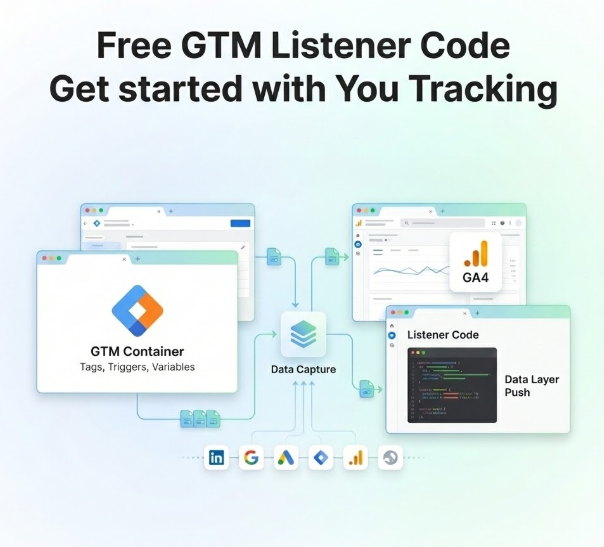
What it does: when a visitor lands with UTMs or a click ID (gclid, gbraid, wbraid, fbclid, msclkid, ttclid), it saves them on your domain. A new ad click replaces the old values. On later pages without UTMs, it hands the saved values to GoHighLevel’s embed script in the same place the script keeps its own UTMs, so the form gets them in the page URL. The values expire after 30 minutes without a page view, so an old campaign doesn’t stick to a direct visit days later.
I tested it in a headless browser against GoHighLevel’s real form_embed.js and a simulated form iframe. Without the keeper, a visitor who landed with UTMs and a gclid on a page without a form reached the contact page form with no UTMs at all. With the keeper, the form got utm_source, utm_medium, utm_campaign and gclid. It also worked in a new tab, a new ad click replaced the old values, UTMs already in the URL won, and a direct visit got nothing added. No page errors.
One honest limit: the keeper uses the session storage key the current GoHighLevel embed script reads. If GoHighLevel changes that script, test again.
Phase 6: Bring Third-Party Forms into GoHighLevel Attribution
- For WordPress forms (Gravity Forms, WPForms, Contact Form 7), custom HTML forms and site-builder forms, use HighLevel’s External Tracking: Settings → External Tracking → copy the script and add it before
</body>on every page. - HighLevel says External Tracking captures UTM parameters, page URLs and session data with each submission, but it doesn’t support forms inside iframes by itself.
- For a third-party form in an iframe, HighLevel has a separate iFrame form setup: one snippet on the page that hosts the form and one on your main page, with
data-parent-originset to your exact site origin. - Forms that only send data through Zapier or a webhook usually lose the browser’s attribution. Pass the UTMs as hidden fields if you have to keep them.
Phase 7: Test First and Latest with Two Visits
- In a private window, open your landing page with
?utm_source=test_first&utm_medium=cpc&utm_campaign=attribution_test, go to the form page and submit with a test email. - Check the contact: First and Latest should both show
test_first. - Later, open the site again with
?utm_source=test_latest&utm_medium=emailand submit the same form with the same email. - Now First should still say
test_firstand Latest should saytest_latest. Delete the test contact afterwards.
Phase 8: Use Attribution to Judge Campaigns, Then Send Results Back
- Add the Attribution filter to opportunity widgets too, so you see which first and latest sources lead to won deals, not just leads.
- Send won deals back to the ad platforms as offline conversions, as in my GoHighLevel offline conversion tracking guide.
- Track form submits in GA4 and Google Ads as well with my GoHighLevel iframe form and calendar tracking guide, so ad platforms and the CRM tell the same story.
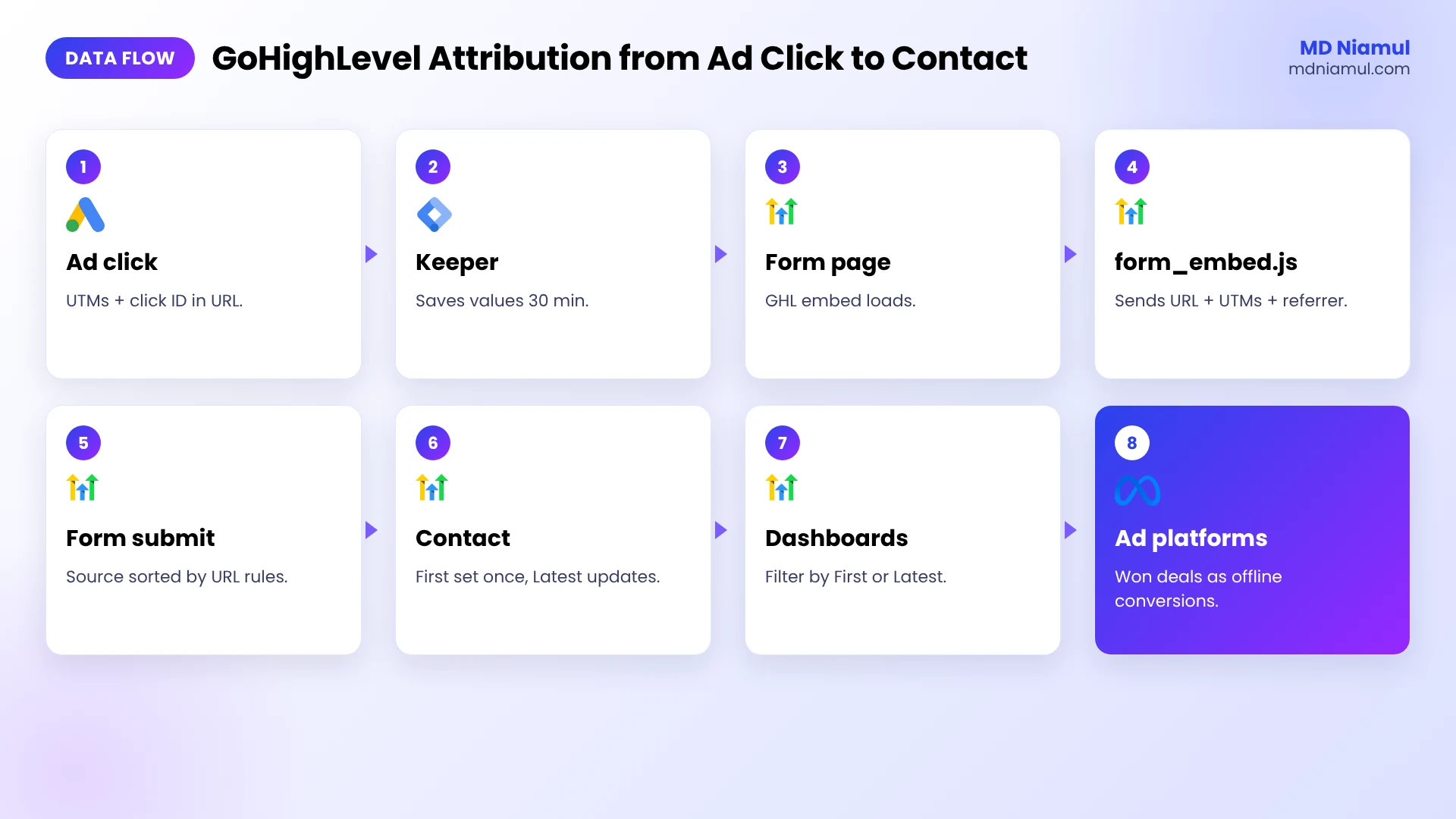
GoHighLevel Attribution: The Full Data Flow
| # | What happens | Where |
|---|---|---|
| 1 | A visitor clicks an ad with UTMs and a click ID | Ad platform |
| 2 | The landing page loads; the keeper saves UTMs and click IDs | Your site, GTM |
| 3 | The visitor moves to the page with the GHL form | Your site |
| 4 | The GHL embed script sends the page URL, saved UTMs and referrer to the form | form_embed.js |
| 5 | The form submits, and HighLevel sorts the source by its URL and referrer rules | GoHighLevel |
| 6 | First Attribution is set once, Latest Attribution updates | Contact record |
| 7 | Dashboards filter leads and deals by first or latest source | Dashboards |
| 8 | Won deals go back to Google Ads and Meta as offline conversions | Ad platforms |
Testing & Validation Workflow
- Landing test. Open the landing page with test UTMs and a
gclid, then runlocalStorage.getItem('mdn_ghl_attr')in the console. You should see the values. - Form page test. On the form page, run
sessionStorage.getItem('UPS'). The saved UTMs andgclidshould be there. - Contact test. Submit and check that the contact’s Latest Attribution shows your test source.
- Repeat test. Submit again from a second test link and confirm First stays and Latest changes.
- Report test. A dashboard widget filtered by First Attribution shows the test lead under the first source.
- Monthly test. Compare paid leads in GoHighLevel with leads reported by the ad platforms for the same month.
Troubleshooting Common Mistakes
Mistake 1: Paid leads show as Direct Traffic
The Problem: contacts from ads say Direct Traffic.
The Cause: the UTMs or click ID never reached the form, usually because the form is on a different page than the landing page.
The Solution: add the keeper from Phase 5 and test with the steps in Phase 4.
Mistake 2: Expecting First Attribution to change
The Problem: a returning lead still shows an old campaign.
The Cause: First Attribution never changes by design.
The Solution: look at Latest Attribution for the return visit, and report on both.
Mistake 3: One channel split into many sources
The Problem: reports show Facebook, facebook, fb and FB as separate rows.
The Cause: UTMs typed by hand with different spellings.
The Solution: use one lowercase naming rule and build links with a UTM builder.
Mistake 4: Meta leads don’t show as Paid Social
The Problem: Meta ad leads land under Social Media or Referral.
The Cause: HighLevel’s rule looks for “fb_ad” in utm_source, and the ads use another value.
The Solution: use fb_ad in the source if GoHighLevel is your main report, and adjust GA4 channel groups to match.
Mistake 5: Third-party forms have no attribution
The Problem: contacts from WordPress or iframe forms have empty sources.
The Cause: External Tracking isn’t installed, or the form sits in an iframe without the iFrame snippets.
The Solution: install External Tracking on every page and add both iFrame snippets for iframe forms.
What to Set Up Next
- Running several websites into one GoHighLevel account? Read my multi-website marketing attribution guide.
- Comparing CRM numbers with GA4 and Google Ads? See why Google Ads and GA4 conversions don’t match.
- Want the lead and deal events to reach Google Ads and Meta through server-side tracking? I host server GTM containers on Stape (EU businesses can use Stape EU).
- Need ready GTM listeners for other form tools? Browse the GTM event listener library.
Want your GoHighLevel attribution set up and checked? See my GoHighLevel form conversion tracking services and marketing attribution tracking service.
Conclusion
GoHighLevel attribution isn’t broken in most accounts. It’s starved. The CRM can only record what reaches the form, and too often that’s a bare page URL with no UTMs.
Clean up your UTM naming, keep auto-tagging on, and run the two-visit test from Phase 7. If the form page loses the UTMs, add the keeper. Then build a first-source and a latest-source view in your dashboard and use them in your next budget review.
Summary by MD Niamul
GoHighLevel attribution stores two sources on every contact: First Attribution, which never changes and shows the campaign that found the lead, and Latest Attribution, which updates with each new tracked interaction. HighLevel sorts the channel from the page URL and referrer, treating gclid, gbraid, wbraid or “adwords” in utm_source as Paid Search and “fb_ad” as Paid Social. I keep UTMs lowercase and consistent, keep Google Ads auto-tagging on, and test embedded forms, because GoHighLevel’s embed script only passes the current page URL plus UTMs saved earlier in the same tab. A small GTM script keeps UTMs and click IDs across pages for 30 minutes. I wrote this from setting up GoHighLevel attribution for agencies and service businesses.
Frequently Asked Questions (FAQ)
1. What is the difference between first and latest attribution in GoHighLevel?
First Attribution is the first time a contact interacted with your HighLevel account, and it never changes. Latest Attribution is the most recent recorded interaction, so it updates each time the contact comes back through a tracked source. First shows which campaign found the lead, Latest shows what brought them back.
2. Why do my GoHighLevel leads show Direct Traffic?
Usually because the UTMs or click ID didn’t reach the form. The most common cause is a form on a different page than the ad’s landing page, where the URL no longer has UTMs. Redirects that strip parameters, and third-party forms without External Tracking, cause it too. Test with a UTM link to see where the values drop.
3. How does GoHighLevel decide the session source?
HighLevel checks the full page URL and the referring domain against rules in order. A utm_source containing adwords, or a gclid, gbraid or wbraid, means Paid Search. A utm_source containing fb_ad means Paid Social. Social and search referrers become Social Media or Organic Search, other referrers Referral, and no referrer Direct Traffic.
4. What UTMs should I use for GoHighLevel?
Keep Google Ads auto-tagging on, since a gclid already counts as Paid Search. For Meta, HighLevel looks for fb_ad in utm_source to label it Paid Social. Use lowercase, one spelling per source, and always set utm_campaign. Check your GA4 channel groups if you change source names, so both tools still agree on the channel.
5. Do embedded GoHighLevel forms capture UTMs?
Yes, from the page they’re on. GoHighLevel’s embed script sends the parent page URL and referrer to the form, and adds UTMs saved earlier in the same browser tab. It doesn’t save click IDs like gclid, and it only saves UTMs on pages where the embed script loaded. A form on a second page can miss them.
6. How do I keep UTMs when the form is on another page?
Save the UTMs and click IDs on the landing page and hand them to the form page. The GTM script in this guide does that for 30 minutes across pages and tabs, and passes them to GoHighLevel’s embed script. Test it with a UTM link, then click through to the form.
7. How do I see first or latest attribution in GoHighLevel reports?
Add the Attribution filter to a dashboard widget and pick First Attribution or Latest Attribution before choosing UTM or Session Source fields. Some built-in widgets, like Contacts by Source and Top Sources, already use Latest Attribution. Build one view of each and compare them side by side to see which campaigns find leads and which close them.
8. Can GoHighLevel track attribution from WordPress forms?
Yes, with External Tracking. Copy the script from Settings, External Tracking and add it to every page of your site. It captures UTMs, page URLs and session data from supported forms like Gravity Forms, WPForms and Contact Form 7. Forms inside iframes need HighLevel’s separate iFrame snippets on both pages.
9. Why doesn’t First Attribution update when a lead comes back?
Because it’s meant to keep the original source. HighLevel’s docs say the latest attribution changes with the last recorded interaction, but the first does not. Look at Latest Attribution for return visits, and report on both side by side to see which campaigns find new leads and which ones close them.
10. How do I send GoHighLevel deals back to Google Ads and Meta?
Save the click IDs and email with each contact, then send qualified and won opportunities to Google Ads as offline conversions and to Meta through the Conversions API. A GoHighLevel workflow with a webhook, or an automation tool like n8n, can do this automatically when the opportunity stage changes to qualified or won.
 Need Help Advanced GHL Automation & Tracking Setup?