
Quick Answer
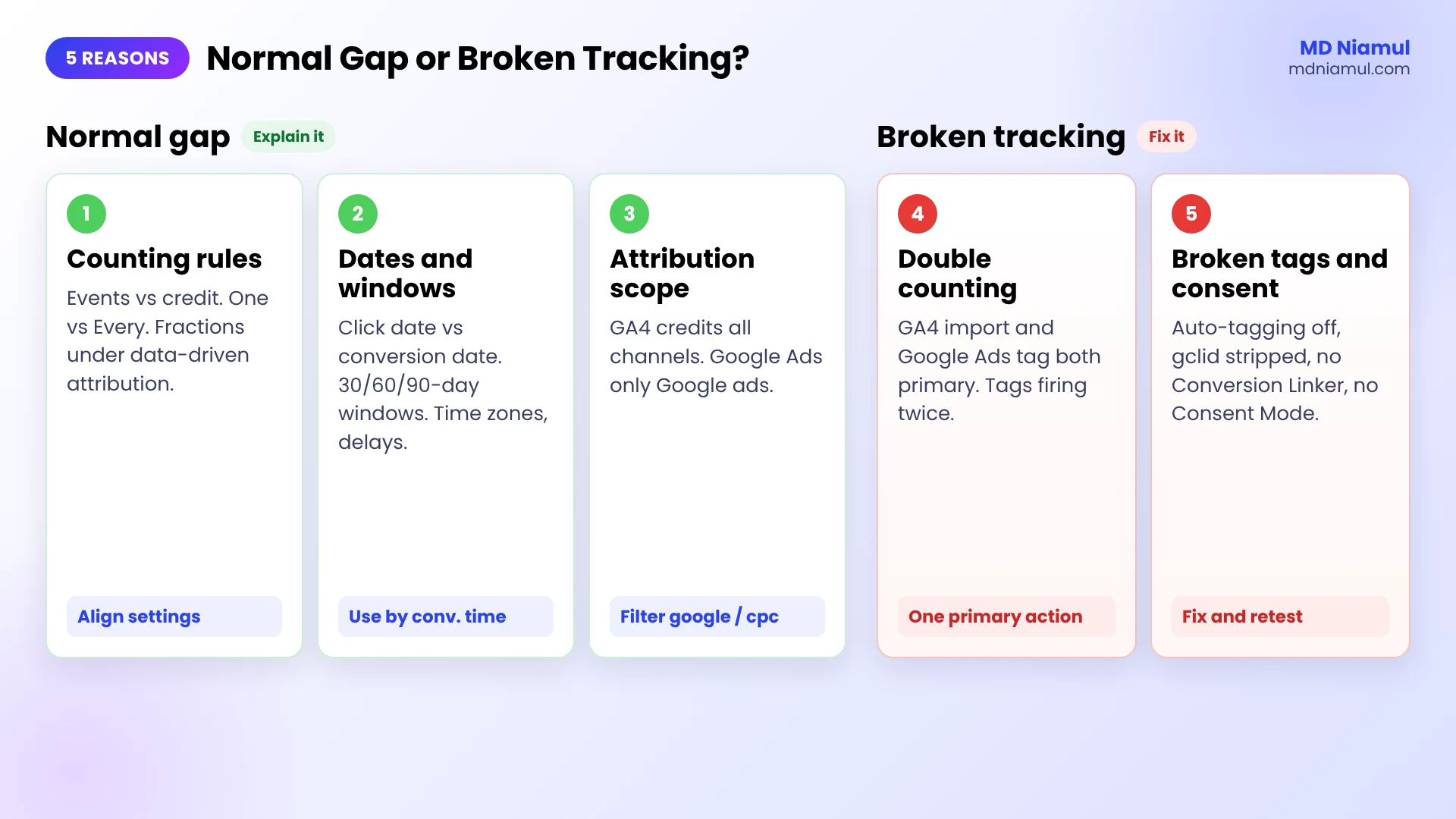
Google Ads vs GA4 conversions almost never match exactly, and a gap of a few percent is normal. The five usual reasons are: different counting rules, different dates and windows, different attribution scope, double counting from imported key events, and broken tags or consent. The first three are by design. The last two are real tracking errors. Compare by conversion time and only Google Ads traffic, then run the console check in this guide for duplicates and missing tags.
Key Takeaways
- Some gap is expected: Google Ads and Google Analytics 4 (GA4) count, date and attribute conversions in different ways, so the two numbers measure slightly different things.
- Different dates: Google Ads puts a conversion on the day of the ad click by default. GA4 puts it on the day it happened.
- Different scope: GA4 gives credit across all channels, organic and direct included. Google Ads only looks at Google ad interactions.
- Different counting: GA4 counts events, or once per session if you choose that. Google Ads uses “Every” or “One” per click, and data-driven attribution can give fractions.
- Double counting is a setup error: a GA4 key event import and a Google Ads tag for the same action, both set as primary, count every conversion twice.
- Missing conversions are a setup error too: auto-tagging off, a redirect that drops the gclid, or consent denied without Consent Mode all lose real conversions.
Introduction Which Number Is Right?
I hear this question a lot from clients who open GA4 and Google Ads side by side. Google Ads shows one number of leads, GA4 shows another, and the CRM shows a third. Someone has to explain it in the Monday meeting.
The honest answer is that both numbers can be correct, because they answer different questions. But “they’re just different” is also the excuse that hides real problems, like a purchase tag that fires twice or a redirect that strips the click ID. In my client audits, I split the gap into two piles: the normal differences you document once, and the broken tracking you fix.
This guide walks through the five reasons in that order, with the exact settings to check and a console script that finds the broken ones on a thank-you page in seconds. If your problem is bigger, like whole campaigns missing or “Unassigned” traffic, see my emergency GA4 and Google Ads attribution audit.
Normal Gap or Broken Tracking?
| Reason | What you see | Normal or broken? | What to do |
|---|---|---|---|
| 1. Counting rules | Fractions in Google Ads, GA4 higher on repeat actions | Normal | Align the counting settings |
| 2. Dates and windows | Recent days differ, totals close over time | Normal | Compare by conversion time, same time zone, older dates |
| 3. Attribution scope | GA4 gives part of the credit to organic or direct | Normal | Compare only Google Ads traffic in GA4 |
| 4. Double counting | Google Ads about twice the real number | Broken | One primary action per conversion |
| 5. Broken tags and consent | One side far lower, or sudden drops | Broken | Fix tags, click IDs and Consent Mode |
Prerequisites & Setup Checklist
- Admin access to Google Ads and the linked GA4 property.
- Edit access to Google Tag Manager (GTM), if your tags run through it.
- A test path you can trigger yourself: a form, a booking or a test purchase.
- Chrome, for the console check.
- A date range that ended at least a week ago, so late conversions have arrived.
Want a quick outside view first? Run your site through the free tracking audit tool and the free GA4 event checker.
Video Tutorial Walkthrough
In the video I explain the three groups behind most gaps (counting rules, attribution and imports, broken tags and consent) and show a before and after once the broken parts are fixed.
Step-by-Step Implementation Guide
Eight phases. Phases 1 to 3 explain the normal gap. Phases 4 to 6 find and fix the broken part. Phases 7 and 8 make the numbers easier to trust.
Phase 1: Compare the Right Columns
- In Google Ads, add the column Conversions (by conv. time) next to Conversions. Google says these columns report conversions based on the date the conversion happened, which is how GA4 reports them.
- Pick a date range that ended at least 7 days ago. Google mentions a 24 to 48 hour processing delay, and data-driven attribution can reassign credit for up to 7 days after a conversion.
- Check both time zones: Google Ads under Admin → Account settings, GA4 under Admin → Property details. Different zones move conversions near midnight to another day.
- Don’t calculate CPA or ROAS from the “by conv. time” columns. Cost is still by click date, so mixing the two gives wrong ratios.
Phase 2: Align the Counting Rules (Reason 1)
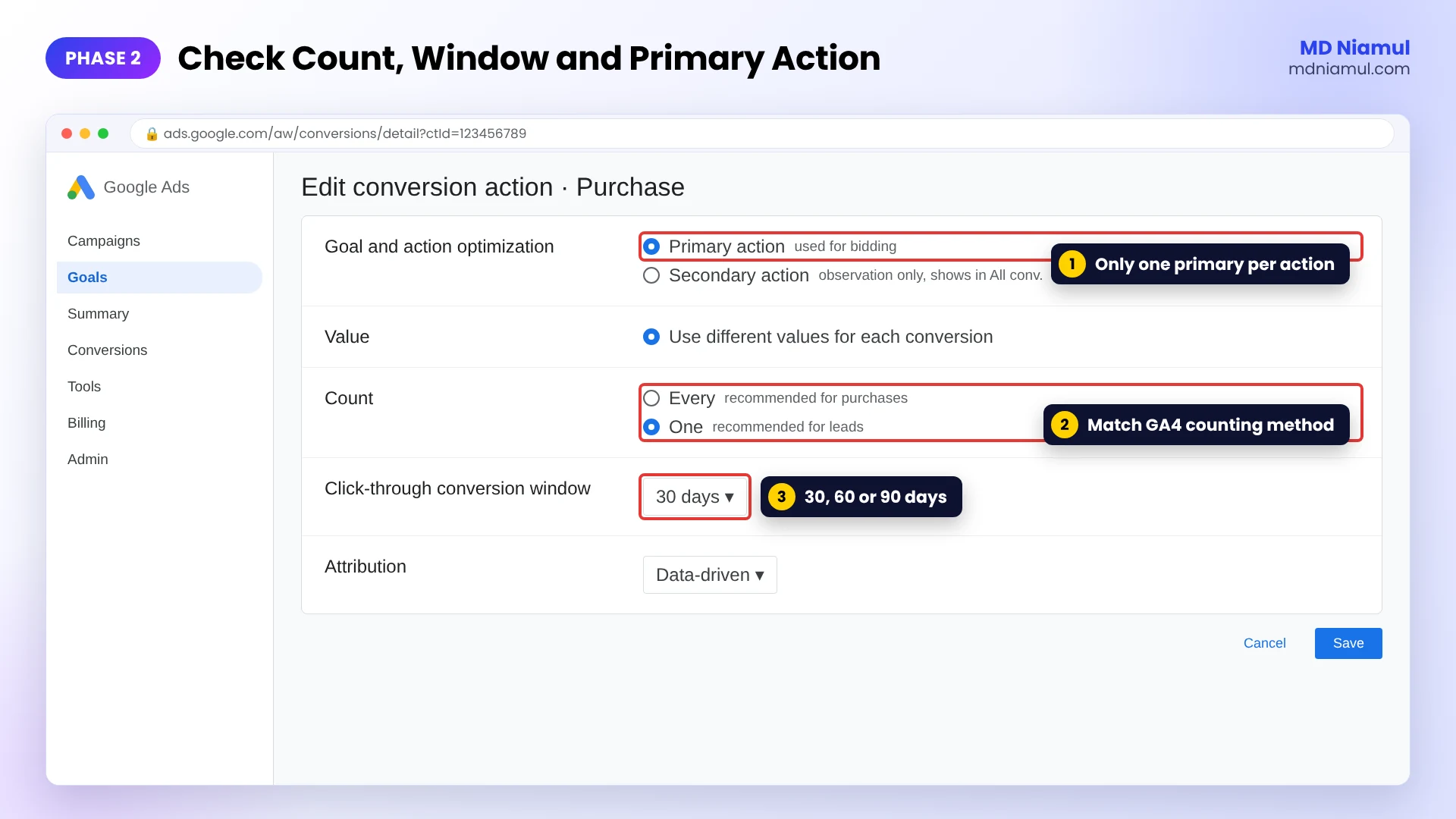
- In Google Ads, open Goals → Conversions → Summary, click each action and check Count. Leads usually need One, purchases need Every.
- In GA4, open Admin → Key events, click the three dots on the event and check the counting method: Once per event or Once per session.
- Match them. A lead counted “One” in Google Ads but “Once per event” in GA4 will always show more in GA4 when people submit twice.
- Remember that Google Ads can show fractions under data-driven attribution, because a conversion is shared across clicks. GA4’s event count is always a whole number.
Phase 3: Compare Only Google Ads Traffic in GA4 (Reasons 2 and 3)
- GA4 shares credit across every channel, so a conversion after an ad click and a later organic visit may go partly to organic. Google Ads ignores the organic visit.
- In GA4, use the Google Ads reports under Advertising, or filter Traffic acquisition to Session source / medium = google / cpc.
- Check the conversion windows. Google Ads uses 30 days by default and can be set to 60 or 90 days for Search and Display. GA4’s key event lookback is 30 days for acquisition key events and 90 days for the rest.
- Remember that view-through conversions show only in Google Ads’ All conv. column. GA4 doesn’t have them.
Phase 4: Find Double Counting (Reason 4)
- In Goals → Conversions → Summary, look for two actions that measure the same thing, for example a Google Ads “Purchase” tag and an imported GA4 “purchase” key event.
- If both are Primary, every sale is counted twice in the Conversions column. Keep one as primary and set the other to Secondary.
- Check the site too. A thank-you page that fires on every reload, or two tags firing on one event, inflates both tools. Use a transaction ID on purchases.
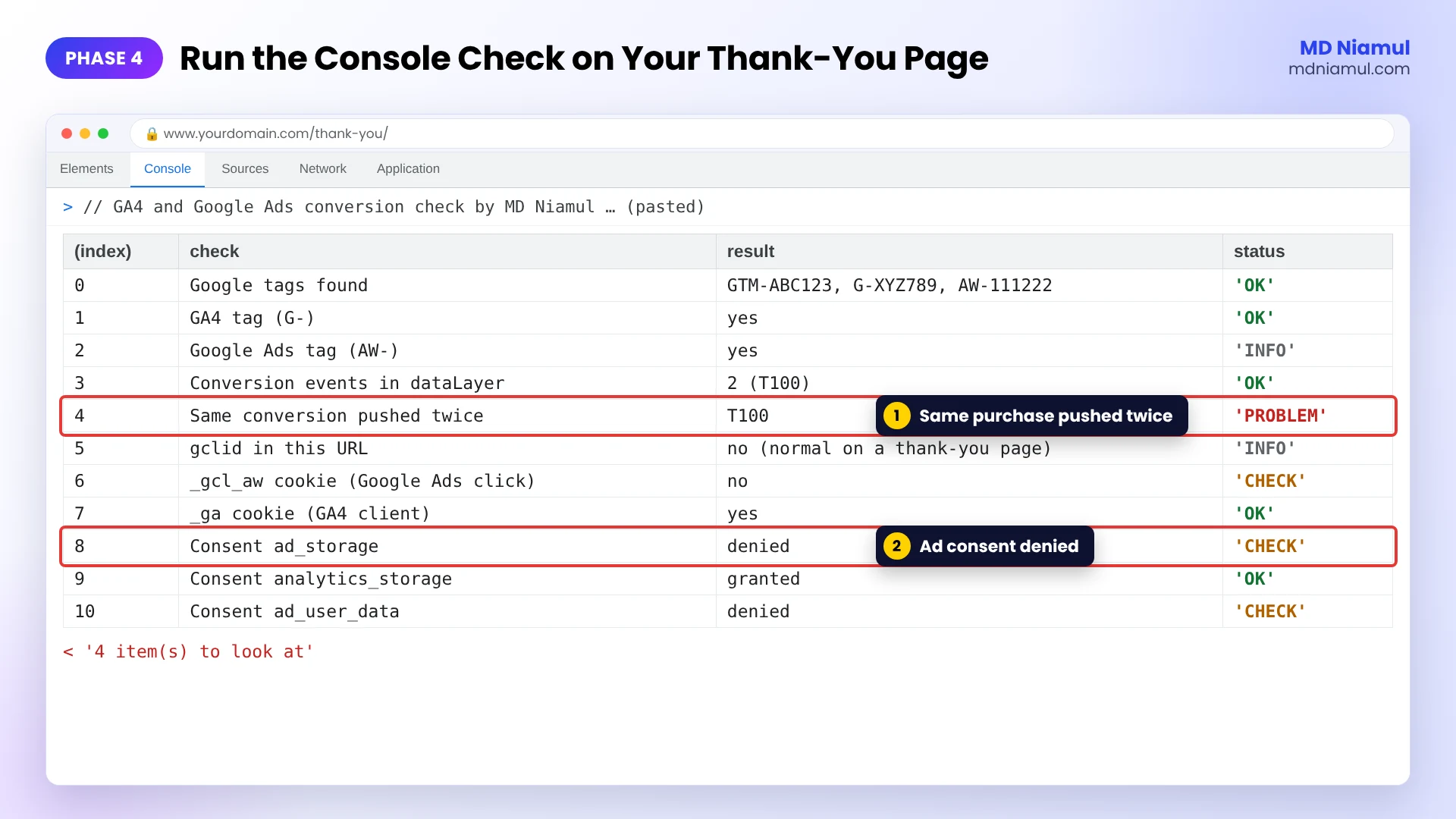
- Run the console check below on your thank-you page after a test conversion. It flags a conversion pushed twice.
// GA4 and Google Ads conversion check by MD Niamul (mdniamul.com)
// Paste in the browser console (F12 → Console) on your thank-you page after a test conversion.
// It reads the page only. Nothing is sent anywhere.
(function () {
  var dl = window.dataLayer || [];
  var report = [];
  function add(check, result, status) { report.push({ check: check, result: result, status: status }); }
  function cookie(name) {
    var m = document.cookie.match('(?:^|; )' + name + '=([^;]*)');
    return m ? decodeURIComponent(m[1]) : '';
  }

  // 1. Which Google tags are on this page?
  var ids = {};
  if (window.google_tag_manager) Object.keys(window.google_tag_manager).forEach(function (k) {
    if (/^(GTM|G|AW)-/.test(k)) ids[k] = true;
  });
  dl.forEach(function (e) { if (e && e[0] === 'config' && typeof e[1] === 'string') ids[e[1]] = true; });
  var list = Object.keys(ids);
  add('Google tags found', list.join(', ') || 'none', list.length ? 'OK' : 'CHECK');
  add('GA4 tag (G-)', list.some(function (i) { return /^G-/.test(i); }) ? 'yes' : 'no', list.some(function (i) { return /^G-/.test(i); }) ? 'OK' : 'CHECK');
  add('Google Ads tag (AW-)', list.some(function (i) { return /^AW-/.test(i); }) ? 'yes' : 'no (fine if only GA4 key events are imported)', 'INFO');

  // 2. Did the conversion event fire more than once?
  var names = ['purchase', 'generate_lead', 'conversion', 'sign_up', 'book_appointment'];
  var seen = {}, dupes = [];
  dl.forEach(function (e) {
    var name = e && (e.event || (e[0] === 'event' ? e[1] : ''));
    if (names.indexOf(name) < 0) return;
    var ec = e.ecommerce || (e[0] === 'event' && e[2]) || {};
    var id = ec.transaction_id || name;
    seen[id] = (seen[id] || 0) + 1;
    if (seen[id] === 2) dupes.push(id);
  });
  var total = Object.keys(seen).reduce(function (s, k) { return s + seen[k]; }, 0);
  add('Conversion events in dataLayer', total ? total + ' (' + Object.keys(seen).join(', ') + ')' : 'none found', total ? 'OK' : 'CHECK');
  add('Same conversion pushed twice', dupes.length ? dupes.join(', ') : 'no', dupes.length ? 'PROBLEM' : 'OK');

  // 3. Can Google Ads match this visit to a click?
  var gclid = new URLSearchParams(location.search).get('gclid');
  add('gclid in this URL', gclid ? 'yes' : 'no (normal on a thank-you page)', 'INFO');
  add('_gcl_aw cookie (Google Ads click)', cookie('_gcl_aw') ? 'yes' : 'no', cookie('_gcl_aw') ? 'OK' : 'CHECK');
  add('_ga cookie (GA4 client)', cookie('_ga') ? 'yes' : 'no', cookie('_ga') ? 'OK' : 'CHECK');

  // 4. What does Consent Mode say right now?
  var consent = {};
  dl.forEach(function (e) {
    if (e && e[0] === 'consent' && e[2] && typeof e[2] === 'object') {
      Object.keys(e[2]).forEach(function (k) { consent[k] = e[2][k]; });
    }
  });
  ['ad_storage', 'analytics_storage', 'ad_user_data'].forEach(function (k) {
    add('Consent ' + k, consent[k] || 'not set', consent[k] === 'denied' ? 'CHECK' : (consent[k] ? 'OK' : 'INFO'));
  });

  console.table(report);
  return report.filter(function (r) { return r.status === 'PROBLEM' || r.status === 'CHECK'; }).length + ' item(s) to look at';
})();
Open Chrome DevTools with F12, go to the Console tab, paste the code and press Enter. It reads only the page: which Google tags are loaded (GTM, G- and AW- IDs), how many conversion events reached the data layer and whether the same transaction ID appeared twice, whether the _gcl_aw and _ga cookies exist, and what Consent Mode currently says. It prints a table and the number of items to look at.
I tested it in a headless browser on a page with a duplicate purchase and denied ad consent (it flagged both), on a clean page with a gtag config and a Google Ads click cookie (nothing flagged), and on a page with no data layer at all (no errors).
Phase 5: Fix Lost Click IDs (Reason 5, Part 1)
- Check that auto-tagging is on in Google Ads (Admin → Account settings). Without it, GA4 can’t link sessions to your campaigns.
- Click your own ad and check that the landing URL keeps
?gclid=. Redirects, URL shorteners and some cookie banners strip it. The free UTM redirect checker shows each hop. - In GTM, make sure the Conversion Linker tag fires on all pages, so the Google Ads click cookie is set before the visitor converts.
- If people pay or book on another domain, add it to GA4’s unwanted referrals and set up cross-domain measurement. My Stripe and PayPal Google Ads guide covers this case.
Phase 6: Check Consent Mode (Reason 5, Part 2)
- When a visitor denies consent, GA4’s standard reports don’t get their full data, while Google Ads can still show modeled conversions when Consent Mode is set up. That alone can make GA4 look lower.
- Without Consent Mode, denied visitors are simply missing from both tools, and you can’t recover them.
- Check that your banner sends
ad_storage,analytics_storage,ad_user_dataandad_personalization. The console check shows the current values, and the free Consent Mode checker tests the whole setup.
Phase 7: Pick One Source of Truth per Question
- For bidding, use Google Ads conversions. That’s what Smart Bidding learns from.
- For channel mix and user journeys, use GA4.
- For revenue, use your shop or CRM. Send closed deals back to Google Ads as offline conversions, as in my offline conversion tracking guide.
- Write these rules down for your team, so the Monday meeting stops being about which number is right.
Phase 8: Reduce Data Loss with Server-Side Tracking
- Ad blockers and browser limits cut both tools, not always equally. Server-side GTM sends the same events from your own domain.
- Add Enhanced Conversions so Google Ads can match more conversions with hashed first-party data.
- Host server-side GTM on Stape (or Stape EU). Not sure if you need it? Read Google tag gateway vs server-side tracking.
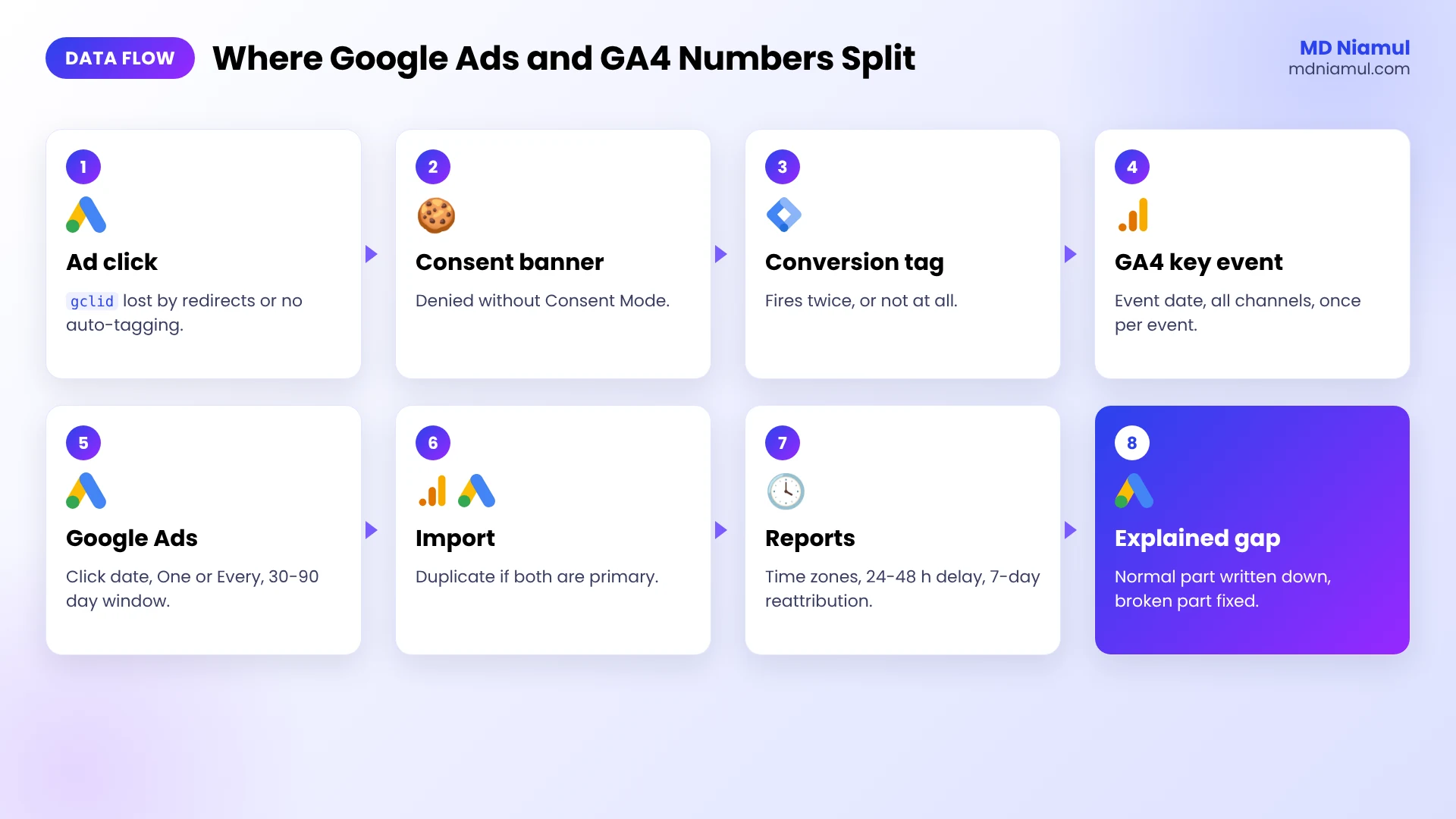
Google Ads vs GA4 Conversions Where the Gap Comes From
| # | Step | Where numbers can split |
|---|---|---|
| 1 | Ad click with gclid | Auto-tagging off or a redirect drops the gclid |
| 2 | Landing page and consent banner | Consent denied, Conversion Linker missing |
| 3 | Conversion on the site | Tag fires twice, or not at all |
| 4 | GA4 records the key event | Counting method, all-channel credit, conversion date |
| 5 | Google Ads records the conversion | Count setting, click date, conversion window, modeled conversions |
| 6 | GA4 key event imported into Google Ads | Duplicate if a Google Ads tag is also primary |
| 7 | Reports | Time zones, processing delay, data-driven reattribution |
Testing & Validation Workflow
- Test conversion. Click your own ad (or add
?gclid=TESTin GTM Preview), convert, and run the console check on the thank-you page. - Same-day check. GA4 Realtime or DebugView shows the key event once.
- Next-day check. Google Ads shows one conversion under the right action, not two.
- Weekly check. Compare Conversions (by conv. time) with GA4 google / cpc key events for a week that ended at least 7 days ago.
- Write down the normal gap. Once the broken parts are fixed, note the usual difference so the next jump stands out.
Troubleshooting Common Mistakes
Mistake 1: Comparing click date with conversion date
The Problem: yesterday’s numbers never match, last month’s almost do.
The Cause: the default Google Ads Conversions column is by click date, GA4 by event date.
The Solution: compare with Conversions (by conv. time) and use older date ranges.
Mistake 2: Two primary actions for one conversion
The Problem: Google Ads shows about twice the leads in the CRM.
The Cause: a Google Ads tag and an imported GA4 key event both count as primary.
The Solution: keep one primary and set the other to secondary.
Mistake 3: Different counting settings
The Problem: GA4 shows more leads than Google Ads, mostly from repeat submits.
The Cause: Google Ads counts One per click, GA4 counts every event.
The Solution: set GA4’s key event to Once per session, or accept and document the gap.
Mistake 4: The gclid never reaches the site
The Problem: GA4 shows paid conversions as direct or referral.
The Cause: auto-tagging is off, or a redirect or plugin strips the URL parameters.
The Solution: turn on auto-tagging, fix the redirect and keep the Conversion Linker on all pages.
Mistake 5: Consent Mode is missing or half set up
The Problem: conversions dropped when the cookie banner went live.
The Cause: tags are blocked on denial and no consent signals are sent, so nothing can be modeled.
The Solution: connect the banner to Consent Mode v2 and test it with the checker.
What to Set Up Next
- Run a full account check with the free Google Ads audit tool.
- Selling on Shopify? See how to fix Shopify attribution in GA4 and Google Ads.
- Using HubSpot forms? Many recent gaps come from the new forms editor, covered in HubSpot form tracking in GTM.
Want me to find your gap and fix it? See my Google Ads tracking specialist, GA4 tracking specialist and marketing attribution tracking service pages.
Conclusion
A gap between Google Ads and GA4 isn’t a reason to panic, and it isn’t a reason to ignore either. Most of it comes from rules you can write down once. The rest is usually one duplicate action, one lost click ID or one banner that blocks too much.
Start with the columns and dates, then run the console check on your thank-you page. Fix what it flags, write down your normal gap, and check it again next month.
Summary by MD Niamul
Google Ads vs GA4 conversions rarely match because the two tools count, date and attribute conversions differently, and some gap is normal. Google Ads dates a conversion by the ad click and only credits Google ads, while GA4 dates it by the event and shares credit across all channels. Google Ads counts One or Every per click and can show fractions, while GA4 counts each event or once per session. I compare Conversions (by conv. time) with GA4’s google / cpc key events, in the same time zone, for a week that ended at least 7 days ago. A large gap left after that usually means a duplicate primary action, a lost gclid or broken Consent Mode. I wrote this from auditing GA4 and Google Ads setups for my clients.
Frequently Asked Questions (FAQ)
1. Why don’t Google Ads and GA4 conversions match?
Because they measure different things. Google Ads dates a conversion by the ad click, counts only Google ad interactions and can split credit into fractions. GA4 dates it by the event and shares credit across all channels. On top of that, duplicate actions, lost click IDs and consent settings can add real errors.
2. How big a gap between Google Ads and GA4 is normal?
There’s no official number, and it depends on your sales cycle, channels and consent rate. In practice I look for a steady gap once dates, time zones and channels are aligned. A gap that suddenly jumps, or one side being about double, usually points to broken tracking rather than normal differences.
3. Which number should I trust, Google Ads or GA4?
Use each for its job. Google Ads conversions are what Smart Bidding learns from, so use them for bidding. GA4 is better for channel mix and user journeys. For revenue, trust your shop or CRM, and send closed deals back to Google Ads as offline conversions. Write these rules down so your team stops arguing over one number.
4. What does Conversions (by conv. time) mean in Google Ads?
It’s a column that reports conversions on the date they happened, not the date of the ad click. That’s closer to how GA4 reports, so it’s the right column for comparing the two. Don’t use it for CPA or ROAS, because cost is still reported by click date. You’ll find it under Columns → Conversions.
5. Why does Google Ads show conversions with decimals?
With data-driven attribution, Google Ads can split one conversion across several ad clicks, so a campaign may get 0.4 of a conversion. GA4’s event count is always a whole number. The total over all campaigns stays the same, but per-campaign numbers won’t match GA4 exactly. Last click attribution removes the fractions if you need whole numbers.
6. Can importing GA4 key events into Google Ads cause double counting?
Yes, if you also have a Google Ads conversion tag for the same action and both are set as primary. Every conversion is then counted twice in the Conversions column. Keep one primary and set the other to secondary, so it still shows in All conv. but doesn’t affect bidding.
7. How do the conversion windows differ?
Google Ads uses a 30-day click-through window by default, which you can set to 60 or 90 days for Search and Display. GA4’s key event lookback window is 30 days for acquisition key events and 90 days for other key events. Different windows mean late conversions land in one tool and not the other.
8. Does Consent Mode affect the gap?
It can. When visitors deny consent, GA4’s standard reports don’t get their full data, while Google Ads can show modeled conversions if Consent Mode is set up correctly. Without Consent Mode, those visitors are missing from both tools. Test your banner so the signals are actually sent, both on the landing page and on the thank-you page.
9. Why do my Google Ads conversions show as direct or referral in GA4?
Usually the gclid didn’t reach your site or wasn’t saved. Auto-tagging may be off, a redirect may strip URL parameters, or the payment step may run on another domain. Turn on auto-tagging, fix the redirect, keep the Conversion Linker on all pages and add payment domains to unwanted referrals. Then test with a real ad click.
10. How long should I wait before comparing the numbers?
At least a few days, and a week is safer. Google mentions a 24 to 48 hour processing delay, data-driven attribution can reassign credit for up to 7 days, and late conversions keep arriving inside the conversion window. Comparing yesterday’s numbers almost always shows a bigger gap than the real one.
 Need Help Advanced GHL Automation & Tracking Setup?