
Quick Answer
To increase Meta Event Match Quality, send more of the customer details Meta uses to match an event to a real account, in the right format. Start with hashed email and phone, then keep the click ID (fbc) and browser ID (fbp), and add IP address, user agent and an external ID to every server event. Meta scores each server event out of 10 in Events Manager, so check the score per event after each change.
Key Takeaways
- It’s a score out of 10: Meta’s Conversions API best practices say each server event gets an Event Match Quality score in Events Manager, and it’s only available for web events.
- Some details count more: Meta lists email, IP address, name and phone number as high-quality parameters. Stape’s EMQ guide also ranks email and click ID as high.
- User agent is required: Meta says
client_user_agentis required for website events sent through the Conversions API. - Format matters as much as volume: email lowercase and trimmed, phone with country code and digits only, then SHA-256. A wrong format doesn’t match.
- The click ID is easy to lose:
fbccomes from thefbclidin the ad URL. If the Pixel is blocked on the landing page, it’s never saved unless you save it yourself. - Real time helps: Meta says sharing events when they happen helps campaigns get the best results.
Introduction: Why Your Meta Event Match Quality Is Stuck
A low match score is one of the first things I check in a Meta account. The pattern is usually the same: the Conversions API is installed, events arrive, and the Purchase score still sits low because the server event only carries an IP address and a browser ID.
That costs money in a quiet way. Meta can use matched events for attribution and ad delivery. Events it can’t match still count for basic measurement, but they don’t help it find more buyers like yours.
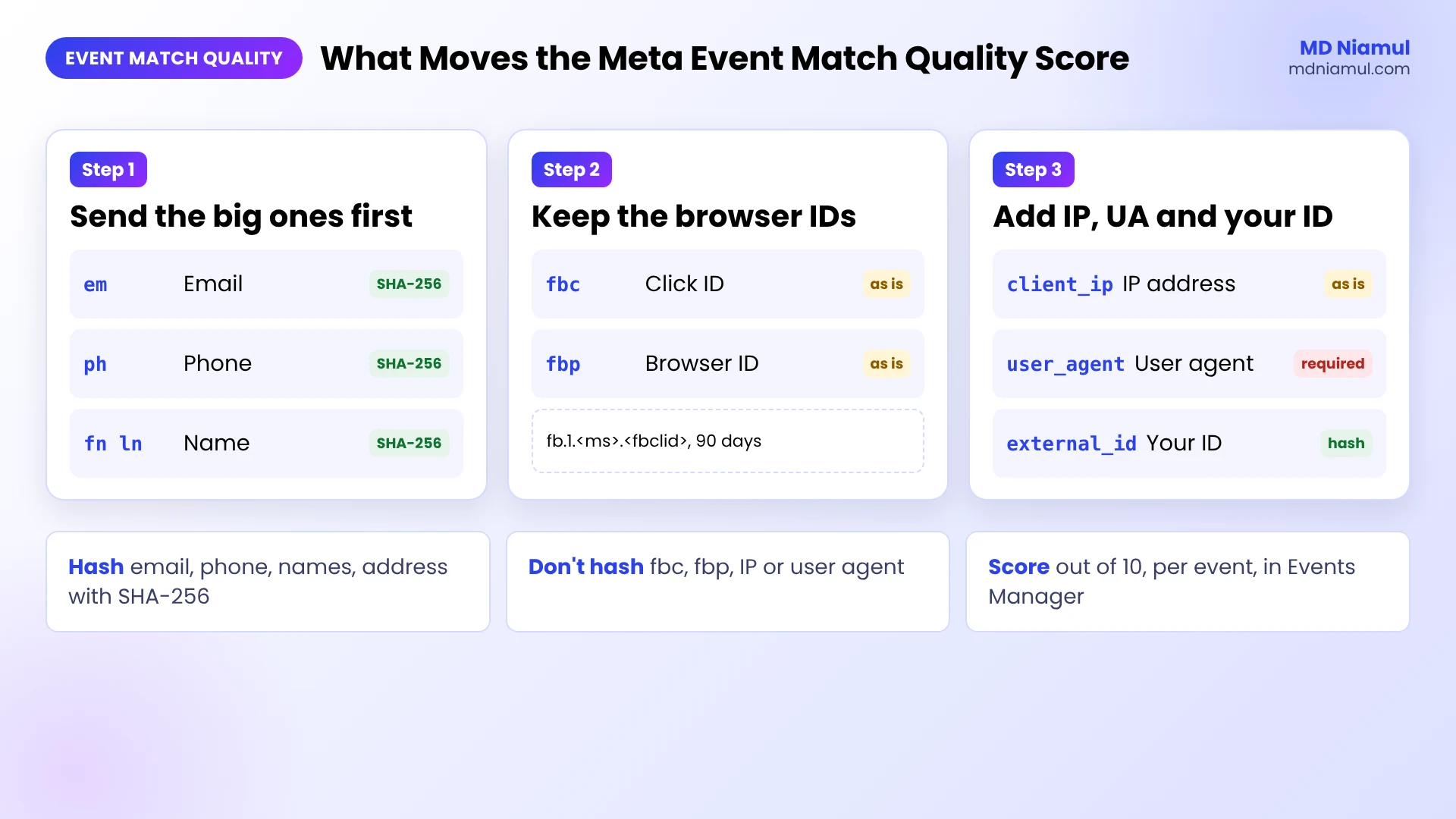
In the video I cover the three fixes in the order I make them: send the big ones first, keep the browser IDs, and add IP, user agent and external ID. This guide adds the exact formats from Meta’s docs and a small GTM script I tested that keeps the click ID even when the Pixel is blocked.
Which Details Move Meta Event Match Quality
| Parameter | Key | Hash it? | Weight | Where it usually comes from |
|---|---|---|---|---|
em |
Yes, SHA-256 | High | Checkout, lead form, logged-in user | |
| Phone | ph |
Yes, SHA-256 | High (Meta), medium (Stape) | Checkout, lead form |
| Click ID | fbc |
No | High (Stape) | _fbc cookie or fbclid in the URL |
| IP address | client_ip_address |
No | High (Meta) | Server request |
| User agent | client_user_agent |
No | Required for web events | Server request |
| First and last name | fn, ln |
Yes | High (Meta) | Checkout, form |
| External ID | external_id |
Recommended | Medium (Stape) | Your user ID or a first-party cookie |
| Browser ID | fbp |
No | Medium (Stape) | _fbp cookie set by the Pixel |
| City, state, zip, country | ct, st, zp, country |
Yes | Low to medium | Checkout address |
Prerequisites & Setup Checklist
- Admin access to your Meta Events Manager dataset (Pixel).
- The Meta Pixel and the Conversions API both sending the same events, with deduplication working. If not, start with my Meta Conversions API deduplication guide.
- Google Tag Manager on the site, and a server GTM container. I host mine on Stape (EU businesses can use Stape EU).
- A data layer that exposes the buyer’s email, phone, name and address on purchase or lead events.
- A consent setup that allows these details to be sent where your privacy rules require it.
Video Tutorial Walkthrough
In the video I show which details move the Meta Event Match Quality score most, how to keep the browser IDs, and the before and after in Events Manager.
Step-by-Step Implementation Guide
Seven phases. Phase 1 shows where you stand. Phases 2 to 5 add the missing details. Phases 6 and 7 check the result and keep it there.
Phase 1: Read Your Current Event Match Quality
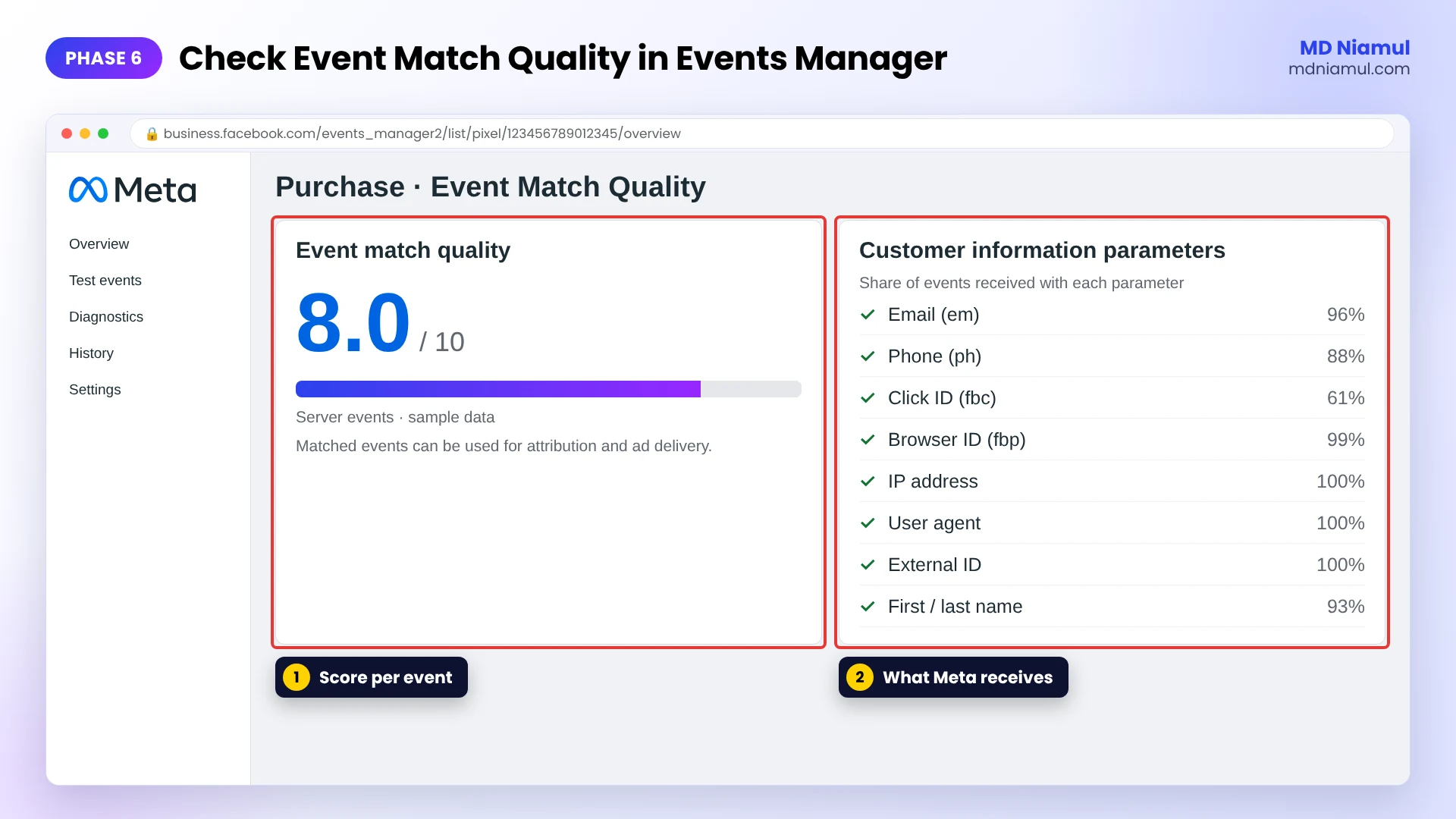
- Open Events Manager, pick your dataset and open the Overview tab.
- Click your most important event, usually Purchase or Lead, and open its Event Match Quality details.
- Note the score and which customer information parameters are being received, and how often. This list is your to-do list.
- Check each event separately. PageView often has no email or phone, so a lower score there is normal. Purchase and Lead are the ones to push up.
Phase 2: Send the Big Ones First: Email and Phone
- Push the buyer’s email and phone into the data layer on the purchase or lead event. My custom data layer guide for higher EMQ shows how.
- Normalize before hashing, the way Meta asks: email trimmed and lowercase, phone with symbols, letters and leading zeros removed and the country code added. Meta’s own example turns (650)555-1212 into 16505551212.
- Hash with SHA-256. If you send through a Stape Conversions API tag, it can hash for you. You can check a hash with my free hashing code generator.
- Add first name, last name and address details from checkout. Meta treats some combinations alone, like first name plus gender, as too weak to match, so these work best next to email or phone.
Phase 3: Keep the Browser IDs (fbc and fbp)
fbpis the browser ID the Pixel saves in the_fbpcookie.fbcis the click ID, saved in_fbcwhen someone arrives from an ad withfbclidin the URL.- Meta’s format for
fbcisfb.1.<time in milliseconds>.<fbclid>. Thefbclidis case sensitive, so never change it. - If the Pixel is blocked or loads late on the landing page,
_fbcis never written, and every later event from that visitor loses the click ID. The script in Phase 5 fixes that. - Meta recommends a 90-day expiry for
_fbcand refreshing it when a new click comes in. Send the latest value with each event.
Phase 4: Add IP Address, User Agent and External ID
- Meta adds IP and user agent to browser events on its own, but you have to add them to server events. In a server GTM container, the GA4 client passes both, and the Stape Conversions API tag maps them.
- Don’t hash IP or user agent. Meta prefers IPv6 when the user has it.
- Add an
external_id: your customer ID if they’re logged in, or a first-party visitor ID if not. Use the same ID on the Pixel and the Conversions API, and hash it as Meta recommends. - Meta’s best practices also say
external_idandfbpcan help it deduplicate whenevent_idis missing. Send all three when you can.
Phase 5: Add the Meta Match Keeper in GTM
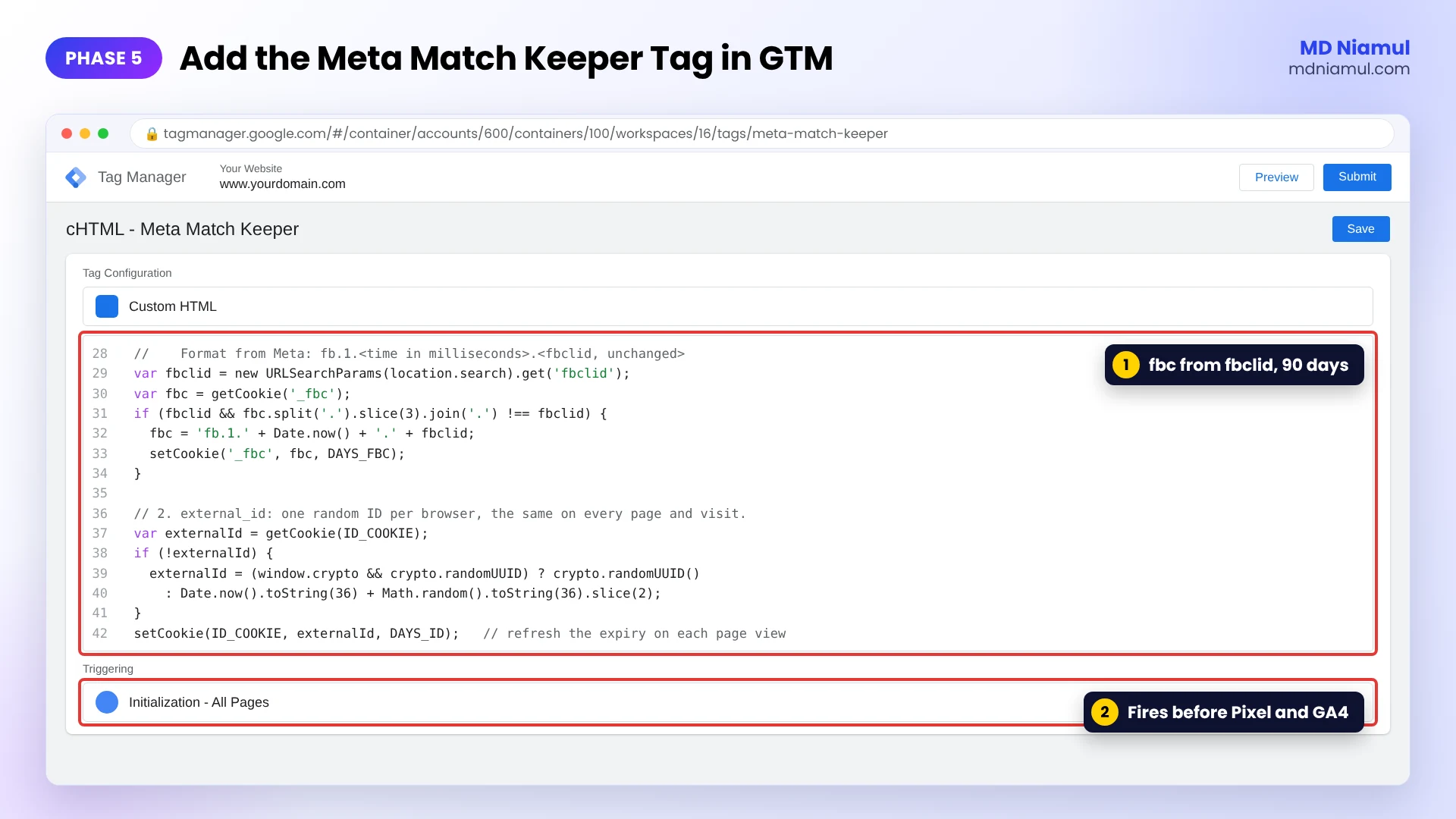
- In your web GTM container, go to Tags → New → Custom HTML and paste the code below.
- Trigger: Initialization – All Pages, so the cookies exist before your Pixel and GA4 tags fire.
- Create two Data Layer Variables,
meta_ids.fbcandmeta_ids.external_id, and send them with your GA4 events (for example asfbcandexternal_idevent parameters) so the server container can pass them to Meta. - Name the tag cHTML – Meta Match Keeper, test in Preview, and publish.
<script>
// Meta match keeper by MD Niamul (mdniamul.com)
// Keeps the Meta click ID (fbc) and a first-party external ID on your own domain,
// so your Pixel and Conversions API events carry them even when the Pixel is blocked.
// GTM: Custom HTML tag, trigger Initialization - All Pages.
(function () {
  var DAYS_FBC = 90;              // Meta recommends a 90-day _fbc cookie
  var DAYS_ID = 365;              // how long to keep your own visitor ID
  var ID_COOKIE = 'mdn_external_id';

  function getCookie(name) {
    var m = document.cookie.match('(?:^|; )' + name + '=([^;]*)');
    return m ? decodeURIComponent(m[1]) : '';
  }
  // Set the cookie on the top domain (example.com, not www.example.com)
  function setCookie(name, value, days) {
    var exp = new Date(Date.now() + days * 864e5).toUTCString();
    var parts = location.hostname.split('.');
    for (var i = parts.length - 2; i >= 0; i--) {
      var domain = parts.slice(i).join('.');
      document.cookie = name + '=' + encodeURIComponent(value) + '; expires=' + exp + '; path=/; domain=' + domain + '; SameSite=Lax';
      if (getCookie(name) === value) return;
    }
    document.cookie = name + '=' + encodeURIComponent(value) + '; expires=' + exp + '; path=/; SameSite=Lax';
  }

  // 1. fbc: build it from fbclid when the cookie is missing or holds an older click.
  //    Format from Meta: fb.1.<time in milliseconds>.<fbclid, unchanged>
  var fbclid = new URLSearchParams(location.search).get('fbclid');
  var fbc = getCookie('_fbc');
  if (fbclid && fbc.split('.').slice(3).join('.') !== fbclid) {
    fbc = 'fb.1.' + Date.now() + '.' + fbclid;
    setCookie('_fbc', fbc, DAYS_FBC);
  }

  // 2. external_id: one random ID per browser, the same on every page and visit.
  var externalId = getCookie(ID_COOKIE);
  if (!externalId) {
    externalId = (window.crypto && crypto.randomUUID) ? crypto.randomUUID()
      : Date.now().toString(36) + Math.random().toString(36).slice(2);
  }
  setCookie(ID_COOKIE, externalId, DAYS_ID);   // refresh the expiry on each page view

  // 3. Hand everything to GTM. Read these with Data Layer Variables.
  window.dataLayer = window.dataLayer || [];
  window.dataLayer.push({
    event: 'meta_ids_ready',
    meta_ids: { fbc: fbc, fbp: getCookie('_fbp'), external_id: externalId }
  });
})();
</script>
What it does: when a visitor lands with fbclid, it writes the _fbc cookie in Meta’s format on your top domain for 90 days, and replaces it when a new ad click comes in. It also gives each browser one random external_id that stays the same across pages, tabs and visits. Then it pushes fbc, fbp and external_id to the data layer for your tags.
I tested it in a headless browser on a test domain. Ten checks passed: a direct visit sets no fbc; an ad click builds fb.1.<milliseconds>.<fbclid> with the fbclid unchanged; the cookie sits on the top domain with a 90-day expiry; later pages keep the same values; the same click doesn’t rewrite it; a new click replaces it; a new tab gets the same external_id; the data layer gets all three values; and no page errors.
Phase 6: Check the Score Again
- Use Test Events in Events Manager with your test code, place a test purchase or lead, and open the server event.
- Look at the customer information parameters on that event: email, phone, fbc, fbp, IP, user agent and external ID should all be there.
- Give it a few days of real traffic, then compare the Event Match Quality score with the one from Phase 1.
- For a quick look at what your Pixel sends from the browser, run your site through my free Meta Pixel checker.
Phase 7: Keep It High
- Send events in real time or close to it. Meta says sharing events when they happen gives the best results.
- Recheck after site changes: a new checkout, a new form tool or a consent banner update can quietly drop email or phone from the data layer.
- Look at the score per event once a month, not just the overall number.
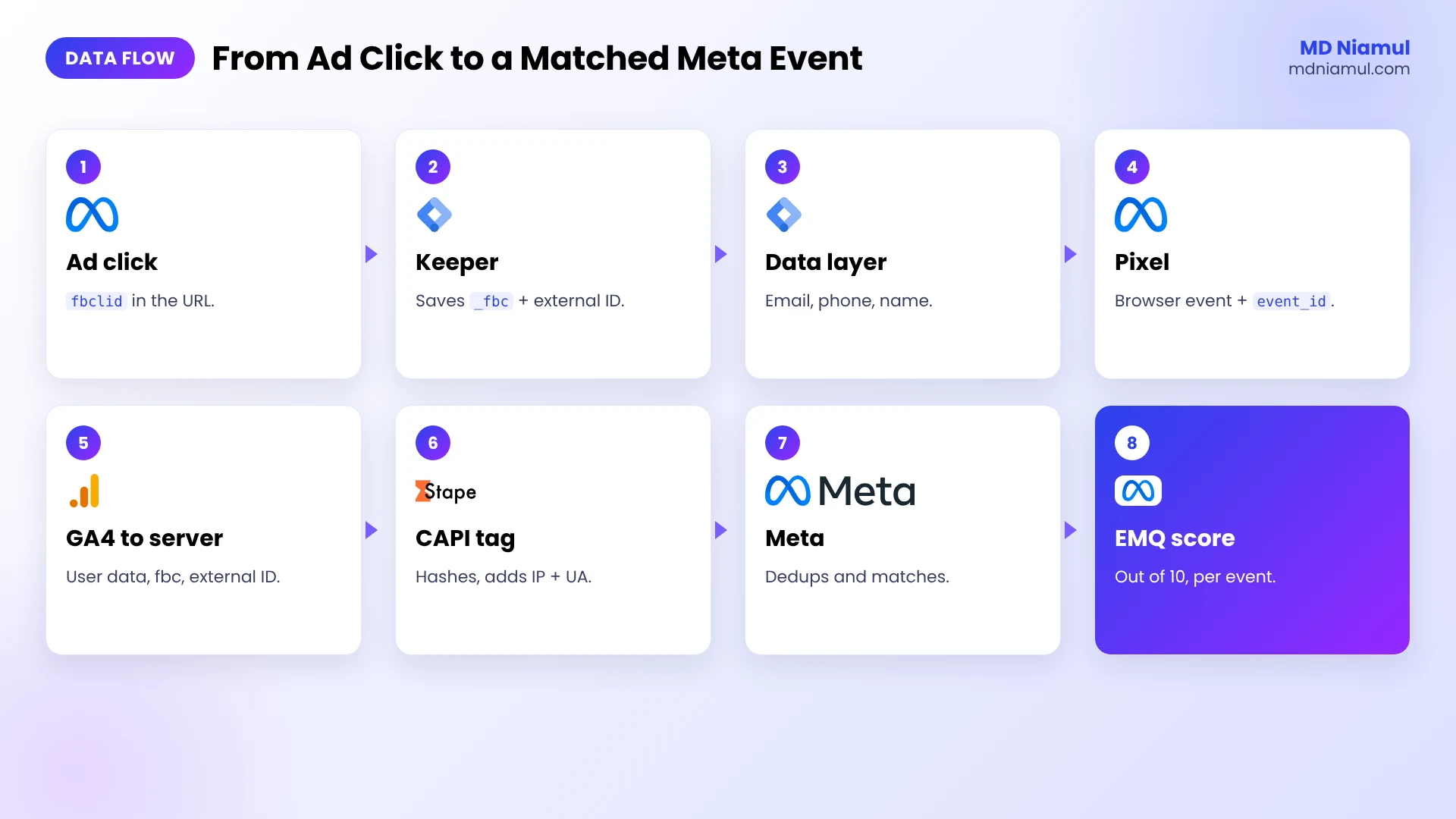
Meta Event Match Quality: The Full Data Flow
| # | What happens | Where |
|---|---|---|
| 1 | A visitor clicks a Meta ad with fbclid in the URL |
Meta ads |
| 2 | The keeper saves _fbc and an external_id on your domain |
Web GTM |
| 3 | The visitor buys or submits a form; email and phone go into the data layer | Your site |
| 4 | The Pixel sends the browser event with event_id |
Browser |
| 5 | GA4 sends the same event with user data, fbc and external_id to the server container |
Server GTM on Stape |
| 6 | The Conversions API tag hashes the details and adds IP and user agent | Server GTM |
| 7 | Meta deduplicates and matches the event to a real account | Meta |
| 8 | Events Manager shows the Event Match Quality score per event | Events Manager |
Testing & Validation Workflow
- Cookie test. Open your site with
?fbclid=TestClick123and rundocument.cookiein the console. You should see_fbc=fb.1.…TestClick123andmdn_external_id. - Data layer test. In GTM Preview, find the
meta_ids_readyevent and check the three values. - Server test. In server GTM Preview, open the Conversions API tag request and confirm
em,ph,fbc,fbp,external_id, IP and user agent are inuser_data. - Format test. Hash a known email yourself and compare it with what the tag sent.
- Meta test. In Test Events, open the server Purchase and check the customer information parameters list.
- Score test. After a few days, compare the score per event with your starting point.
Troubleshooting Common Mistakes
Mistake 1: Email sent unformatted
The Problem: email is sent but the score barely moves.
The Cause: it was hashed with capital letters or spaces, so the hash doesn’t match Meta’s.
The Solution: trim and lowercase before hashing, or let the Stape tag do the hashing.
Mistake 2: Phone without a country code
The Problem: phone shows as received, but matching stays low.
The Cause: local numbers like 0412 345 678 are hashed as they are.
The Solution: remove symbols and leading zeros and add the country code, every time.
Mistake 3: fbc missing on most events
The Problem: traffic comes from Meta ads, but few events carry the click ID.
The Cause: the Pixel is blocked or loads after consent, so _fbc is never written.
The Solution: add the keeper from Phase 5 and pass fbc to the server event.
Mistake 4: IP and user agent are the server’s own
The Problem: every event shows the same IP.
The Cause: a server-to-server integration sends its own IP and user agent instead of the visitor’s.
The Solution: capture the visitor’s IP and user agent at the time of the event and pass them through.
Mistake 5: Hashing what shouldn’t be hashed
The Problem: fbc, fbp or IP show as invalid.
The Cause: they were hashed along with the personal details.
The Solution: hash email, phone, names and address only. Send fbc, fbp, IP and user agent as they are.
What to Set Up Next
- Sending events to Meta from more than one domain? Read my Meta CAPI multi-domain tracking guide.
- Starting the Conversions API from scratch? Follow my Meta Pixel and Conversions API setup with server GTM and Stape.
- Building a test payload by hand? Use the free Meta CAPI payload builder.
- Need ready GTM listeners for your forms? Browse the GTM event listener library.
Want your Meta Event Match Quality fixed for you? See my Facebook CAPI specialist page and server-side tracking service.
Conclusion
Meta Event Match Quality goes up when Meta gets more ways to recognize the buyer, in the format it expects. Email and phone come first. Then the click ID, which is the one most setups lose. Then IP, user agent and a steady external ID on every server event.
Write down your Purchase score today, make the changes in order, and check the same event again next week. The score per event tells you which detail is still missing.
Summary by MD Niamul
Meta Event Match Quality is a score out of 10 that Events Manager gives each server web event, based on how well its customer details can be matched to a Meta account. To increase it, I send hashed email and phone first, normalized the way Meta asks: email lowercase and trimmed, phone with the country code and digits only. Then I keep the click ID by writing the _fbc cookie from fbclid in Meta’s format, fb.1 plus milliseconds plus the unchanged fbclid, for 90 days. I add IP address and user agent, which Meta requires for web events, and a steady external ID to every server event. I wrote this from fixing Meta tracking for e-commerce and lead generation clients.
Frequently Asked Questions (FAQ)
1. What is Meta Event Match Quality?
Meta Event Match Quality is a score out of 10 that Events Manager gives each server web event. It shows how well the customer details sent with that event can be matched to a Meta account. Matched events can be used for attribution and ad delivery, so a higher score helps Meta find more people like your buyers.
2. What is a good Event Match Quality score?
Meta doesn’t publish one target number, so compare each event with itself over time. PageView usually scores lower because it rarely has email or phone. Purchase and Lead events, which can carry email, phone, name and address, are the ones to push up. If those sit low, details are missing or badly formatted.
3. How do I check Event Match Quality in Events Manager?
Open Events Manager, pick your dataset and go to the Overview tab. Click an event like Purchase and open its Event Match Quality details. You’ll see the score and which customer information parameters Meta receives. Check each event separately, because the score is given per event, not for the whole Pixel.
4. Which parameters improve Meta Event Match Quality the most?
Meta lists email, IP address, name and phone number as high-quality parameters, and Stape’s guide ranks email and the click ID as high. In practice I add hashed email and phone first, then fbc and fbp, then IP address, user agent and external ID. Address details help a little more on top.
5. Do I need to hash fbc, fbp, IP and user agent?
No. Meta says to send fbc, fbp, client_ip_address and client_user_agent as they are. Only personal details are hashed with SHA-256: email, phone, first and last name, date of birth, gender, city, state, zip and country. External ID hashing is recommended. Hashing the browser IDs or IP makes them useless for matching.
6. How should I format email and phone before hashing?
For email, trim spaces and make it lowercase. For phone, remove symbols, letters and leading zeros, and always include the country code, even if all your customers are in one country. Meta’s example turns (650)555-1212 into 16505551212. Then hash with SHA-256. A small format slip gives a hash that never matches.
7. What is fbc and why is it often missing?
fbc is the Meta click ID, built from the fbclid in the ad URL and saved in the _fbc cookie. The format is fb.1, the time in milliseconds, then the fbclid unchanged. It goes missing when the Pixel is blocked or loads late on the landing page, so the cookie is never written. Saving it yourself fixes that.
8. Is client_user_agent required for the Conversions API?
Yes, for website events. Meta’s customer information parameters page says client_user_agent is required for website events shared through the Conversions API. The Pixel adds IP and user agent to browser events automatically, but for server events you must pass the visitor’s own values. A server’s own user agent or IP doesn’t help.
9. What is external_id in Meta CAPI?
external_id is any unique ID you have for the person, like a customer ID, loyalty ID or a first-party cookie ID. Send the same value on the Pixel and the Conversions API, hashed as Meta recommends. It helps matching, and Meta’s best practices say external_id with fbp can also help deduplicate events when event_id is missing.
10. How long does it take for Event Match Quality to improve?
The score reflects recent events, so it needs some real traffic after your change. Check Test Events right away to confirm the new parameters arrive, then look at the score again after a few days. If the number doesn’t move, open the event details and see which parameter is still missing or rarely received.
 Need Help Advanced GHL Automation & Tracking Setup?